

Overview
When writing metric prompts (LLM Judge) or metric scripts (Python Metric), you can reference call data using{{variable_name}} placeholders (LLM Judge) or data["variable_name"] accessors (Python). The same set of variables is available across both metric types — what varies is which variables exist in Simulation vs. Observability contexts.
This page is the authoritative reference for that set. If you’re looking at one specific metric type:
- LLM Judge Metric — how to build prompts that consume these variables.
- Python Metric — how to access the same variables from Python code via the
datadict.
Quick Reference
Available Variables
System Variables
These variables are available in both Simulation and Observability calls:{{transcript}}
Availability: ✅ Simulation & Observability
Full conversation transcript as plain text.
Example value:
{{call_end_reason}}
Availability: ✅ Simulation & Observability
Reason why the call ended.
Common end reasons:
"assistant-ended-call""customer-ended-call""customer-did-not-answer""customer-busy""silence-timed-out""exceeded-max-duration""run-cancelled-by-user"
{{date}}
Availability: ✅ Simulation & Observability
Current date in YYYY-MM-DD format.
Example values:
"2024-12-13""2025-01-15"
{{timestamp}}
Availability: ✅ Simulation & Observability
Call’s timestamp in ISO 8601 format, including date, time, and timezone information.
Format: ISO 8601 (YYYY-MM-DDTHH:MM:SS.ffffff±HH:MM)
Example values:
"2024-12-13T14:30:45.123456+00:00""2025-01-15T09:15:30.789012-05:00"
{{provider_call_id}}
Availability: ✅ Simulation | ❌ Observability
Provider-specific call identifier from the telephony provider (e.g., Vapi, Retell).
Note: This value is only available when a provider call has been successfully matched and linked to the simulation run.
Example value:
"provider-call-id"
Namespace Variables
{{agent.*}}
Availability: ✅ Simulation & Observability
Access agent configuration details using the agent. prefix.
Available fields:
{{metadata.*}}
Availability: ✅ Simulation | ❌ Observability
Access metadata fields using the metadata. prefix. This namespace includes two system-generated fields plus any custom key-value pairs you include in the metadata object when submitting a call via the Custom Integration webhook or the observability API.
System-generated fields:
Custom fields (any key-value pair you send):
Any field you include in the
metadata object of your webhook payload is accessible in metric prompts and Python metric scripts using the same dot notation. For example, if your payload includes "metadata": {"client_uuid": "abc123", "prompt_code": "hr_intro"}, you can reference {{metadata.client_uuid}} and {{metadata.prompt_code}} directly in your LLM Judge or Python metric.
{{metadata.client_uuid}}→"abc123"{{metadata.candidate_uuid}}→"xyz789"{{metadata.prompt_code}}→"hr_intro"
Custom metadata fields are passed at call-submission time. For simulation runs, they arrive via the Custom Integration webhook sent after the run ends. For structured test data you want to vary per run, see
{{test_profile.*}} instead.{{test_profile.*}}
Availability: ✅ Simulation | ❌ Observability
Structured test scenario data configured for simulation runs. Supports nested objects and array access for complex test scenarios.
Common fields:
{{provider_call_data.*}}
Availability: ✅ Simulation | ❌ Observability
This is based on the provider you have integrated on the platform. This variable gives you complete access to call details from your provider platform.
Example providers: VAPI, Retell, Elevenlabs, etc.
{{evaluator.*}}
Availability: ✅ Simulation | ❌ Observability
Access the evaluator (scenario) being run, including its instructions. Useful when a metric or expected outcome prompt needs to reference what the evaluator was supposed to do.
Available fields:
{{dynamic_variables.*}}
Availability: ❌ Simulation | ✅ Observability (via API)
Custom variables you pass via API to personalize the agent’s behavior during the call. These are user-defined fields you send when creating a call.
Common examples:
Using Variables in Metrics
When creating metrics, you can reference these variables directly in your metric configuration. Here’s how it looks in the interface: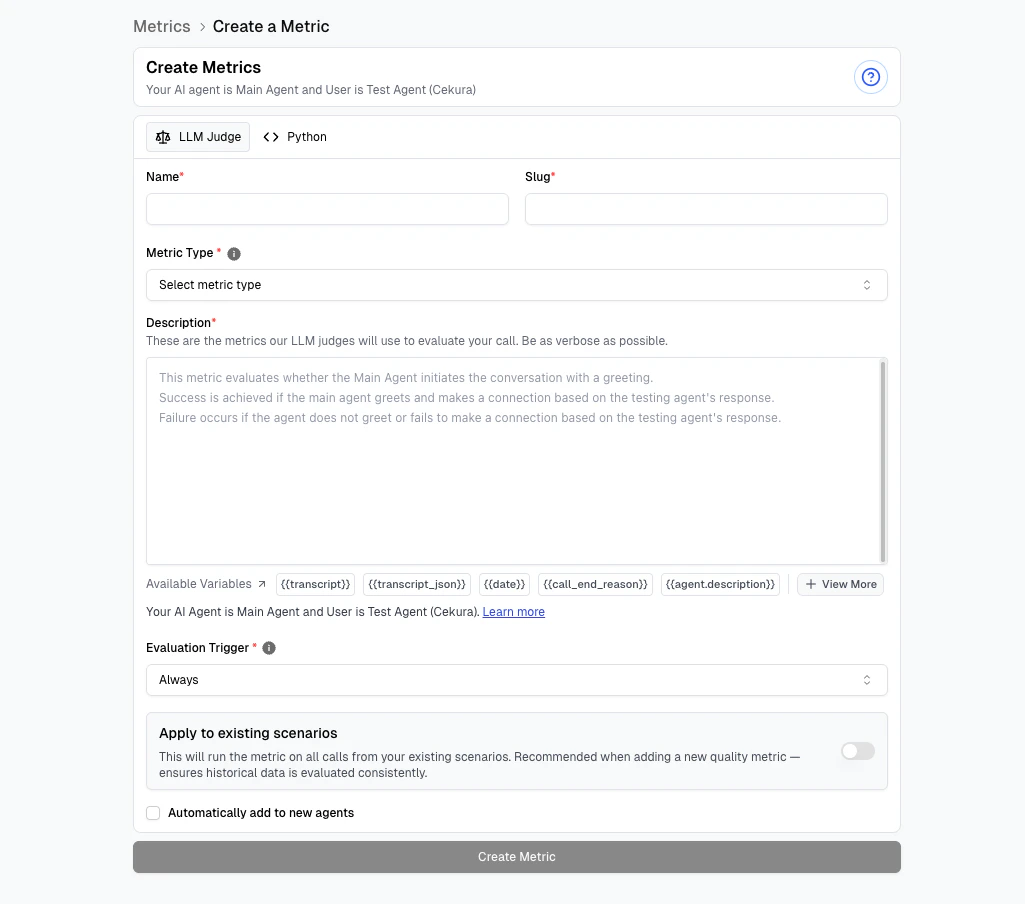
Key Points
- Variables are case-sensitive:
{{user_name}}≠{{User_Name}} - Not all variables exist in every call - handle missing values
- Variables must be accessed with their namespace prefix:
- Use
{{metadata.ringing_duration}}to access metadata fields - Use
{{dynamic_variables.user_name}}to access dynamic variables - Dot notation:
{{metadata.customer_id}} - Bracket notation:
{{metadata["customer_id"]}}(both work the same)
- Use