

Overview
Test your Pipecat agents with automated session management. Cekura handles session creation and management automatically.- No-code
- Code
Run tests directly from the frontend without writing code.
1
Configure Pipecat credentials
Go to your agent settings and configure Pipecat integration: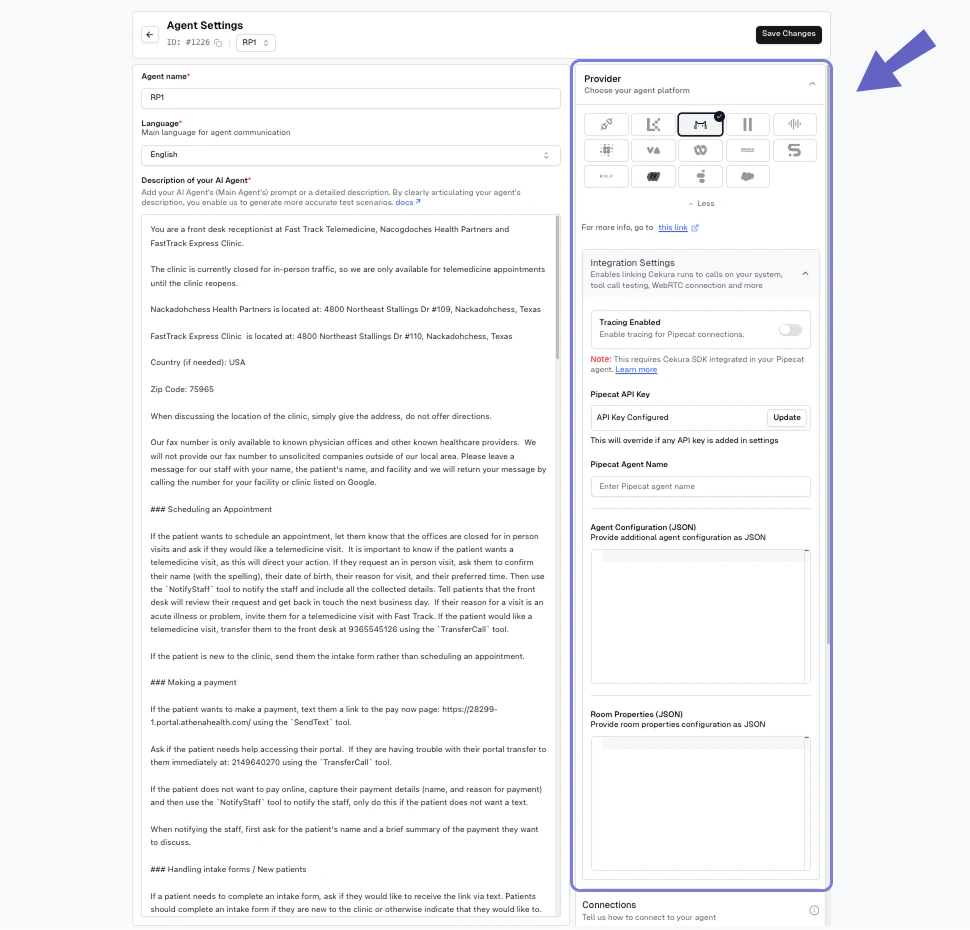
- Provider: Select “Pipecat” as your voice integration provider.
- Assistant ID: (Optional) Your Pipecat assistant identifier. If left empty, the system will use default assistant settings
- Pipecat Cloud API Key: Your authentication key from Pipecat Cloud. This key authenticates requests to the Pipecat API and is required to create automated sessions. The key will override any API key specified in the agent settings if provided here.
- Pipecat Agent Name: A descriptive name for your Pipecat agent (e.g., “my-agent”). This helps identify your agent in the Pipecat dashboard and logs.
- Agent Configuration (JSON): Additional configuration passed to your Pipecat agent. This corresponds to the request body sent to the Pipecat start endpoint when creating a new session.
- Room Properties (JSON): Configuration for the Daily.co room that will host your WebRTC session. These properties control room behavior and SIP settings. A minimal example is shown in the screenshot. See the Daily Room Configuration API for all available room properties and detailed options.
2
Run tests from frontend
In the Configure Run dialog, select WebRTC under Voice connections and click Run.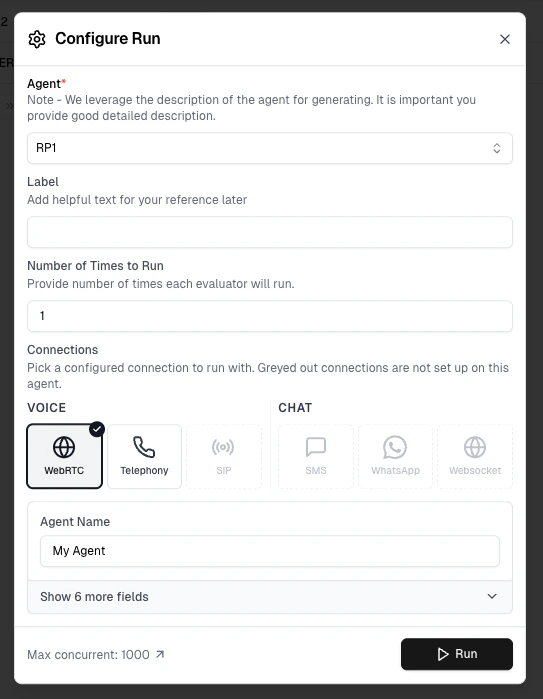
- Creates unique sessions for each scenario
- Manages session lifecycle
- Executes tests and cleans up resources
Greyed out connection options have not been configured in Agent Settings yet — set them up there to enable them.
3
View results
Results appear in your dashboard. Track test status, metrics, and conversation details in real-time.
Accessing Test Profile Data in Your Agent
In the automated flow, Cekura creates the Pipecat session on your behalf. When a test profile is assigned to the scenario, Cekura merges the profile’smain_agent_variables section directly into the Agent Configuration JSON (SessionParams.data). Values in testing_agent_variables stay on Cekura’s simulated caller and are not sent to your agent.
Session Data Structure
Given a test profile with this sectionedinformation:
SessionParams.data becomes:
main_agent_variables keys are flattened. customer_name / story are kept on the simulator. If a main_agent_variables key matches an existing key in the Agent Configuration, the test profile value takes precedence.
Accessing Test Profile Fields in Your Agent
Sincemain_agent_variables are top-level keys in session_data, access them directly:
Only
main_agent_variables are flattened into your Agent Configuration JSON — never testing_agent_variables. Put any value your agent needs to read at call start (e.g., user_id, account_id) into main_agent_variables. Persona facts the simulated caller should use (e.g., customer_name, date_of_birth) belong in testing_agent_variables so they don’t leak into your agent’s config.Key Terminology
- Pipecat Cloud: The hosted platform for deploying and managing Pipecat agents. Get your API key at pipecat.daily.co
- Daily.co: WebRTC infrastructure provider that powers Pipecat’s voice and video capabilities. See Daily docs
- Room URL: The Daily.co WebRTC endpoint where the test session occurs
- Meeting Token: Authentication credential for joining a Daily.co room
- Agent Configuration: JSON payload sent to Pipecat’s start endpoint to configure agent behavior
- Room Properties: Daily.co room settings that control session features and behavior