> ## Documentation Index
> Fetch the complete documentation index at: https://docs.cekura.ai/llms.txt
> Use this file to discover all available pages before exploring further.
# Websocket Simulations
> Test agents with raw-PCM WebSocket voice using the CHIRP protocol
export const CopyPageButton = () => {
if (typeof window !== 'undefined') {
setTimeout(function () {
if (document.getElementById('ck-tools')) return;
var anchor = document.getElementById('content-area') || document.querySelector('.mdx-content');
if (!anchor) return;
if (!document.getElementById('ck-style')) {
var s = document.createElement('style');
s.id = 'ck-style';
s.textContent = '#ck-tools{position:absolute;top:6px;right:0;z-index:100;font-family:inherit;}' + '.ck-row{display:inline-flex;align-items:stretch;border:1px solid rgba(0,0,0,0.15);border-radius:8px;overflow:hidden;background:#fff;}' + ':root.dark .ck-row{background:rgba(255,255,255,0.06);border-color:rgba(255,255,255,0.12);}' + '.ck-btn{padding:5px 12px;border:none;background:none;cursor:pointer;font-size:13px;font-weight:500;font-family:inherit;color:#374151;}' + ':root.dark .ck-btn{color:#d1d5db;}' + '.ck-btn:hover{background:rgba(0,0,0,0.04);}' + ':root.dark .ck-btn:hover{background:rgba(255,255,255,0.06);}' + '.ck-chevron{padding:5px 8px;border:none;background:none;cursor:pointer;font-size:14px;font-family:inherit;color:#374151;}' + ':root.dark .ck-chevron{color:#d1d5db;}' + '.ck-chevron:hover{background:rgba(0,0,0,0.04);}' + ':root.dark .ck-chevron:hover{background:rgba(255,255,255,0.06);}' + '.ck-divider{width:1px;background:rgba(0,0,0,0.12);flex-shrink:0;}' + ':root.dark .ck-divider{background:rgba(255,255,255,0.12);}' + '.ck-dd{position:absolute;top:calc(100% + 4px);right:0;min-width:180px;background:#fff;border:1px solid rgba(0,0,0,0.12);border-radius:8px;box-shadow:0 4px 12px rgba(0,0,0,0.1);padding:4px;display:none;z-index:200;}' + ':root.dark .ck-dd{background:#1f2937;border-color:rgba(255,255,255,0.1);box-shadow:0 4px 16px rgba(0,0,0,0.35);}' + '.ck-item{display:block;width:100%;padding:7px 12px;border:none;background:none;border-radius:6px;cursor:pointer;font-size:13px;font-family:inherit;text-align:left;color:#374151;}' + ':root.dark .ck-item{color:#d1d5db;}' + '.ck-item:hover{background:rgba(0,0,0,0.05);}' + ':root.dark .ck-item:hover{background:rgba(255,255,255,0.07);}';
document.head.appendChild(s);
}
var wrap = document.createElement('div');
wrap.id = 'ck-tools';
var row = document.createElement('div');
row.className = 'ck-row';
var mainBtn = document.createElement('button');
mainBtn.className = 'ck-btn';
mainBtn.textContent = 'Copy page';
var divider = document.createElement('span');
divider.className = 'ck-divider';
var chevron = document.createElement('button');
chevron.className = 'ck-chevron';
chevron.textContent = '▾';
var dd = document.createElement('div');
dd.className = 'ck-dd';
function closeDD() {
dd.style.display = 'none';
}
function openDD() {
dd.style.display = 'block';
}
chevron.onclick = function (e) {
e.stopPropagation();
if (dd.style.display === 'block') {
closeDD();
} else {
openDD();
}
};
document.addEventListener('click', function (e) {
if (!e.target.closest('#ck-tools')) {
closeDD();
}
});
document.addEventListener('keydown', function (e) {
if (e.key === 'Escape') {
closeDD();
}
});
function makeItem(label, fn) {
var b = document.createElement('button');
b.className = 'ck-item';
b.textContent = label;
b.onclick = function () {
fn();
closeDD();
};
return b;
}
function getMarkdown() {
var walk = function (node) {
if (!node) return '';
if (node.nodeType === 3) return node.textContent || '';
if (node.nodeType !== 1) return '';
var tag = node.tagName.toLowerCase();
var skip = ['script', 'style', 'svg', 'noscript', 'button', 'iframe'];
if (skip.indexOf(tag) !== -1) return '';
if (node.id === 'ck-tools') return '';
var ch = Array.from(node.childNodes).map(walk).join('');
if (tag === 'h1') return '\n# ' + ch.trim() + '\n\n';
if (tag === 'h2') return '\n## ' + ch.trim() + '\n\n';
if (tag === 'h3') return '\n### ' + ch.trim() + '\n\n';
if (tag === 'p') return '\n' + ch.trim() + '\n\n';
if (tag === 'pre') return '\n```\n' + node.textContent.trim() + '\n```\n\n';
if (tag === 'li') return '- ' + ch.trim() + '\n';
if (tag === 'code') return '`' + ch.trim() + '`';
return ch;
};
var content = document.querySelector('.mdx-content') || document.getElementById('content-area') || document.body;
return walk(content).replace(/\n\n\n+/g, '\n\n').trim();
}
function copyMd() {
var md = getMarkdown();
navigator.clipboard.writeText(md).then(function () {
mainBtn.textContent = 'Copied!';
setTimeout(function () {
mainBtn.textContent = 'Copy page';
}, 2000);
});
}
function viewMd() {
var md = getMarkdown();
var safe = md.split('&').join('&').split('<').join('<').split('>').join('>');
var html = '' + safe + '';
window.open(URL.createObjectURL(new Blob([html], {
type: 'text/html'
})), '_blank');
}
function openClaude() {
var prompt = 'Can you read this Cekura docs page ' + window.location.href + ' so I can ask you questions?';
window.open('https://claude.ai/new?q=' + encodeURIComponent(prompt), '_blank');
}
mainBtn.onclick = copyMd;
dd.appendChild(makeItem('Copy page', copyMd));
dd.appendChild(makeItem('View as Markdown', viewMd));
dd.appendChild(makeItem('Open in Claude', openClaude));
row.appendChild(mainBtn);
row.appendChild(divider);
row.appendChild(chevron);
wrap.appendChild(row);
wrap.appendChild(dd);
anchor.style.position = 'relative';
anchor.insertBefore(wrap, anchor.firstChild);
}, 50);
}
return null;
};
## Overview
Cekura can simulate calls against any voice agent that exposes a raw-PCM WebSocket endpoint. Instead of going through a vendor SDK, Cekura dials your `wss://` URL directly and exchanges 16 kHz mono PCM audio as binary WebSocket frames using the **CHIRP** protocol.
Use Websocket Simulations when:
* Your agent has no phone number and you don't want to use a vendor SDK.
* You already operate a real-time audio pipeline and want lower-latency bidirectional streaming.
* You're building a custom voice stack or research prototype that handles raw PCM natively.
The page below has two parts:
* **How to test** — configure your agent and trigger runs from the dashboard or the API.
* **Protocol details** — the full CHIRP wire format, for teams implementing the server side.
Run tests directly from the dashboard against your CHIRP WebSocket endpoint.
Open your agent settings, pick **Chirp** in the provider grid, and fill in the WebSocket URL (and optional Basic Auth):
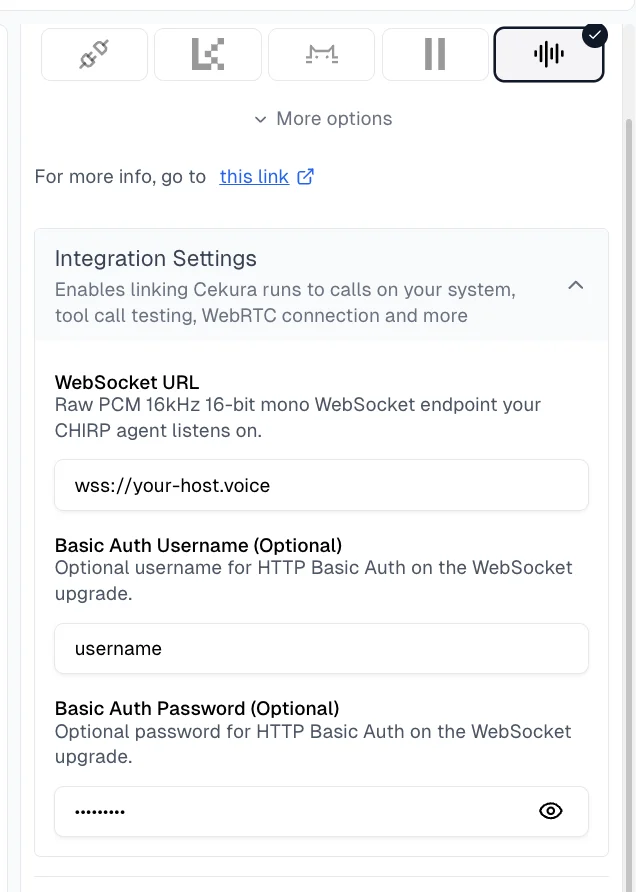 **Required:**
* **WebSocket URL** — The `wss://` (or `ws://`) endpoint your agent listens on. Cekura connects directly to this URL.
**Optional:**
* **Basic Auth Username**
* **Basic Auth Password**
When both username and password are provided, Cekura sends an `Authorization: Basic ` header on the WebSocket upgrade. Leave them empty if your endpoint is unauthenticated.
Your endpoint must speak raw `pcm_s16le` audio at **16 kHz mono**, framed as WebSocket binary messages. See **Protocol details** above for the full handshake, message types, and barge-in semantics.
1. Select scenarios for your agent and click **Run**.
2. With Chirp configured, you will see **Websocket** option under **VOICE** options in **Configure Run** dialog.
3. Select **Websocket** and click **Run**.
**Required:**
* **WebSocket URL** — The `wss://` (or `ws://`) endpoint your agent listens on. Cekura connects directly to this URL.
**Optional:**
* **Basic Auth Username**
* **Basic Auth Password**
When both username and password are provided, Cekura sends an `Authorization: Basic ` header on the WebSocket upgrade. Leave them empty if your endpoint is unauthenticated.
Your endpoint must speak raw `pcm_s16le` audio at **16 kHz mono**, framed as WebSocket binary messages. See **Protocol details** above for the full handshake, message types, and barge-in semantics.
1. Select scenarios for your agent and click **Run**.
2. With Chirp configured, you will see **Websocket** option under **VOICE** options in **Configure Run** dialog.
3. Select **Websocket** and click **Run**.
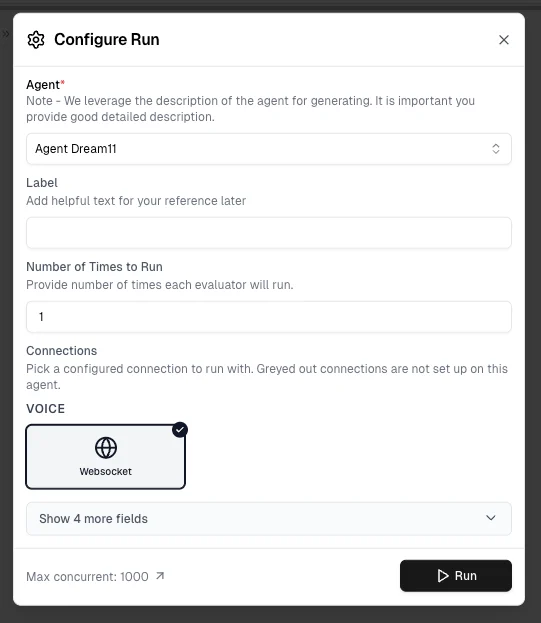 Cekura will:
* Open a WebSocket to your configured URL with the Basic Auth header (if set)
* Stream 16 kHz mono PCM audio to your agent and play your agent's audio back
* Capture the conversation, transcribe it, and run your evaluators against the result
Results appear in your dashboard like any other run — status, metrics, transcripts, and audio playback are all available. Failed connections are surfaced via run status:
| Run status | When you see it |
| ------------- | ---------------------------------------------------------------------------------------------- |
| `REJECTED` | Server returned `401`/`403` on the WebSocket upgrade (bad Basic Auth or rejected origin). |
| `INCOMPLETED` | Host unreachable, TLS failure, or server closed the connection before the test could complete. |
| `COMPLETED` | Audio exchange finished cleanly. Evaluator scores are available. |
Use the API to trigger Chirp runs from your own code or CI.
## Prerequisites
Configure Chirp credentials on your agent first (same as the **Dashboard** tab):
**Required:**
* **WebSocket URL** — `wss://` endpoint that speaks the CHIRP protocol (see **Protocol details**).
**Optional:**
* **Basic Auth Username** / **Password** for the WebSocket upgrade.
## API Endpoint
```
POST https://api.cekura.ai/test_framework/v1/scenarios-external/run_scenarios_chirp/
```
## Authentication
Include your Cekura API key in the request header:
```
X-CEKURA-API-KEY:
```
## Request Parameters
**scenarios** (array | integer | string, required): Test scenarios to run
* **Array format**: List of scenario IDs `[123, 456, 789]`
* **Integer format**: Run the first N scenarios for the agent `5`
* **String format**: Run all scenarios for the agent `"all"`
**agent\_id** (integer, optional): Your Agent ID in Cekura. Required when using integer or `"all"` format for scenarios.
**frequency** (integer, optional): Number of times to run each scenario (default: `1`).
**name** (string, optional): Custom name for this test run.
**concurrency\_limit** (integer, optional): Cap on parallel runs.
## Examples
### Single Run (cURL)
```bash theme={null}
curl -X POST \
'https://api.cekura.ai/test_framework/v1/scenarios-external/run_scenarios_chirp/' \
-H 'X-CEKURA-API-KEY: ' \
-H 'Content-Type: application/json' \
-d '{
"scenarios": [30]
}'
```
### Multiple Runs (cURL)
```bash theme={null}
curl -X POST \
'https://api.cekura.ai/test_framework/v1/scenarios-external/run_scenarios_chirp/' \
-H 'X-CEKURA-API-KEY: ' \
-H 'Content-Type: application/json' \
-d '{
"scenarios": [30, 31, 32],
"frequency": 2,
"name": "Chirp Test Run"
}'
```
### Run First N Scenarios (cURL)
```bash theme={null}
curl -X POST \
'https://api.cekura.ai/test_framework/v1/scenarios-external/run_scenarios_chirp/' \
-H 'X-CEKURA-API-KEY: ' \
-H 'Content-Type: application/json' \
-d '{
"scenarios": 5,
"agent_id": 123,
"frequency": 1,
"name": "First 5 Scenarios"
}'
```
### Run All Scenarios (cURL)
```bash theme={null}
curl -X POST \
'https://api.cekura.ai/test_framework/v1/scenarios-external/run_scenarios_chirp/' \
-H 'X-CEKURA-API-KEY: ' \
-H 'Content-Type: application/json' \
-d '{
"scenarios": "all",
"agent_id": 123,
"frequency": 1,
"name": "All Scenarios Test"
}'
```
### Python Example
```python theme={null}
import requests
API_KEY = ""
BASE_URL = "https://api.cekura.ai/test_framework"
headers = {
"X-CEKURA-API-KEY": API_KEY,
"Content-Type": "application/json",
}
payload = {
"scenarios": [30, 31, 32],
"frequency": 2,
"name": "Chirp Test Run",
}
resp = requests.post(
f"{BASE_URL}/v1/scenarios-external/run_scenarios_chirp/",
headers=headers,
json=payload,
)
result = resp.json()
print(result)
```
### Python — Run All Scenarios
```python theme={null}
import requests
API_KEY = ""
BASE_URL = "https://api.cekura.ai/test_framework"
headers = {
"X-CEKURA-API-KEY": API_KEY,
"Content-Type": "application/json",
}
payload = {
"scenarios": "all",
"agent_id": 123,
"frequency": 1,
"name": "All Scenarios Test",
}
resp = requests.post(
f"{BASE_URL}/v1/scenarios-external/run_scenarios_chirp/",
headers=headers,
json=payload,
)
result = resp.json()
print(result)
```
## Response
```json theme={null}
{
"id": 16870,
"name": "Chirp Test Run",
"agent": 5,
"status": "in_progress",
"success_rate": 0.0,
"run_as_text": false,
"is_cronjob": false,
"runs": [
{
"id": 34625,
"status": "running",
"scenario": 11547,
"scenario_name": "Customer Support Scenario",
"test_profile_data": {"key": "value"}
}
],
"created_at": "2026-04-30T09:32:59.484534Z",
"updated_at": "2026-04-30T09:32:59.484942Z"
}
```
## Error Responses
### Missing Chirp Credentials
```json theme={null}
{
"detail": "Agent must have CHIRP credentials configured (chirp_data with chirp_websocket_url)."
}
```
### Missing WebSocket URL
```json theme={null}
{
"chirp_data": ["chirp_websocket_url is required"]
}
```
### Invalid Scenarios
```json theme={null}
{
"scenarios": ["Invalid scenario IDs or scenarios not found"]
}
```
### Insufficient Balance
```json theme={null}
{
"detail": "Insufficient balance for this operation"
}
```
## Monitor Results
Poll for results using the [List Runs with IDs API](/api-reference/test_framework/list-runs-with-ids).
**CHIRP** (Conversational Handoff for Inter-agent Realtime Protocol) is the wire format Cekura uses to exchange real-time voice with your agent over a single WebSocket connection.
It is intentionally minimal: raw PCM audio as binary frames in both directions, plus a small set of JSON control events for speech boundaries and errors. There is no SDK, no framing layer, and no vendor lock-in — any server that can accept a WebSocket upgrade and read/write 16 kHz mono PCM can plug into Cekura.
### Audio Specification
| Property | Value |
| --------------- | ------------------------------------------------------------------ |
| **Encoding** | `pcm_s16le` (signed 16-bit little-endian PCM) |
| **Sample rate** | 16,000 Hz |
| **Channels** | 1 (mono) |
| **Frame size** | 20 ms (640 bytes) recommended; any even-length payload is accepted |
All binary WebSocket frames carry raw audio samples at this format. There is no header, container, or framing — just sample bytes.
### Authentication & Handshake
1. **Request:** Cekura initiates a WebSocket upgrade against the URL configured on your agent. If you set Basic Auth credentials, the upgrade includes:
```
Authorization: Basic
```
2. **Response:** Your server responds with `HTTP 101 Switching Protocols` to accept, or `HTTP 401`/`HTTP 403` to reject.
3. **Result:** A valid handshake establishes the live connection. A rejected handshake marks the run as `REJECTED`.
If you don't configure Basic Auth on the agent, no `Authorization` header is sent.
### Message Types
#### Binary Frames — Audio (bidirectional)
* **Direction:** Cekura ↔ your server
* **Content:** Raw `pcm_s16le` samples, 16 kHz mono
* **Format:** WebSocket binary frame; payload is sample bytes only
* **Minimum integration:** A working server only needs to read and write binary frames
#### Text Frames — Control Events
All text frames are UTF-8 JSON. Every event has these fields:
| Field | Type | Description |
| ------- | ----------- | ---------------------------------------------------- |
| `type` | string | Event name (see below) |
| `id` | UUID string | Event ID, auto-filled by sender |
| `ts_ms` | integer | Unix epoch milliseconds when the event was generated |
| `data` | object | Event-specific payload |
##### `speech.started`
```json theme={null}
{
"type": "speech.started",
"id": "c0e1a39f-92d1-4f1c-9d8a-2a1b3c4d5e6f",
"ts_ms": 1729123456789,
"data": { "utterance_id": "u_abc123" }
}
```
* **Sent by:** Cekura when its VAD detects the digital human starting to speak, **or** by your server to interrupt Cekura mid-utterance.
* **Required fields:** `type`, `data.utterance_id`.
* **Timing:** Not precisely bracketed around audio — the first audio frames may arrive before this event by \~200 ms.
##### `speech.completed`
```json theme={null}
{
"type": "speech.completed",
"id": "a2dbf8e4-0767-4a3d-8a29-3f5b7f2c4d10",
"ts_ms": 1729123460220,
"data": { "utterance_id": "u_abc123" }
}
```
* **Sent by:** Cekura when its VAD declares end-of-speech, **or** by your server to signal that the user finished talking.
* **Required fields:** `type`, `data.utterance_id` (must match the corresponding `speech.started`).
* **Timing:** Trailing audio frames may arrive after this event. Don't treat it as a hard playback cutoff.
##### `session.error`
```json theme={null}
{
"type": "session.error",
"id": "b1-err-0001",
"ts_ms": 1729123462000,
"data": {
"code": "INVALID_MESSAGE",
"message": "Unexpected type 'foo'"
}
}
```
| Code | Meaning |
| --------------------- | ---------------------------------------------------- |
| `INVALID_MESSAGE` | Malformed JSON or unknown `type` |
| `MISSING_FIELD` | Required field absent |
| `INVALID_AUDIO_FRAME` | Empty or odd-length binary frame |
| `INTERNAL_ERROR` | Server-side bug — connection is closed after sending |
Recoverable errors (everything except `INTERNAL_ERROR`) leave the connection open. The offending frame is dropped and the session continues.
### Event Ordering & Timing
VAD runs independently from audio reading, which creates timing skew you should plan for:
| Event | Offset relative to audio |
| ------------------ | ---------------------------------------- |
| `speech.started` | \~200 ms **after** the first audio frame |
| `speech.completed` | \~200 ms **before** the last audio frame |
**Implications:**
* Binary frames arrive outside the `speech.started`/`speech.completed` boundary.
* Don't treat `speech.completed` as a hard cutoff for audio playback.
* Use `utterance_id` for grouping, but treat associations as best-effort near boundaries.
* Servers that ignore text events entirely (binary-only minimum) are unaffected.
### Barge-in (Interruption)
To interrupt the digital human while it's speaking, send `speech.started` from your server mid-utterance:
* Cekura stops audio transmission immediately.
* Cekura cancels the in-flight digital-human utterance and emits a `speech.completed` for it.
* The session re-enters listening mode.
There is no separate "interrupt" message — `speech.started` from your side is the signal. This is the right hook for custom VAD or push-to-talk flows on your end.
### Connection Lifecycle
1. Cekura opens a WebSocket to your configured URL (e.g. `wss://your-host/voice`) with the Basic Auth header (if configured).
2. Your server validates the handshake and responds `HTTP 101` (or rejects with `401`/`403`).
3. Both sides exchange audio as binary frames (`pcm_s16le`, 16 kHz mono).
4. Either side may emit text control events (`speech.started`, `speech.completed`, `session.error`).
5. The connection closes with WebSocket code `1000` for normal termination.
### Close Codes
| Code | Meaning |
| ------ | ------------------------------------- |
| `1000` | Normal closure |
| `1008` | Policy violation (e.g. auth rejected) |
| `1011` | Internal error on the sender's side |
### Error Handling
| Scenario | Run status | Behavior |
| -------------------------------------------------------------------- | ----------------- | ---------------------------------------------------------------- |
| `HTTP 401`/`403` on upgrade | `REJECTED` | Cekura logs the rejection and stops. |
| Host unreachable, TCP refused, TLS failure | `INCOMPLETED` | Cekura retries 3 times with backoff before giving up. |
| Upgrade accepted but immediately closed | `INCOMPLETED` | Close code is logged in the run details. |
| Protocol violation (malformed JSON, missing field, odd-length audio) | session continues | Cekura sends a `session.error`, drops the offending frame. |
| Server closes gracefully | depends on call | Status is determined by whether the test completed before close. |
| Network drop or crash | `INCOMPLETED` | Same handling as a TCP failure. |
### Sample Session Flow
```
1. [Cekura → Server] HTTP upgrade with Authorization header
2. [Server → Cekura] HTTP 101 Switching Protocols
3. [Server → Cekura] binary <640 B audio @ 16k mono> (user speaking)
4. [Server → Cekura] binary (additional frames)
5. [Cekura → Server] binary (digital-human audio response)
6. [Cekura → Server] binary (more audio)
7. [Cekura → Server] text speech.started { utterance_id: "agent-u1" }
8. [Cekura → Server] binary (more audio)
9. [Cekura → Server] text speech.completed { utterance_id: "agent-u1" }
10. [Cekura → Server] binary (trailing audio)
11. [Server → Cekura] WebSocket close 1000
```
### Implementation Notes
* **Audio-and-events only.** CHIRP does not include a tool/function-call mechanism. Any tool calls must happen inside your server's own LLM/agent loop.
* **Minimum viable server:** validate Basic Auth, accept binary frames, emit binary frames. You can ignore all text events and still have a working integration.
* **Recommended enhancements:** react to `speech.started` / `speech.completed` for UI cues, custom VAD, or finer-grained barge-in control.
* **Audio format is fixed.** Cekura only sends and accepts `pcm_s16le` at 16 kHz mono. If your stack speaks something else, resample and convert at the WebSocket boundary.
## Next Steps
* [Custom metrics](/documentation/key-concepts/metrics/custom-metrics)
* [Instruction following metric](/documentation/key-concepts/metrics/instruction-following-metric)
* [Load testing](/documentation/guides/testing-agents/load-testing)
Cekura will:
* Open a WebSocket to your configured URL with the Basic Auth header (if set)
* Stream 16 kHz mono PCM audio to your agent and play your agent's audio back
* Capture the conversation, transcribe it, and run your evaluators against the result
Results appear in your dashboard like any other run — status, metrics, transcripts, and audio playback are all available. Failed connections are surfaced via run status:
| Run status | When you see it |
| ------------- | ---------------------------------------------------------------------------------------------- |
| `REJECTED` | Server returned `401`/`403` on the WebSocket upgrade (bad Basic Auth or rejected origin). |
| `INCOMPLETED` | Host unreachable, TLS failure, or server closed the connection before the test could complete. |
| `COMPLETED` | Audio exchange finished cleanly. Evaluator scores are available. |
Use the API to trigger Chirp runs from your own code or CI.
## Prerequisites
Configure Chirp credentials on your agent first (same as the **Dashboard** tab):
**Required:**
* **WebSocket URL** — `wss://` endpoint that speaks the CHIRP protocol (see **Protocol details**).
**Optional:**
* **Basic Auth Username** / **Password** for the WebSocket upgrade.
## API Endpoint
```
POST https://api.cekura.ai/test_framework/v1/scenarios-external/run_scenarios_chirp/
```
## Authentication
Include your Cekura API key in the request header:
```
X-CEKURA-API-KEY:
```
## Request Parameters
**scenarios** (array | integer | string, required): Test scenarios to run
* **Array format**: List of scenario IDs `[123, 456, 789]`
* **Integer format**: Run the first N scenarios for the agent `5`
* **String format**: Run all scenarios for the agent `"all"`
**agent\_id** (integer, optional): Your Agent ID in Cekura. Required when using integer or `"all"` format for scenarios.
**frequency** (integer, optional): Number of times to run each scenario (default: `1`).
**name** (string, optional): Custom name for this test run.
**concurrency\_limit** (integer, optional): Cap on parallel runs.
## Examples
### Single Run (cURL)
```bash theme={null}
curl -X POST \
'https://api.cekura.ai/test_framework/v1/scenarios-external/run_scenarios_chirp/' \
-H 'X-CEKURA-API-KEY: ' \
-H 'Content-Type: application/json' \
-d '{
"scenarios": [30]
}'
```
### Multiple Runs (cURL)
```bash theme={null}
curl -X POST \
'https://api.cekura.ai/test_framework/v1/scenarios-external/run_scenarios_chirp/' \
-H 'X-CEKURA-API-KEY: ' \
-H 'Content-Type: application/json' \
-d '{
"scenarios": [30, 31, 32],
"frequency": 2,
"name": "Chirp Test Run"
}'
```
### Run First N Scenarios (cURL)
```bash theme={null}
curl -X POST \
'https://api.cekura.ai/test_framework/v1/scenarios-external/run_scenarios_chirp/' \
-H 'X-CEKURA-API-KEY: ' \
-H 'Content-Type: application/json' \
-d '{
"scenarios": 5,
"agent_id": 123,
"frequency": 1,
"name": "First 5 Scenarios"
}'
```
### Run All Scenarios (cURL)
```bash theme={null}
curl -X POST \
'https://api.cekura.ai/test_framework/v1/scenarios-external/run_scenarios_chirp/' \
-H 'X-CEKURA-API-KEY: ' \
-H 'Content-Type: application/json' \
-d '{
"scenarios": "all",
"agent_id": 123,
"frequency": 1,
"name": "All Scenarios Test"
}'
```
### Python Example
```python theme={null}
import requests
API_KEY = ""
BASE_URL = "https://api.cekura.ai/test_framework"
headers = {
"X-CEKURA-API-KEY": API_KEY,
"Content-Type": "application/json",
}
payload = {
"scenarios": [30, 31, 32],
"frequency": 2,
"name": "Chirp Test Run",
}
resp = requests.post(
f"{BASE_URL}/v1/scenarios-external/run_scenarios_chirp/",
headers=headers,
json=payload,
)
result = resp.json()
print(result)
```
### Python — Run All Scenarios
```python theme={null}
import requests
API_KEY = ""
BASE_URL = "https://api.cekura.ai/test_framework"
headers = {
"X-CEKURA-API-KEY": API_KEY,
"Content-Type": "application/json",
}
payload = {
"scenarios": "all",
"agent_id": 123,
"frequency": 1,
"name": "All Scenarios Test",
}
resp = requests.post(
f"{BASE_URL}/v1/scenarios-external/run_scenarios_chirp/",
headers=headers,
json=payload,
)
result = resp.json()
print(result)
```
## Response
```json theme={null}
{
"id": 16870,
"name": "Chirp Test Run",
"agent": 5,
"status": "in_progress",
"success_rate": 0.0,
"run_as_text": false,
"is_cronjob": false,
"runs": [
{
"id": 34625,
"status": "running",
"scenario": 11547,
"scenario_name": "Customer Support Scenario",
"test_profile_data": {"key": "value"}
}
],
"created_at": "2026-04-30T09:32:59.484534Z",
"updated_at": "2026-04-30T09:32:59.484942Z"
}
```
## Error Responses
### Missing Chirp Credentials
```json theme={null}
{
"detail": "Agent must have CHIRP credentials configured (chirp_data with chirp_websocket_url)."
}
```
### Missing WebSocket URL
```json theme={null}
{
"chirp_data": ["chirp_websocket_url is required"]
}
```
### Invalid Scenarios
```json theme={null}
{
"scenarios": ["Invalid scenario IDs or scenarios not found"]
}
```
### Insufficient Balance
```json theme={null}
{
"detail": "Insufficient balance for this operation"
}
```
## Monitor Results
Poll for results using the [List Runs with IDs API](/api-reference/test_framework/list-runs-with-ids).
**CHIRP** (Conversational Handoff for Inter-agent Realtime Protocol) is the wire format Cekura uses to exchange real-time voice with your agent over a single WebSocket connection.
It is intentionally minimal: raw PCM audio as binary frames in both directions, plus a small set of JSON control events for speech boundaries and errors. There is no SDK, no framing layer, and no vendor lock-in — any server that can accept a WebSocket upgrade and read/write 16 kHz mono PCM can plug into Cekura.
### Audio Specification
| Property | Value |
| --------------- | ------------------------------------------------------------------ |
| **Encoding** | `pcm_s16le` (signed 16-bit little-endian PCM) |
| **Sample rate** | 16,000 Hz |
| **Channels** | 1 (mono) |
| **Frame size** | 20 ms (640 bytes) recommended; any even-length payload is accepted |
All binary WebSocket frames carry raw audio samples at this format. There is no header, container, or framing — just sample bytes.
### Authentication & Handshake
1. **Request:** Cekura initiates a WebSocket upgrade against the URL configured on your agent. If you set Basic Auth credentials, the upgrade includes:
```
Authorization: Basic
```
2. **Response:** Your server responds with `HTTP 101 Switching Protocols` to accept, or `HTTP 401`/`HTTP 403` to reject.
3. **Result:** A valid handshake establishes the live connection. A rejected handshake marks the run as `REJECTED`.
If you don't configure Basic Auth on the agent, no `Authorization` header is sent.
### Message Types
#### Binary Frames — Audio (bidirectional)
* **Direction:** Cekura ↔ your server
* **Content:** Raw `pcm_s16le` samples, 16 kHz mono
* **Format:** WebSocket binary frame; payload is sample bytes only
* **Minimum integration:** A working server only needs to read and write binary frames
#### Text Frames — Control Events
All text frames are UTF-8 JSON. Every event has these fields:
| Field | Type | Description |
| ------- | ----------- | ---------------------------------------------------- |
| `type` | string | Event name (see below) |
| `id` | UUID string | Event ID, auto-filled by sender |
| `ts_ms` | integer | Unix epoch milliseconds when the event was generated |
| `data` | object | Event-specific payload |
##### `speech.started`
```json theme={null}
{
"type": "speech.started",
"id": "c0e1a39f-92d1-4f1c-9d8a-2a1b3c4d5e6f",
"ts_ms": 1729123456789,
"data": { "utterance_id": "u_abc123" }
}
```
* **Sent by:** Cekura when its VAD detects the digital human starting to speak, **or** by your server to interrupt Cekura mid-utterance.
* **Required fields:** `type`, `data.utterance_id`.
* **Timing:** Not precisely bracketed around audio — the first audio frames may arrive before this event by \~200 ms.
##### `speech.completed`
```json theme={null}
{
"type": "speech.completed",
"id": "a2dbf8e4-0767-4a3d-8a29-3f5b7f2c4d10",
"ts_ms": 1729123460220,
"data": { "utterance_id": "u_abc123" }
}
```
* **Sent by:** Cekura when its VAD declares end-of-speech, **or** by your server to signal that the user finished talking.
* **Required fields:** `type`, `data.utterance_id` (must match the corresponding `speech.started`).
* **Timing:** Trailing audio frames may arrive after this event. Don't treat it as a hard playback cutoff.
##### `session.error`
```json theme={null}
{
"type": "session.error",
"id": "b1-err-0001",
"ts_ms": 1729123462000,
"data": {
"code": "INVALID_MESSAGE",
"message": "Unexpected type 'foo'"
}
}
```
| Code | Meaning |
| --------------------- | ---------------------------------------------------- |
| `INVALID_MESSAGE` | Malformed JSON or unknown `type` |
| `MISSING_FIELD` | Required field absent |
| `INVALID_AUDIO_FRAME` | Empty or odd-length binary frame |
| `INTERNAL_ERROR` | Server-side bug — connection is closed after sending |
Recoverable errors (everything except `INTERNAL_ERROR`) leave the connection open. The offending frame is dropped and the session continues.
### Event Ordering & Timing
VAD runs independently from audio reading, which creates timing skew you should plan for:
| Event | Offset relative to audio |
| ------------------ | ---------------------------------------- |
| `speech.started` | \~200 ms **after** the first audio frame |
| `speech.completed` | \~200 ms **before** the last audio frame |
**Implications:**
* Binary frames arrive outside the `speech.started`/`speech.completed` boundary.
* Don't treat `speech.completed` as a hard cutoff for audio playback.
* Use `utterance_id` for grouping, but treat associations as best-effort near boundaries.
* Servers that ignore text events entirely (binary-only minimum) are unaffected.
### Barge-in (Interruption)
To interrupt the digital human while it's speaking, send `speech.started` from your server mid-utterance:
* Cekura stops audio transmission immediately.
* Cekura cancels the in-flight digital-human utterance and emits a `speech.completed` for it.
* The session re-enters listening mode.
There is no separate "interrupt" message — `speech.started` from your side is the signal. This is the right hook for custom VAD or push-to-talk flows on your end.
### Connection Lifecycle
1. Cekura opens a WebSocket to your configured URL (e.g. `wss://your-host/voice`) with the Basic Auth header (if configured).
2. Your server validates the handshake and responds `HTTP 101` (or rejects with `401`/`403`).
3. Both sides exchange audio as binary frames (`pcm_s16le`, 16 kHz mono).
4. Either side may emit text control events (`speech.started`, `speech.completed`, `session.error`).
5. The connection closes with WebSocket code `1000` for normal termination.
### Close Codes
| Code | Meaning |
| ------ | ------------------------------------- |
| `1000` | Normal closure |
| `1008` | Policy violation (e.g. auth rejected) |
| `1011` | Internal error on the sender's side |
### Error Handling
| Scenario | Run status | Behavior |
| -------------------------------------------------------------------- | ----------------- | ---------------------------------------------------------------- |
| `HTTP 401`/`403` on upgrade | `REJECTED` | Cekura logs the rejection and stops. |
| Host unreachable, TCP refused, TLS failure | `INCOMPLETED` | Cekura retries 3 times with backoff before giving up. |
| Upgrade accepted but immediately closed | `INCOMPLETED` | Close code is logged in the run details. |
| Protocol violation (malformed JSON, missing field, odd-length audio) | session continues | Cekura sends a `session.error`, drops the offending frame. |
| Server closes gracefully | depends on call | Status is determined by whether the test completed before close. |
| Network drop or crash | `INCOMPLETED` | Same handling as a TCP failure. |
### Sample Session Flow
```
1. [Cekura → Server] HTTP upgrade with Authorization header
2. [Server → Cekura] HTTP 101 Switching Protocols
3. [Server → Cekura] binary <640 B audio @ 16k mono> (user speaking)
4. [Server → Cekura] binary (additional frames)
5. [Cekura → Server] binary (digital-human audio response)
6. [Cekura → Server] binary (more audio)
7. [Cekura → Server] text speech.started { utterance_id: "agent-u1" }
8. [Cekura → Server] binary (more audio)
9. [Cekura → Server] text speech.completed { utterance_id: "agent-u1" }
10. [Cekura → Server] binary (trailing audio)
11. [Server → Cekura] WebSocket close 1000
```
### Implementation Notes
* **Audio-and-events only.** CHIRP does not include a tool/function-call mechanism. Any tool calls must happen inside your server's own LLM/agent loop.
* **Minimum viable server:** validate Basic Auth, accept binary frames, emit binary frames. You can ignore all text events and still have a working integration.
* **Recommended enhancements:** react to `speech.started` / `speech.completed` for UI cues, custom VAD, or finer-grained barge-in control.
* **Audio format is fixed.** Cekura only sends and accepts `pcm_s16le` at 16 kHz mono. If your stack speaks something else, resample and convert at the WebSocket boundary.
## Next Steps
* [Custom metrics](/documentation/key-concepts/metrics/custom-metrics)
* [Instruction following metric](/documentation/key-concepts/metrics/instruction-following-metric)
* [Load testing](/documentation/guides/testing-agents/load-testing)