> ## Documentation Index
> Fetch the complete documentation index at: https://docs.cekura.ai/llms.txt
> Use this file to discover all available pages before exploring further.
# Observability
> Monitor and analyze your VAPI-based voice agents
export const CopyPageButton = () => {
if (typeof window !== 'undefined') {
setTimeout(function () {
if (document.getElementById('ck-tools')) return;
var anchor = document.getElementById('content-area') || document.querySelector('.mdx-content');
if (!anchor) return;
if (!document.getElementById('ck-style')) {
var s = document.createElement('style');
s.id = 'ck-style';
s.textContent = '#ck-tools{position:absolute;top:6px;right:0;z-index:100;font-family:inherit;}' + '.ck-row{display:inline-flex;align-items:stretch;border:1px solid rgba(0,0,0,0.15);border-radius:8px;overflow:hidden;background:#fff;}' + ':root.dark .ck-row{background:rgba(255,255,255,0.06);border-color:rgba(255,255,255,0.12);}' + '.ck-btn{padding:5px 12px;border:none;background:none;cursor:pointer;font-size:13px;font-weight:500;font-family:inherit;color:#374151;}' + ':root.dark .ck-btn{color:#d1d5db;}' + '.ck-btn:hover{background:rgba(0,0,0,0.04);}' + ':root.dark .ck-btn:hover{background:rgba(255,255,255,0.06);}' + '.ck-chevron{padding:5px 8px;border:none;background:none;cursor:pointer;font-size:14px;font-family:inherit;color:#374151;}' + ':root.dark .ck-chevron{color:#d1d5db;}' + '.ck-chevron:hover{background:rgba(0,0,0,0.04);}' + ':root.dark .ck-chevron:hover{background:rgba(255,255,255,0.06);}' + '.ck-divider{width:1px;background:rgba(0,0,0,0.12);flex-shrink:0;}' + ':root.dark .ck-divider{background:rgba(255,255,255,0.12);}' + '.ck-dd{position:absolute;top:calc(100% + 4px);right:0;min-width:180px;background:#fff;border:1px solid rgba(0,0,0,0.12);border-radius:8px;box-shadow:0 4px 12px rgba(0,0,0,0.1);padding:4px;display:none;z-index:200;}' + ':root.dark .ck-dd{background:#1f2937;border-color:rgba(255,255,255,0.1);box-shadow:0 4px 16px rgba(0,0,0,0.35);}' + '.ck-item{display:block;width:100%;padding:7px 12px;border:none;background:none;border-radius:6px;cursor:pointer;font-size:13px;font-family:inherit;text-align:left;color:#374151;}' + ':root.dark .ck-item{color:#d1d5db;}' + '.ck-item:hover{background:rgba(0,0,0,0.05);}' + ':root.dark .ck-item:hover{background:rgba(255,255,255,0.07);}';
document.head.appendChild(s);
}
var wrap = document.createElement('div');
wrap.id = 'ck-tools';
var row = document.createElement('div');
row.className = 'ck-row';
var mainBtn = document.createElement('button');
mainBtn.className = 'ck-btn';
mainBtn.textContent = 'Copy page';
var divider = document.createElement('span');
divider.className = 'ck-divider';
var chevron = document.createElement('button');
chevron.className = 'ck-chevron';
chevron.textContent = '▾';
var dd = document.createElement('div');
dd.className = 'ck-dd';
function closeDD() {
dd.style.display = 'none';
}
function openDD() {
dd.style.display = 'block';
}
chevron.onclick = function (e) {
e.stopPropagation();
if (dd.style.display === 'block') {
closeDD();
} else {
openDD();
}
};
document.addEventListener('click', function (e) {
if (!e.target.closest('#ck-tools')) {
closeDD();
}
});
document.addEventListener('keydown', function (e) {
if (e.key === 'Escape') {
closeDD();
}
});
function makeItem(label, fn) {
var b = document.createElement('button');
b.className = 'ck-item';
b.textContent = label;
b.onclick = function () {
fn();
closeDD();
};
return b;
}
function getMarkdown() {
var walk = function (node) {
if (!node) return '';
if (node.nodeType === 3) return node.textContent || '';
if (node.nodeType !== 1) return '';
var tag = node.tagName.toLowerCase();
var skip = ['script', 'style', 'svg', 'noscript', 'button', 'iframe'];
if (skip.indexOf(tag) !== -1) return '';
if (node.id === 'ck-tools') return '';
var ch = Array.from(node.childNodes).map(walk).join('');
if (tag === 'h1') return '\n# ' + ch.trim() + '\n\n';
if (tag === 'h2') return '\n## ' + ch.trim() + '\n\n';
if (tag === 'h3') return '\n### ' + ch.trim() + '\n\n';
if (tag === 'p') return '\n' + ch.trim() + '\n\n';
if (tag === 'pre') return '\n```\n' + node.textContent.trim() + '\n```\n\n';
if (tag === 'li') return '- ' + ch.trim() + '\n';
if (tag === 'code') return '`' + ch.trim() + '`';
return ch;
};
var content = document.querySelector('.mdx-content') || document.getElementById('content-area') || document.body;
return walk(content).replace(/\n\n\n+/g, '\n\n').trim();
}
function copyMd() {
var md = getMarkdown();
navigator.clipboard.writeText(md).then(function () {
mainBtn.textContent = 'Copied!';
setTimeout(function () {
mainBtn.textContent = 'Copy page';
}, 2000);
});
}
function viewMd() {
var md = getMarkdown();
var safe = md.split('&').join('&').split('<').join('<').split('>').join('>');
var html = '' + safe + '';
window.open(URL.createObjectURL(new Blob([html], {
type: 'text/html'
})), '_blank');
}
function openClaude() {
var prompt = 'Can you read this Cekura docs page ' + window.location.href + ' so I can ask you questions?';
window.open('https://claude.ai/new?q=' + encodeURIComponent(prompt), '_blank');
}
mainBtn.onclick = copyMd;
dd.appendChild(makeItem('Copy page', copyMd));
dd.appendChild(makeItem('View as Markdown', viewMd));
dd.appendChild(makeItem('Open in Claude', openClaude));
row.appendChild(mainBtn);
row.appendChild(divider);
row.appendChild(chevron);
wrap.appendChild(row);
wrap.appendChild(dd);
anchor.style.position = 'relative';
anchor.insertBefore(wrap, anchor.firstChild);
}, 50);
}
return null;
};
## Overview
Learn how to monitor, analyze, and optimize your VAPI-based voice agents using Cekura's observability tools. This guide will walk you through setting up and configuring your VAPI integration.
Auto-fetch is the simplest way to get VAPI calls into Cekura. When enabled, Cekura pulls your call data from VAPI every 30 seconds—no webhook configuration required.
In your Cekura dashboard, create a new agent or select an existing one with VAPI as the voice provider.
In the Agent Settings page:
1. Select **VAPI** as the voice integration provider
2. Add your VAPI API key
3. Enter your VAPI Assistant ID
Toggle on **Auto-fetch Production Calls** in the voice integration settings.
Make a test call from VAPI. Within 30 seconds, your call should appear in the Cekura observability `Calls` section.
Auto-fetch is ideal for getting started quickly or when you can't configure webhooks. For real-time call data, use the webhook-based setup in the other tabs.
Follow these steps to connect your VAPI agent with Cekura's observability suite:
Navigate to the [API keys](https://dashboard.cekura.ai/dashboard/settings/org/api-key) section in your Cekura dashboard settings. If you don't have an API key yet, create a new one. Copy the API key value as you'll need it to authenticate your requests to Cekura's observability API.
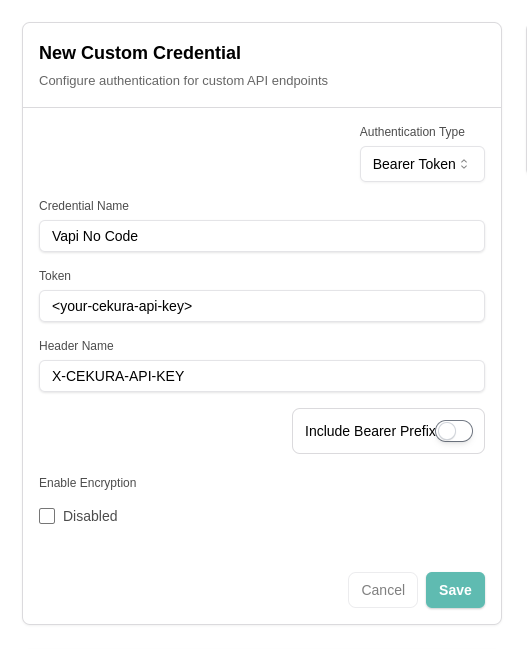
 In your VAPI dashboard, navigate to [integrations](https://dashboard.vapi.ai/settings/integrations/custom-credential) in your account settings and add custom integration with the following details:
* Auth type: Bearer token
* Credential name: Cekura API key
* Token: Your Cekura API key
* Header name: X-CEKURA-API-KEY
* Include bearer prefix: No
In your VAPI dashboard, navigate to [integrations](https://dashboard.vapi.ai/settings/integrations/custom-credential) in your account settings and add custom integration with the following details:
* Auth type: Bearer token
* Credential name: Cekura API key
* Token: Your Cekura API key
* Header name: X-CEKURA-API-KEY
* Include bearer prefix: No
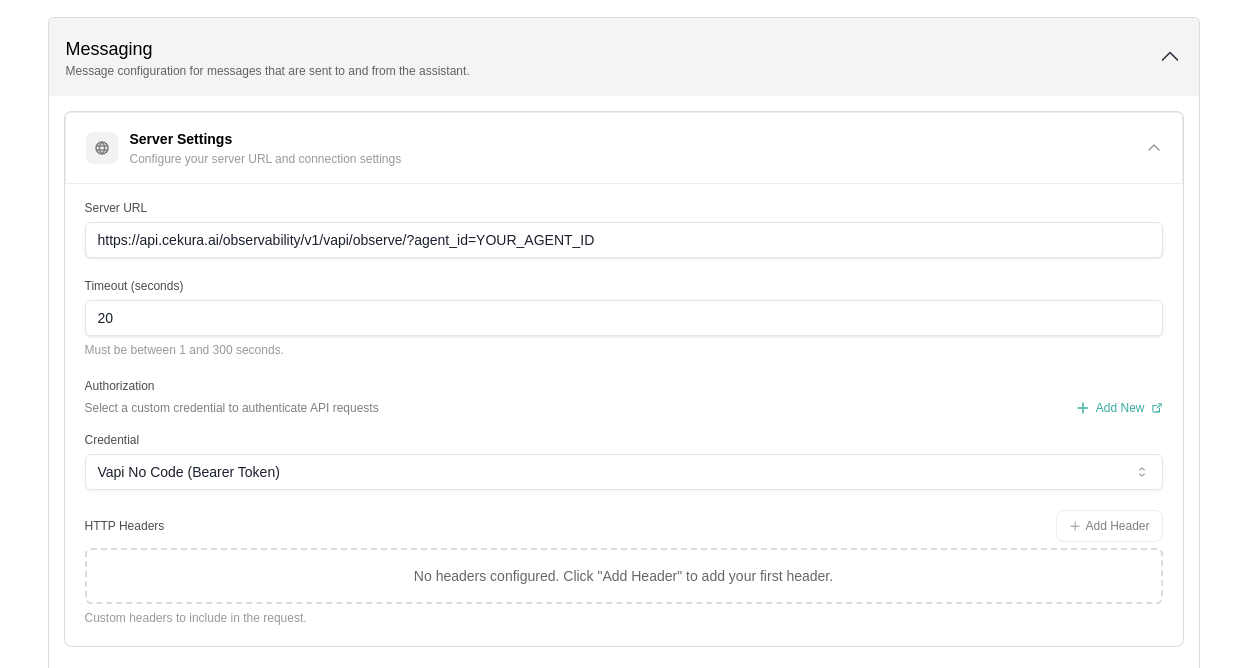
 In your VAPI dashboard, navigate to your agent settings and configure the Server URL and authorization header you created in the previous step. This URL is used for all communication between your application and VAPI, including context retrieval, function calls, and end-of-call reporting.
Set the Server URL to:
```
https://api.cekura.ai/observability/v1/vapi/observe/?agent_id=YOUR_AGENT_ID
```
In your VAPI dashboard, navigate to your agent settings and configure the Server URL and authorization header you created in the previous step. This URL is used for all communication between your application and VAPI, including context retrieval, function calls, and end-of-call reporting.
Set the Server URL to:
```
https://api.cekura.ai/observability/v1/vapi/observe/?agent_id=YOUR_AGENT_ID
```
 Each VAPI agent has a unique Assistant ID that identifies your specific implementation. Copy your Assistant ID from the VAPI dashboard:
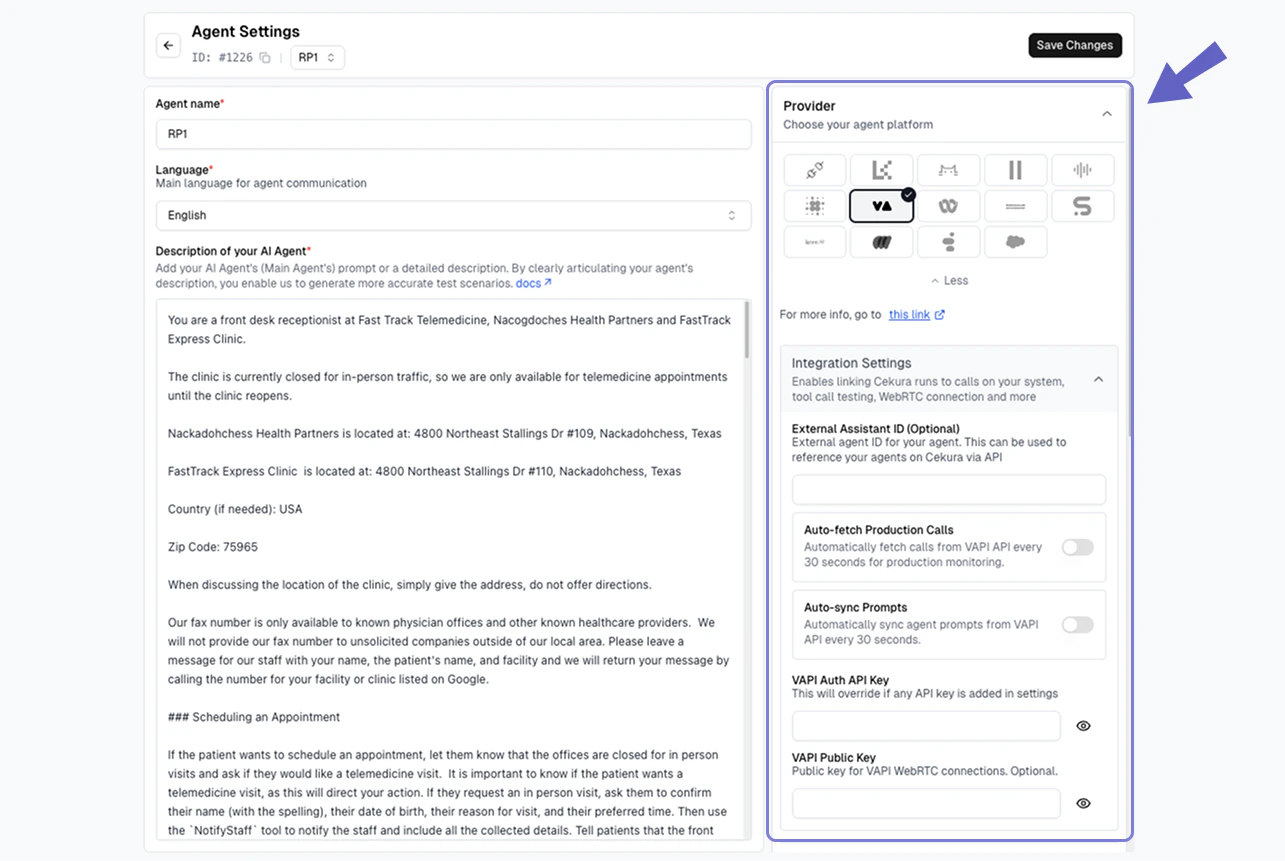
 In your Cekura Agent Settings page:
1. Add the API key from VAPI with the tag `webhook`
2. Copy and add your `agent ID` from VAPI
In your Cekura Agent Settings page:
1. Add the API key from VAPI with the tag `webhook`
2. Copy and add your `agent ID` from VAPI
 Make a test call from VAPI (phone number based or webcall). Your calls should now appear in the Cekura observability `Calls` section.
If you already have an existing webhook setup and want to forward the VAPI response to Cekura's observability suite:
Set up a forwarding mechanism to send the VAPI webhook response to Cekura's observability endpoint:
```
POST https://api.cekura.ai/observability/v1/observe/
```
Include your Cekura API key in the request headers:
```
X-CEKURA-API-KEY:
Content-Type: application/json
```
Forward the VAPI webhook response to Cekura with the following request body structure:
```json theme={null}
{
"agent": ,
"voice_recording_url": vapi_response["stereoRecordingUrl"],
"transcript_type": "vapi",
"transcript_json": vapi_response["messages"],
"call_id": vapi_response["id"],
"call_ended_reason": vapi_response["endedReason"]
}
```
Make a test call from VAPI (phone number based or webcall). Your calls should now appear in the Cekura observability `Calls` section.
If you already have an existing webhook setup and want to forward the VAPI response to Cekura's observability suite:
Set up a forwarding mechanism to send the VAPI webhook response to Cekura's observability endpoint:
```
POST https://api.cekura.ai/observability/v1/observe/
```
Include your Cekura API key in the request headers:
```
X-CEKURA-API-KEY:
Content-Type: application/json
```
Forward the VAPI webhook response to Cekura with the following request body structure:
```json theme={null}
{
"agent": ,
"voice_recording_url": vapi_response["stereoRecordingUrl"],
"transcript_type": "vapi",
"transcript_json": vapi_response["messages"],
"call_id": vapi_response["id"],
"call_ended_reason": vapi_response["endedReason"]
}
```