> ## Documentation Index
> Fetch the complete documentation index at: https://docs.cekura.ai/llms.txt
> Use this file to discover all available pages before exploring further.
# SIP Calls
> Testing SIP (Session Initiation Protocol) Based Agents
export const CopyPageButton = () => {
if (typeof window !== 'undefined') {
setTimeout(function () {
if (document.getElementById('ck-tools')) return;
var anchor = document.getElementById('content-area') || document.querySelector('.mdx-content');
if (!anchor) return;
if (!document.getElementById('ck-style')) {
var s = document.createElement('style');
s.id = 'ck-style';
s.textContent = '#ck-tools{position:absolute;top:6px;right:0;z-index:100;font-family:inherit;}' + '.ck-row{display:inline-flex;align-items:stretch;border:1px solid rgba(0,0,0,0.15);border-radius:8px;overflow:hidden;background:#fff;}' + ':root.dark .ck-row{background:rgba(255,255,255,0.06);border-color:rgba(255,255,255,0.12);}' + '.ck-btn{padding:5px 12px;border:none;background:none;cursor:pointer;font-size:13px;font-weight:500;font-family:inherit;color:#374151;}' + ':root.dark .ck-btn{color:#d1d5db;}' + '.ck-btn:hover{background:rgba(0,0,0,0.04);}' + ':root.dark .ck-btn:hover{background:rgba(255,255,255,0.06);}' + '.ck-chevron{padding:5px 8px;border:none;background:none;cursor:pointer;font-size:14px;font-family:inherit;color:#374151;}' + ':root.dark .ck-chevron{color:#d1d5db;}' + '.ck-chevron:hover{background:rgba(0,0,0,0.04);}' + ':root.dark .ck-chevron:hover{background:rgba(255,255,255,0.06);}' + '.ck-divider{width:1px;background:rgba(0,0,0,0.12);flex-shrink:0;}' + ':root.dark .ck-divider{background:rgba(255,255,255,0.12);}' + '.ck-dd{position:absolute;top:calc(100% + 4px);right:0;min-width:180px;background:#fff;border:1px solid rgba(0,0,0,0.12);border-radius:8px;box-shadow:0 4px 12px rgba(0,0,0,0.1);padding:4px;display:none;z-index:200;}' + ':root.dark .ck-dd{background:#1f2937;border-color:rgba(255,255,255,0.1);box-shadow:0 4px 16px rgba(0,0,0,0.35);}' + '.ck-item{display:block;width:100%;padding:7px 12px;border:none;background:none;border-radius:6px;cursor:pointer;font-size:13px;font-family:inherit;text-align:left;color:#374151;}' + ':root.dark .ck-item{color:#d1d5db;}' + '.ck-item:hover{background:rgba(0,0,0,0.05);}' + ':root.dark .ck-item:hover{background:rgba(255,255,255,0.07);}';
document.head.appendChild(s);
}
var wrap = document.createElement('div');
wrap.id = 'ck-tools';
var row = document.createElement('div');
row.className = 'ck-row';
var mainBtn = document.createElement('button');
mainBtn.className = 'ck-btn';
mainBtn.textContent = 'Copy page';
var divider = document.createElement('span');
divider.className = 'ck-divider';
var chevron = document.createElement('button');
chevron.className = 'ck-chevron';
chevron.textContent = '▾';
var dd = document.createElement('div');
dd.className = 'ck-dd';
function closeDD() {
dd.style.display = 'none';
}
function openDD() {
dd.style.display = 'block';
}
chevron.onclick = function (e) {
e.stopPropagation();
if (dd.style.display === 'block') {
closeDD();
} else {
openDD();
}
};
document.addEventListener('click', function (e) {
if (!e.target.closest('#ck-tools')) {
closeDD();
}
});
document.addEventListener('keydown', function (e) {
if (e.key === 'Escape') {
closeDD();
}
});
function makeItem(label, fn) {
var b = document.createElement('button');
b.className = 'ck-item';
b.textContent = label;
b.onclick = function () {
fn();
closeDD();
};
return b;
}
function getMarkdown() {
var walk = function (node) {
if (!node) return '';
if (node.nodeType === 3) return node.textContent || '';
if (node.nodeType !== 1) return '';
var tag = node.tagName.toLowerCase();
var skip = ['script', 'style', 'svg', 'noscript', 'button', 'iframe'];
if (skip.indexOf(tag) !== -1) return '';
if (node.id === 'ck-tools') return '';
var ch = Array.from(node.childNodes).map(walk).join('');
if (tag === 'h1') return '\n# ' + ch.trim() + '\n\n';
if (tag === 'h2') return '\n## ' + ch.trim() + '\n\n';
if (tag === 'h3') return '\n### ' + ch.trim() + '\n\n';
if (tag === 'p') return '\n' + ch.trim() + '\n\n';
if (tag === 'pre') return '\n```\n' + node.textContent.trim() + '\n```\n\n';
if (tag === 'li') return '- ' + ch.trim() + '\n';
if (tag === 'code') return '`' + ch.trim() + '`';
return ch;
};
var content = document.querySelector('.mdx-content') || document.getElementById('content-area') || document.body;
return walk(content).replace(/\n\n\n+/g, '\n\n').trim();
}
function copyMd() {
var md = getMarkdown();
navigator.clipboard.writeText(md).then(function () {
mainBtn.textContent = 'Copied!';
setTimeout(function () {
mainBtn.textContent = 'Copy page';
}, 2000);
});
}
function viewMd() {
var md = getMarkdown();
var safe = md.split('&').join('&').split('<').join('<').split('>').join('>');
var html = '' + safe + '';
window.open(URL.createObjectURL(new Blob([html], {
type: 'text/html'
})), '_blank');
}
function openClaude() {
var prompt = 'Can you read this Cekura docs page ' + window.location.href + ' so I can ask you questions?';
window.open('https://claude.ai/new?q=' + encodeURIComponent(prompt), '_blank');
}
mainBtn.onclick = copyMd;
dd.appendChild(makeItem('Copy page', copyMd));
dd.appendChild(makeItem('View as Markdown', viewMd));
dd.appendChild(makeItem('Open in Claude', openClaude));
row.appendChild(mainBtn);
row.appendChild(divider);
row.appendChild(chevron);
wrap.appendChild(row);
wrap.appendChild(dd);
anchor.style.position = 'relative';
anchor.insertBefore(wrap, anchor.firstChild);
}, 50);
}
return null;
};
## Overview
Test your SIP (Session Initiation Protocol) based agents directly through Cekura's agents, bypassing traditional telephony networks. This provides enhanced control, reduced latency, and access to rich call metadata through custom headers.
## What is SIP?
SIP (Session Initiation Protocol) is a signaling protocol used for initiating, maintaining, and terminating real-time communication sessions. Unlike traditional PSTN calls that route through telephone networks, SIP enables direct IP-based communication between endpoints.
### How SIP Testing Works on Cekura
When you run a SIP test, the flow works as follows:
1. **SIP Invite**: Cekura sends a SIP INVITE request to your agent's SIP endpoint
2. **Header Injection**: Cekura automatically injects custom headers with test metadata
3. **Session Negotiation**: SIP protocols negotiate audio codecs, media parameters, and connection details
4. **Media Stream**: Direct RTP (Real-time Transport Protocol) audio streams are established
5. **Call Handling**: Your agent processes the call with full access to SIP headers and metadata
6. **Results Collection**: Cekura captures audio, transcripts, and evaluation metrics
### Custom Headers
Cekura injects headers into every SIP INVITE request to provide metadata and enable advanced functionality.
#### Default Headers
Cekura automatically injects critical headers into every SIP INVITE request to link the call session to the test run:
```
X-Run-Id:
X-Scenario-Id:
X-Result-Id:
```
These headers allow you to:
* Track which test scenario triggered the call
* Link calls with specific test runs
* Extract metadata for debugging and analysis
* Enrich simulation evaluations programmatically
#### User-Defined Custom Headers
You can add additional custom headers through test profiles. When a test profile is attached to a scenario or run, your custom headers are sent alongside the default headers in the SIP INVITE request.
**Requirements:**
* Put custom headers in the test profile's `information.main_agent_variables` section (these reach the agent under test; values in `testing_agent_variables` stay on the simulator and are not sent over the wire).
* Header keys must start with `"X-"` (e.g., `"X-Auth-Token"`, `"X-Customer-Type"`)
* Only keys with the `"X-"` prefix from `main_agent_variables` are included as SIP headers
**Example test profile:**
```json theme={null}
{
"name": "Premium Customer Profile",
"information": {
"main_agent_variables": {
"X-Auth-Token": "abc123xyz",
"X-Customer-Tier": "premium",
"X-Account-Type": "business"
},
"testing_agent_variables": {
"customer_name": "Jane Smith"
}
}
}
```
In this example, the SIP INVITE will include:
* Default headers: `X-Run-Id`, `X-Scenario-Id`, `X-Result-Id`
* Custom headers: `X-Auth-Token`, `X-Customer-Tier`, `X-Account-Type`
* Note: `customer_name` is in `testing_agent_variables` so it is NOT sent as a SIP header. Keys in `testing_agent_variables` stay on Cekura's simulator only.
Use custom headers to pass authentication tokens, routing information, or metadata to your SIP infrastructure.
Test your SIP-based agents directly from the frontend without writing code.
Go to your agent settings and configure the SIP endpoint:
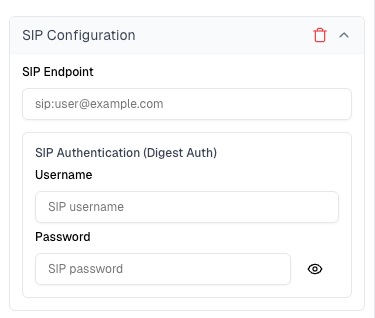 **Required field:**
* **SIP Endpoint**: The SIP URI where your agent receives calls (e.g., `sip:agent@yourdomain.com` or `sip:192.168.1.100:5060`)
**Optional fields (for secure private endpoints):**
* **Username**: Digest authentication username (only required if your SIP endpoint uses digest authentication)
* **Password**: Digest authentication password (only required if your SIP endpoint uses digest authentication)
Your SIP endpoint can be either publicly accessible or a private endpoint secured with digest authentication. If using digest authentication, provide the username and password credentials configured on your SIP server.
If your SIP endpoint is behind a firewall, you will need to whitelist Cekura's outbound IP addresses so that SIP INVITE requests can reach your server. See [IP Whitelisting](/documentation/advanced/ip-whitelisting) for the current IP list.
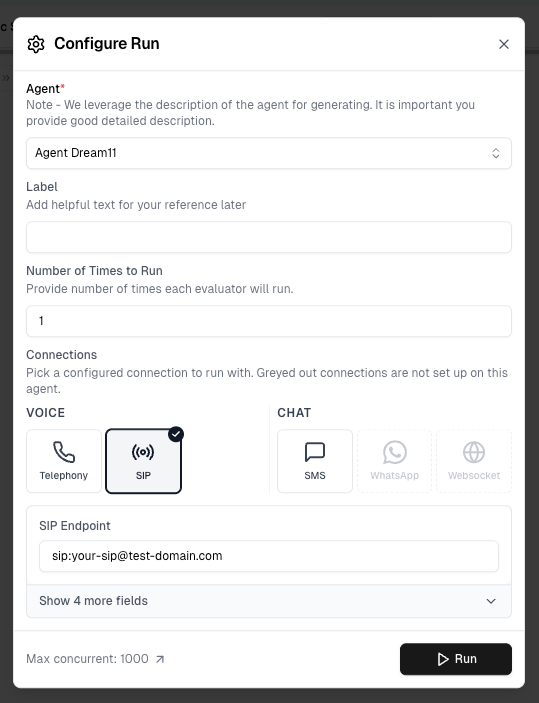
1. Select scenarios and run tests using the UI.
2. Click **Run** to open the **Configure Run** dialog. Under **Connections**, select **SIP** under the **VOICE** section.
3. Confirm your SIP endpoint, then click **Run**.
**Required field:**
* **SIP Endpoint**: The SIP URI where your agent receives calls (e.g., `sip:agent@yourdomain.com` or `sip:192.168.1.100:5060`)
**Optional fields (for secure private endpoints):**
* **Username**: Digest authentication username (only required if your SIP endpoint uses digest authentication)
* **Password**: Digest authentication password (only required if your SIP endpoint uses digest authentication)
Your SIP endpoint can be either publicly accessible or a private endpoint secured with digest authentication. If using digest authentication, provide the username and password credentials configured on your SIP server.
If your SIP endpoint is behind a firewall, you will need to whitelist Cekura's outbound IP addresses so that SIP INVITE requests can reach your server. See [IP Whitelisting](/documentation/advanced/ip-whitelisting) for the current IP list.
1. Select scenarios and run tests using the UI.
2. Click **Run** to open the **Configure Run** dialog. Under **Connections**, select **SIP** under the **VOICE** section.
3. Confirm your SIP endpoint, then click **Run**.
 Cekura automatically:
* Sends SIP INVITE requests to your configured endpoint
* Injects custom headers (`X-Run-Id`, `X-Scenario-Id`, `X-Result-Id`)
* Executes test scenarios
* Captures audio and transcript data
* Evaluates metrics in real-time
Results appear in your dashboard.
Track test status, metrics, conversation details, and other details.
Use the API to integrate SIP testing into your CI/CD workflow.
## Prerequisites
Configure the SIP endpoint in your agent settings:
**Required field:**
* **SIP Endpoint**: The SIP URI where your agent receives calls (e.g., `sip:agent@yourdomain.com` or `sip:192.168.1.100:5060`)
**Optional fields (for secure private endpoints):**
* **Username**: Digest authentication username (only required if your SIP endpoint uses digest authentication)
* **Password**: Digest authentication password (only required if your SIP endpoint uses digest authentication)
Your SIP endpoint can be either publicly accessible or a private endpoint secured with digest authentication. If using digest authentication, provide the username and password credentials configured on your SIP server.
If your SIP endpoint is behind a firewall, you will need to whitelist Cekura's outbound IP addresses so that SIP INVITE requests can reach your server. See [IP Whitelisting](/documentation/advanced/ip-whitelisting) for the current IP list.
## API Endpoint
```
POST https://api.cekura.ai/test_framework/v1/scenarios/run_scenarios_sip/
```
## Authentication
Include your API key in the request header:
```
X-CEKURA-API-KEY:
```
## Request Parameters
**scenarios** (array | integer | string, required): Test scenarios to run
* **Array format**: List of scenario IDs `[123, 456, 789]`
* **Integer format**: Run first N scenarios for the agent `5`
* **String format**: Run all scenarios for the agent `"all"`
**agent\_id** (integer, optional): Your Agent ID in Cekura. Required when using integer or "all" format for scenarios
**frequency** (integer, optional): Number of times to run each scenario (default: 1)
**name** (string, optional): Custom name for this test run
## Examples
### Single Run (cURL)
```bash theme={null}
curl -X POST \
'https://api.cekura.ai/test_framework/v1/scenarios/run_scenarios_sip/' \
-H 'X-CEKURA-API-KEY: ' \
-H 'Content-Type: application/json' \
-d '{
"scenarios": [30]
}'
```
### Multiple Runs (cURL)
```bash theme={null}
curl -X POST \
'https://api.cekura.ai/test_framework/v1/scenarios/run_scenarios_sip/' \
-H 'X-CEKURA-API-KEY: ' \
-H 'Content-Type: application/json' \
-d '{
"scenarios": [30, 31, 32],
"frequency": 2,
"name": "SIP Test Run"
}'
```
## Response
```json theme={null}
{
"id": 16870,
"name": "SIP Test Run",
"agent": 5,
"status": "in_progress",
"success_rate": 0.0,
"run_as_text": false,
"is_cronjob": false,
"runs": [
{
"id": 34625,
"status": "running",
"scenario": 11547,
"scenario_name": "Customer Support Scenario",
"test_profile_data": {"key": "value"}
}
],
"created_at": "2025-10-16T09:32:59.484534Z",
"updated_at": "2025-10-16T09:32:59.484942Z"
}
```
## Error Responses
### Missing SIP Endpoint
```json theme={null}
{
"sip_endpoint": ["Agent does not have a SIP endpoint configured. Please configure sip_endpoint in the agent settings."]
}
```
### Invalid SIP Endpoint Format
```json theme={null}
{
"sip_endpoint": ["Invalid SIP URI format. Expected format: sip:user@host[:port]"]
}
```
## Monitor Results
Poll for results using the [List Runs with IDs API](/api-reference/test_framework/list-runs-with-ids).
## Extracting Custom Headers
Your SIP infrastructure can extract the custom headers during call setup for tracking and debugging:
```python theme={null}
# Example: Extracting headers in a SIP application
def handle_sip_invite(invite_message):
run_id = invite_message.headers.get('X-Run-Id')
scenario_id = invite_message.headers.get('X-Scenario-Id')
result_id = invite_message.headers.get('X-Result-Id')
if run_id and scenario_id and result_id:
# Store for later use in debugging or enriching evaluations
log_test_metadata(run_id, scenario_id, result_id)
```
Use these headers to correlate SIP calls with specific test runs in your own logging and monitoring systems.
Cekura automatically:
* Sends SIP INVITE requests to your configured endpoint
* Injects custom headers (`X-Run-Id`, `X-Scenario-Id`, `X-Result-Id`)
* Executes test scenarios
* Captures audio and transcript data
* Evaluates metrics in real-time
Results appear in your dashboard.
Track test status, metrics, conversation details, and other details.
Use the API to integrate SIP testing into your CI/CD workflow.
## Prerequisites
Configure the SIP endpoint in your agent settings:
**Required field:**
* **SIP Endpoint**: The SIP URI where your agent receives calls (e.g., `sip:agent@yourdomain.com` or `sip:192.168.1.100:5060`)
**Optional fields (for secure private endpoints):**
* **Username**: Digest authentication username (only required if your SIP endpoint uses digest authentication)
* **Password**: Digest authentication password (only required if your SIP endpoint uses digest authentication)
Your SIP endpoint can be either publicly accessible or a private endpoint secured with digest authentication. If using digest authentication, provide the username and password credentials configured on your SIP server.
If your SIP endpoint is behind a firewall, you will need to whitelist Cekura's outbound IP addresses so that SIP INVITE requests can reach your server. See [IP Whitelisting](/documentation/advanced/ip-whitelisting) for the current IP list.
## API Endpoint
```
POST https://api.cekura.ai/test_framework/v1/scenarios/run_scenarios_sip/
```
## Authentication
Include your API key in the request header:
```
X-CEKURA-API-KEY:
```
## Request Parameters
**scenarios** (array | integer | string, required): Test scenarios to run
* **Array format**: List of scenario IDs `[123, 456, 789]`
* **Integer format**: Run first N scenarios for the agent `5`
* **String format**: Run all scenarios for the agent `"all"`
**agent\_id** (integer, optional): Your Agent ID in Cekura. Required when using integer or "all" format for scenarios
**frequency** (integer, optional): Number of times to run each scenario (default: 1)
**name** (string, optional): Custom name for this test run
## Examples
### Single Run (cURL)
```bash theme={null}
curl -X POST \
'https://api.cekura.ai/test_framework/v1/scenarios/run_scenarios_sip/' \
-H 'X-CEKURA-API-KEY: ' \
-H 'Content-Type: application/json' \
-d '{
"scenarios": [30]
}'
```
### Multiple Runs (cURL)
```bash theme={null}
curl -X POST \
'https://api.cekura.ai/test_framework/v1/scenarios/run_scenarios_sip/' \
-H 'X-CEKURA-API-KEY: ' \
-H 'Content-Type: application/json' \
-d '{
"scenarios": [30, 31, 32],
"frequency": 2,
"name": "SIP Test Run"
}'
```
## Response
```json theme={null}
{
"id": 16870,
"name": "SIP Test Run",
"agent": 5,
"status": "in_progress",
"success_rate": 0.0,
"run_as_text": false,
"is_cronjob": false,
"runs": [
{
"id": 34625,
"status": "running",
"scenario": 11547,
"scenario_name": "Customer Support Scenario",
"test_profile_data": {"key": "value"}
}
],
"created_at": "2025-10-16T09:32:59.484534Z",
"updated_at": "2025-10-16T09:32:59.484942Z"
}
```
## Error Responses
### Missing SIP Endpoint
```json theme={null}
{
"sip_endpoint": ["Agent does not have a SIP endpoint configured. Please configure sip_endpoint in the agent settings."]
}
```
### Invalid SIP Endpoint Format
```json theme={null}
{
"sip_endpoint": ["Invalid SIP URI format. Expected format: sip:user@host[:port]"]
}
```
## Monitor Results
Poll for results using the [List Runs with IDs API](/api-reference/test_framework/list-runs-with-ids).
## Extracting Custom Headers
Your SIP infrastructure can extract the custom headers during call setup for tracking and debugging:
```python theme={null}
# Example: Extracting headers in a SIP application
def handle_sip_invite(invite_message):
run_id = invite_message.headers.get('X-Run-Id')
scenario_id = invite_message.headers.get('X-Scenario-Id')
result_id = invite_message.headers.get('X-Result-Id')
if run_id and scenario_id and result_id:
# Store for later use in debugging or enriching evaluations
log_test_metadata(run_id, scenario_id, result_id)
```
Use these headers to correlate SIP calls with specific test runs in your own logging and monitoring systems.