> ## Documentation Index
> Fetch the complete documentation index at: https://docs.cekura.ai/llms.txt
> Use this file to discover all available pages before exploring further.
# Observability
> Monitor and analyze your Retell-based voice agents
export const CopyPageButton = () => {
if (typeof window !== 'undefined') {
setTimeout(function () {
if (document.getElementById('ck-tools')) return;
var anchor = document.getElementById('content-area') || document.querySelector('.mdx-content');
if (!anchor) return;
if (!document.getElementById('ck-style')) {
var s = document.createElement('style');
s.id = 'ck-style';
s.textContent = '#ck-tools{position:absolute;top:6px;right:0;z-index:100;font-family:inherit;}' + '.ck-row{display:inline-flex;align-items:stretch;border:1px solid rgba(0,0,0,0.15);border-radius:8px;overflow:hidden;background:#fff;}' + ':root.dark .ck-row{background:rgba(255,255,255,0.06);border-color:rgba(255,255,255,0.12);}' + '.ck-btn{padding:5px 12px;border:none;background:none;cursor:pointer;font-size:13px;font-weight:500;font-family:inherit;color:#374151;}' + ':root.dark .ck-btn{color:#d1d5db;}' + '.ck-btn:hover{background:rgba(0,0,0,0.04);}' + ':root.dark .ck-btn:hover{background:rgba(255,255,255,0.06);}' + '.ck-chevron{padding:5px 8px;border:none;background:none;cursor:pointer;font-size:14px;font-family:inherit;color:#374151;}' + ':root.dark .ck-chevron{color:#d1d5db;}' + '.ck-chevron:hover{background:rgba(0,0,0,0.04);}' + ':root.dark .ck-chevron:hover{background:rgba(255,255,255,0.06);}' + '.ck-divider{width:1px;background:rgba(0,0,0,0.12);flex-shrink:0;}' + ':root.dark .ck-divider{background:rgba(255,255,255,0.12);}' + '.ck-dd{position:absolute;top:calc(100% + 4px);right:0;min-width:180px;background:#fff;border:1px solid rgba(0,0,0,0.12);border-radius:8px;box-shadow:0 4px 12px rgba(0,0,0,0.1);padding:4px;display:none;z-index:200;}' + ':root.dark .ck-dd{background:#1f2937;border-color:rgba(255,255,255,0.1);box-shadow:0 4px 16px rgba(0,0,0,0.35);}' + '.ck-item{display:block;width:100%;padding:7px 12px;border:none;background:none;border-radius:6px;cursor:pointer;font-size:13px;font-family:inherit;text-align:left;color:#374151;}' + ':root.dark .ck-item{color:#d1d5db;}' + '.ck-item:hover{background:rgba(0,0,0,0.05);}' + ':root.dark .ck-item:hover{background:rgba(255,255,255,0.07);}';
document.head.appendChild(s);
}
var wrap = document.createElement('div');
wrap.id = 'ck-tools';
var row = document.createElement('div');
row.className = 'ck-row';
var mainBtn = document.createElement('button');
mainBtn.className = 'ck-btn';
mainBtn.textContent = 'Copy page';
var divider = document.createElement('span');
divider.className = 'ck-divider';
var chevron = document.createElement('button');
chevron.className = 'ck-chevron';
chevron.textContent = '▾';
var dd = document.createElement('div');
dd.className = 'ck-dd';
function closeDD() {
dd.style.display = 'none';
}
function openDD() {
dd.style.display = 'block';
}
chevron.onclick = function (e) {
e.stopPropagation();
if (dd.style.display === 'block') {
closeDD();
} else {
openDD();
}
};
document.addEventListener('click', function (e) {
if (!e.target.closest('#ck-tools')) {
closeDD();
}
});
document.addEventListener('keydown', function (e) {
if (e.key === 'Escape') {
closeDD();
}
});
function makeItem(label, fn) {
var b = document.createElement('button');
b.className = 'ck-item';
b.textContent = label;
b.onclick = function () {
fn();
closeDD();
};
return b;
}
function getMarkdown() {
var walk = function (node) {
if (!node) return '';
if (node.nodeType === 3) return node.textContent || '';
if (node.nodeType !== 1) return '';
var tag = node.tagName.toLowerCase();
var skip = ['script', 'style', 'svg', 'noscript', 'button', 'iframe'];
if (skip.indexOf(tag) !== -1) return '';
if (node.id === 'ck-tools') return '';
var ch = Array.from(node.childNodes).map(walk).join('');
if (tag === 'h1') return '\n# ' + ch.trim() + '\n\n';
if (tag === 'h2') return '\n## ' + ch.trim() + '\n\n';
if (tag === 'h3') return '\n### ' + ch.trim() + '\n\n';
if (tag === 'p') return '\n' + ch.trim() + '\n\n';
if (tag === 'pre') return '\n```\n' + node.textContent.trim() + '\n```\n\n';
if (tag === 'li') return '- ' + ch.trim() + '\n';
if (tag === 'code') return '`' + ch.trim() + '`';
return ch;
};
var content = document.querySelector('.mdx-content') || document.getElementById('content-area') || document.body;
return walk(content).replace(/\n\n\n+/g, '\n\n').trim();
}
function copyMd() {
var md = getMarkdown();
navigator.clipboard.writeText(md).then(function () {
mainBtn.textContent = 'Copied!';
setTimeout(function () {
mainBtn.textContent = 'Copy page';
}, 2000);
});
}
function viewMd() {
var md = getMarkdown();
var safe = md.split('&').join('&').split('<').join('<').split('>').join('>');
var html = '' + safe + '';
window.open(URL.createObjectURL(new Blob([html], {
type: 'text/html'
})), '_blank');
}
function openClaude() {
var prompt = 'Can you read this Cekura docs page ' + window.location.href + ' so I can ask you questions?';
window.open('https://claude.ai/new?q=' + encodeURIComponent(prompt), '_blank');
}
mainBtn.onclick = copyMd;
dd.appendChild(makeItem('Copy page', copyMd));
dd.appendChild(makeItem('View as Markdown', viewMd));
dd.appendChild(makeItem('Open in Claude', openClaude));
row.appendChild(mainBtn);
row.appendChild(divider);
row.appendChild(chevron);
wrap.appendChild(row);
wrap.appendChild(dd);
anchor.style.position = 'relative';
anchor.insertBefore(wrap, anchor.firstChild);
}, 50);
}
return null;
};
## Overview
This guide walks you through setting up and monitoring your Retell-based voice agents using Cekura's observability suite. Learn how to configure your integration and access powerful monitoring tools.
With auto-fetch enabled, Cekura automatically pulls your call data from Retell's API every 30 seconds—no webhook configuration required.
In your Cekura dashboard, create a new agent or select an existing one with Retell as the voice provider.
In your Cekura Agent Settings page:
1. Select **Retell** as the voice integration provider
2. Add your Retell API key
3. Enter your Retell `agent ID`
Toggle on **Auto-fetch Production Calls** in the voice integration settings.
Make a test call from Retell. Within 30 seconds, your call should appear in the Cekura observability `Calls` section.
Auto-fetch is ideal for getting started quickly or when you can't configure webhooks. For real-time call data, use the webhook-based setup in the other tabs.
Follow these steps to connect your Retell agent with Cekura's observability suite:
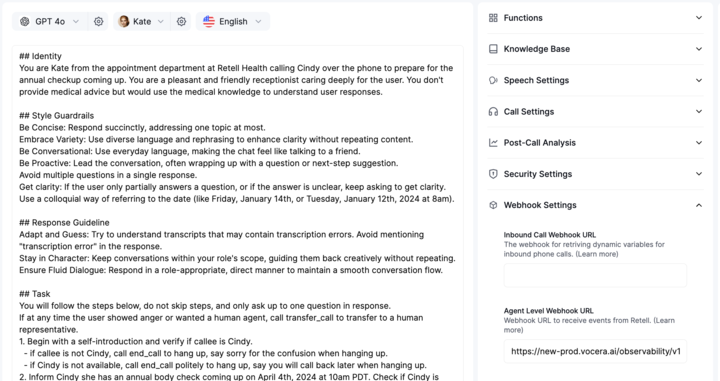
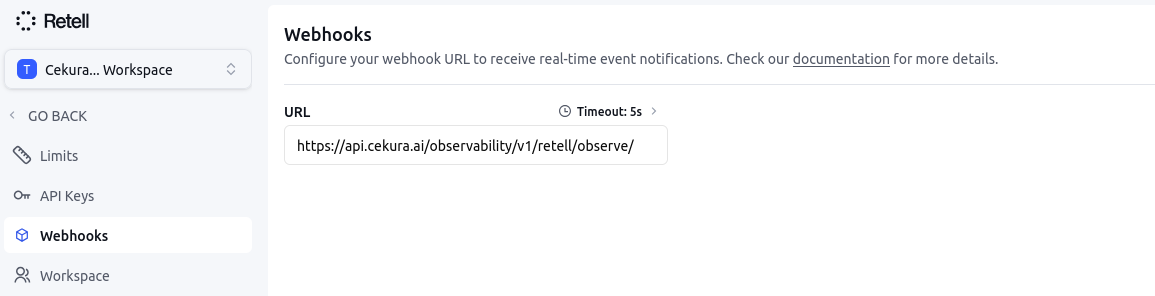
In your Retell dashboard, add the observability webhook URL:
```
https://api.cekura.ai/observability/v1/retell/observe/
```
You can configure the webhook at either level:
* **Setting Webhook at Agent level:** Navigate to your agent settings and add the webhook URL for a specific agent.
 * **Setting Webhook at Workspace level:** Navigate to your workspace settings and add the webhook URL for all agents in the workspace.
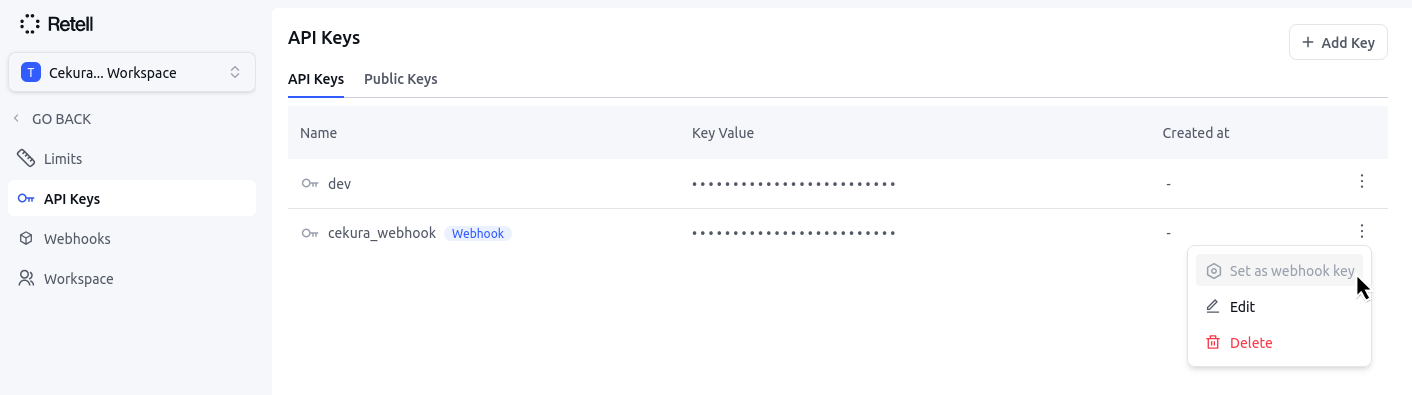
 Go to the API keys section in your Retell dashboard. Create/ensure you have at least one API key configured with the webhook tag set.
 In your Cekura Agent Settings page:
1. Add the API key from Retell with the tag `webhook`
2. Copy and add your `agent ID` from Retell
In your Cekura Agent Settings page:
1. Add the API key from Retell with the tag `webhook`
2. Copy and add your `agent ID` from Retell
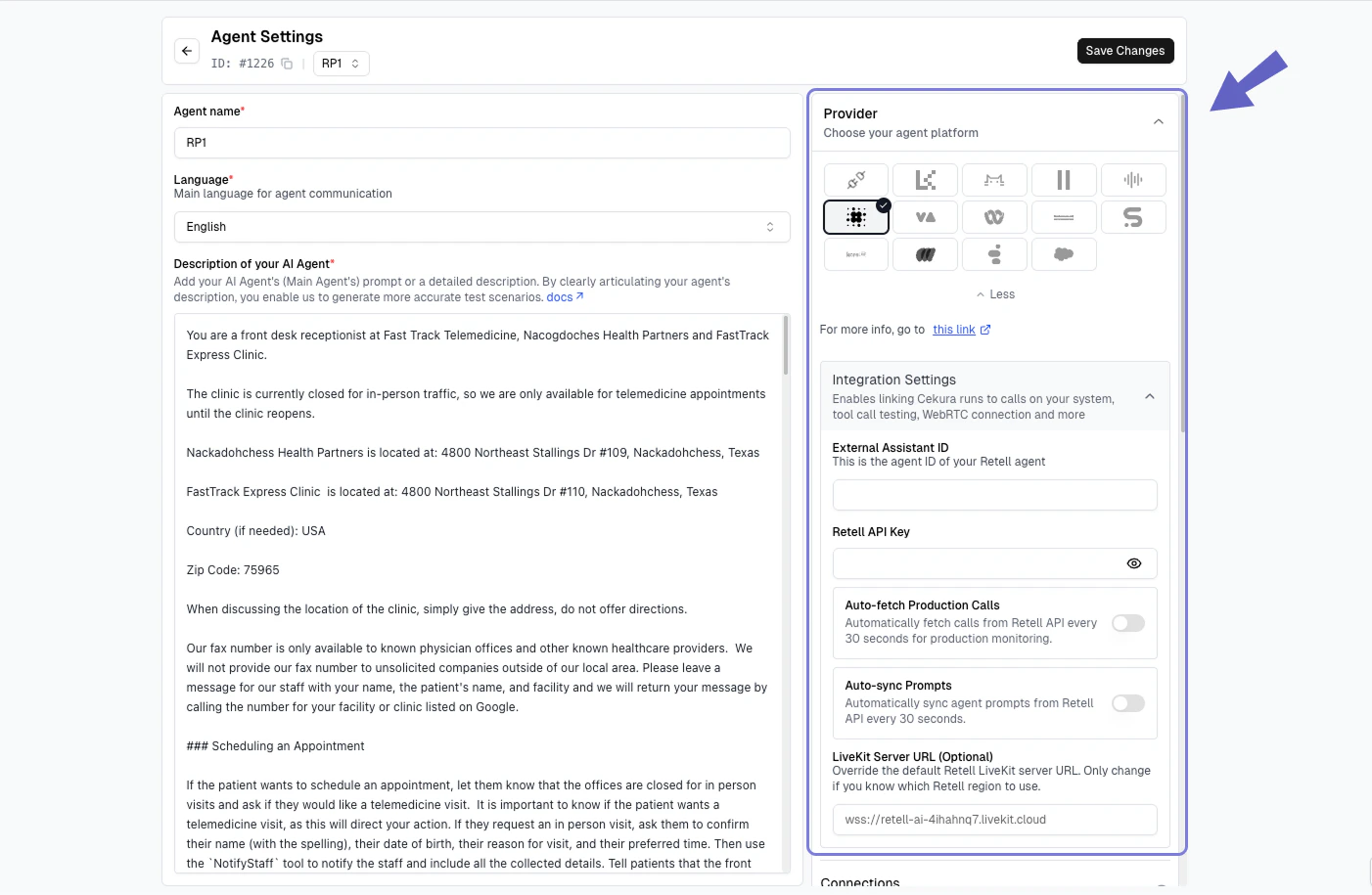 Make a test call from Retell (phone number based or webcall). Your calls should now appear in the Cekura observability `Calls` section.
If you already have an existing webhook setup and want to forward the Retell response to Cekura's observability suite:
Set up a forwarding mechanism to send the Retell webhook response to Cekura's observability endpoint:
```
POST https://api.cekura.ai/observability/v1/observe/
```
Include your Cekura API key in the request headers:
```
X-CEKURA-API-KEY:
Content-Type: application/json
```
Forward the Retell webhook response to Cekura with the following request body structure:
```json theme={null}
{
"agent": ,
"voice_recording_url": retell_response["recording_multi_channel_url"],
"transcript_type": "retell",
"transcript_json": retell_response["transcript_with_tool_calls"],
"call_id": retell_response["call_id"],
"call_ended_reason": retell_response["disconnection_reason"]
}
```
Make a test call from Retell (phone number based or webcall). Your calls should now appear in the Cekura observability `Calls` section.
If you already have an existing webhook setup and want to forward the Retell response to Cekura's observability suite:
Set up a forwarding mechanism to send the Retell webhook response to Cekura's observability endpoint:
```
POST https://api.cekura.ai/observability/v1/observe/
```
Include your Cekura API key in the request headers:
```
X-CEKURA-API-KEY:
Content-Type: application/json
```
Forward the Retell webhook response to Cekura with the following request body structure:
```json theme={null}
{
"agent": ,
"voice_recording_url": retell_response["recording_multi_channel_url"],
"transcript_type": "retell",
"transcript_json": retell_response["transcript_with_tool_calls"],
"call_id": retell_response["call_id"],
"call_ended_reason": retell_response["disconnection_reason"]
}
```