> ## Documentation Index
> Fetch the complete documentation index at: https://docs.cekura.ai/llms.txt
> Use this file to discover all available pages before exploring further.
# Pipecat Tracing
> Enhanced observability and simulation testing for Pipecat agents using the Cekura Python SDK
export const CopyLlmPromptButton = ({prompt}) => {
if (typeof window === 'undefined') return null;
var copied = false;
function handleClick() {
if (copied) return;
navigator.clipboard.writeText(prompt).then(function () {
var btn = document.getElementById('ck-llm-btn');
if (btn) {
btn.textContent = 'Copied!';
copied = true;
setTimeout(function () {
btn.textContent = 'Copy LLM Prompt';
copied = false;
}, 2000);
}
});
}
setTimeout(function () {
var btn = document.getElementById('ck-llm-btn');
if (btn) btn.onclick = handleClick;
}, 50);
return ;
};
export const CopyPageButton = () => {
if (typeof window !== 'undefined') {
setTimeout(function () {
if (document.getElementById('ck-tools')) return;
var anchor = document.getElementById('content-area') || document.querySelector('.mdx-content');
if (!anchor) return;
if (!document.getElementById('ck-style')) {
var s = document.createElement('style');
s.id = 'ck-style';
s.textContent = '#ck-tools{position:absolute;top:6px;right:0;z-index:100;font-family:inherit;}' + '.ck-row{display:inline-flex;align-items:stretch;border:1px solid rgba(0,0,0,0.15);border-radius:8px;overflow:hidden;background:#fff;}' + ':root.dark .ck-row{background:rgba(255,255,255,0.06);border-color:rgba(255,255,255,0.12);}' + '.ck-btn{padding:5px 12px;border:none;background:none;cursor:pointer;font-size:13px;font-weight:500;font-family:inherit;color:#374151;}' + ':root.dark .ck-btn{color:#d1d5db;}' + '.ck-btn:hover{background:rgba(0,0,0,0.04);}' + ':root.dark .ck-btn:hover{background:rgba(255,255,255,0.06);}' + '.ck-chevron{padding:5px 8px;border:none;background:none;cursor:pointer;font-size:14px;font-family:inherit;color:#374151;}' + ':root.dark .ck-chevron{color:#d1d5db;}' + '.ck-chevron:hover{background:rgba(0,0,0,0.04);}' + ':root.dark .ck-chevron:hover{background:rgba(255,255,255,0.06);}' + '.ck-divider{width:1px;background:rgba(0,0,0,0.12);flex-shrink:0;}' + ':root.dark .ck-divider{background:rgba(255,255,255,0.12);}' + '.ck-dd{position:absolute;top:calc(100% + 4px);right:0;min-width:180px;background:#fff;border:1px solid rgba(0,0,0,0.12);border-radius:8px;box-shadow:0 4px 12px rgba(0,0,0,0.1);padding:4px;display:none;z-index:200;}' + ':root.dark .ck-dd{background:#1f2937;border-color:rgba(255,255,255,0.1);box-shadow:0 4px 16px rgba(0,0,0,0.35);}' + '.ck-item{display:block;width:100%;padding:7px 12px;border:none;background:none;border-radius:6px;cursor:pointer;font-size:13px;font-family:inherit;text-align:left;color:#374151;}' + ':root.dark .ck-item{color:#d1d5db;}' + '.ck-item:hover{background:rgba(0,0,0,0.05);}' + ':root.dark .ck-item:hover{background:rgba(255,255,255,0.07);}';
document.head.appendChild(s);
}
var wrap = document.createElement('div');
wrap.id = 'ck-tools';
var row = document.createElement('div');
row.className = 'ck-row';
var mainBtn = document.createElement('button');
mainBtn.className = 'ck-btn';
mainBtn.textContent = 'Copy page';
var divider = document.createElement('span');
divider.className = 'ck-divider';
var chevron = document.createElement('button');
chevron.className = 'ck-chevron';
chevron.textContent = '▾';
var dd = document.createElement('div');
dd.className = 'ck-dd';
function closeDD() {
dd.style.display = 'none';
}
function openDD() {
dd.style.display = 'block';
}
chevron.onclick = function (e) {
e.stopPropagation();
if (dd.style.display === 'block') {
closeDD();
} else {
openDD();
}
};
document.addEventListener('click', function (e) {
if (!e.target.closest('#ck-tools')) {
closeDD();
}
});
document.addEventListener('keydown', function (e) {
if (e.key === 'Escape') {
closeDD();
}
});
function makeItem(label, fn) {
var b = document.createElement('button');
b.className = 'ck-item';
b.textContent = label;
b.onclick = function () {
fn();
closeDD();
};
return b;
}
function getMarkdown() {
var walk = function (node) {
if (!node) return '';
if (node.nodeType === 3) return node.textContent || '';
if (node.nodeType !== 1) return '';
var tag = node.tagName.toLowerCase();
var skip = ['script', 'style', 'svg', 'noscript', 'button', 'iframe'];
if (skip.indexOf(tag) !== -1) return '';
if (node.id === 'ck-tools') return '';
var ch = Array.from(node.childNodes).map(walk).join('');
if (tag === 'h1') return '\n# ' + ch.trim() + '\n\n';
if (tag === 'h2') return '\n## ' + ch.trim() + '\n\n';
if (tag === 'h3') return '\n### ' + ch.trim() + '\n\n';
if (tag === 'p') return '\n' + ch.trim() + '\n\n';
if (tag === 'pre') return '\n```\n' + node.textContent.trim() + '\n```\n\n';
if (tag === 'li') return '- ' + ch.trim() + '\n';
if (tag === 'code') return '`' + ch.trim() + '`';
return ch;
};
var content = document.querySelector('.mdx-content') || document.getElementById('content-area') || document.body;
return walk(content).replace(/\n\n\n+/g, '\n\n').trim();
}
function copyMd() {
var md = getMarkdown();
navigator.clipboard.writeText(md).then(function () {
mainBtn.textContent = 'Copied!';
setTimeout(function () {
mainBtn.textContent = 'Copy page';
}, 2000);
});
}
function viewMd() {
var md = getMarkdown();
var safe = md.split('&').join('&').split('<').join('<').split('>').join('>');
var html = '' + safe + '';
window.open(URL.createObjectURL(new Blob([html], {
type: 'text/html'
})), '_blank');
}
function openClaude() {
var prompt = 'Can you read this Cekura docs page ' + window.location.href + ' so I can ask you questions?';
window.open('https://claude.ai/new?q=' + encodeURIComponent(prompt), '_blank');
}
mainBtn.onclick = copyMd;
dd.appendChild(makeItem('Copy page', copyMd));
dd.appendChild(makeItem('View as Markdown', viewMd));
dd.appendChild(makeItem('Open in Claude', openClaude));
row.appendChild(mainBtn);
row.appendChild(divider);
row.appendChild(chevron);
wrap.appendChild(row);
wrap.appendChild(dd);
anchor.style.position = 'relative';
anchor.insertBefore(wrap, anchor.firstChild);
}, 50);
}
return null;
};
export const pipecatPrompt = ["You are integrating Cekura observability and testing into an existing Pipecat voice agent codebase.", "", "OBJECTIVE", "Add the Cekura PipecatTracer SDK so that:", "- Production calls are monitored with transcripts, tool calls, audio recording, logs, and OpenTelemetry traces (observability mode).", "- UAT/dev/staging calls support simulation testing from the Cekura platform with transcripts, logs, and OTel traces but no audio recording (testing mode).", "", "The user's codebase likely has separate entrypoints or environment-based configuration for prod vs UAT. Ask the user how they distinguish between these environments before writing code.", "", "BEFORE YOU START", '1. Ask the user: "Do you have separate entrypoints or an environment variable that distinguishes your production agent from your UAT/dev/staging agent? (e.g., ENV=production vs ENV=staging, or separate files like bot_prod.py vs bot_dev.py)"', '2. Ask the user: "What is your Cekura agent ID? You can find it in the Cekura dashboard under your agent settings. If you don\'t know it, I can look it up for you."', "3. Find the function that builds and runs the Pipecat pipeline (look for PipelineRunner, PipelineTask, Pipeline).", "4. Find the LLMContext and LLMContextAggregatorPair usage — the SDK requires both user and assistant aggregators in the pipeline.", "5. Find existing error handling and service patterns in the codebase. Follow them.", "", "IMPLEMENTATION REQUIREMENTS", "", "For the production / observability entrypoint:", "- Use cekura.observe_pipeline() or cekura.observe_and_create_task() — these capture transcripts AND record dual-channel audio.", "", "For the UAT / testing entrypoint:", "- Use cekura.track_pipeline() or cekura.track_and_create_task() — these capture transcripts only, no audio. This is what Cekura simulation calls use.", "", "Common setup for both:", "1. Install the SDK: pip install cekura[pipecat]==1.4.1", "2. Import PipecatTracer: from cekura.pipecat import PipecatTracer", "3. Initialize the tracer:", " cekura = PipecatTracer(", ' api_key=os.getenv("CEKURA_API_KEY"),', " agent_id=,", " )", "4. The pipeline MUST contain LLMUserAggregator and LLMAssistantAggregator (created via LLMContextAggregatorPair). If they are missing, add them.", "5. After wrapping the pipeline, create the PipelineTask with enable_tracing=True and enable_turn_tracking=True for OTel traces.", "6. Register task handlers: cekura.register_task_handlers(task, transport=transport)", "7. Store the API key in an environment variable CEKURA_API_KEY — never hardcode it.", "", "Single-step API (recommended for simpler setups):", "- Production: task = cekura.observe_and_create_task(pipeline, context, runner_args=runner_args, transport=transport)", "- UAT: task = cekura.track_and_create_task(pipeline, context, runner_args=runner_args, transport=transport)", "These combine pipeline wrapping, task creation (with OTel tracing), and handler registration in one call.", "", "Multi-step API (when you need more control over PipelineTask):", "- Production: pipeline = cekura.observe_pipeline(pipeline, context, runner_args=runner_args)", "- UAT: pipeline = cekura.track_pipeline(pipeline, context, runner_args=runner_args)", "Then manually create PipelineTask with enable_tracing=True, enable_turn_tracking=True, and call cekura.register_task_handlers(task, transport=transport).", "", "INTEGRATION POINTS", "- The tracer wraps the existing Pipeline — insert it between Pipeline construction and PipelineTask creation.", "- register_task_handlers hooks into the task lifecycle for cleanup — call it after PipelineTask creation.", "- If runner_args is available, pass it so the SDK can extract the session ID automatically.", "- The transport parameter enables automatic cleanup on participant disconnect.", "", "SUCCESS CRITERIA", "- Production calls appear in the Cekura dashboard Calls section with transcripts, audio, tool calls, logs, and OTel traces.", "- UAT/simulation calls from the Cekura platform appear in the Runs section with transcripts, tool calls, logs, and OTel traces.", "- No audio recording in UAT mode.", "- The pipeline runs identically to before — the tracer is non-intrusive.", "- CEKURA_API_KEY is read from environment, not hardcoded.", "- Existing pipeline structure, error handling, and patterns in the codebase are preserved.", "", "CONSTRAINTS", "- DO NOT restructure the existing pipeline or change its processor order.", "- DO NOT create new files unless the codebase clearly separates concerns into modules.", "- DO NOT add Cekura-specific error handling that diverges from existing patterns.", "- DO NOT remove or modify any existing processors, transports, or LLM configuration.", "- The only new dependency is cekura[pipecat].", "- If aggregators are missing from the pipeline, add them in the standard Pipecat pattern (user_aggregator after STT, assistant_aggregator after transport output).", "", "REFERENCE IMPLEMENTATION", "", "Production (observability):", "```python", "from cekura.pipecat import PipecatTracer", "", "cekura = PipecatTracer(", ' api_key=os.getenv("CEKURA_API_KEY"),', " agent_id=,", ")", "pipeline = cekura.observe_pipeline(pipeline, context, runner_args=runner_args)", "task = PipelineTask(pipeline, enable_tracing=True, enable_turn_tracking=True)", "task = cekura.register_task_handlers(task, transport=transport)", "```", "", "UAT/Testing (simulation):", "```python", "from cekura.pipecat import PipecatTracer", "", "cekura = PipecatTracer(", ' api_key=os.getenv("CEKURA_API_KEY"),', " agent_id=,", ")", "pipeline = cekura.track_pipeline(pipeline, context, runner_args=runner_args)", "task = PipelineTask(pipeline, enable_tracing=True, enable_turn_tracking=True)", "task = cekura.register_task_handlers(task, transport=transport)", "```", "", "NEXT STEPS", "Once the SDK is integrated, use the Cekura MCP tools to:", "- Create test scenarios and run simulations against your agent (use the cekura MCP skills for scenarios, runs, and metrics).", "- Monitor production calls and evaluate agent performance from the Cekura dashboard.", "If the Cekura MCP server is available in your environment, use its tools/skills to create scenarios, trigger test runs, review results, and set up metrics — all without leaving your coding agent.", "", "ADDITIONAL REFERENCE", "For full SDK reference, OTel tracing details, troubleshooting, and advanced options see: https://docs.cekura.ai/documentation/integrations/pipecat/tracing"].join("\n");
**Using a coding agent?** Paste this prompt directly in your Pipecat agent codebase to jumpstart your Cekura integration.
## Overview
Pipecat Tracing provides deep observability into your Pipecat agent's performance by integrating the Cekura Python SDK directly into your agent code. This integration significantly enhances the information available in the Cekura platform for end-to-end visibility over agent execution.
**What you get:**
* Complete agent-side conversation transcripts with UTC timestamps
* Tool/function calls with inputs and outputs
* Dual-channel audio recording (agent + user) for production monitoring
* OpenTelemetry traces with conversation, turn, and service spans (STT, LLM, TTS)
* Session logs capture from agent
* Session metadata for correlation and debugging
**Replacing an existing direct API integration?** If you currently post call data to the `POST /observability/v1/observe/` endpoint directly, the Pipecat SDK is a **replacement**, not an add-on — these two approaches are mutually exclusive for the same session. Running both creates duplicate records with no merging. Migrate by moving your metadata to `set_custom_metadata()` and removing the direct API call. See [Migrating from the direct API to the SDK](/documentation/FAQ#i-already-post-call-data-to-the-observability-endpoint-from-my-pipecat-agent-can-i-also-add-the-pipecat-sdk) for step-by-step instructions.
## Video Tutorial
Watch this video to see the Pipecat tracing integration in action:
## Prerequisites
* A Cekura account with an API key
* A Pipecat agent project
## Setup
Use this setup in your test agents while running simulation calls from the Cekura platform. This mode captures transcripts, logs, and OTel traces — no audio recording.
```bash theme={null}
pip install cekura[pipecat]==1.4.1
```
Add the Cekura tracer to your Pipecat agent:
1. Initialize the tracer with your API key and agent ID
2. Track your pipeline to capture transcripts, tool calls, logs, and OTel traces
3. Register task handlers for automatic cleanup
```python theme={null}
import os
from pipecat.pipeline.pipeline import Pipeline
from pipecat.pipeline.task import PipelineTask
from pipecat.pipeline.runner import PipelineRunner
from pipecat.processors.aggregators.llm_context import LLMContext
from pipecat.processors.aggregators.llm_response_universal import (
LLMContextAggregatorPair,
LLMUserAggregatorParams,
)
from pipecat.audio.vad.silero import SileroVADAnalyzer
from cekura.pipecat import PipecatTracer
async def run_bot(transport, runner_args):
# Build your pipeline with aggregators
context = LLMContext(tools=tools)
user_aggregator, assistant_aggregator = LLMContextAggregatorPair(
context,
user_params=LLMUserAggregatorParams(
vad_analyzer=SileroVADAnalyzer(),
),
)
pipeline = Pipeline([
transport.input(),
stt,
user_aggregator,
llm,
tts,
transport.output(),
assistant_aggregator,
])
# Initialize Cekura tracer
cekura = PipecatTracer(
api_key=os.getenv("CEKURA_API_KEY"),
agent_id=123, # Your agent ID from Cekura dashboard
)
# Track pipeline (transcript only, no audio)
pipeline = cekura.track_pipeline(pipeline, context, runner_args=runner_args)
# Create task with OTel tracing enabled
task = PipelineTask(pipeline, enable_tracing=True, enable_turn_tracking=True)
# Register task handlers for automatic cleanup
task = cekura.register_task_handlers(task, transport=transport)
# Run pipeline as usual
runner = PipelineRunner()
await runner.run(task)
```
**What this does:**
* Captures transcripts and tool calls
* Captures session logs (INFO+)
* Exports OpenTelemetry traces (conversation, turn, STT/LLM/TTS spans)
* Sends data to Cekura's simulation webhook for test analysis
* No audio recording — lightweight for testing
For simpler setups, you can combine all steps into one call:
```python theme={null}
task = cekura.track_and_create_task(
pipeline, context, runner_args=runner_args, transport=transport,
custom_metadata={"bot_version": "1.0"}, # optional
**pipeline_task_kwargs # additional args forwarded to PipelineTask
)
```
Navigate to your agent settings in the Cekura dashboard, select **Pipecat** as the provider, and enable tracing:
**Required configuration:**
* **Provider**: Select "Pipecat" as your voice integration provider
* **Pipecat Cloud API Key**: Your authentication key from [Pipecat Cloud](https://pipecat.daily.co/)
* **Pipecat Agent Name**: Your agent name in Pipecat (e.g., "my-agent")
* **Tracing Enabled**: Set to **true** to enable SDK-based tracing
**Testing connection types:**
Configure at least one connection type for voice-based testing:
* **WebRTC**: Direct Pipecat session connection using the credentials configured above
* **Telephony**: Phone-based testing if your Pipecat agent is connected to a phone system (requires Contact Number)
See the [Pipecat Automated Testing](/documentation/integrations/pipecat/automated) guide for details on all configuration fields including Agent Configuration JSON and Room Properties.
Run tests using your preferred connection type:
* **WebRTC**: Select WebRTC under Voice connections in the Configure Run dialog for WebRTC-based testing
* **Telephony**: Select Telephony under Voice connections for phone-based testing
Test results will appear in the Runs section with enhanced data including transcripts, tool calls, logs, and OTel traces.
Use this setup in your production agents for monitoring live calls with audio recording, logs, and OTel traces.
```bash theme={null}
pip install cekura[pipecat]==1.4.1
```
Add the Cekura tracer to your Pipecat agent:
1. Initialize the tracer with your API key and agent ID
2. Observe your pipeline to capture transcripts, tool calls, audio, logs, and OTel traces
3. Register task handlers for audio recording and automatic cleanup
```python theme={null}
import os
from pipecat.pipeline.pipeline import Pipeline
from pipecat.pipeline.task import PipelineTask
from pipecat.pipeline.runner import PipelineRunner
from pipecat.processors.aggregators.llm_context import LLMContext
from pipecat.processors.aggregators.llm_response_universal import (
LLMContextAggregatorPair,
LLMUserAggregatorParams,
)
from pipecat.audio.vad.silero import SileroVADAnalyzer
from cekura.pipecat import PipecatTracer
async def run_bot(transport, runner_args):
# Build your pipeline with aggregators
context = LLMContext(tools=tools)
user_aggregator, assistant_aggregator = LLMContextAggregatorPair(
context,
user_params=LLMUserAggregatorParams(
vad_analyzer=SileroVADAnalyzer(),
),
)
pipeline = Pipeline([
transport.input(),
stt,
user_aggregator,
llm,
tts,
transport.output(),
assistant_aggregator,
])
# Initialize Cekura tracer
cekura = PipecatTracer(
api_key=os.getenv("CEKURA_API_KEY"),
agent_id=123, # Your agent ID from Cekura dashboard
)
# Observe pipeline (transcript + audio recording)
pipeline = cekura.observe_pipeline(pipeline, context, runner_args=runner_args)
# Create task with OTel tracing enabled
task = PipelineTask(pipeline, enable_tracing=True, enable_turn_tracking=True)
# Register task handlers for audio recording
task = cekura.register_task_handlers(task, transport=transport)
# Run pipeline as usual
runner = PipelineRunner()
await runner.run(task)
```
**What this does:**
* Captures transcripts, tool calls, and session metadata
* Records dual-channel audio (agent + user) for analysis
* Captures session logs (INFO+)
* Exports OpenTelemetry traces (conversation, turn, STT/LLM/TTS spans)
* Exports data to Cekura observability endpoint
`observe_pipeline()` registers its own audio frame processor and performs a parallel recording independently of any audio capture you already have in your pipeline. The two recordings are completely separate — the SDK's recording is asynchronous and does not add latency. If you already record audio and want to understand the impact, see [Will the Cekura SDK record audio again if I already capture it?](/documentation/FAQ#if-i-already-capture-and-store-audio-in-my-own-pipecat-pipeline-will-the-cekura-sdk-record-it-again) in the FAQ. To avoid recording entirely or control it per call, see [Can I disable or selectively control audio recording?](/documentation/FAQ#can-i-disable-or-selectively-control-audio-recording-in-the-pipecat-sdk).
For simpler setups, you can combine all steps into one call:
```python theme={null}
task = cekura.observe_and_create_task(
pipeline, context, runner_args=runner_args, transport=transport,
custom_metadata={"bot_version": "1.0"}, # optional
**pipeline_task_kwargs # additional args forwarded to PipelineTask
)
```
Once the SDK is configured in your agent code, all production calls will automatically appear in the Calls section of your Cekura dashboard with enhanced data. No additional dashboard configuration is required for observability mode.
## Enhanced Data in Cekura UI
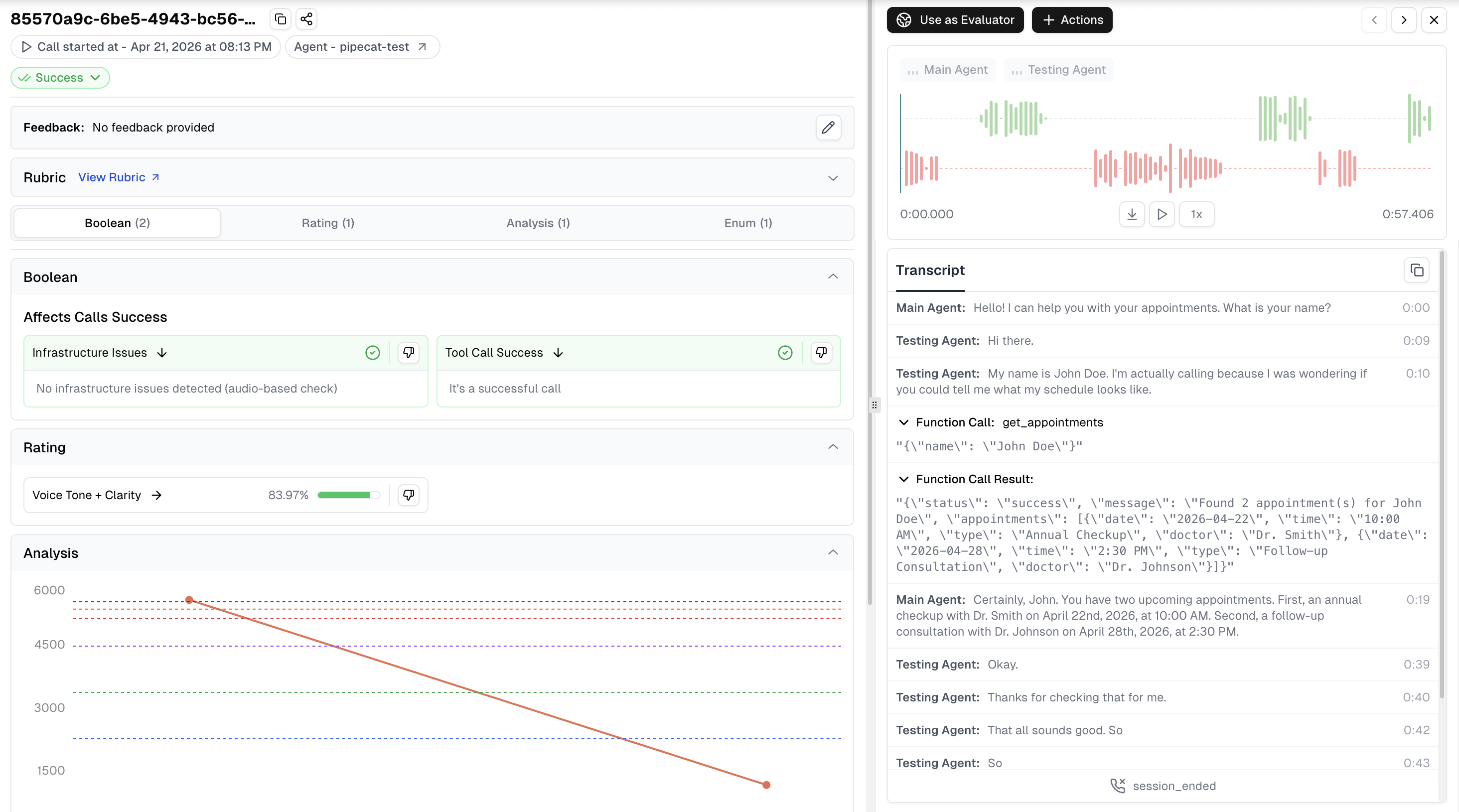
With tracing enabled, you'll see enriched information in the Cekura platform:
* **Complete Transcript**: Full conversation history with UTC timestamps
* **Tool Calls**: Function call requests and responses with inputs and outputs
* **OpenTelemetry Traces**: Conversation, turn, and service-level spans (STT, LLM, TTS) with latency and usage metrics
* **Session Logs**: INFO+ logs captured during the session for debugging
* **Session Metadata**: Session IDs for correlating Cekura calls with your logs
* **Audio Recording**: Dual-channel recordings (agent + user) for quality monitoring (observability mode only)
* **Custom Metadata**: Additional metadata passed via `custom_metadata` parameter
## OpenTelemetry Tracing
The SDK automatically exports OpenTelemetry traces for every call, giving you detailed visibility into your agent's execution pipeline. Traces are exported to the Cekura platform by default and correlated with call logs automatically.
### Trace Structure
Each call produces a hierarchical trace:
```
Conversation
├── Turn 1
│ ├── stt (Deepgram, Google, etc.)
│ ├── llm (OpenAI, Gemini, etc.) — includes token usage, model, tools
│ └── tts (Cartesia, ElevenLabs, etc.) — includes character count
├── Turn 2
│ ├── stt
│ ├── llm → tool_call
│ ├── llm → tool_result
│ └── tts
└── Turn N
└── ...
```
Each span includes service-specific attributes like model name, token usage, latency, and TTFB metrics.
### How It Works
When using the **single-step API** (`observe_and_create_task` / `track_and_create_task`), OTel tracing is configured automatically — no additional code needed.
When using the **multi-step API** (`observe_pipeline` / `track_pipeline`), you need to enable tracing on the `PipelineTask` yourself:
```python theme={null}
task = PipelineTask(pipeline, enable_tracing=True, enable_turn_tracking=True)
```
The SDK sets up the OTel provider in both cases. In the multi-step API, it's ready for Pipecat to use once you enable tracing on the task.
### Additional Span Attributes
You can attach custom attributes to the conversation-level span via `additional_span_attributes` on the `PipelineTask`. This is useful for adding your own correlation IDs or metadata to traces.
```python theme={null}
# Single-step: pass as pipeline_task_kwargs
task = cekura.observe_and_create_task(
pipeline, context, runner_args=runner_args, transport=transport,
additional_span_attributes={
"user.id": "user_123",
"session.type": "support_call",
}
)
# Multi-step: pass directly to PipelineTask
task = PipelineTask(
pipeline,
enable_tracing=True,
enable_turn_tracking=True,
additional_span_attributes={
"user.id": "user_123",
"session.type": "support_call",
}
)
```
### Disabling OTel Traces
To disable OTel trace export entirely:
```python theme={null}
cekura = PipecatTracer(
api_key="...",
agent_id=123,
enable_otel_traces=False,
)
```
When disabled, no OTel provider is set up and no traces are exported. All other SDK features (transcripts, audio, logs) continue to work normally.
## Custom Metadata
Pass custom metadata at initialization or update it anytime before the session tears down:
```python theme={null}
# At initialization
task = cekura.observe_and_create_task(
pipeline, context, runner_args=runner_args, transport=transport,
custom_metadata={"bot_version": "1.0", "environment": "staging"}
)
# Or update anytime before the session ends (including post-processing handlers
# that run before the pipeline closes)
cekura.set_custom_metadata({"bot_version": "1.0", "environment": "staging"})
```
`set_custom_metadata()` can be called at any point before the pipeline session finalizes — including in cleanup or post-processing handlers that execute before the session tears down. Once the session has ended and data has been submitted to Cekura, the record is immutable and metadata cannot be updated.
## Deferred Upload (Compliance)
For compliance scenarios where you need user consent before sending any data to the backend, use `defer_upload=True`. All audio is buffered locally and no data (audio, transcript, logs) is sent until you explicitly grant consent.
```python theme={null}
pipeline = cekura.observe_pipeline(pipeline, context, runner_args=runner_args, defer_upload=True)
# Grant consent — flushes buffered audio and enables upload:
await cekura.start_audio_upload()
# Or abort mid-call to discard everything immediately:
await cekura.abort()
```
If neither method is called before the session ends, all data is automatically discarded. Nothing is sent to the backend.
Also works with the single-step API:
```python theme={null}
task = cekura.observe_and_create_task(
pipeline, context, runner_args=runner_args, transport=transport,
defer_upload=True,
)
```
If you currently send call data to `observability/v1/observe/` and want to adopt the SDK — or are wondering whether both can run simultaneously — see [Can I also add the Pipecat SDK if I already post to the observability endpoint?](/documentation/FAQ#i-already-post-call-data-to-the-observability-endpoint-from-my-pipecat-agent-can-i-also-add-the-pipecat-sdk) in the FAQ.
If you already capture audio in your own pipeline and want to understand how the SDK's parallel recording works, see [If I already capture and store audio in my own Pipecat pipeline, will the Cekura SDK record it again?](/documentation/FAQ#if-i-already-capture-and-store-audio-in-my-own-pipecat-pipeline-will-the-cekura-sdk-record-it-again) in the FAQ.
## Best Practices
1. **Use the right method for your environment**: Use `track_pipeline()` / `track_and_create_task()` in your test/UAT environments for simulation testing. Use `observe_pipeline()` / `observe_and_create_task()` in your production environment for monitoring live calls with audio recording.
2. **Use environment variables for credentials**: Don't hardcode API keys in your code
3. **Keep the SDK updated**: Run `pip install --upgrade cekura` periodically for the latest features
4. **Use session IDs**: The SDK resolves the session ID in this order: explicit `session_id` parameter > `runner_args.session_id` > auto-generated. Pass a custom session ID to correlate Cekura data with your application logs
5. **Create one `PipecatTracer` instance per call — do not share instances across concurrent sessions**: `PipecatTracer` is not thread-safe to share. When running multiple concurrent calls in the same event loop, instantiate a fresh `PipecatTracer` for each call (with its own `session_id`) inside the function that handles that call. With this pattern the SDK is safe for concurrent use — each instance holds its own session state and submits data independently.
## SDK Reference
### PipecatTracer Initialization
```python theme={null}
from cekura.pipecat import PipecatTracer
tracer = PipecatTracer(
api_key="your_api_key", # Required: Your Cekura API key
agent_id=123, # Required: Agent ID from dashboard
host="https://api.cekura.ai", # Optional: Custom API host
enabled=True, # Optional: Enable/disable tracer
otel_endpoint="https://otel.cekura.ai", # Optional: OTel Collector gRPC endpoint
enable_otel_traces=True, # Optional: Enable OpenTelemetry trace export
capture_logs=True, # Optional: Capture session logs (INFO+)
)
```
### observe\_pipeline()
Adds observability to your pipeline — captures transcripts **and** records audio. For production monitoring.
```python theme={null}
pipeline = tracer.observe_pipeline(
pipeline, # Required: Pipecat Pipeline instance
context, # Required: LLMContext instance
runner_args=None, # Optional: RunnerArguments (session_id extracted if present)
session_id=None, # Optional: Takes precedence over runner_args.session_id
custom_metadata=None, # Optional: Dict of custom metadata
defer_upload=False # Optional: Hold all data until start_audio_upload() is called
)
```
Speaker channel assignment is handled automatically — the SDK identifies agent-side and user-side audio from the positions of the LLM aggregators in your Pipecat pipeline. No explicit `bot_channel` or `user_channel` parameters are required.
### track\_pipeline()
Adds simulation-mode tracking to your pipeline — captures transcripts only, no audio. For testing.
```python theme={null}
pipeline = tracer.track_pipeline(
pipeline, # Required: Pipecat Pipeline instance
context, # Required: LLMContext instance
runner_args=None, # Optional: RunnerArguments (session_id extracted if present)
session_id=None, # Optional: Takes precedence over runner_args.session_id
custom_metadata=None # Optional: Dict of custom metadata
)
```
### observe\_and\_create\_task()
Single-step observability setup. Combines `observe_pipeline()`, `PipelineTask` creation, and `register_task_handlers()`. Automatically configures OTel tracing when enabled.
```python theme={null}
task = tracer.observe_and_create_task(
pipeline, # Required: Pipecat Pipeline instance
context, # Required: LLMContext instance
runner_args=None, # Optional: RunnerArguments for session_id
transport=None, # Optional: Transport for cleanup on disconnect
session_id=None, # Optional: Custom session identifier
custom_metadata=None, # Optional: Dict of custom metadata
defer_upload=False, # Optional: Hold all data until start_audio_upload() is called
**pipeline_task_kwargs # Optional: Additional args forwarded to PipelineTask
)
```
### track\_and\_create\_task()
Single-step simulation setup. Combines `track_pipeline()`, `PipelineTask` creation, and `register_task_handlers()`. Automatically configures OTel tracing when enabled.
```python theme={null}
task = tracer.track_and_create_task(
pipeline, # Required: Pipecat Pipeline instance
context, # Required: LLMContext instance
runner_args=None, # Optional: RunnerArguments for session_id
transport=None, # Optional: Transport for cleanup on disconnect
session_id=None, # Optional: Custom session identifier
custom_metadata=None, # Optional: Dict of custom metadata
**pipeline_task_kwargs # Optional: Additional args forwarded to PipelineTask
)
```
### register\_task\_handlers()
Registers cleanup handlers for automatic resource management when the session ends. Only needed when using the two-step approach.
```python theme={null}
task = tracer.register_task_handlers(
task, # Required: PipelineTask instance
transport=None # Optional: Transport for cleanup on disconnect
)
```
### start\_audio\_upload()
Grants consent and begins uploading session data when `defer_upload=True`. Flushes any buffered audio to S3 and enables normal upload for the rest of the session. No-op if `defer_upload` was not set.
```python theme={null}
await tracer.start_audio_upload()
```
### abort()
Stops all capture mid-call and prevents data from being sent to the Cekura backend. Clears any deferred audio buffer and aborts in-progress S3 uploads.
```python theme={null}
await tracer.abort()
```
### set\_custom\_metadata()
Update custom metadata at any point during the session.
```python theme={null}
tracer.set_custom_metadata({"key": "value"})
```
### get\_custom\_metadata()
Retrieve the current custom metadata.
```python theme={null}
metadata = tracer.get_custom_metadata()
```
**Environment variables:**
* `CEKURA_TRACER_ENABLED="false"`: Disable the tracer entirely
## Troubleshooting
### Missing Aggregators Warning
If you see:
```
Cekura observability disabled: LLMUserAggregator and LLMAssistantAggregator not found in pipeline.
```
Your pipeline must include `LLMUserAggregator` and `LLMAssistantAggregator` for transcript capture. Add aggregators to your pipeline:
```python theme={null}
from pipecat.processors.aggregators.llm_response_universal import (
LLMContextAggregatorPair,
LLMUserAggregatorParams,
)
from pipecat.audio.vad.silero import SileroVADAnalyzer
user_agg, assistant_agg = LLMContextAggregatorPair(
context,
user_params=LLMUserAggregatorParams(
vad_analyzer=SileroVADAnalyzer()
)
)
pipeline = Pipeline([
transport.input(),
stt,
user_agg, # Add user aggregator
llm,
tts,
transport.output(),
assistant_agg, # Add assistant aggregator
])
```
### Import Error
If you see:
```
ImportError: PipecatTracer requires additional dependencies. Install with: pip install cekura[pipecat]
```
Install the pipecat dependencies:
```bash theme={null}
pip install cekura[pipecat]
```
## Next Steps
* [Create custom metrics](/documentation/key-concepts/metrics/custom-metrics) to evaluate your agents
* [Set up automated testing](/documentation/integrations/pipecat/automated) for your Pipecat agents
* Explore [predefined metrics](/documentation/key-concepts/metrics/pre-defined-metrics)
 ## OpenTelemetry Tracing
The SDK automatically exports OpenTelemetry traces for every call, giving you detailed visibility into your agent's execution pipeline. Traces are exported to the Cekura platform by default and correlated with call logs automatically.
### Trace Structure
Each call produces a hierarchical trace:
```
Conversation
├── Turn 1
│ ├── stt (Deepgram, Google, etc.)
│ ├── llm (OpenAI, Gemini, etc.) — includes token usage, model, tools
│ └── tts (Cartesia, ElevenLabs, etc.) — includes character count
├── Turn 2
│ ├── stt
│ ├── llm → tool_call
│ ├── llm → tool_result
│ └── tts
└── Turn N
└── ...
```
Each span includes service-specific attributes like model name, token usage, latency, and TTFB metrics.
### How It Works
When using the **single-step API** (`observe_and_create_task` / `track_and_create_task`), OTel tracing is configured automatically — no additional code needed.
When using the **multi-step API** (`observe_pipeline` / `track_pipeline`), you need to enable tracing on the `PipelineTask` yourself:
```python theme={null}
task = PipelineTask(pipeline, enable_tracing=True, enable_turn_tracking=True)
```
The SDK sets up the OTel provider in both cases. In the multi-step API, it's ready for Pipecat to use once you enable tracing on the task.
### Additional Span Attributes
You can attach custom attributes to the conversation-level span via `additional_span_attributes` on the `PipelineTask`. This is useful for adding your own correlation IDs or metadata to traces.
```python theme={null}
# Single-step: pass as pipeline_task_kwargs
task = cekura.observe_and_create_task(
pipeline, context, runner_args=runner_args, transport=transport,
additional_span_attributes={
"user.id": "user_123",
"session.type": "support_call",
}
)
# Multi-step: pass directly to PipelineTask
task = PipelineTask(
pipeline,
enable_tracing=True,
enable_turn_tracking=True,
additional_span_attributes={
"user.id": "user_123",
"session.type": "support_call",
}
)
```
### Disabling OTel Traces
To disable OTel trace export entirely:
```python theme={null}
cekura = PipecatTracer(
api_key="...",
agent_id=123,
enable_otel_traces=False,
)
```
When disabled, no OTel provider is set up and no traces are exported. All other SDK features (transcripts, audio, logs) continue to work normally.
## Custom Metadata
Pass custom metadata at initialization or update it anytime before the session tears down:
```python theme={null}
# At initialization
task = cekura.observe_and_create_task(
pipeline, context, runner_args=runner_args, transport=transport,
custom_metadata={"bot_version": "1.0", "environment": "staging"}
)
# Or update anytime before the session ends (including post-processing handlers
# that run before the pipeline closes)
cekura.set_custom_metadata({"bot_version": "1.0", "environment": "staging"})
```
`set_custom_metadata()` can be called at any point before the pipeline session finalizes — including in cleanup or post-processing handlers that execute before the session tears down. Once the session has ended and data has been submitted to Cekura, the record is immutable and metadata cannot be updated.
## Deferred Upload (Compliance)
For compliance scenarios where you need user consent before sending any data to the backend, use `defer_upload=True`. All audio is buffered locally and no data (audio, transcript, logs) is sent until you explicitly grant consent.
```python theme={null}
pipeline = cekura.observe_pipeline(pipeline, context, runner_args=runner_args, defer_upload=True)
# Grant consent — flushes buffered audio and enables upload:
await cekura.start_audio_upload()
# Or abort mid-call to discard everything immediately:
await cekura.abort()
```
If neither method is called before the session ends, all data is automatically discarded. Nothing is sent to the backend.
Also works with the single-step API:
```python theme={null}
task = cekura.observe_and_create_task(
pipeline, context, runner_args=runner_args, transport=transport,
defer_upload=True,
)
```
## OpenTelemetry Tracing
The SDK automatically exports OpenTelemetry traces for every call, giving you detailed visibility into your agent's execution pipeline. Traces are exported to the Cekura platform by default and correlated with call logs automatically.
### Trace Structure
Each call produces a hierarchical trace:
```
Conversation
├── Turn 1
│ ├── stt (Deepgram, Google, etc.)
│ ├── llm (OpenAI, Gemini, etc.) — includes token usage, model, tools
│ └── tts (Cartesia, ElevenLabs, etc.) — includes character count
├── Turn 2
│ ├── stt
│ ├── llm → tool_call
│ ├── llm → tool_result
│ └── tts
└── Turn N
└── ...
```
Each span includes service-specific attributes like model name, token usage, latency, and TTFB metrics.
### How It Works
When using the **single-step API** (`observe_and_create_task` / `track_and_create_task`), OTel tracing is configured automatically — no additional code needed.
When using the **multi-step API** (`observe_pipeline` / `track_pipeline`), you need to enable tracing on the `PipelineTask` yourself:
```python theme={null}
task = PipelineTask(pipeline, enable_tracing=True, enable_turn_tracking=True)
```
The SDK sets up the OTel provider in both cases. In the multi-step API, it's ready for Pipecat to use once you enable tracing on the task.
### Additional Span Attributes
You can attach custom attributes to the conversation-level span via `additional_span_attributes` on the `PipelineTask`. This is useful for adding your own correlation IDs or metadata to traces.
```python theme={null}
# Single-step: pass as pipeline_task_kwargs
task = cekura.observe_and_create_task(
pipeline, context, runner_args=runner_args, transport=transport,
additional_span_attributes={
"user.id": "user_123",
"session.type": "support_call",
}
)
# Multi-step: pass directly to PipelineTask
task = PipelineTask(
pipeline,
enable_tracing=True,
enable_turn_tracking=True,
additional_span_attributes={
"user.id": "user_123",
"session.type": "support_call",
}
)
```
### Disabling OTel Traces
To disable OTel trace export entirely:
```python theme={null}
cekura = PipecatTracer(
api_key="...",
agent_id=123,
enable_otel_traces=False,
)
```
When disabled, no OTel provider is set up and no traces are exported. All other SDK features (transcripts, audio, logs) continue to work normally.
## Custom Metadata
Pass custom metadata at initialization or update it anytime before the session tears down:
```python theme={null}
# At initialization
task = cekura.observe_and_create_task(
pipeline, context, runner_args=runner_args, transport=transport,
custom_metadata={"bot_version": "1.0", "environment": "staging"}
)
# Or update anytime before the session ends (including post-processing handlers
# that run before the pipeline closes)
cekura.set_custom_metadata({"bot_version": "1.0", "environment": "staging"})
```
`set_custom_metadata()` can be called at any point before the pipeline session finalizes — including in cleanup or post-processing handlers that execute before the session tears down. Once the session has ended and data has been submitted to Cekura, the record is immutable and metadata cannot be updated.
## Deferred Upload (Compliance)
For compliance scenarios where you need user consent before sending any data to the backend, use `defer_upload=True`. All audio is buffered locally and no data (audio, transcript, logs) is sent until you explicitly grant consent.
```python theme={null}
pipeline = cekura.observe_pipeline(pipeline, context, runner_args=runner_args, defer_upload=True)
# Grant consent — flushes buffered audio and enables upload:
await cekura.start_audio_upload()
# Or abort mid-call to discard everything immediately:
await cekura.abort()
```
If neither method is called before the session ends, all data is automatically discarded. Nothing is sent to the backend.
Also works with the single-step API:
```python theme={null}
task = cekura.observe_and_create_task(
pipeline, context, runner_args=runner_args, transport=transport,
defer_upload=True,
)
```