> ## Documentation Index
> Fetch the complete documentation index at: https://docs.cekura.ai/llms.txt
> Use this file to discover all available pages before exploring further.
# LiveKit Tracing
> Enhanced observability for LiveKit agents using the Cekura SDK
export const CopyLlmPromptButton = ({prompt}) => {
if (typeof window === 'undefined') return null;
var copied = false;
function handleClick() {
if (copied) return;
navigator.clipboard.writeText(prompt).then(function () {
var btn = document.getElementById('ck-llm-btn');
if (btn) {
btn.textContent = 'Copied!';
copied = true;
setTimeout(function () {
btn.textContent = 'Copy LLM Prompt';
copied = false;
}, 2000);
}
});
}
setTimeout(function () {
var btn = document.getElementById('ck-llm-btn');
if (btn) btn.onclick = handleClick;
}, 50);
return ;
};
export const CopyPageButton = () => {
if (typeof window !== 'undefined') {
setTimeout(function () {
if (document.getElementById('ck-tools')) return;
var anchor = document.getElementById('content-area') || document.querySelector('.mdx-content');
if (!anchor) return;
if (!document.getElementById('ck-style')) {
var s = document.createElement('style');
s.id = 'ck-style';
s.textContent = '#ck-tools{position:absolute;top:6px;right:0;z-index:100;font-family:inherit;}' + '.ck-row{display:inline-flex;align-items:stretch;border:1px solid rgba(0,0,0,0.15);border-radius:8px;overflow:hidden;background:#fff;}' + ':root.dark .ck-row{background:rgba(255,255,255,0.06);border-color:rgba(255,255,255,0.12);}' + '.ck-btn{padding:5px 12px;border:none;background:none;cursor:pointer;font-size:13px;font-weight:500;font-family:inherit;color:#374151;}' + ':root.dark .ck-btn{color:#d1d5db;}' + '.ck-btn:hover{background:rgba(0,0,0,0.04);}' + ':root.dark .ck-btn:hover{background:rgba(255,255,255,0.06);}' + '.ck-chevron{padding:5px 8px;border:none;background:none;cursor:pointer;font-size:14px;font-family:inherit;color:#374151;}' + ':root.dark .ck-chevron{color:#d1d5db;}' + '.ck-chevron:hover{background:rgba(0,0,0,0.04);}' + ':root.dark .ck-chevron:hover{background:rgba(255,255,255,0.06);}' + '.ck-divider{width:1px;background:rgba(0,0,0,0.12);flex-shrink:0;}' + ':root.dark .ck-divider{background:rgba(255,255,255,0.12);}' + '.ck-dd{position:absolute;top:calc(100% + 4px);right:0;min-width:180px;background:#fff;border:1px solid rgba(0,0,0,0.12);border-radius:8px;box-shadow:0 4px 12px rgba(0,0,0,0.1);padding:4px;display:none;z-index:200;}' + ':root.dark .ck-dd{background:#1f2937;border-color:rgba(255,255,255,0.1);box-shadow:0 4px 16px rgba(0,0,0,0.35);}' + '.ck-item{display:block;width:100%;padding:7px 12px;border:none;background:none;border-radius:6px;cursor:pointer;font-size:13px;font-family:inherit;text-align:left;color:#374151;}' + ':root.dark .ck-item{color:#d1d5db;}' + '.ck-item:hover{background:rgba(0,0,0,0.05);}' + ':root.dark .ck-item:hover{background:rgba(255,255,255,0.07);}';
document.head.appendChild(s);
}
var wrap = document.createElement('div');
wrap.id = 'ck-tools';
var row = document.createElement('div');
row.className = 'ck-row';
var mainBtn = document.createElement('button');
mainBtn.className = 'ck-btn';
mainBtn.textContent = 'Copy page';
var divider = document.createElement('span');
divider.className = 'ck-divider';
var chevron = document.createElement('button');
chevron.className = 'ck-chevron';
chevron.textContent = '▾';
var dd = document.createElement('div');
dd.className = 'ck-dd';
function closeDD() {
dd.style.display = 'none';
}
function openDD() {
dd.style.display = 'block';
}
chevron.onclick = function (e) {
e.stopPropagation();
if (dd.style.display === 'block') {
closeDD();
} else {
openDD();
}
};
document.addEventListener('click', function (e) {
if (!e.target.closest('#ck-tools')) {
closeDD();
}
});
document.addEventListener('keydown', function (e) {
if (e.key === 'Escape') {
closeDD();
}
});
function makeItem(label, fn) {
var b = document.createElement('button');
b.className = 'ck-item';
b.textContent = label;
b.onclick = function () {
fn();
closeDD();
};
return b;
}
function getMarkdown() {
var walk = function (node) {
if (!node) return '';
if (node.nodeType === 3) return node.textContent || '';
if (node.nodeType !== 1) return '';
var tag = node.tagName.toLowerCase();
var skip = ['script', 'style', 'svg', 'noscript', 'button', 'iframe'];
if (skip.indexOf(tag) !== -1) return '';
if (node.id === 'ck-tools') return '';
var ch = Array.from(node.childNodes).map(walk).join('');
if (tag === 'h1') return '\n# ' + ch.trim() + '\n\n';
if (tag === 'h2') return '\n## ' + ch.trim() + '\n\n';
if (tag === 'h3') return '\n### ' + ch.trim() + '\n\n';
if (tag === 'p') return '\n' + ch.trim() + '\n\n';
if (tag === 'pre') return '\n```\n' + node.textContent.trim() + '\n```\n\n';
if (tag === 'li') return '- ' + ch.trim() + '\n';
if (tag === 'code') return '`' + ch.trim() + '`';
return ch;
};
var content = document.querySelector('.mdx-content') || document.getElementById('content-area') || document.body;
return walk(content).replace(/\n\n\n+/g, '\n\n').trim();
}
function copyMd() {
var md = getMarkdown();
navigator.clipboard.writeText(md).then(function () {
mainBtn.textContent = 'Copied!';
setTimeout(function () {
mainBtn.textContent = 'Copy page';
}, 2000);
});
}
function viewMd() {
var md = getMarkdown();
var safe = md.split('&').join('&').split('<').join('<').split('>').join('>');
var html = '' + safe + '';
window.open(URL.createObjectURL(new Blob([html], {
type: 'text/html'
})), '_blank');
}
function openClaude() {
var prompt = 'Can you read this Cekura docs page ' + window.location.href + ' so I can ask you questions?';
window.open('https://claude.ai/new?q=' + encodeURIComponent(prompt), '_blank');
}
mainBtn.onclick = copyMd;
dd.appendChild(makeItem('Copy page', copyMd));
dd.appendChild(makeItem('View as Markdown', viewMd));
dd.appendChild(makeItem('Open in Claude', openClaude));
row.appendChild(mainBtn);
row.appendChild(divider);
row.appendChild(chevron);
wrap.appendChild(row);
wrap.appendChild(dd);
anchor.style.position = 'relative';
anchor.insertBefore(wrap, anchor.firstChild);
}, 50);
}
return null;
};
export const livekitPrompt = ["You are integrating Cekura observability and testing into an existing LiveKit voice agent codebase.", "", "OBJECTIVE", "Add the Cekura LiveKitTracer SDK so that:", "- Production calls are monitored with transcripts, tool calls, dual-channel audio recording, session logs, and performance metrics (observability mode).", "- UAT/dev/staging calls support simulation testing from the Cekura platform with transcripts, tool calls, mock tools, session logs, and metrics but no audio recording (testing mode).", "", "The user's codebase likely has separate entrypoints or environment-based configuration for prod vs UAT. Ask the user how they distinguish between these environments before writing code.", "", "BEFORE YOU START", '1. Ask the user: "Do you have separate entrypoints or an environment variable that distinguishes your production agent from your UAT/dev/staging agent? (e.g., ENV=production vs ENV=staging, or separate files)"', '2. Ask the user: "What is your Cekura agent ID? You can find it in the Cekura dashboard under your agent settings. If you don\'t know it, I can look it up for you."', '3. Ask the user: "Is your LiveKit agent written in Python or JavaScript/TypeScript?"', "4. Find the agent entrypoint function (look for @server.rtc_session or defineAgent with a JobContext parameter).", "5. Find the AgentSession creation and session.start() call.", "6. Find existing error handling and service patterns in the codebase. Follow them.", "", "IMPLEMENTATION REQUIREMENTS", "", "For the production / observability entrypoint:", "- Use cekura.observe_session(ctx, session) — captures transcripts, tool calls, metrics, session logs, AND records dual-channel audio.", "", "For the UAT / testing entrypoint:", "- Use cekura.track_session(ctx, session, agent) — captures transcripts, tool calls, metrics, session logs, and automatically injects mock tools configured in Cekura. No audio recording.", "- Note: track_session takes an additional agent parameter (the Agent instance) so it can inject mock tools.", "", "Common setup for both (Python):", "1. Install the SDK: pip install cekura[livekit]==1.2.0", "2. Import LiveKitTracer: from cekura.livekit import LiveKitTracer", "3. Initialize the tracer (outside the entrypoint function):", " cekura = LiveKitTracer(", ' api_key=os.getenv("CEKURA_API_KEY"),', " agent_id=,", " )", "4. Call the appropriate method BEFORE session.start().", "5. Store the API key in an environment variable CEKURA_API_KEY — never hardcode it.", "", "Common setup for both (JavaScript/TypeScript):", "1. Install the SDK: npm install @cekura/livekit@1.0.0-rc.1", "2. Import LiveKitTracer: import { LiveKitTracer } from '@cekura/livekit';", "3. Initialize the tracer (outside the entry function):", " const cekura = new LiveKitTracer({", " apiKey: process.env.CEKURA_API_KEY || '',", " agentId: ,", " });", "4. Call the appropriate method BEFORE session.start().", "5. Store the API key in an environment variable CEKURA_API_KEY — never hardcode it.", "", "INTEGRATION POINTS", "- The tracer hooks into the AgentSession — call track_session/observe_session BEFORE session.start().", "- The ctx (JobContext) parameter gives the SDK access to the LiveKit room and job metadata.", "- For testing mode, passing the agent instance enables automatic mock tool injection.", "- The SDK automatically handles chat/text mode when Cekura runs text-based simulations — no code changes needed.", "", "SUCCESS CRITERIA", "- Production calls appear in the Cekura dashboard Calls section with transcripts, audio, tool calls, metrics, and session logs.", "- UAT/simulation calls from the Cekura platform appear in the Runs section with transcripts, tool calls, metrics, and session logs.", "- No audio recording in UAT mode.", "- Mock tools configured in Cekura are automatically injected during testing.", "- The agent runs identically to before — the tracer is non-intrusive.", "- CEKURA_API_KEY is read from environment, not hardcoded.", "- Existing agent structure, error handling, and patterns in the codebase are preserved.", "", "CONSTRAINTS", "- DO NOT restructure the existing agent or change its logic.", "- DO NOT create new files unless the codebase clearly separates concerns into modules.", "- DO NOT add Cekura-specific error handling that diverges from existing patterns.", "- DO NOT remove or modify any existing STT, LLM, TTS, or VAD configuration.", "- The only new dependency is cekura[livekit] (Python) or @cekura/livekit (JS).", "- The tracer call MUST be placed before session.start().", "", "REFERENCE IMPLEMENTATION", "", "Python — Production (observability):", "```python", "from cekura.livekit import LiveKitTracer", "", "cekura = LiveKitTracer(", ' api_key=os.getenv("CEKURA_API_KEY"),', " agent_id=,", ")", "", "@server.rtc_session(agent_name='my_agent')", "async def entrypoint(ctx: agents.JobContext):", " assistant = YourAssistant()", " session = agents.AgentSession(...)", " await cekura.observe_session(ctx, session)", " await session.start(room=ctx.room, agent=assistant)", "```", "", "Python — UAT/Testing (simulation):", "```python", "from cekura.livekit import LiveKitTracer", "", "cekura = LiveKitTracer(", ' api_key=os.getenv("CEKURA_API_KEY"),', " agent_id=,", ")", "", "@server.rtc_session(agent_name='my_agent')", "async def entrypoint(ctx: agents.JobContext):", " assistant = YourAssistant()", " session = agents.AgentSession(...)", " await cekura.track_session(ctx, session, assistant)", " await session.start(room=ctx.room, agent=assistant)", "```", "", "JavaScript — Production (observability):", "```typescript", "import { LiveKitTracer } from '@cekura/livekit';", "", "const cekura = new LiveKitTracer({", " apiKey: process.env.CEKURA_API_KEY || '',", " agentId: ,", "});", "", "export default defineAgent({", " entry: async (ctx: JobContext) => {", " const agent = new YourAssistant();", " const session = new voice.AgentSession({ /* stt, llm, tts, vad */ });", " await cekura.observeSession(ctx, session);", " await session.start({ room: ctx.room, agent });", " },", "});", "```", "", "JavaScript — UAT/Testing (simulation):", "```typescript", "import { LiveKitTracer } from '@cekura/livekit';", "", "const cekura = new LiveKitTracer({", " apiKey: process.env.CEKURA_API_KEY || '',", " agentId: ,", "});", "", "export default defineAgent({", " entry: async (ctx: JobContext) => {", " const agent = new YourAssistant();", " const session = new voice.AgentSession({ /* stt, llm, tts, vad */ });", " await cekura.trackSession(ctx, session, agent);", " await session.start({ room: ctx.room, agent });", " },", "});", "```", "", "NEXT STEPS", "Once the SDK is integrated, use the Cekura MCP tools to:", "- Create test scenarios and run simulations against your agent (use the cekura MCP skills for scenarios, runs, and metrics).", "- Monitor production calls and evaluate agent performance from the Cekura dashboard.", "If the Cekura MCP server is available in your environment, use its tools/skills to create scenarios, trigger test runs, review results, and set up metrics — all without leaving your coding agent.", "", "ADDITIONAL REFERENCE", "For full SDK reference, mock tools, chat mode, troubleshooting, and advanced options see: https://docs.cekura.ai/documentation/integrations/livekit/tracing"].join("\n");
**Using a coding agent?** Paste this prompt directly in your LiveKit agent codebase to jumpstart your Cekura integration.
## Overview
LiveKit Tracing provides deep observability into your LiveKit agent's performance by integrating the Cekura SDK directly into your agent code. This integration significantly enhances the information available in the Cekura platform for end-to-end visibility over agent execution.
**What you get:**
* Complete conversation transcripts with full message history
* Tool/function calls with inputs and outputs
* Detailed performance metrics (STT, TTS, LLM, End-of-Utterance)
* Session logs captured automatically from your application
* Mock tools support for testing with predictable tool responses
* Dual-channel audio recording for monitoring production calls
* LiveKit job and room metadata
## Video Tutorial
## Prerequisites
* A Cekura account with an API key
* A LiveKit agent project
## Setup
Use this setup in your test agents while running simulation calls from the Cekura platform.
```bash theme={null}
pip install cekura[livekit]==1.2.0
```
```bash theme={null}
npm install @cekura/livekit@1.0.0-rc.1
```
Add the Cekura tracer to your LiveKit agent's entrypoint:
```python theme={null}
import os
from livekit import agents
from cekura.livekit import LiveKitTracer
# Initialize Cekura tracer
cekura = LiveKitTracer(
api_key=os.getenv("CEKURA_API_KEY"),
agent_id=123 # Your agent ID from Cekura dashboard
)
@server.rtc_session(agent_name="my_agent")
async def entrypoint(ctx: agents.JobContext):
assistant = YourAssistant()
session = agents.AgentSession(...)
# Track session with automatic tool injection and export
await cekura.track_session(ctx, session, assistant)
await session.start(room=ctx.room, agent=assistant)
```
```typescript theme={null}
import { defineAgent, voice } from '@livekit/agents';
import type { JobContext } from '@livekit/agents';
import { LiveKitTracer } from '@cekura/livekit';
// Initialize Cekura tracer
const cekura = new LiveKitTracer({
apiKey: process.env.CEKURA_API_KEY || '',
agentId: 123, // Your agent ID from Cekura dashboard
});
export default defineAgent({
entry: async (ctx: JobContext) => {
const agent = new YourAssistant();
const session = new voice.AgentSession({ /* stt, llm, tts, vad */ });
// Track session with automatic tool injection and export
await cekura.trackSession(ctx, session, agent);
await session.start({ room: ctx.room, agent });
},
});
```
**What this does:**
* Captures transcripts, tool calls, metrics, and session logs
* Automatically injects mock tools configured in Cekura
* Automatically configures chat/text mode when running text-based tests
* Exports data to Cekura for test analysis
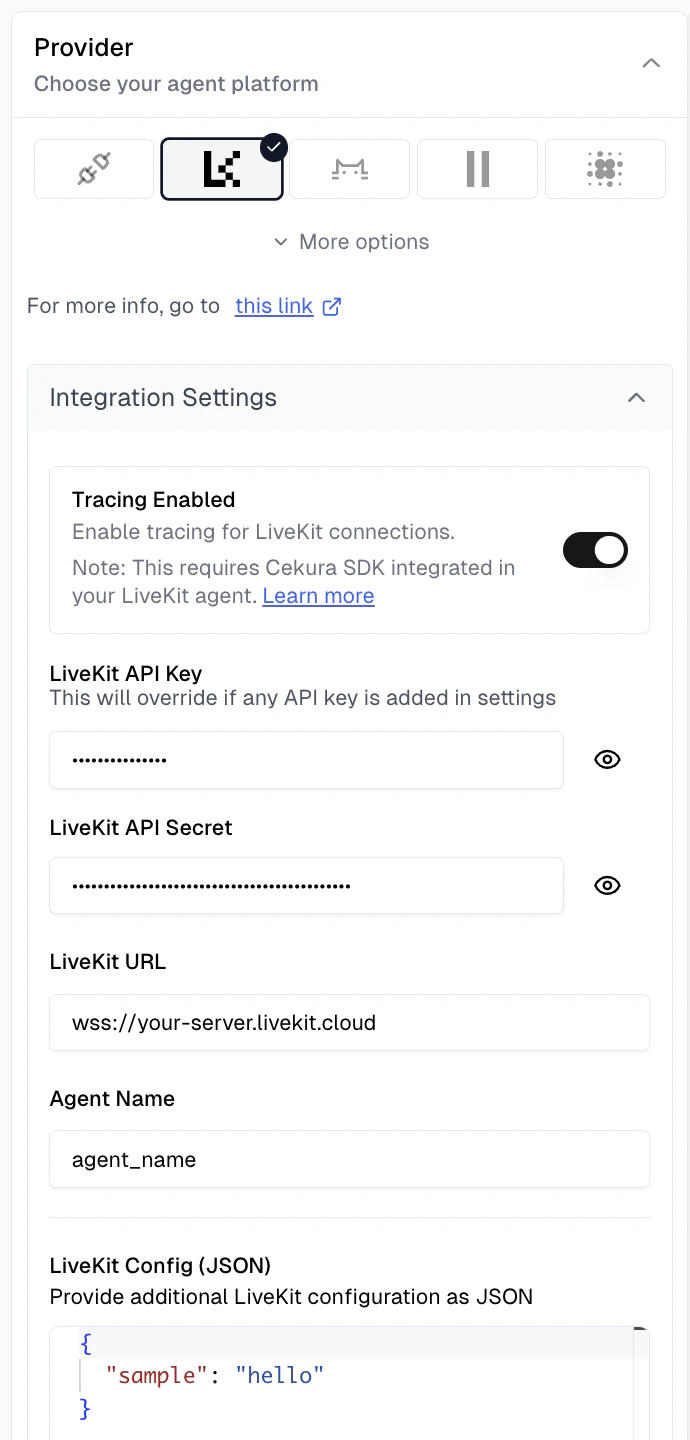
Navigate to your agent settings in the Cekura dashboard, select **LiveKit** as the provider, and enable tracing:
**Required configuration:**
* **LiveKit API Key**: Your LiveKit API key
* **LiveKit API Secret**: Your LiveKit API secret
* **LiveKit URL**: Your LiveKit server URL (e.g., `wss://your-server.livekit.cloud`)
* **Agent Name**: The specific agent name to dispatch in LiveKit
**Optional configuration:**
* **LiveKit Config (JSON)**: Additional room configuration parameters (accessible in agent code via [`get_simulation_data()`](#get_simulation_data))
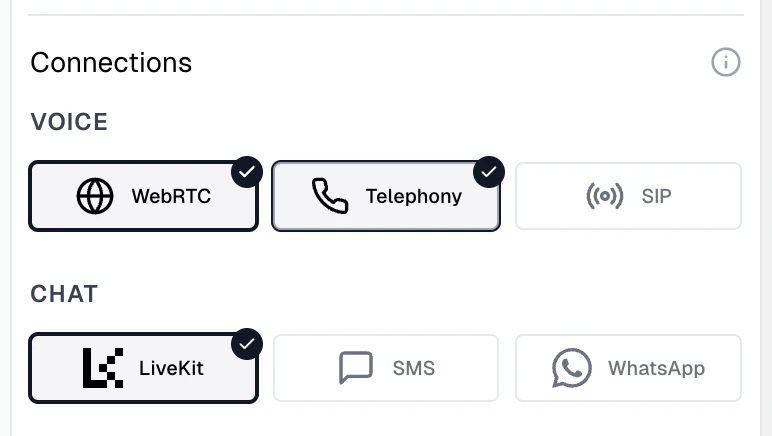
**Testing connection types:**
Configure at least one connection type for voice-based testing:
* **WebRTC**: Direct LiveKit room connection using the credentials configured above
* **Telephony**: Phone-based testing if your LiveKit agent is connected to a phone system (requires Contact Number)
For text-based testing:
* **Chat**: Select LiveKit to enable chat-based testing (uses the same WebRTC configuration, no additional setup required)
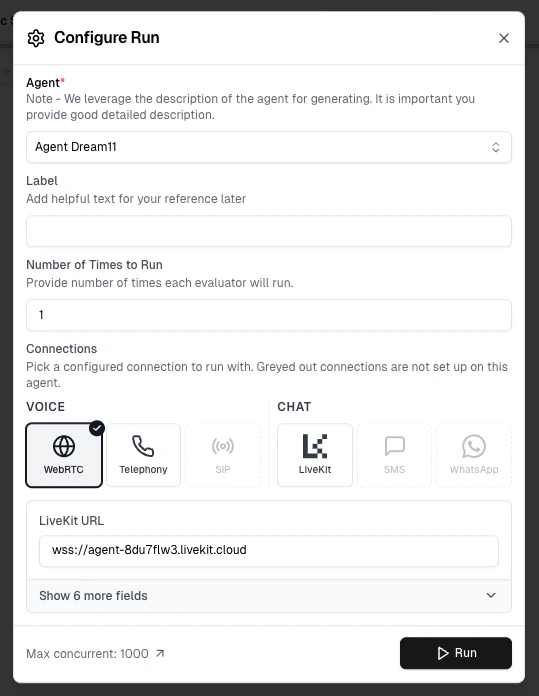
Run tests using your preferred connection type:
* **WebRTC**: Select WebRTC under Voice connections in the Configure Run dialog for WebRTC-based testing
* **Telephony**: Select Telephony under Voice connections for phone-based testing
* **Chat**: Select a chat connection for text-based testing
Navigate to the Runs section to view your test results with enhanced data including transcripts, tool calls, session logs, and detailed performance metrics.
Use this setup in your production agents for monitoring live calls with audio recording.
```bash theme={null}
pip install cekura[livekit]==1.2.0
```
```bash theme={null}
npm install @cekura/livekit@1.0.0-rc.1
```
Add the Cekura tracer to your LiveKit agent's entrypoint:
```python theme={null}
import os
from livekit import agents
from cekura.livekit import LiveKitTracer
# Initialize Cekura tracer
cekura = LiveKitTracer(
api_key=os.getenv("CEKURA_API_KEY"),
agent_id=123 # Your agent ID from Cekura dashboard
)
@server.rtc_session(agent_name="my_agent")
async def entrypoint(ctx: agents.JobContext):
assistant = YourAssistant()
session = agents.AgentSession(...)
# Observe session with audio recording and metrics
await cekura.observe_session(ctx, session)
await session.start(room=ctx.room, agent=assistant)
```
```typescript theme={null}
import { defineAgent, voice } from '@livekit/agents';
import type { JobContext } from '@livekit/agents';
import { LiveKitTracer } from '@cekura/livekit';
// Initialize Cekura tracer
const cekura = new LiveKitTracer({
apiKey: process.env.CEKURA_API_KEY || '',
agentId: 123, // Your agent ID from Cekura dashboard
});
export default defineAgent({
entry: async (ctx: JobContext) => {
const agent = new YourAssistant();
const session = new voice.AgentSession({ /* stt, llm, tts, vad */ });
// Observe session with audio recording and metrics
await cekura.observeSession(ctx, session);
await session.start({ room: ctx.room, agent });
},
});
```
**What this does:**
* Captures transcripts, tool calls, metrics, and session logs
* Records dual-channel audio (agent + user) for analysis
* Exports data to Cekura observability endpoint
Navigate to your agent settings in the Cekura dashboard, select **LiveKit** as the provider:
**Required configuration for audio recording:**
* **LiveKit API Key**: Your LiveKit API key
* **LiveKit API Secret**: Your LiveKit API secret
* **LiveKit URL**: Your LiveKit server URL (e.g., `wss://your-server.livekit.cloud`)
* **Agent Name**: The specific agent name to dispatch in LiveKit
All LiveKit credentials are required to enable audio egress recording for production calls.
Once configured, all production calls will automatically appear in the Calls section of your Cekura dashboard.
## Enhanced Data in Cekura UI
With tracing enabled, you'll see enriched information in the Cekura platform:
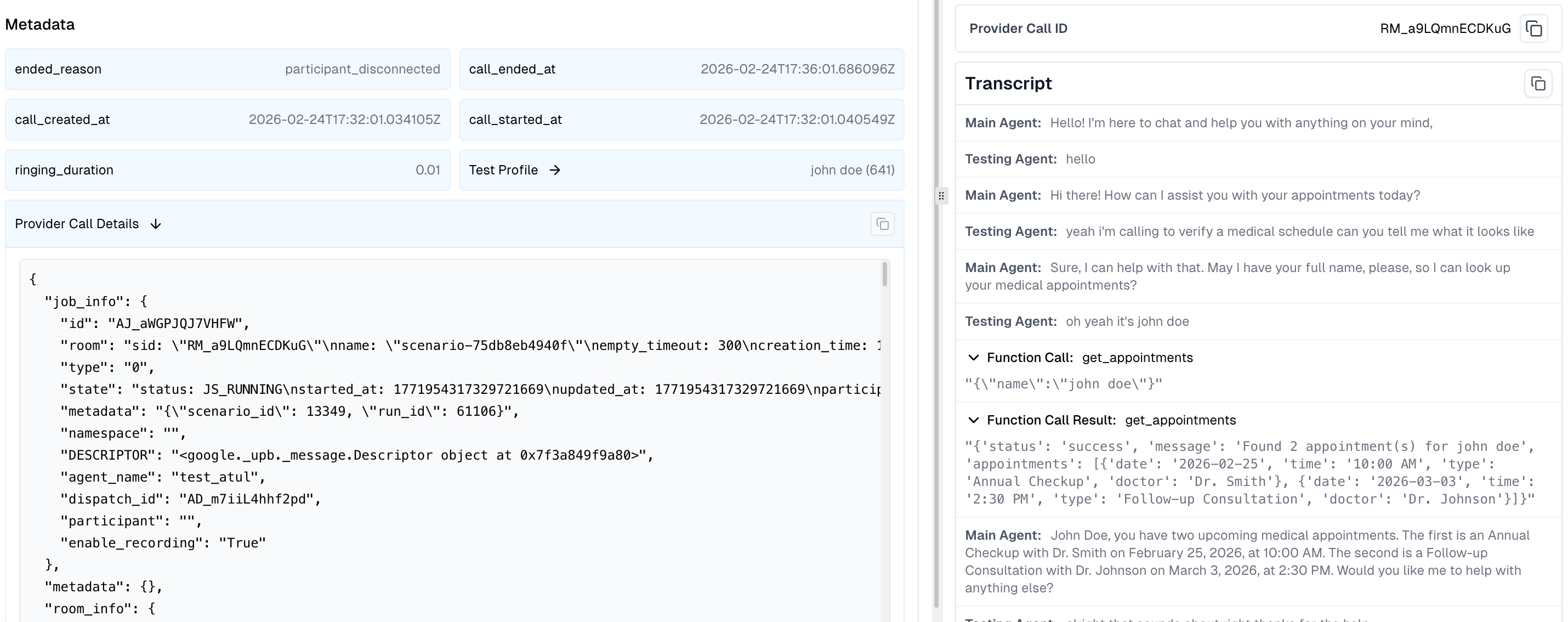
The run now displays:
* **Room Session ID**: Visible in the call provider ID field, allowing you to correlate Cekura test runs with specific LiveKit sessions
* **Complete Transcript**: Full conversation history from the LiveKit agent, including tool/function call requests and responses
* **Provider Call Data**: Detailed metadata accessible in the run details, including job information, room configuration, session logs, and raw performance metrics
**Provider Call Data** contains the following information:
* **Job Information**: Job ID, room name, participant details, and agent dispatch metadata
* **Room Information**: Room configuration, participant count, session duration, and connection details
* **Session Logs**: Captured agent session logs with timestamps, log levels, and messages for debugging
* **Raw Metrics**:
* **STT (Speech-to-Text)**: Latency, duration, and transcription timing
* **TTS (Text-to-Speech)**: Generation time and audio synthesis metrics
* **LLM**: Token usage, response time, and inference latency
* **EOU (End-of-Utterance)**: Detection timing and accuracy
* **Custom Metadata**: Additional metadata passed to the SDK via the `metadata` parameter
## Automatic Chat Mode Support
The SDK automatically handles chat/text mode configuration when you run scenarios using "Run with Text" — **no code changes required**.
When you run a text-based test, the SDK automatically patches your session to disable audio processing, enabling pure text-based interactions with your agent. This provides:
* **Targeted testing** of your agent's conversational logic without audio overhead
* **Cost savings** by eliminating STT/TTS provider costs and reducing Cekura credit usage
* **Faster simulations** compared to voice-based tests
Your `track_session()` / `trackSession()` integration works seamlessly for both voice and text modes.
## Using Mock Tools with LiveKit Tracing
The SDK supports mock tools, allowing you to test your agent with predictable tool responses. This is useful for creating reproducible test scenarios without relying on live external services.
**To use mock tools:**
1. **Create mock tools in Cekura**: Set up your mock tool configurations in the Cekura dashboard. See the [Mock Tools guide](/documentation/guides/testing-agents/mock-tools) for detailed instructions.
2. **SDK handles the rest**: Once mock tools are configured, the SDK automatically routes tool calls to Cekura's mock endpoints during testing - no additional code changes needed.
3. **Test with predictable data**: Your agent will receive the mock responses you configured, making it easy to test specific scenarios and edge cases.
## Best Practices
1. **Use the right method for your environment**: Use `track_session()` / `trackSession()` in your test/UAT environments for simulation testing with mock tools. Use `observe_session()` / `observeSession()` in your production environment for monitoring live calls with audio recording.
2. **Use environment variables for credentials**: Don't hardcode API keys in your code
3. **Keep the SDK updated**: Periodically upgrade to the latest version for new features.
```bash theme={null}
pip install --upgrade cekura[livekit]
```
```bash theme={null}
npm install @cekura/livekit@latest
```
4. **Review tool calls regularly**: Add the predefined metric **Tool Call Success** to your evaluators
## SDK Reference
### LiveKitTracer Initialization
```python theme={null}
from cekura.livekit import LiveKitTracer
cekura = LiveKitTracer(
api_key="your_api_key", # Required: Your Cekura API key
agent_id=123, # Required: Agent ID from dashboard
host="https://api.cekura.ai", # Optional: Custom API host
enabled=True # Optional: Enable/disable tracer
)
```
```typescript theme={null}
import { LiveKitTracer } from '@cekura/livekit';
const cekura = new LiveKitTracer({
apiKey: 'your_api_key', // Required: Your Cekura API key
agentId: 123, // Required: Agent ID from dashboard
host: 'https://api.cekura.ai', // Optional: Custom API host
enabled: true, // Optional: Enable/disable tracer
});
```
### track\_session()
Tracks simulation/test calls with automatic mock tool injection and chat mode support. Collects transcripts, tool calls, session logs, and metrics.
```python theme={null}
await cekura.track_session(
ctx, # Required: LiveKit JobContext
session, # Required: LiveKit AgentSession
agent, # Optional: Agent instance for mock tool injection
capture_logs=True, # Optional: Capture session logs (default: True)
**metadata # Optional: Custom metadata
)
```
```typescript theme={null}
await cekura.trackSession(
ctx, // Required: LiveKit JobContext
session, // Required: LiveKit AgentSession
agent, // Optional: Agent instance for mock tool injection
metadata, // Optional: Custom metadata object
captureLogs, // Optional: Capture session logs (default: true)
);
```
**Environment variables:**
* `CEKURA_TRACING_ENABLED="false"`: Disable tracking entirely
* `CEKURA_MOCK_TOOLS_ENABLED="false"`: Disable only mock tool injection
### observe\_session()
Monitors production calls with dual-channel audio recording. Collects transcripts, tool calls, session logs, and metrics. Requires LiveKit credentials configured in Cekura.
```python theme={null}
await cekura.observe_session(
ctx, # Required: LiveKit JobContext
session, # Required: LiveKit AgentSession
capture_logs=True, # Optional: Capture session logs (default: True)
**metadata # Optional: Custom metadata
)
```
```typescript theme={null}
await cekura.observeSession(
ctx, // Required: LiveKit JobContext
session, // Required: LiveKit AgentSession
metadata, // Optional: Custom metadata object
captureLogs, // Optional: Capture session logs (default: true)
);
```
**Environment variables:**
* `CEKURA_OBSERVABILITY_ENABLED="false"`: Disable observability entirely
### get\_simulation\_data()
Extracts simulation data populated by Cekura when running simulation calls from the platform. Returns an empty object for phone-based calls.
```python theme={null}
await ctx.connect() # Must be called first
simulation_data = cekura.get_simulation_data(
ctx # Required: LiveKit JobContext
)
```
```typescript theme={null}
await ctx.connect(); // Must be called first
const simulationData = cekura.getSimulationData(
ctx, // Required: LiveKit JobContext
);
```
**Returns:** Object with simulation metadata:
```python theme={null}
{
"scenario_id": 123, # Scenario being tested
"run_id": 456, # Current run ID
"test_profile_data": { # Test profile data
"customer_name": "John Doe",
"account_number": "ACC-12345"
},
"additional_config": { # LiveKit config from agent settings
"sample_key": "sample_value"
}
}
```
```typescript theme={null}
{
scenario_id: 123, // Scenario being tested
run_id: 456, // Current run ID
test_profile_data: { // Test profile data
customer_name: 'John Doe',
account_number: 'ACC-12345',
},
additional_config: { // LiveKit config from agent settings
sample_key: 'sample_value',
},
}
```
This data is ONLY available when using Option 2 (Automated LiveKit Testing) — running tests via WebRTC connection. Phone-based calls (Option 1) will return an empty object.
## Next Steps
* [Set up mock tools](/documentation/guides/testing-agents/mock-tools) for testing with predictable tool responses
* [Create custom metrics](/documentation/key-concepts/metrics/custom-metrics) to evaluate based on provider call data
* [Perform load testing](/documentation/guides/testing-agents/load-testing) with your LiveKit agent
* Explore [predefined metrics](/documentation/key-concepts/metrics/pre-defined-metrics)
 **Required configuration:**
* **LiveKit API Key**: Your LiveKit API key
* **LiveKit API Secret**: Your LiveKit API secret
* **LiveKit URL**: Your LiveKit server URL (e.g., `wss://your-server.livekit.cloud`)
* **Agent Name**: The specific agent name to dispatch in LiveKit
**Optional configuration:**
* **LiveKit Config (JSON)**: Additional room configuration parameters (accessible in agent code via [`get_simulation_data()`](#get_simulation_data))
**Testing connection types:**
**Required configuration:**
* **LiveKit API Key**: Your LiveKit API key
* **LiveKit API Secret**: Your LiveKit API secret
* **LiveKit URL**: Your LiveKit server URL (e.g., `wss://your-server.livekit.cloud`)
* **Agent Name**: The specific agent name to dispatch in LiveKit
**Optional configuration:**
* **LiveKit Config (JSON)**: Additional room configuration parameters (accessible in agent code via [`get_simulation_data()`](#get_simulation_data))
**Testing connection types:**
 Configure at least one connection type for voice-based testing:
* **WebRTC**: Direct LiveKit room connection using the credentials configured above
* **Telephony**: Phone-based testing if your LiveKit agent is connected to a phone system (requires Contact Number)
For text-based testing:
* **Chat**: Select LiveKit to enable chat-based testing (uses the same WebRTC configuration, no additional setup required)
Configure at least one connection type for voice-based testing:
* **WebRTC**: Direct LiveKit room connection using the credentials configured above
* **Telephony**: Phone-based testing if your LiveKit agent is connected to a phone system (requires Contact Number)
For text-based testing:
* **Chat**: Select LiveKit to enable chat-based testing (uses the same WebRTC configuration, no additional setup required)
 **Provider Call Data** contains the following information:
* **Job Information**: Job ID, room name, participant details, and agent dispatch metadata
* **Room Information**: Room configuration, participant count, session duration, and connection details
* **Session Logs**: Captured agent session logs with timestamps, log levels, and messages for debugging
* **Raw Metrics**:
* **STT (Speech-to-Text)**: Latency, duration, and transcription timing
* **TTS (Text-to-Speech)**: Generation time and audio synthesis metrics
* **LLM**: Token usage, response time, and inference latency
* **EOU (End-of-Utterance)**: Detection timing and accuracy
* **Custom Metadata**: Additional metadata passed to the SDK via the `metadata` parameter
## Automatic Chat Mode Support
The SDK automatically handles chat/text mode configuration when you run scenarios using "Run with Text" — **no code changes required**.
When you run a text-based test, the SDK automatically patches your session to disable audio processing, enabling pure text-based interactions with your agent. This provides:
* **Targeted testing** of your agent's conversational logic without audio overhead
* **Cost savings** by eliminating STT/TTS provider costs and reducing Cekura credit usage
* **Faster simulations** compared to voice-based tests
Your `track_session()` / `trackSession()` integration works seamlessly for both voice and text modes.
## Using Mock Tools with LiveKit Tracing
The SDK supports mock tools, allowing you to test your agent with predictable tool responses. This is useful for creating reproducible test scenarios without relying on live external services.
**To use mock tools:**
1. **Create mock tools in Cekura**: Set up your mock tool configurations in the Cekura dashboard. See the [Mock Tools guide](/documentation/guides/testing-agents/mock-tools) for detailed instructions.
2. **SDK handles the rest**: Once mock tools are configured, the SDK automatically routes tool calls to Cekura's mock endpoints during testing - no additional code changes needed.
3. **Test with predictable data**: Your agent will receive the mock responses you configured, making it easy to test specific scenarios and edge cases.
## Best Practices
1. **Use the right method for your environment**: Use `track_session()` / `trackSession()` in your test/UAT environments for simulation testing with mock tools. Use `observe_session()` / `observeSession()` in your production environment for monitoring live calls with audio recording.
2. **Use environment variables for credentials**: Don't hardcode API keys in your code
3. **Keep the SDK updated**: Periodically upgrade to the latest version for new features.
**Provider Call Data** contains the following information:
* **Job Information**: Job ID, room name, participant details, and agent dispatch metadata
* **Room Information**: Room configuration, participant count, session duration, and connection details
* **Session Logs**: Captured agent session logs with timestamps, log levels, and messages for debugging
* **Raw Metrics**:
* **STT (Speech-to-Text)**: Latency, duration, and transcription timing
* **TTS (Text-to-Speech)**: Generation time and audio synthesis metrics
* **LLM**: Token usage, response time, and inference latency
* **EOU (End-of-Utterance)**: Detection timing and accuracy
* **Custom Metadata**: Additional metadata passed to the SDK via the `metadata` parameter
## Automatic Chat Mode Support
The SDK automatically handles chat/text mode configuration when you run scenarios using "Run with Text" — **no code changes required**.
When you run a text-based test, the SDK automatically patches your session to disable audio processing, enabling pure text-based interactions with your agent. This provides:
* **Targeted testing** of your agent's conversational logic without audio overhead
* **Cost savings** by eliminating STT/TTS provider costs and reducing Cekura credit usage
* **Faster simulations** compared to voice-based tests
Your `track_session()` / `trackSession()` integration works seamlessly for both voice and text modes.
## Using Mock Tools with LiveKit Tracing
The SDK supports mock tools, allowing you to test your agent with predictable tool responses. This is useful for creating reproducible test scenarios without relying on live external services.
**To use mock tools:**
1. **Create mock tools in Cekura**: Set up your mock tool configurations in the Cekura dashboard. See the [Mock Tools guide](/documentation/guides/testing-agents/mock-tools) for detailed instructions.
2. **SDK handles the rest**: Once mock tools are configured, the SDK automatically routes tool calls to Cekura's mock endpoints during testing - no additional code changes needed.
3. **Test with predictable data**: Your agent will receive the mock responses you configured, making it easy to test specific scenarios and edge cases.
## Best Practices
1. **Use the right method for your environment**: Use `track_session()` / `trackSession()` in your test/UAT environments for simulation testing with mock tools. Use `observe_session()` / `observeSession()` in your production environment for monitoring live calls with audio recording.
2. **Use environment variables for credentials**: Don't hardcode API keys in your code
3. **Keep the SDK updated**: Periodically upgrade to the latest version for new features.