> ## Documentation Index
> Fetch the complete documentation index at: https://docs.cekura.ai/llms.txt
> Use this file to discover all available pages before exploring further.
# LiveKit (Automated)
> Test agents with automated LiveKit room creation and token generation
export const CopyPageButton = () => {
if (typeof window !== 'undefined') {
setTimeout(function () {
if (document.getElementById('ck-tools')) return;
var anchor = document.getElementById('content-area') || document.querySelector('.mdx-content');
if (!anchor) return;
if (!document.getElementById('ck-style')) {
var s = document.createElement('style');
s.id = 'ck-style';
s.textContent = '#ck-tools{position:absolute;top:6px;right:0;z-index:100;font-family:inherit;}' + '.ck-row{display:inline-flex;align-items:stretch;border:1px solid rgba(0,0,0,0.15);border-radius:8px;overflow:hidden;background:#fff;}' + ':root.dark .ck-row{background:rgba(255,255,255,0.06);border-color:rgba(255,255,255,0.12);}' + '.ck-btn{padding:5px 12px;border:none;background:none;cursor:pointer;font-size:13px;font-weight:500;font-family:inherit;color:#374151;}' + ':root.dark .ck-btn{color:#d1d5db;}' + '.ck-btn:hover{background:rgba(0,0,0,0.04);}' + ':root.dark .ck-btn:hover{background:rgba(255,255,255,0.06);}' + '.ck-chevron{padding:5px 8px;border:none;background:none;cursor:pointer;font-size:14px;font-family:inherit;color:#374151;}' + ':root.dark .ck-chevron{color:#d1d5db;}' + '.ck-chevron:hover{background:rgba(0,0,0,0.04);}' + ':root.dark .ck-chevron:hover{background:rgba(255,255,255,0.06);}' + '.ck-divider{width:1px;background:rgba(0,0,0,0.12);flex-shrink:0;}' + ':root.dark .ck-divider{background:rgba(255,255,255,0.12);}' + '.ck-dd{position:absolute;top:calc(100% + 4px);right:0;min-width:180px;background:#fff;border:1px solid rgba(0,0,0,0.12);border-radius:8px;box-shadow:0 4px 12px rgba(0,0,0,0.1);padding:4px;display:none;z-index:200;}' + ':root.dark .ck-dd{background:#1f2937;border-color:rgba(255,255,255,0.1);box-shadow:0 4px 16px rgba(0,0,0,0.35);}' + '.ck-item{display:block;width:100%;padding:7px 12px;border:none;background:none;border-radius:6px;cursor:pointer;font-size:13px;font-family:inherit;text-align:left;color:#374151;}' + ':root.dark .ck-item{color:#d1d5db;}' + '.ck-item:hover{background:rgba(0,0,0,0.05);}' + ':root.dark .ck-item:hover{background:rgba(255,255,255,0.07);}';
document.head.appendChild(s);
}
var wrap = document.createElement('div');
wrap.id = 'ck-tools';
var row = document.createElement('div');
row.className = 'ck-row';
var mainBtn = document.createElement('button');
mainBtn.className = 'ck-btn';
mainBtn.textContent = 'Copy page';
var divider = document.createElement('span');
divider.className = 'ck-divider';
var chevron = document.createElement('button');
chevron.className = 'ck-chevron';
chevron.textContent = '▾';
var dd = document.createElement('div');
dd.className = 'ck-dd';
function closeDD() {
dd.style.display = 'none';
}
function openDD() {
dd.style.display = 'block';
}
chevron.onclick = function (e) {
e.stopPropagation();
if (dd.style.display === 'block') {
closeDD();
} else {
openDD();
}
};
document.addEventListener('click', function (e) {
if (!e.target.closest('#ck-tools')) {
closeDD();
}
});
document.addEventListener('keydown', function (e) {
if (e.key === 'Escape') {
closeDD();
}
});
function makeItem(label, fn) {
var b = document.createElement('button');
b.className = 'ck-item';
b.textContent = label;
b.onclick = function () {
fn();
closeDD();
};
return b;
}
function getMarkdown() {
var walk = function (node) {
if (!node) return '';
if (node.nodeType === 3) return node.textContent || '';
if (node.nodeType !== 1) return '';
var tag = node.tagName.toLowerCase();
var skip = ['script', 'style', 'svg', 'noscript', 'button', 'iframe'];
if (skip.indexOf(tag) !== -1) return '';
if (node.id === 'ck-tools') return '';
var ch = Array.from(node.childNodes).map(walk).join('');
if (tag === 'h1') return '\n# ' + ch.trim() + '\n\n';
if (tag === 'h2') return '\n## ' + ch.trim() + '\n\n';
if (tag === 'h3') return '\n### ' + ch.trim() + '\n\n';
if (tag === 'p') return '\n' + ch.trim() + '\n\n';
if (tag === 'pre') return '\n```\n' + node.textContent.trim() + '\n```\n\n';
if (tag === 'li') return '- ' + ch.trim() + '\n';
if (tag === 'code') return '`' + ch.trim() + '`';
return ch;
};
var content = document.querySelector('.mdx-content') || document.getElementById('content-area') || document.body;
return walk(content).replace(/\n\n\n+/g, '\n\n').trim();
}
function copyMd() {
var md = getMarkdown();
navigator.clipboard.writeText(md).then(function () {
mainBtn.textContent = 'Copied!';
setTimeout(function () {
mainBtn.textContent = 'Copy page';
}, 2000);
});
}
function viewMd() {
var md = getMarkdown();
var safe = md.split('&').join('&').split('<').join('<').split('>').join('>');
var html = '' + safe + '';
window.open(URL.createObjectURL(new Blob([html], {
type: 'text/html'
})), '_blank');
}
function openClaude() {
var prompt = 'Can you read this Cekura docs page ' + window.location.href + ' so I can ask you questions?';
window.open('https://claude.ai/new?q=' + encodeURIComponent(prompt), '_blank');
}
mainBtn.onclick = copyMd;
dd.appendChild(makeItem('Copy page', copyMd));
dd.appendChild(makeItem('View as Markdown', viewMd));
dd.appendChild(makeItem('Open in Claude', openClaude));
row.appendChild(mainBtn);
row.appendChild(divider);
row.appendChild(chevron);
wrap.appendChild(row);
wrap.appendChild(dd);
anchor.style.position = 'relative';
anchor.insertBefore(wrap, anchor.firstChild);
}, 50);
}
return null;
};
## Overview
Test your LiveKit agents with automated room and token management. Cekura handles room creation and token generation automatically.
Run tests directly from the frontend without writing code.
Go to your agent settings and configure LiveKit integration:
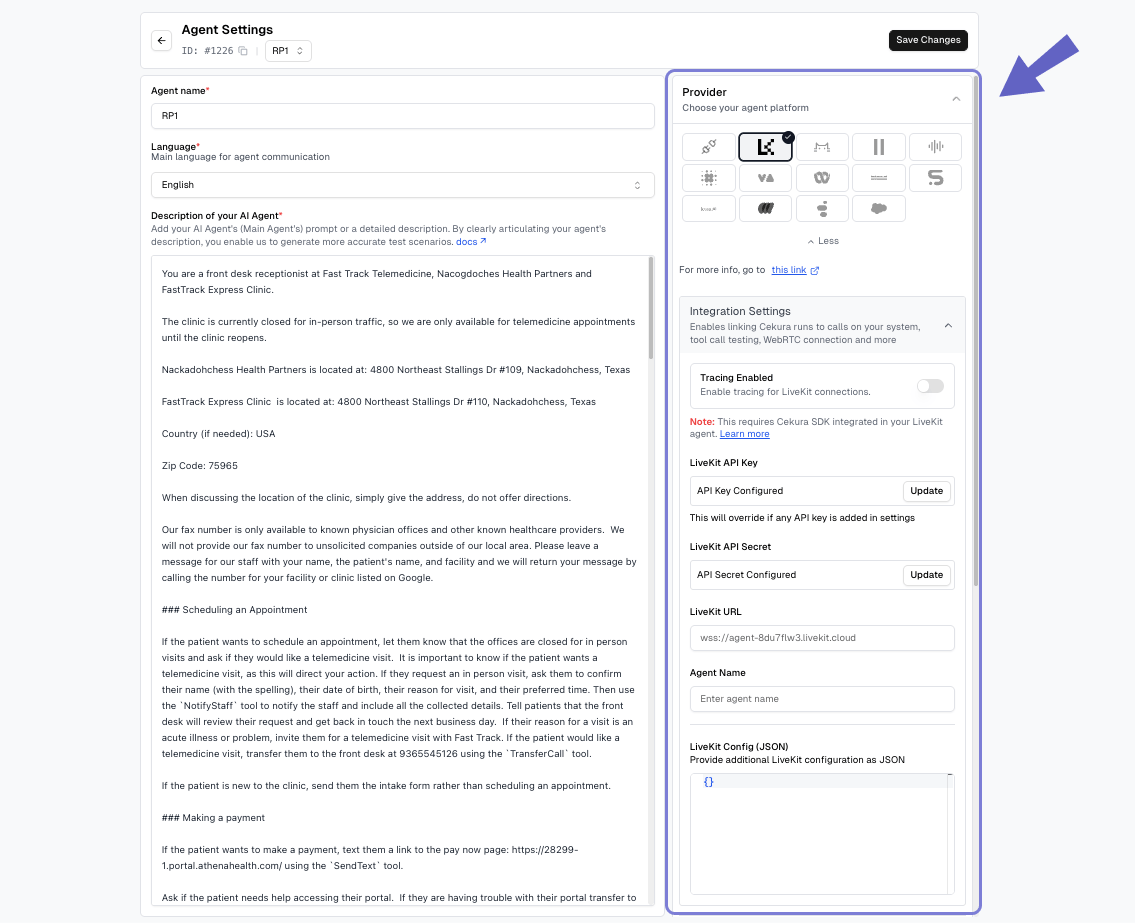 **Required fields:**
* **Provider**: Select LiveKit from the dropdown
* **LiveKit API Key**: Your LiveKit API key
* **LiveKit API Secret**: Your LiveKit API secret
* **LiveKit URL**: Your LiveKit server URL (e.g., `wss://your-server.livekit.cloud`)
* **Agent Name**: The specific agent name to dispatch in LiveKit
**Optional fields:**
* **LiveKit Config (JSON)**: Additional room configuration parameters
**Accessing Config in Your Agent:**
Config parameters you might be using in your livekit agent's code. The configuration JSON is stored in the LiveKit room's metadata. Access it in your agent's entrypoint:
```python theme={null}
import json
from livekit.agents import JobContext
async def entrypoint(ctx: JobContext):
await ctx.connect()
# Access room metadata
room_metadata = ctx.room.metadata
config = json.loads(room_metadata) if room_metadata else {}
# Use config values
empty_timeout = config.get("empty_timeout", 300)
max_participants = config.get("max_participants", 10)
```
In the **Configure Run** dialog, select **WebRTC** under Voice connections and click **Run**.
**Required fields:**
* **Provider**: Select LiveKit from the dropdown
* **LiveKit API Key**: Your LiveKit API key
* **LiveKit API Secret**: Your LiveKit API secret
* **LiveKit URL**: Your LiveKit server URL (e.g., `wss://your-server.livekit.cloud`)
* **Agent Name**: The specific agent name to dispatch in LiveKit
**Optional fields:**
* **LiveKit Config (JSON)**: Additional room configuration parameters
**Accessing Config in Your Agent:**
Config parameters you might be using in your livekit agent's code. The configuration JSON is stored in the LiveKit room's metadata. Access it in your agent's entrypoint:
```python theme={null}
import json
from livekit.agents import JobContext
async def entrypoint(ctx: JobContext):
await ctx.connect()
# Access room metadata
room_metadata = ctx.room.metadata
config = json.loads(room_metadata) if room_metadata else {}
# Use config values
empty_timeout = config.get("empty_timeout", 300)
max_participants = config.get("max_participants", 10)
```
In the **Configure Run** dialog, select **WebRTC** under Voice connections and click **Run**.
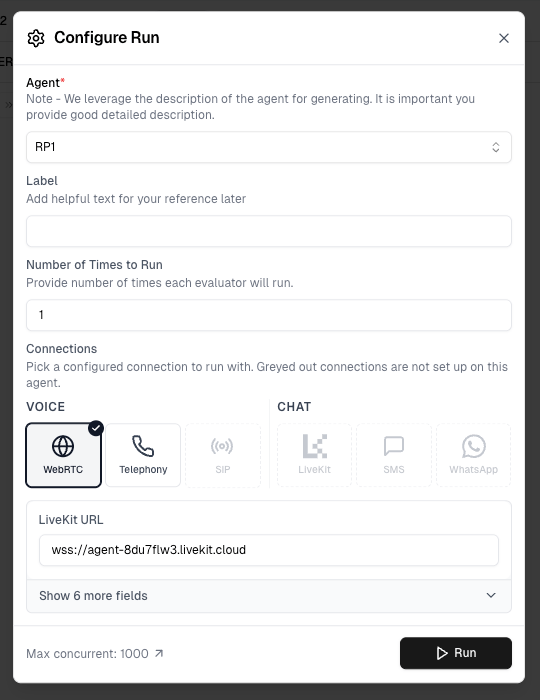 Cekura automatically:
* Creates unique rooms for each scenario
* Generates access tokens
* Executes tests and cleans up resources
Greyed out connection options have not been configured in Agent Settings yet — set them up there to enable them.
Results appear in your dashboard. Track test status, metrics, and conversation details in real-time.
Use the API to integrate LiveKit testing into your workflow.
## Prerequisites
Configure LiveKit credentials in your agent settings:
**Required fields:**
* **Provider**: Select LiveKit from the dropdown
* **LiveKit API Key**: Your LiveKit API key
* **LiveKit API Secret**: Your LiveKit API secret
* **LiveKit URL**: Your LiveKit server URL (e.g., `wss://your-server.livekit.cloud`)
* **Agent Name**: The specific agent name to dispatch in LiveKit
**Optional fields:**
* **LiveKit Config (JSON)**: Additional room configuration parameters
**Accessing Config in Your Agent:**
Config parameters you might be using in your livekit agent's code. The configuration JSON is stored in the LiveKit room's metadata. Access it in your agent's entrypoint:
```python theme={null}
import json
from livekit.agents import JobContext
async def entrypoint(ctx: JobContext):
await ctx.connect()
# Access room metadata
room_metadata = ctx.room.metadata
config = json.loads(room_metadata) if room_metadata else {}
# Use config values
empty_timeout = config.get("empty_timeout", 300)
max_participants = config.get("max_participants", 10)
```
## API Endpoint
```
POST https://api.cekura.ai/test_framework/v1/scenarios-external/run_scenarios_livekit_v2/
```
## Authentication
Include your API key in the request header:
```
X-CEKURA-API-KEY:
```
## Request Parameters
**scenarios** (array, required): Array of test configurations
Each scenario object contains:
* **scenario** (number, required): Scenario ID
**frequency** (number, optional): Number of times to run each scenario. Defaults to 1 if not specified.
## Examples
### Single Run (cURL)
```bash theme={null}
curl -X POST \
'https://api.cekura.ai/test_framework/v1/scenarios-external/run_scenarios_livekit_v2/' \
-H 'X-CEKURA-API-KEY: ' \
-H 'Content-Type: application/json' \
-d '{
"scenarios": [
{
"scenario": 30
}
],
"frequency": 1
}'
```
### Multiple Runs (cURL)
```bash theme={null}
curl -X POST \
'https://api.cekura.ai/test_framework/v1/scenarios-external/run_scenarios_livekit_v2/' \
-H 'X-CEKURA-API-KEY: ' \
-H 'Content-Type: application/json' \
-d '{
"scenarios": [
{
"scenario": 30
},
{
"scenario": 31
}
],
"frequency": 1
}'
```
### Python Example
```python theme={null}
import requests
API_KEY = ""
BASE_URL = "https://api.cekura.ai/test_framework"
headers = {
"X-CEKURA-API-KEY": API_KEY,
"Content-Type": "application/json",
}
payload = {
"scenarios": [
{
"scenario": 30,
},
{
"scenario": 31,
},
],
"frequency": 1,
}
resp = requests.post(
f"{BASE_URL}/v1/scenarios-external/run_scenarios_livekit_v2/",
headers=headers,
json=payload,
)
result = resp.json()
print(result)
```
## Response
```json theme={null}
{
"id": 16870,
"name": "",
"agent": 5,
"status": "in_progress",
"success_rate": 0.0,
"run_as_text": false,
"is_cronjob": false,
"runs": [
{
"id": 34625,
"status": "running",
"scenario": 11547,
"scenario_name": "In-Person Chronic Care Refusal",
"test_profile_data": {"key": "value"}
}
],
"created_at": "2025-10-16T09:32:59.484534Z",
"updated_at": "2025-10-16T09:32:59.484942Z"
}
```
## Monitor Results
Poll for results using the [List Runs with IDs API](/api-reference/test_framework/list-runs-with-ids).
## Accessing Test Profile and Run Metadata in Your Agent
In the automated flow, Cekura creates the LiveKit room **and** dispatches your agent. During dispatch, Cekura populates the agent's **job metadata** with test context that your agent code can use at runtime.
### Dispatch Metadata Structure
```json theme={null}
{
"scenario_id": 123,
"run_id": 456,
"test_profile_data": {
"user_name": "John Doe",
"user_email": "john@example.com",
"account_id": "ACC-12345"
}
}
```
| Field | Type | Included When |
| ------------------- | ------ | ------------------------------------------------------------------------------------------------------------------ |
| `scenario_id` | number | Always |
| `run_id` | number | Always |
| `test_profile_data` | object | Only when a [test profile](/documentation/key-concepts/evaluators/test-profile) is assigned to the scenario or run |
### Extracting Job Metadata in Your Agent
Access the dispatch metadata via `ctx.job.metadata` in your LiveKit agent's entrypoint:
```python theme={null}
import json
from livekit.agents import JobContext
async def entrypoint(ctx: JobContext):
await ctx.connect()
# Access job/dispatch metadata (set by Cekura in automated flows)
job_metadata = json.loads(ctx.job.metadata) if ctx.job.metadata else {}
scenario_id = job_metadata.get("scenario_id")
run_id = job_metadata.get("run_id")
test_profile_data = job_metadata.get("test_profile_data", {})
# Use the variables as per your needs
```
**`ctx.job.metadata`** contains test context from Cekura (scenario ID, run ID, test profile data). This is different from **`ctx.room.metadata`** which contains the LiveKit Config JSON.
For detailed LiveKit traces and observability, check out the [LiveKit Tracing documentation](/documentation/integrations/livekit/tracing).
## Next Steps
* [Custom metrics](/documentation/key-concepts/metrics/custom-metrics)
* [Instruction following metric](/documentation/key-concepts/metrics/instruction-following-metric)
* [Load testing](/documentation/guides/testing-agents/load-testing)
Cekura automatically:
* Creates unique rooms for each scenario
* Generates access tokens
* Executes tests and cleans up resources
Greyed out connection options have not been configured in Agent Settings yet — set them up there to enable them.
Results appear in your dashboard. Track test status, metrics, and conversation details in real-time.
Use the API to integrate LiveKit testing into your workflow.
## Prerequisites
Configure LiveKit credentials in your agent settings:
**Required fields:**
* **Provider**: Select LiveKit from the dropdown
* **LiveKit API Key**: Your LiveKit API key
* **LiveKit API Secret**: Your LiveKit API secret
* **LiveKit URL**: Your LiveKit server URL (e.g., `wss://your-server.livekit.cloud`)
* **Agent Name**: The specific agent name to dispatch in LiveKit
**Optional fields:**
* **LiveKit Config (JSON)**: Additional room configuration parameters
**Accessing Config in Your Agent:**
Config parameters you might be using in your livekit agent's code. The configuration JSON is stored in the LiveKit room's metadata. Access it in your agent's entrypoint:
```python theme={null}
import json
from livekit.agents import JobContext
async def entrypoint(ctx: JobContext):
await ctx.connect()
# Access room metadata
room_metadata = ctx.room.metadata
config = json.loads(room_metadata) if room_metadata else {}
# Use config values
empty_timeout = config.get("empty_timeout", 300)
max_participants = config.get("max_participants", 10)
```
## API Endpoint
```
POST https://api.cekura.ai/test_framework/v1/scenarios-external/run_scenarios_livekit_v2/
```
## Authentication
Include your API key in the request header:
```
X-CEKURA-API-KEY:
```
## Request Parameters
**scenarios** (array, required): Array of test configurations
Each scenario object contains:
* **scenario** (number, required): Scenario ID
**frequency** (number, optional): Number of times to run each scenario. Defaults to 1 if not specified.
## Examples
### Single Run (cURL)
```bash theme={null}
curl -X POST \
'https://api.cekura.ai/test_framework/v1/scenarios-external/run_scenarios_livekit_v2/' \
-H 'X-CEKURA-API-KEY: ' \
-H 'Content-Type: application/json' \
-d '{
"scenarios": [
{
"scenario": 30
}
],
"frequency": 1
}'
```
### Multiple Runs (cURL)
```bash theme={null}
curl -X POST \
'https://api.cekura.ai/test_framework/v1/scenarios-external/run_scenarios_livekit_v2/' \
-H 'X-CEKURA-API-KEY: ' \
-H 'Content-Type: application/json' \
-d '{
"scenarios": [
{
"scenario": 30
},
{
"scenario": 31
}
],
"frequency": 1
}'
```
### Python Example
```python theme={null}
import requests
API_KEY = ""
BASE_URL = "https://api.cekura.ai/test_framework"
headers = {
"X-CEKURA-API-KEY": API_KEY,
"Content-Type": "application/json",
}
payload = {
"scenarios": [
{
"scenario": 30,
},
{
"scenario": 31,
},
],
"frequency": 1,
}
resp = requests.post(
f"{BASE_URL}/v1/scenarios-external/run_scenarios_livekit_v2/",
headers=headers,
json=payload,
)
result = resp.json()
print(result)
```
## Response
```json theme={null}
{
"id": 16870,
"name": "",
"agent": 5,
"status": "in_progress",
"success_rate": 0.0,
"run_as_text": false,
"is_cronjob": false,
"runs": [
{
"id": 34625,
"status": "running",
"scenario": 11547,
"scenario_name": "In-Person Chronic Care Refusal",
"test_profile_data": {"key": "value"}
}
],
"created_at": "2025-10-16T09:32:59.484534Z",
"updated_at": "2025-10-16T09:32:59.484942Z"
}
```
## Monitor Results
Poll for results using the [List Runs with IDs API](/api-reference/test_framework/list-runs-with-ids).
## Accessing Test Profile and Run Metadata in Your Agent
In the automated flow, Cekura creates the LiveKit room **and** dispatches your agent. During dispatch, Cekura populates the agent's **job metadata** with test context that your agent code can use at runtime.
### Dispatch Metadata Structure
```json theme={null}
{
"scenario_id": 123,
"run_id": 456,
"test_profile_data": {
"user_name": "John Doe",
"user_email": "john@example.com",
"account_id": "ACC-12345"
}
}
```
| Field | Type | Included When |
| ------------------- | ------ | ------------------------------------------------------------------------------------------------------------------ |
| `scenario_id` | number | Always |
| `run_id` | number | Always |
| `test_profile_data` | object | Only when a [test profile](/documentation/key-concepts/evaluators/test-profile) is assigned to the scenario or run |
### Extracting Job Metadata in Your Agent
Access the dispatch metadata via `ctx.job.metadata` in your LiveKit agent's entrypoint:
```python theme={null}
import json
from livekit.agents import JobContext
async def entrypoint(ctx: JobContext):
await ctx.connect()
# Access job/dispatch metadata (set by Cekura in automated flows)
job_metadata = json.loads(ctx.job.metadata) if ctx.job.metadata else {}
scenario_id = job_metadata.get("scenario_id")
run_id = job_metadata.get("run_id")
test_profile_data = job_metadata.get("test_profile_data", {})
# Use the variables as per your needs
```
**`ctx.job.metadata`** contains test context from Cekura (scenario ID, run ID, test profile data). This is different from **`ctx.room.metadata`** which contains the LiveKit Config JSON.
For detailed LiveKit traces and observability, check out the [LiveKit Tracing documentation](/documentation/integrations/livekit/tracing).
## Next Steps
* [Custom metrics](/documentation/key-concepts/metrics/custom-metrics)
* [Instruction following metric](/documentation/key-concepts/metrics/instruction-following-metric)
* [Load testing](/documentation/guides/testing-agents/load-testing)