> ## Documentation Index
> Fetch the complete documentation index at: https://docs.cekura.ai/llms.txt
> Use this file to discover all available pages before exploring further.
# Bland AI Integration
> Connect a Bland AI agent to Cekura for voice and chat testing, automatic configuration, outbound calls, and mock tools.
export const CopyPageButton = () => {
if (typeof window !== 'undefined') {
setTimeout(function () {
if (document.getElementById('ck-tools')) return;
var anchor = document.getElementById('content-area') || document.querySelector('.mdx-content');
if (!anchor) return;
if (!document.getElementById('ck-style')) {
var s = document.createElement('style');
s.id = 'ck-style';
s.textContent = '#ck-tools{position:absolute;top:6px;right:0;z-index:100;font-family:inherit;}' + '.ck-row{display:inline-flex;align-items:stretch;border:1px solid rgba(0,0,0,0.15);border-radius:8px;overflow:hidden;background:#fff;}' + ':root.dark .ck-row{background:rgba(255,255,255,0.06);border-color:rgba(255,255,255,0.12);}' + '.ck-btn{padding:5px 12px;border:none;background:none;cursor:pointer;font-size:13px;font-weight:500;font-family:inherit;color:#374151;}' + ':root.dark .ck-btn{color:#d1d5db;}' + '.ck-btn:hover{background:rgba(0,0,0,0.04);}' + ':root.dark .ck-btn:hover{background:rgba(255,255,255,0.06);}' + '.ck-chevron{padding:5px 8px;border:none;background:none;cursor:pointer;font-size:14px;font-family:inherit;color:#374151;}' + ':root.dark .ck-chevron{color:#d1d5db;}' + '.ck-chevron:hover{background:rgba(0,0,0,0.04);}' + ':root.dark .ck-chevron:hover{background:rgba(255,255,255,0.06);}' + '.ck-divider{width:1px;background:rgba(0,0,0,0.12);flex-shrink:0;}' + ':root.dark .ck-divider{background:rgba(255,255,255,0.12);}' + '.ck-dd{position:absolute;top:calc(100% + 4px);right:0;min-width:180px;background:#fff;border:1px solid rgba(0,0,0,0.12);border-radius:8px;box-shadow:0 4px 12px rgba(0,0,0,0.1);padding:4px;display:none;z-index:200;}' + ':root.dark .ck-dd{background:#1f2937;border-color:rgba(255,255,255,0.1);box-shadow:0 4px 16px rgba(0,0,0,0.35);}' + '.ck-item{display:block;width:100%;padding:7px 12px;border:none;background:none;border-radius:6px;cursor:pointer;font-size:13px;font-family:inherit;text-align:left;color:#374151;}' + ':root.dark .ck-item{color:#d1d5db;}' + '.ck-item:hover{background:rgba(0,0,0,0.05);}' + ':root.dark .ck-item:hover{background:rgba(255,255,255,0.07);}';
document.head.appendChild(s);
}
var wrap = document.createElement('div');
wrap.id = 'ck-tools';
var row = document.createElement('div');
row.className = 'ck-row';
var mainBtn = document.createElement('button');
mainBtn.className = 'ck-btn';
mainBtn.textContent = 'Copy page';
var divider = document.createElement('span');
divider.className = 'ck-divider';
var chevron = document.createElement('button');
chevron.className = 'ck-chevron';
chevron.textContent = '▾';
var dd = document.createElement('div');
dd.className = 'ck-dd';
function closeDD() {
dd.style.display = 'none';
}
function openDD() {
dd.style.display = 'block';
}
chevron.onclick = function (e) {
e.stopPropagation();
if (dd.style.display === 'block') {
closeDD();
} else {
openDD();
}
};
document.addEventListener('click', function (e) {
if (!e.target.closest('#ck-tools')) {
closeDD();
}
});
document.addEventListener('keydown', function (e) {
if (e.key === 'Escape') {
closeDD();
}
});
function makeItem(label, fn) {
var b = document.createElement('button');
b.className = 'ck-item';
b.textContent = label;
b.onclick = function () {
fn();
closeDD();
};
return b;
}
function getMarkdown() {
var walk = function (node) {
if (!node) return '';
if (node.nodeType === 3) return node.textContent || '';
if (node.nodeType !== 1) return '';
var tag = node.tagName.toLowerCase();
var skip = ['script', 'style', 'svg', 'noscript', 'button', 'iframe'];
if (skip.indexOf(tag) !== -1) return '';
if (node.id === 'ck-tools') return '';
var ch = Array.from(node.childNodes).map(walk).join('');
if (tag === 'h1') return '\n# ' + ch.trim() + '\n\n';
if (tag === 'h2') return '\n## ' + ch.trim() + '\n\n';
if (tag === 'h3') return '\n### ' + ch.trim() + '\n\n';
if (tag === 'p') return '\n' + ch.trim() + '\n\n';
if (tag === 'pre') return '\n```\n' + node.textContent.trim() + '\n```\n\n';
if (tag === 'li') return '- ' + ch.trim() + '\n';
if (tag === 'code') return '`' + ch.trim() + '`';
return ch;
};
var content = document.querySelector('.mdx-content') || document.getElementById('content-area') || document.body;
return walk(content).replace(/\n\n\n+/g, '\n\n').trim();
}
function copyMd() {
var md = getMarkdown();
navigator.clipboard.writeText(md).then(function () {
mainBtn.textContent = 'Copied!';
setTimeout(function () {
mainBtn.textContent = 'Copy page';
}, 2000);
});
}
function viewMd() {
var md = getMarkdown();
var safe = md.split('&').join('&').split('<').join('<').split('>').join('>');
var html = '' + safe + '';
window.open(URL.createObjectURL(new Blob([html], {
type: 'text/html'
})), '_blank');
}
function openClaude() {
var prompt = 'Can you read this Cekura docs page ' + window.location.href + ' so I can ask you questions?';
window.open('https://claude.ai/new?q=' + encodeURIComponent(prompt), '_blank');
}
mainBtn.onclick = copyMd;
dd.appendChild(makeItem('Copy page', copyMd));
dd.appendChild(makeItem('View as Markdown', viewMd));
dd.appendChild(makeItem('Open in Claude', openClaude));
row.appendChild(mainBtn);
row.appendChild(divider);
row.appendChild(chevron);
wrap.appendChild(row);
wrap.appendChild(dd);
anchor.style.position = 'relative';
anchor.insertBefore(wrap, anchor.firstChild);
}, 50);
}
return null;
};
## Overview
Connect Bland AI to Cekura to run voice and chat evaluations. The integration supports automatic agent configuration, prompt sync, outbound test calls, and mock tools.
Use your Bland **Persona ID** for voice testing or your **Pathway ID** for chat testing. Cekura can configure either one automatically.
## Prerequisites
* A Bland AI API key
* A published Bland Persona and its Persona ID
* A Bland phone number for voice testing
* A published Bland Pathway and its Pathway ID for chat testing
## Configure automatically
In Cekura, go to **Agents**, create an agent, and select **Bland AI** as the provider.
Enter the published Persona ID or Pathway ID and your Bland API key.
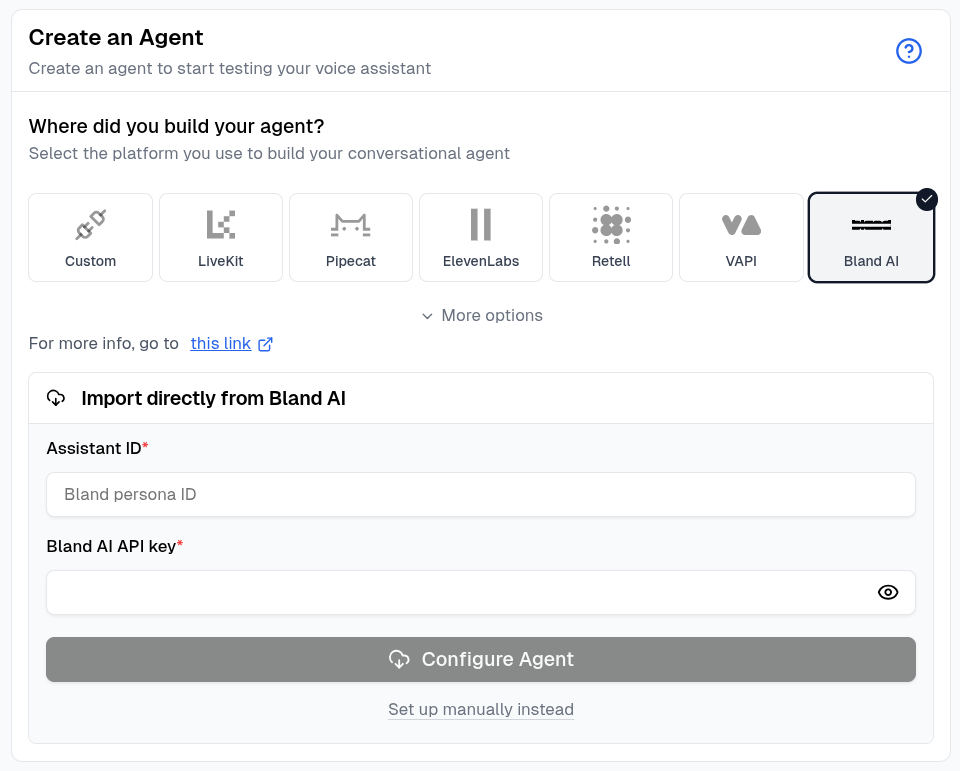 Click **Configure Agent**. Cekura detects whether the ID belongs to a Persona or Pathway and imports the supported name, prompt or pathway configuration, language, phone number, knowledge base, and tools.
When the import finishes, open the agent and confirm the imported settings before running an evaluator.
Persona imports configure voice testing. Pathway imports configure the Bland chat connection.
## Configure manually
Click **Set up manually instead**, then enter the Persona ID as the **External Assistant ID** and add your Bland API key. For chat testing, add the Pathway ID under **Bland Chat Settings**.
Click **Configure Agent**. Cekura detects whether the ID belongs to a Persona or Pathway and imports the supported name, prompt or pathway configuration, language, phone number, knowledge base, and tools.
When the import finishes, open the agent and confirm the imported settings before running an evaluator.
Persona imports configure voice testing. Pathway imports configure the Bland chat connection.
## Configure manually
Click **Set up manually instead**, then enter the Persona ID as the **External Assistant ID** and add your Bland API key. For chat testing, add the Pathway ID under **Bland Chat Settings**.
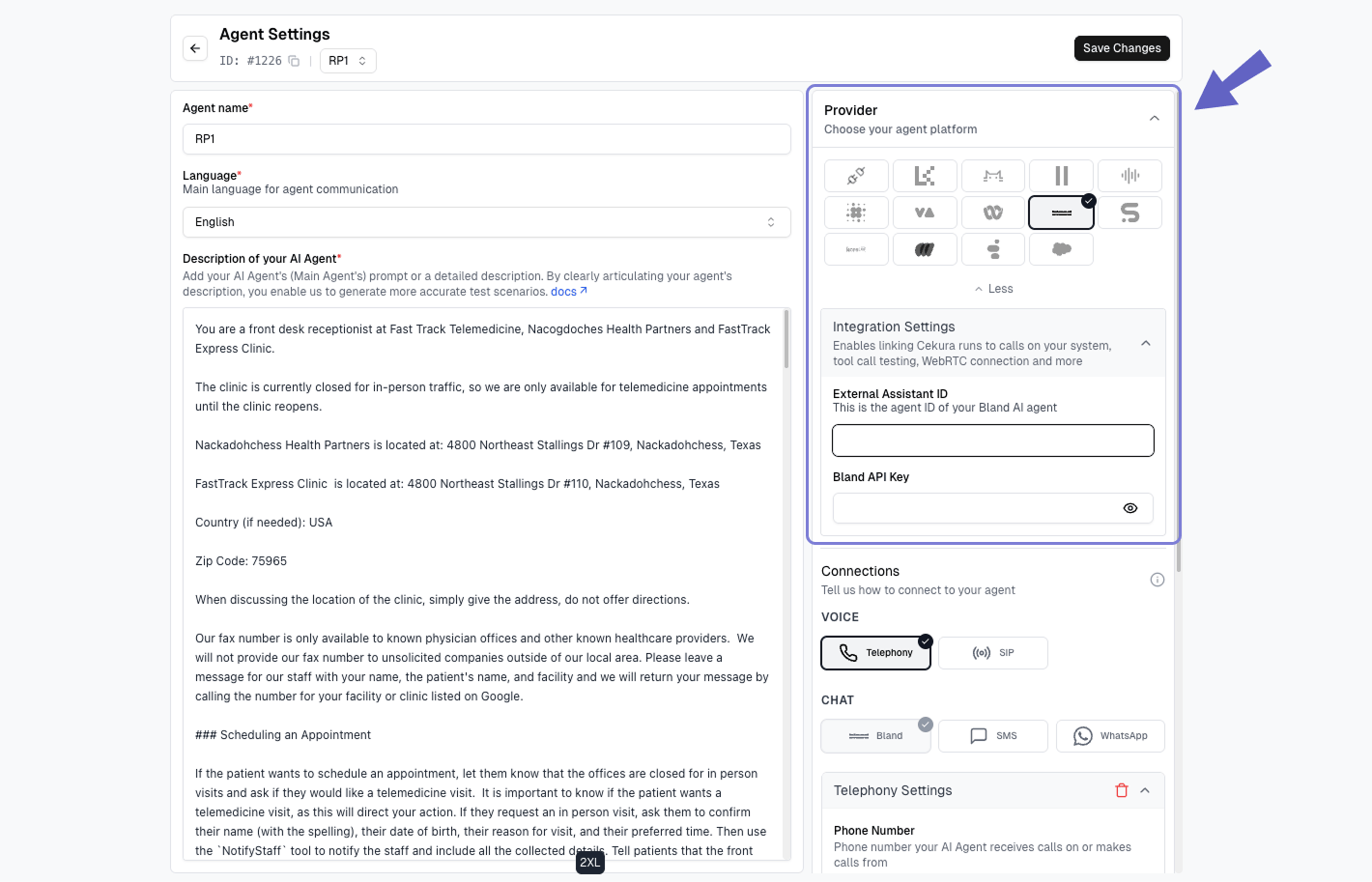 Enable **Auto-sync Prompt** if you want Cekura to keep the agent description aligned with the Bland Persona.
## Voice testing and automatic outbound calls
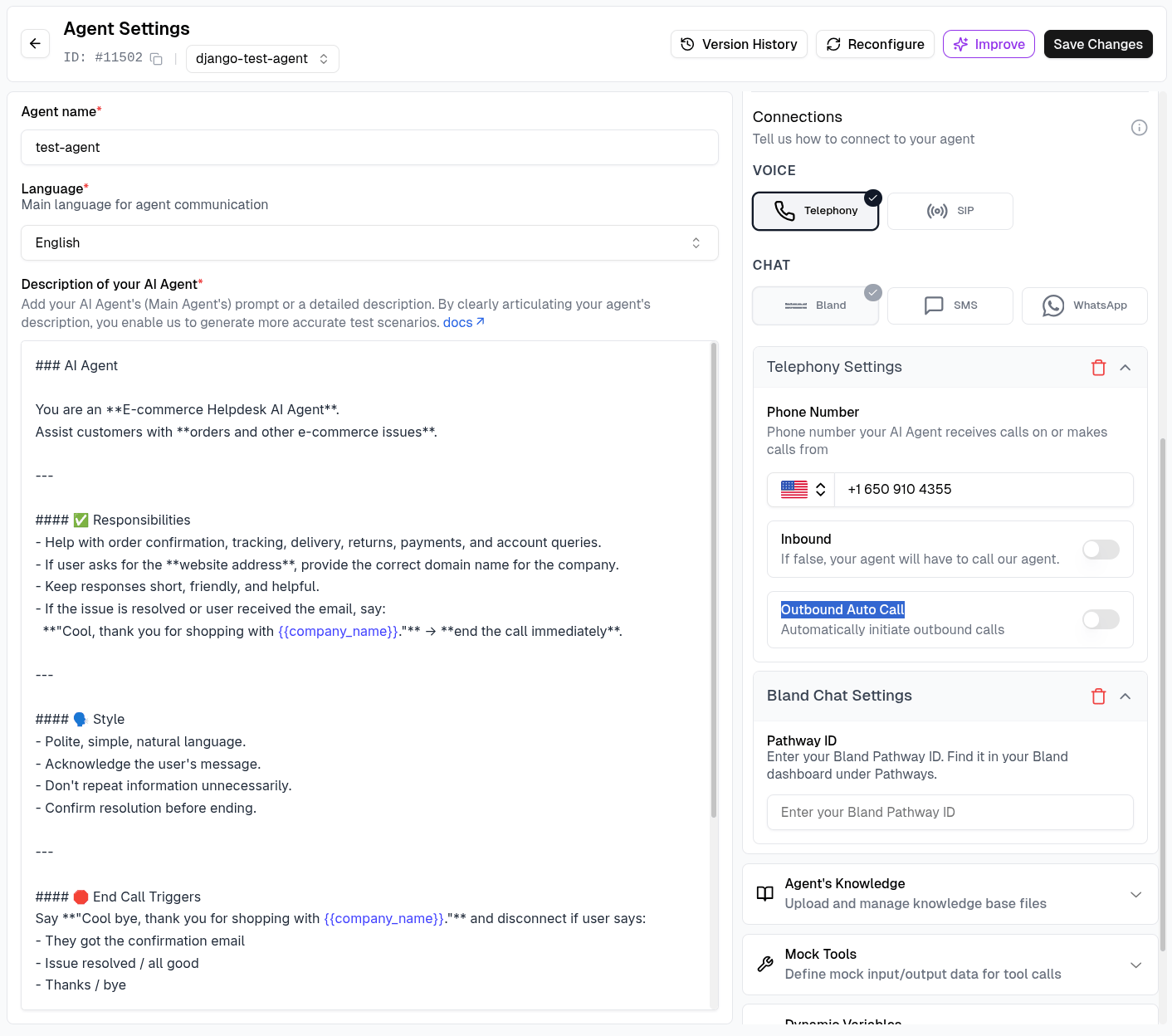
To run voice evaluations, configure the Bland phone number under **Telephony Settings**.
For Cekura to initiate each Bland test call automatically:
1. Leave **Inbound** disabled.
2. Enable **Outbound Auto Call**.
3. Save the agent and run an evaluator using the **Telephony** connection.
Enable **Auto-sync Prompt** if you want Cekura to keep the agent description aligned with the Bland Persona.
## Voice testing and automatic outbound calls
To run voice evaluations, configure the Bland phone number under **Telephony Settings**.
For Cekura to initiate each Bland test call automatically:
1. Leave **Inbound** disabled.
2. Enable **Outbound Auto Call**.
3. Save the agent and run an evaluator using the **Telephony** connection.
 Cekura sends configured dynamic variables with the call and records the transcript, audio, metrics, and tool calls in the result. See [Automatic Outbound Calls](/documentation/guides/testing-agents/outbound-auto-call) for the complete workflow.
## Chat testing
Bland chat testing uses a conversational Pathway instead of the voice Persona.
Automatic Pathway imports configure this connection for you. For manual setup, open **Agent Settings → Bland Chat Settings**, enter the Pathway ID, and save the agent.
Open an evaluator, click **Run**, select **Bland** under **Chat**, and start the run.
Cekura sends configured dynamic variables with the call and records the transcript, audio, metrics, and tool calls in the result. See [Automatic Outbound Calls](/documentation/guides/testing-agents/outbound-auto-call) for the complete workflow.
## Chat testing
Bland chat testing uses a conversational Pathway instead of the voice Persona.
Automatic Pathway imports configure this connection for you. For manual setup, open **Agent Settings → Bland Chat Settings**, enter the Pathway ID, and save the agent.
Open an evaluator, click **Run**, select **Bland** under **Chat**, and start the run.
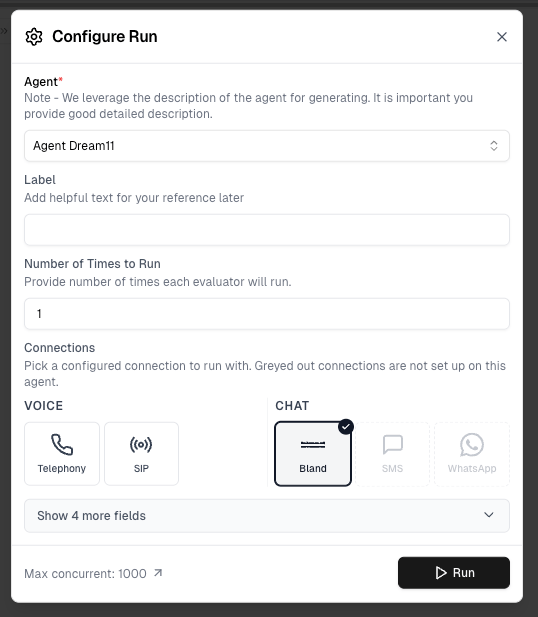 See [Chat Testing](/documentation/integrations/chat-testing#bland) for more details.
## Mock tools
Use **Auto-Fetch** in the agent's **Mock Tools** section to import supported Bland tools and generate mock responses. During an outbound test, Cekura uses temporary tool copies for that run, leaving the Persona's production tools unchanged.
Learn more in [Mock Tools](/documentation/key-concepts/evaluators/mock-tools).
Bland does not currently support automatic import of production calls into Cekura.
See [Chat Testing](/documentation/integrations/chat-testing#bland) for more details.
## Mock tools
Use **Auto-Fetch** in the agent's **Mock Tools** section to import supported Bland tools and generate mock responses. During an outbound test, Cekura uses temporary tool copies for that run, leaving the Persona's production tools unchanged.
Learn more in [Mock Tools](/documentation/key-concepts/evaluators/mock-tools).
Bland does not currently support automatic import of production calls into Cekura.