> ## Documentation Index
> Fetch the complete documentation index at: https://docs.cekura.ai/llms.txt
> Use this file to discover all available pages before exploring further.
# WhatsApp Testing
> Test conversational agents via WhatsApp messaging - fast and cost-effective text-based testing
export const CopyPageButton = () => {
if (typeof window !== 'undefined') {
setTimeout(function () {
if (document.getElementById('ck-tools')) return;
var anchor = document.getElementById('content-area') || document.querySelector('.mdx-content');
if (!anchor) return;
if (!document.getElementById('ck-style')) {
var s = document.createElement('style');
s.id = 'ck-style';
s.textContent = '#ck-tools{position:absolute;top:6px;right:0;z-index:100;font-family:inherit;}' + '.ck-row{display:inline-flex;align-items:stretch;border:1px solid rgba(0,0,0,0.15);border-radius:8px;overflow:hidden;background:#fff;}' + ':root.dark .ck-row{background:rgba(255,255,255,0.06);border-color:rgba(255,255,255,0.12);}' + '.ck-btn{padding:5px 12px;border:none;background:none;cursor:pointer;font-size:13px;font-weight:500;font-family:inherit;color:#374151;}' + ':root.dark .ck-btn{color:#d1d5db;}' + '.ck-btn:hover{background:rgba(0,0,0,0.04);}' + ':root.dark .ck-btn:hover{background:rgba(255,255,255,0.06);}' + '.ck-chevron{padding:5px 8px;border:none;background:none;cursor:pointer;font-size:14px;font-family:inherit;color:#374151;}' + ':root.dark .ck-chevron{color:#d1d5db;}' + '.ck-chevron:hover{background:rgba(0,0,0,0.04);}' + ':root.dark .ck-chevron:hover{background:rgba(255,255,255,0.06);}' + '.ck-divider{width:1px;background:rgba(0,0,0,0.12);flex-shrink:0;}' + ':root.dark .ck-divider{background:rgba(255,255,255,0.12);}' + '.ck-dd{position:absolute;top:calc(100% + 4px);right:0;min-width:180px;background:#fff;border:1px solid rgba(0,0,0,0.12);border-radius:8px;box-shadow:0 4px 12px rgba(0,0,0,0.1);padding:4px;display:none;z-index:200;}' + ':root.dark .ck-dd{background:#1f2937;border-color:rgba(255,255,255,0.1);box-shadow:0 4px 16px rgba(0,0,0,0.35);}' + '.ck-item{display:block;width:100%;padding:7px 12px;border:none;background:none;border-radius:6px;cursor:pointer;font-size:13px;font-family:inherit;text-align:left;color:#374151;}' + ':root.dark .ck-item{color:#d1d5db;}' + '.ck-item:hover{background:rgba(0,0,0,0.05);}' + ':root.dark .ck-item:hover{background:rgba(255,255,255,0.07);}';
document.head.appendChild(s);
}
var wrap = document.createElement('div');
wrap.id = 'ck-tools';
var row = document.createElement('div');
row.className = 'ck-row';
var mainBtn = document.createElement('button');
mainBtn.className = 'ck-btn';
mainBtn.textContent = 'Copy page';
var divider = document.createElement('span');
divider.className = 'ck-divider';
var chevron = document.createElement('button');
chevron.className = 'ck-chevron';
chevron.textContent = '▾';
var dd = document.createElement('div');
dd.className = 'ck-dd';
function closeDD() {
dd.style.display = 'none';
}
function openDD() {
dd.style.display = 'block';
}
chevron.onclick = function (e) {
e.stopPropagation();
if (dd.style.display === 'block') {
closeDD();
} else {
openDD();
}
};
document.addEventListener('click', function (e) {
if (!e.target.closest('#ck-tools')) {
closeDD();
}
});
document.addEventListener('keydown', function (e) {
if (e.key === 'Escape') {
closeDD();
}
});
function makeItem(label, fn) {
var b = document.createElement('button');
b.className = 'ck-item';
b.textContent = label;
b.onclick = function () {
fn();
closeDD();
};
return b;
}
function getMarkdown() {
var walk = function (node) {
if (!node) return '';
if (node.nodeType === 3) return node.textContent || '';
if (node.nodeType !== 1) return '';
var tag = node.tagName.toLowerCase();
var skip = ['script', 'style', 'svg', 'noscript', 'button', 'iframe'];
if (skip.indexOf(tag) !== -1) return '';
if (node.id === 'ck-tools') return '';
var ch = Array.from(node.childNodes).map(walk).join('');
if (tag === 'h1') return '\n# ' + ch.trim() + '\n\n';
if (tag === 'h2') return '\n## ' + ch.trim() + '\n\n';
if (tag === 'h3') return '\n### ' + ch.trim() + '\n\n';
if (tag === 'p') return '\n' + ch.trim() + '\n\n';
if (tag === 'pre') return '\n```\n' + node.textContent.trim() + '\n```\n\n';
if (tag === 'li') return '- ' + ch.trim() + '\n';
if (tag === 'code') return '`' + ch.trim() + '`';
return ch;
};
var content = document.querySelector('.mdx-content') || document.getElementById('content-area') || document.body;
return walk(content).replace(/\n\n\n+/g, '\n\n').trim();
}
function copyMd() {
var md = getMarkdown();
navigator.clipboard.writeText(md).then(function () {
mainBtn.textContent = 'Copied!';
setTimeout(function () {
mainBtn.textContent = 'Copy page';
}, 2000);
});
}
function viewMd() {
var md = getMarkdown();
var safe = md.split('&').join('&').split('<').join('<').split('>').join('>');
var html = '' + safe + '';
window.open(URL.createObjectURL(new Blob([html], {
type: 'text/html'
})), '_blank');
}
function openClaude() {
var prompt = 'Can you read this Cekura docs page ' + window.location.href + ' so I can ask you questions?';
window.open('https://claude.ai/new?q=' + encodeURIComponent(prompt), '_blank');
}
mainBtn.onclick = copyMd;
dd.appendChild(makeItem('Copy page', copyMd));
dd.appendChild(makeItem('View as Markdown', viewMd));
dd.appendChild(makeItem('Open in Claude', openClaude));
row.appendChild(mainBtn);
row.appendChild(divider);
row.appendChild(chevron);
wrap.appendChild(row);
wrap.appendChild(dd);
anchor.style.position = 'relative';
anchor.insertBefore(wrap, anchor.firstChild);
}, 50);
}
return null;
};
## What is WhatsApp Testing?
WhatsApp testing allows you to test your conversational agents through WhatsApp messages. This provides a text-based alternative to voice testing, making it faster and more cost-effective for workflow validation.
WhatsApp testing is useful for:
* Testing conversation logic and flow without voice calls
* Validating agent responses and decision-making
* Quick iteration on agent behavior
* Cost-effective bulk testing scenarios
**Template Message**: Due to WhatsApp's 24-hour conversation window constraints, you may see a template message at the beginning of conversations: *"Thank you for your order. Your order ID is xyz and has been received successfully."* This opens the conversation window and allows the test to proceed.
## Setting Up WhatsApp Testing
In your agent settings, go to Provider tab in right side, in the Connection section, select WhatsApp under CHAT.
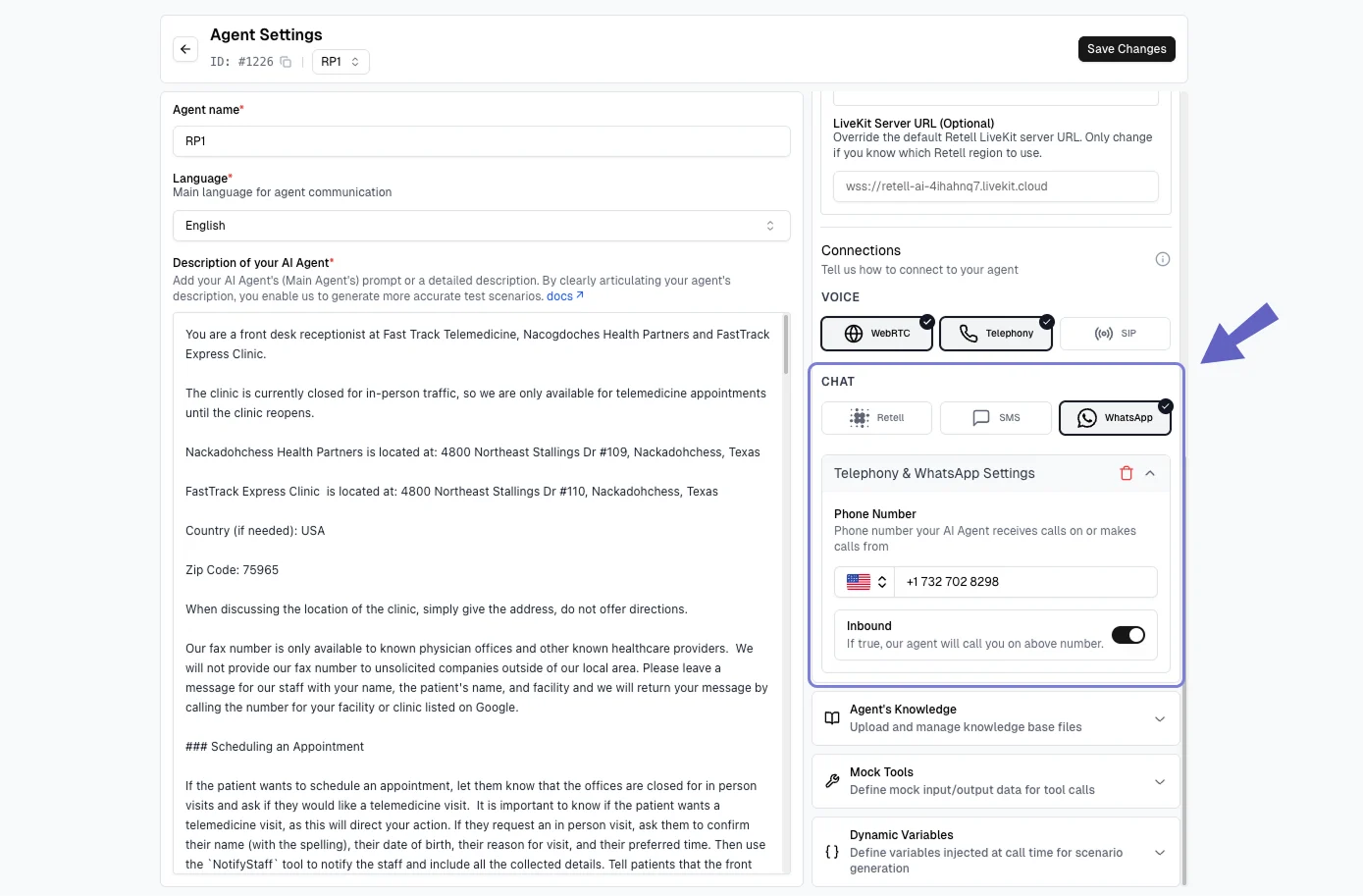 In the Phone Number section, add the WhatsApp-enabled phone number for the agent.
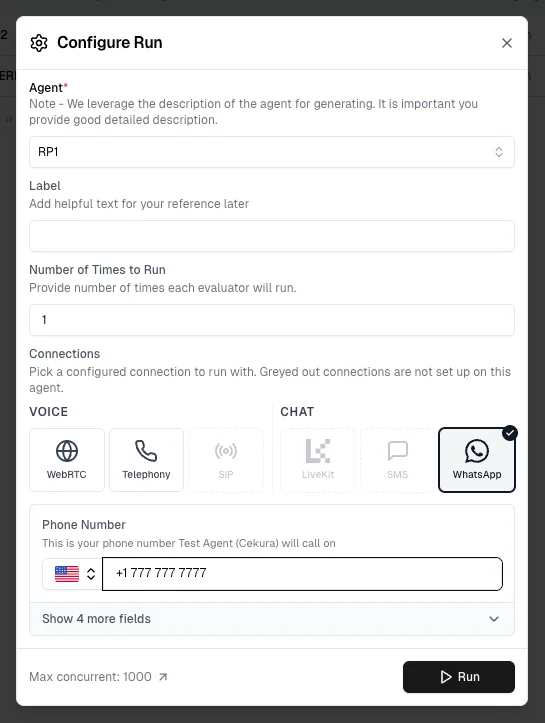
Head to **Evaluators**, select your evaluator, and click **Run**.
In the **Configure Run** dialog, select **WhatsApp** and click **Run** to start your test.
In the Phone Number section, add the WhatsApp-enabled phone number for the agent.
Head to **Evaluators**, select your evaluator, and click **Run**.
In the **Configure Run** dialog, select **WhatsApp** and click **Run** to start your test.
 View your test results on the **Results Page**.
## Tool Support
When testing via WhatsApp, the following tools are available:
| Tool | Description |
| ----------------------------- | -------------------------------------------- |
| **End Call** | End the conversation at any point |
| **End Call Only on Transfer** | End conversation only when a transfer occurs |
## Example Use Cases
**Customer Support:**
```
You are a customer asking about store hours.
Ask politely and thank the agent when you get the information.
```
**Appointment Confirmation:**
```
You received a reminder about tomorrow's 2 PM appointment.
Confirm your attendance when asked.
```
## Timeouts and Behavior
WhatsApp tests automatically end after a timeout period if no response is received. The timeout is configured in your project settings.
When a timeout occurs, it appears in the transcript as: `Main agent-whatsapp-timeout`
## Best Practices
1. **Use for Workflow Testing** - Ideal for validating conversation logic without voice overhead
2. **Write Clear Instructions** - Be specific in evaluator prompts:
```
✅ Good: "Ask about appointment on Monday and provide ID APT-123 when asked"
❌ Vague: "Interact with the agent about an appointment"
```
3. **Verify WhatsApp is Enabled** - Ensure your phone number has WhatsApp enabled before testing
4. **Monitor Results** - Review transcripts via the Results API to verify conversation flow
## Troubleshooting
**Solutions:**
* Check timeout settings in project configuration
* Verify phone number is correctly configured
* Ensure the phone number has WhatsApp enabled
**Solutions:**
* Verify WhatsApp is enabled for your phone number
* Ensure the phone number is correctly added in agent settings
**Solutions:**
* Verify the phone number is WhatsApp-enabled
* Check that the phone number is correctly configured in agent settings
* Confirm the number format is correct
***
## Next Steps
* Learn about [SMS Testing](/documentation/guides/testing-agents/sms-during-call) for voice-based text testing
* Explore [Test Profiles](/documentation/key-concepts/evaluators/test-profile) for identity-based testing
* Review [Custom Metrics](/documentation/key-concepts/metrics/custom-metrics) for conversation validation
* Check [Results API](/api-reference/endpoint/results) for viewing test outcomes
View your test results on the **Results Page**.
## Tool Support
When testing via WhatsApp, the following tools are available:
| Tool | Description |
| ----------------------------- | -------------------------------------------- |
| **End Call** | End the conversation at any point |
| **End Call Only on Transfer** | End conversation only when a transfer occurs |
## Example Use Cases
**Customer Support:**
```
You are a customer asking about store hours.
Ask politely and thank the agent when you get the information.
```
**Appointment Confirmation:**
```
You received a reminder about tomorrow's 2 PM appointment.
Confirm your attendance when asked.
```
## Timeouts and Behavior
WhatsApp tests automatically end after a timeout period if no response is received. The timeout is configured in your project settings.
When a timeout occurs, it appears in the transcript as: `Main agent-whatsapp-timeout`
## Best Practices
1. **Use for Workflow Testing** - Ideal for validating conversation logic without voice overhead
2. **Write Clear Instructions** - Be specific in evaluator prompts:
```
✅ Good: "Ask about appointment on Monday and provide ID APT-123 when asked"
❌ Vague: "Interact with the agent about an appointment"
```
3. **Verify WhatsApp is Enabled** - Ensure your phone number has WhatsApp enabled before testing
4. **Monitor Results** - Review transcripts via the Results API to verify conversation flow
## Troubleshooting
**Solutions:**
* Check timeout settings in project configuration
* Verify phone number is correctly configured
* Ensure the phone number has WhatsApp enabled
**Solutions:**
* Verify WhatsApp is enabled for your phone number
* Ensure the phone number is correctly added in agent settings
**Solutions:**
* Verify the phone number is WhatsApp-enabled
* Check that the phone number is correctly configured in agent settings
* Confirm the number format is correct
***
## Next Steps
* Learn about [SMS Testing](/documentation/guides/testing-agents/sms-during-call) for voice-based text testing
* Explore [Test Profiles](/documentation/key-concepts/evaluators/test-profile) for identity-based testing
* Review [Custom Metrics](/documentation/key-concepts/metrics/custom-metrics) for conversation validation
* Check [Results API](/api-reference/endpoint/results) for viewing test outcomes