> ## Documentation Index
> Fetch the complete documentation index at: https://docs.cekura.ai/llms.txt
> Use this file to discover all available pages before exploring further.
# Auto Outbound Calls
> Automatically trigger outbound calls for testing without writing any scripts - the system handles everything using your voice provider configuration.
export const CopyPageButton = () => {
if (typeof window !== 'undefined') {
setTimeout(function () {
if (document.getElementById('ck-tools')) return;
var anchor = document.getElementById('content-area') || document.querySelector('.mdx-content');
if (!anchor) return;
if (!document.getElementById('ck-style')) {
var s = document.createElement('style');
s.id = 'ck-style';
s.textContent = '#ck-tools{position:absolute;top:6px;right:0;z-index:100;font-family:inherit;}' + '.ck-row{display:inline-flex;align-items:stretch;border:1px solid rgba(0,0,0,0.15);border-radius:8px;overflow:hidden;background:#fff;}' + ':root.dark .ck-row{background:rgba(255,255,255,0.06);border-color:rgba(255,255,255,0.12);}' + '.ck-btn{padding:5px 12px;border:none;background:none;cursor:pointer;font-size:13px;font-weight:500;font-family:inherit;color:#374151;}' + ':root.dark .ck-btn{color:#d1d5db;}' + '.ck-btn:hover{background:rgba(0,0,0,0.04);}' + ':root.dark .ck-btn:hover{background:rgba(255,255,255,0.06);}' + '.ck-chevron{padding:5px 8px;border:none;background:none;cursor:pointer;font-size:14px;font-family:inherit;color:#374151;}' + ':root.dark .ck-chevron{color:#d1d5db;}' + '.ck-chevron:hover{background:rgba(0,0,0,0.04);}' + ':root.dark .ck-chevron:hover{background:rgba(255,255,255,0.06);}' + '.ck-divider{width:1px;background:rgba(0,0,0,0.12);flex-shrink:0;}' + ':root.dark .ck-divider{background:rgba(255,255,255,0.12);}' + '.ck-dd{position:absolute;top:calc(100% + 4px);right:0;min-width:180px;background:#fff;border:1px solid rgba(0,0,0,0.12);border-radius:8px;box-shadow:0 4px 12px rgba(0,0,0,0.1);padding:4px;display:none;z-index:200;}' + ':root.dark .ck-dd{background:#1f2937;border-color:rgba(255,255,255,0.1);box-shadow:0 4px 16px rgba(0,0,0,0.35);}' + '.ck-item{display:block;width:100%;padding:7px 12px;border:none;background:none;border-radius:6px;cursor:pointer;font-size:13px;font-family:inherit;text-align:left;color:#374151;}' + ':root.dark .ck-item{color:#d1d5db;}' + '.ck-item:hover{background:rgba(0,0,0,0.05);}' + ':root.dark .ck-item:hover{background:rgba(255,255,255,0.07);}';
document.head.appendChild(s);
}
var wrap = document.createElement('div');
wrap.id = 'ck-tools';
var row = document.createElement('div');
row.className = 'ck-row';
var mainBtn = document.createElement('button');
mainBtn.className = 'ck-btn';
mainBtn.textContent = 'Copy page';
var divider = document.createElement('span');
divider.className = 'ck-divider';
var chevron = document.createElement('button');
chevron.className = 'ck-chevron';
chevron.textContent = '▾';
var dd = document.createElement('div');
dd.className = 'ck-dd';
function closeDD() {
dd.style.display = 'none';
}
function openDD() {
dd.style.display = 'block';
}
chevron.onclick = function (e) {
e.stopPropagation();
if (dd.style.display === 'block') {
closeDD();
} else {
openDD();
}
};
document.addEventListener('click', function (e) {
if (!e.target.closest('#ck-tools')) {
closeDD();
}
});
document.addEventListener('keydown', function (e) {
if (e.key === 'Escape') {
closeDD();
}
});
function makeItem(label, fn) {
var b = document.createElement('button');
b.className = 'ck-item';
b.textContent = label;
b.onclick = function () {
fn();
closeDD();
};
return b;
}
function getMarkdown() {
var walk = function (node) {
if (!node) return '';
if (node.nodeType === 3) return node.textContent || '';
if (node.nodeType !== 1) return '';
var tag = node.tagName.toLowerCase();
var skip = ['script', 'style', 'svg', 'noscript', 'button', 'iframe'];
if (skip.indexOf(tag) !== -1) return '';
if (node.id === 'ck-tools') return '';
var ch = Array.from(node.childNodes).map(walk).join('');
if (tag === 'h1') return '\n# ' + ch.trim() + '\n\n';
if (tag === 'h2') return '\n## ' + ch.trim() + '\n\n';
if (tag === 'h3') return '\n### ' + ch.trim() + '\n\n';
if (tag === 'p') return '\n' + ch.trim() + '\n\n';
if (tag === 'pre') return '\n```\n' + node.textContent.trim() + '\n```\n\n';
if (tag === 'li') return '- ' + ch.trim() + '\n';
if (tag === 'code') return '`' + ch.trim() + '`';
return ch;
};
var content = document.querySelector('.mdx-content') || document.getElementById('content-area') || document.body;
return walk(content).replace(/\n\n\n+/g, '\n\n').trim();
}
function copyMd() {
var md = getMarkdown();
navigator.clipboard.writeText(md).then(function () {
mainBtn.textContent = 'Copied!';
setTimeout(function () {
mainBtn.textContent = 'Copy page';
}, 2000);
});
}
function viewMd() {
var md = getMarkdown();
var safe = md.split('&').join('&').split('<').join('<').split('>').join('>');
var html = '' + safe + '';
window.open(URL.createObjectURL(new Blob([html], {
type: 'text/html'
})), '_blank');
}
function openClaude() {
var prompt = 'Can you read this Cekura docs page ' + window.location.href + ' so I can ask you questions?';
window.open('https://claude.ai/new?q=' + encodeURIComponent(prompt), '_blank');
}
mainBtn.onclick = copyMd;
dd.appendChild(makeItem('Copy page', copyMd));
dd.appendChild(makeItem('View as Markdown', viewMd));
dd.appendChild(makeItem('Open in Claude', openClaude));
row.appendChild(mainBtn);
row.appendChild(divider);
row.appendChild(chevron);
wrap.appendChild(row);
wrap.appendChild(dd);
anchor.style.position = 'relative';
anchor.insertBefore(wrap, anchor.firstChild);
}, 50);
}
return null;
};
## What is Auto Outbound Call?
Auto Outbound Call is an automated testing feature where Cekura automatically initiates outbound calls when you run evaluators. Unlike [manual outbound testing](/documentation/guides/testing-agents/outbound-evaluators) where you write scripts to handle calls, this feature does everything automatically.
## How It Works
Toggle the **Auto Outbound Call** setting ON in your agent settings
Execute evaluators through the dashboard - no script needed
Cekura uses your voice provider (Vapi, Retell, or ElevenLabs) to initiate calls
Check test results and transcripts in your dashboard
## Prerequisites
* **Outbound mode enabled**: Agent's `inbound` must be set to `false`
* **Voice provider configured**: Valid API key and Assistant ID for your provider (Vapi, Retell, or ElevenLabs)
* **Agent `contact_number` set to your outbound caller ID**: Cekura validates the caller ID (ANI) of every incoming outbound-test call against the agent's `contact_number` field. If the provider dials from `+15551234567`, the agent's `contact_number` must be exactly `+15551234567` in E.164 format. Set this in Agent settings or via the [Update Agent API](/api-reference/test_framework/update-agent-partial).
* **Evaluators ready**: Created evaluators with valid phone numbers
**API Key Permissions:** Ensure your API key has outbound call permissions enabled. For ElevenLabs, enable "Conversational AI" and "Phone Number" permissions at [https://elevenlabs.io/app/settings/api-keys](https://elevenlabs.io/app/settings/api-keys)
**Caller ID mismatch causes silent rejects.** If the `contact_number` on your agent is empty or doesn't match the `from_number` your voice provider uses to place the call, Cekura drops the incoming call without returning a SIP error. The symptom on the provider side is `Busy`, `NoAnswer`, or a generic failed dial — no audio, no descriptive error. Confirm `contact_number` matches the provider's outbound caller ID before debugging anything further.
## Enabling Auto Outbound Call
Navigate to your Agent settings -> Right sidebar -> Connection -> Select **Telephony** under VOICE -> Toggle ON **Auto Outbound Call**.
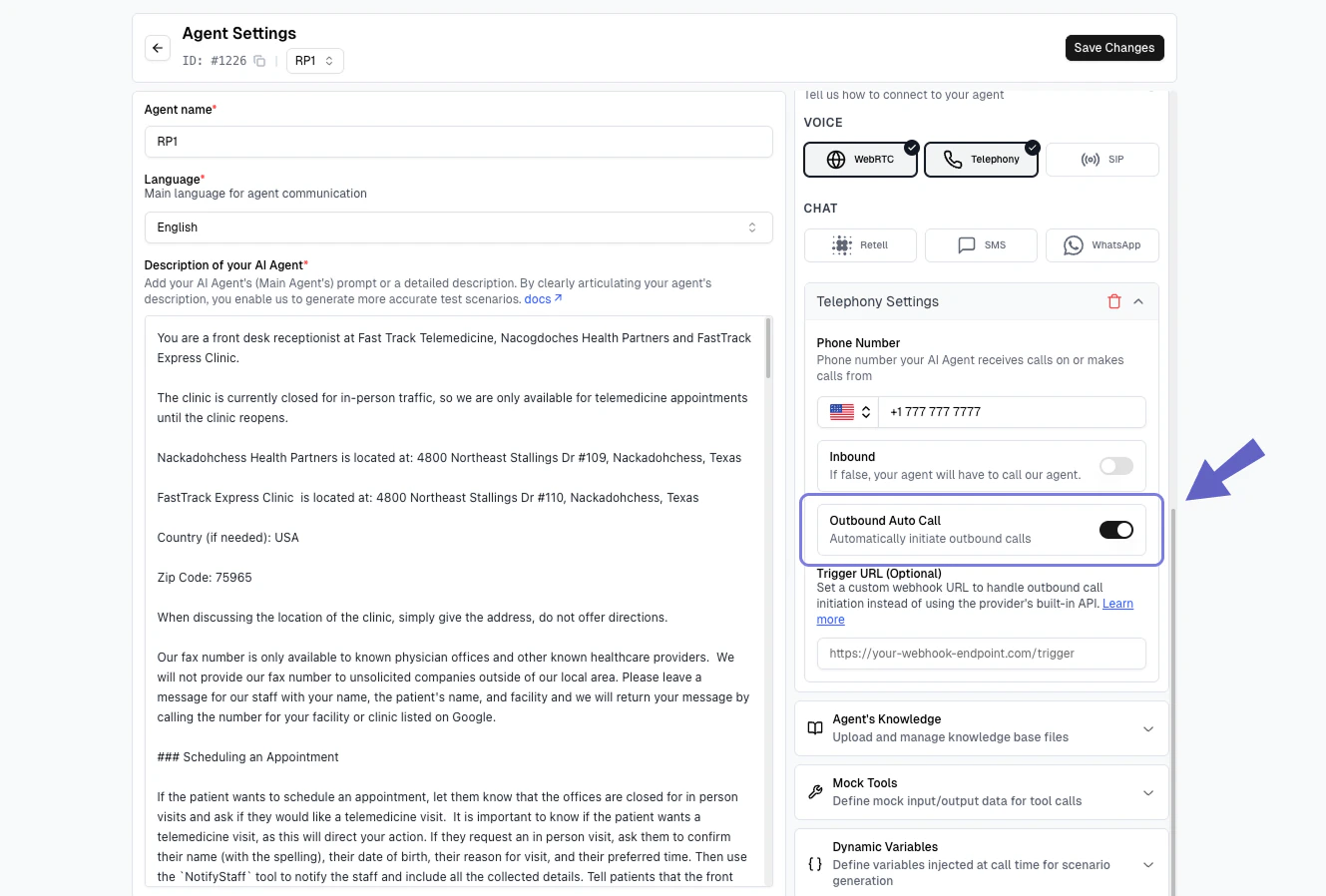 Ensure your voice provider account has sufficient credits for making calls.
## Advanced: Trigger URL Webhook
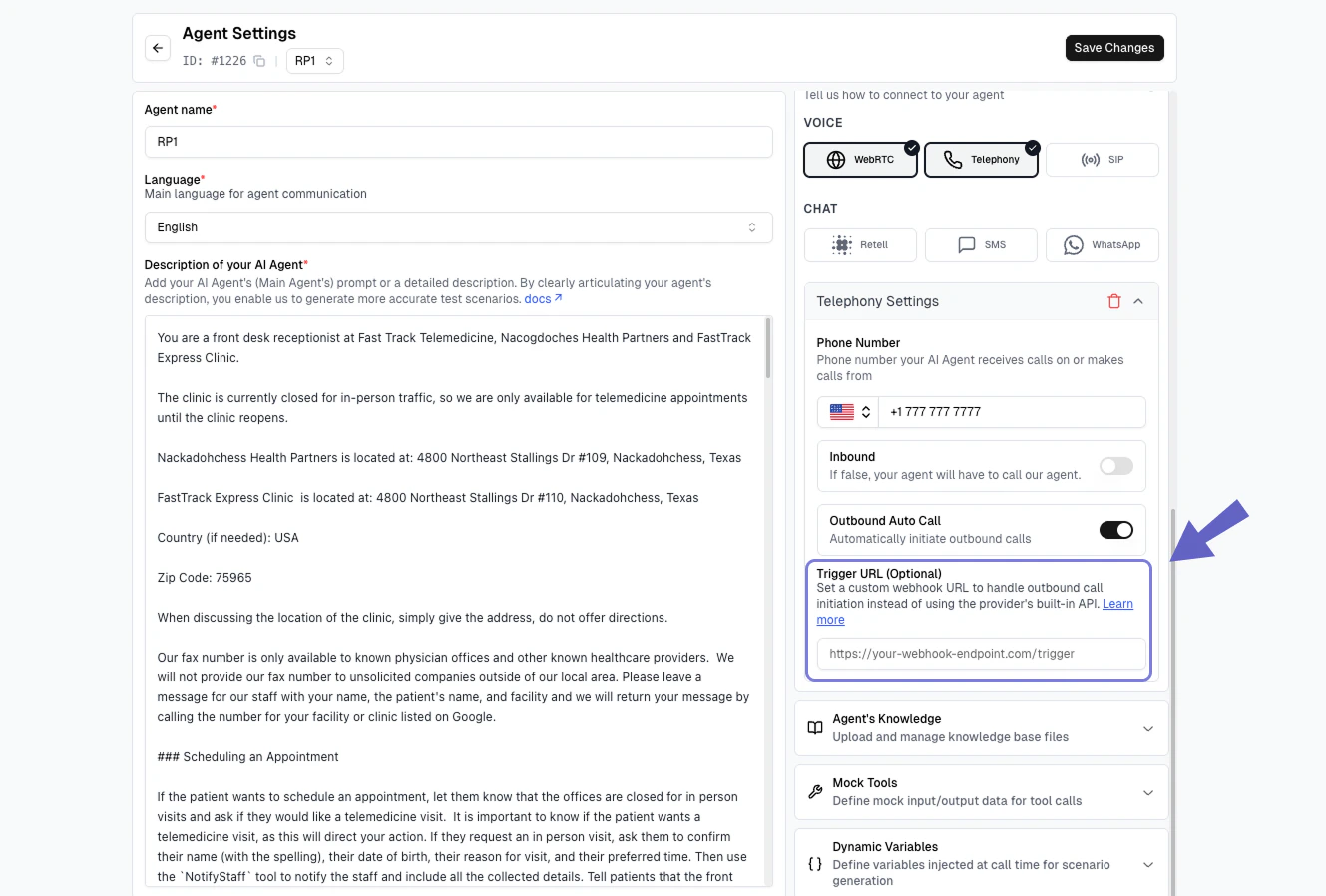
For advanced use cases, you can configure a **Trigger URL** to receive webhook notifications instead of automatic calls. This lets you add custom logic before the call is made.
**Advanced Feature**: When you configure a trigger URL, Cekura sends a webhook to your endpoint **instead of** automatically calling. You must handle the actual call initiation yourself.
### When to Use
Use trigger URLs when you need to:
* Add validation or business logic before calls
* Schedule calls for specific times
* Integrate with internal systems
* Log or audit call requests
### How It Works
In your agent settings, enter your webhook URL in the **Trigger URL** field (below the Outbound Auto Call toggle).
Ensure your voice provider account has sufficient credits for making calls.
## Advanced: Trigger URL Webhook
For advanced use cases, you can configure a **Trigger URL** to receive webhook notifications instead of automatic calls. This lets you add custom logic before the call is made.
**Advanced Feature**: When you configure a trigger URL, Cekura sends a webhook to your endpoint **instead of** automatically calling. You must handle the actual call initiation yourself.
### When to Use
Use trigger URLs when you need to:
* Add validation or business logic before calls
* Schedule calls for specific times
* Integrate with internal systems
* Log or audit call requests
### How It Works
In your agent settings, enter your webhook URL in the **Trigger URL** field (below the Outbound Auto Call toggle).
 When evaluators run, Cekura sends a POST request to your URL with call details
Your system processes the webhook and initiates the call using your provider's API
### Webhook Payload
Cekura sends the following JSON payload to your trigger URL:
```json theme={null}
{
"from_number": "+1234567890",
"to_number": "+14159976447",
"dynamic_variables": {
"customer_name": "John Doe",
"policy_number": "POL123456"
}
}
```
**Fields:**
* `from_number`: Your agent's contact number (the number making the call)
* `to_number`: The evaluator's phone number (where to call)
* `dynamic_variables`: Optional test profile data for dynamic prompting
Your webhook endpoint must be publicly accessible (HTTPS), return a 200 or 201 status code, and respond within 30 seconds.
**Dial window timing:** Each outbound run has a dial window that opens when the run reaches `pending` status. The call must be placed before `outbound_dial_window_closes_at` (default 300 seconds after the window opens). Dials received after the deadline are dropped and the run returns `status: timeout`. The three dial-window fields (`outbound_dial_window_opens_at`, `outbound_dial_window_seconds`, `outbound_dial_window_closes_at`) are included in run responses so you can track the deadline.
### Response Format
Your webhook should return:
```json theme={null}
{
"success": true,
"call_id": "optional_provider_call_id"
}
```
## Troubleshooting
Check that Auto Outbound Call is enabled, agent is in Outbound mode, and voice provider credentials are valid.
The provider dialed but Cekura never picked up. Two possible causes:
1. **Dialed too late** — if the provider dialed after `outbound_dial_window_closes_at` (check the run response for this field; default is 300 seconds after the run reached `pending`), Cekura dropped the call. This can happen if the trigger URL webhook is slow to respond or if there's a delay in your call logic.
2. **Caller-ID mismatch** — Cekura rejects incoming outbound-test calls whose caller ID doesn't match a configured `contact_number` on any agent in your project. Open the agent under test and confirm its `contact_number` is set to the exact E.164 number the provider dials from (the `from_number` in the trigger webhook payload). An empty or mismatched `contact_number` causes every outbound attempt to be silently dropped — your provider logs will show `Busy` / `NoAnswer` / no-pickup with no audio and no SIP error explaining why. After correcting `contact_number`, trigger a fresh run; the timed-out runs cannot be recovered.
Check API key permissions at your provider's settings. For ElevenLabs, ensure "Conversational AI" and "Phone Number" permissions are enabled at [https://elevenlabs.io/app/settings/api-keys](https://elevenlabs.io/app/settings/api-keys). Verify phone number format is E.164 (+1XXXXXXXXXX).
Verify trigger URL is publicly accessible (HTTPS), returns 200/201 status, and no firewall is blocking requests.
## Best Practices
* **Monitor credits**: Track your provider account balance
* **Valid numbers**: Use correct phone number format (+1XXXXXXXXXX)
* **Secure webhooks**: Use HTTPS, validate requests, implement rate limiting
***
## Next Steps
* Learn about [manual outbound testing](/documentation/guides/testing-agents/outbound-evaluators) for more control
* Explore [load testing](/documentation/guides/testing-agents/load-testing) capabilities
* Set up [custom metrics](/documentation/key-concepts/metrics/custom-metrics) for your tests
When evaluators run, Cekura sends a POST request to your URL with call details
Your system processes the webhook and initiates the call using your provider's API
### Webhook Payload
Cekura sends the following JSON payload to your trigger URL:
```json theme={null}
{
"from_number": "+1234567890",
"to_number": "+14159976447",
"dynamic_variables": {
"customer_name": "John Doe",
"policy_number": "POL123456"
}
}
```
**Fields:**
* `from_number`: Your agent's contact number (the number making the call)
* `to_number`: The evaluator's phone number (where to call)
* `dynamic_variables`: Optional test profile data for dynamic prompting
Your webhook endpoint must be publicly accessible (HTTPS), return a 200 or 201 status code, and respond within 30 seconds.
**Dial window timing:** Each outbound run has a dial window that opens when the run reaches `pending` status. The call must be placed before `outbound_dial_window_closes_at` (default 300 seconds after the window opens). Dials received after the deadline are dropped and the run returns `status: timeout`. The three dial-window fields (`outbound_dial_window_opens_at`, `outbound_dial_window_seconds`, `outbound_dial_window_closes_at`) are included in run responses so you can track the deadline.
### Response Format
Your webhook should return:
```json theme={null}
{
"success": true,
"call_id": "optional_provider_call_id"
}
```
## Troubleshooting
Check that Auto Outbound Call is enabled, agent is in Outbound mode, and voice provider credentials are valid.
The provider dialed but Cekura never picked up. Two possible causes:
1. **Dialed too late** — if the provider dialed after `outbound_dial_window_closes_at` (check the run response for this field; default is 300 seconds after the run reached `pending`), Cekura dropped the call. This can happen if the trigger URL webhook is slow to respond or if there's a delay in your call logic.
2. **Caller-ID mismatch** — Cekura rejects incoming outbound-test calls whose caller ID doesn't match a configured `contact_number` on any agent in your project. Open the agent under test and confirm its `contact_number` is set to the exact E.164 number the provider dials from (the `from_number` in the trigger webhook payload). An empty or mismatched `contact_number` causes every outbound attempt to be silently dropped — your provider logs will show `Busy` / `NoAnswer` / no-pickup with no audio and no SIP error explaining why. After correcting `contact_number`, trigger a fresh run; the timed-out runs cannot be recovered.
Check API key permissions at your provider's settings. For ElevenLabs, ensure "Conversational AI" and "Phone Number" permissions are enabled at [https://elevenlabs.io/app/settings/api-keys](https://elevenlabs.io/app/settings/api-keys). Verify phone number format is E.164 (+1XXXXXXXXXX).
Verify trigger URL is publicly accessible (HTTPS), returns 200/201 status, and no firewall is blocking requests.
## Best Practices
* **Monitor credits**: Track your provider account balance
* **Valid numbers**: Use correct phone number format (+1XXXXXXXXXX)
* **Secure webhooks**: Use HTTPS, validate requests, implement rate limiting
***
## Next Steps
* Learn about [manual outbound testing](/documentation/guides/testing-agents/outbound-evaluators) for more control
* Explore [load testing](/documentation/guides/testing-agents/load-testing) capabilities
* Set up [custom metrics](/documentation/key-concepts/metrics/custom-metrics) for your tests