> ## Documentation Index
> Fetch the complete documentation index at: https://docs.cekura.ai/llms.txt
> Use this file to discover all available pages before exploring further.
# Load Testing
> Learn how to perform load testing on your AI agents to ensure they can handle high call volumes
export const CopyPageButton = () => {
if (typeof window !== 'undefined') {
setTimeout(function () {
if (document.getElementById('ck-tools')) return;
var anchor = document.getElementById('content-area') || document.querySelector('.mdx-content');
if (!anchor) return;
if (!document.getElementById('ck-style')) {
var s = document.createElement('style');
s.id = 'ck-style';
s.textContent = '#ck-tools{position:absolute;top:6px;right:0;z-index:100;font-family:inherit;}' + '.ck-row{display:inline-flex;align-items:stretch;border:1px solid rgba(0,0,0,0.15);border-radius:8px;overflow:hidden;background:#fff;}' + ':root.dark .ck-row{background:rgba(255,255,255,0.06);border-color:rgba(255,255,255,0.12);}' + '.ck-btn{padding:5px 12px;border:none;background:none;cursor:pointer;font-size:13px;font-weight:500;font-family:inherit;color:#374151;}' + ':root.dark .ck-btn{color:#d1d5db;}' + '.ck-btn:hover{background:rgba(0,0,0,0.04);}' + ':root.dark .ck-btn:hover{background:rgba(255,255,255,0.06);}' + '.ck-chevron{padding:5px 8px;border:none;background:none;cursor:pointer;font-size:14px;font-family:inherit;color:#374151;}' + ':root.dark .ck-chevron{color:#d1d5db;}' + '.ck-chevron:hover{background:rgba(0,0,0,0.04);}' + ':root.dark .ck-chevron:hover{background:rgba(255,255,255,0.06);}' + '.ck-divider{width:1px;background:rgba(0,0,0,0.12);flex-shrink:0;}' + ':root.dark .ck-divider{background:rgba(255,255,255,0.12);}' + '.ck-dd{position:absolute;top:calc(100% + 4px);right:0;min-width:180px;background:#fff;border:1px solid rgba(0,0,0,0.12);border-radius:8px;box-shadow:0 4px 12px rgba(0,0,0,0.1);padding:4px;display:none;z-index:200;}' + ':root.dark .ck-dd{background:#1f2937;border-color:rgba(255,255,255,0.1);box-shadow:0 4px 16px rgba(0,0,0,0.35);}' + '.ck-item{display:block;width:100%;padding:7px 12px;border:none;background:none;border-radius:6px;cursor:pointer;font-size:13px;font-family:inherit;text-align:left;color:#374151;}' + ':root.dark .ck-item{color:#d1d5db;}' + '.ck-item:hover{background:rgba(0,0,0,0.05);}' + ':root.dark .ck-item:hover{background:rgba(255,255,255,0.07);}';
document.head.appendChild(s);
}
var wrap = document.createElement('div');
wrap.id = 'ck-tools';
var row = document.createElement('div');
row.className = 'ck-row';
var mainBtn = document.createElement('button');
mainBtn.className = 'ck-btn';
mainBtn.textContent = 'Copy page';
var divider = document.createElement('span');
divider.className = 'ck-divider';
var chevron = document.createElement('button');
chevron.className = 'ck-chevron';
chevron.textContent = '▾';
var dd = document.createElement('div');
dd.className = 'ck-dd';
function closeDD() {
dd.style.display = 'none';
}
function openDD() {
dd.style.display = 'block';
}
chevron.onclick = function (e) {
e.stopPropagation();
if (dd.style.display === 'block') {
closeDD();
} else {
openDD();
}
};
document.addEventListener('click', function (e) {
if (!e.target.closest('#ck-tools')) {
closeDD();
}
});
document.addEventListener('keydown', function (e) {
if (e.key === 'Escape') {
closeDD();
}
});
function makeItem(label, fn) {
var b = document.createElement('button');
b.className = 'ck-item';
b.textContent = label;
b.onclick = function () {
fn();
closeDD();
};
return b;
}
function getMarkdown() {
var walk = function (node) {
if (!node) return '';
if (node.nodeType === 3) return node.textContent || '';
if (node.nodeType !== 1) return '';
var tag = node.tagName.toLowerCase();
var skip = ['script', 'style', 'svg', 'noscript', 'button', 'iframe'];
if (skip.indexOf(tag) !== -1) return '';
if (node.id === 'ck-tools') return '';
var ch = Array.from(node.childNodes).map(walk).join('');
if (tag === 'h1') return '\n# ' + ch.trim() + '\n\n';
if (tag === 'h2') return '\n## ' + ch.trim() + '\n\n';
if (tag === 'h3') return '\n### ' + ch.trim() + '\n\n';
if (tag === 'p') return '\n' + ch.trim() + '\n\n';
if (tag === 'pre') return '\n```\n' + node.textContent.trim() + '\n```\n\n';
if (tag === 'li') return '- ' + ch.trim() + '\n';
if (tag === 'code') return '`' + ch.trim() + '`';
return ch;
};
var content = document.querySelector('.mdx-content') || document.getElementById('content-area') || document.body;
return walk(content).replace(/\n\n\n+/g, '\n\n').trim();
}
function copyMd() {
var md = getMarkdown();
navigator.clipboard.writeText(md).then(function () {
mainBtn.textContent = 'Copied!';
setTimeout(function () {
mainBtn.textContent = 'Copy page';
}, 2000);
});
}
function viewMd() {
var md = getMarkdown();
var safe = md.split('&').join('&').split('<').join('<').split('>').join('>');
var html = '' + safe + '';
window.open(URL.createObjectURL(new Blob([html], {
type: 'text/html'
})), '_blank');
}
function openClaude() {
var prompt = 'Can you read this Cekura docs page ' + window.location.href + ' so I can ask you questions?';
window.open('https://claude.ai/new?q=' + encodeURIComponent(prompt), '_blank');
}
mainBtn.onclick = copyMd;
dd.appendChild(makeItem('Copy page', copyMd));
dd.appendChild(makeItem('View as Markdown', viewMd));
dd.appendChild(makeItem('Open in Claude', openClaude));
row.appendChild(mainBtn);
row.appendChild(divider);
row.appendChild(chevron);
wrap.appendChild(row);
wrap.appendChild(dd);
anchor.style.position = 'relative';
anchor.insertBefore(wrap, anchor.firstChild);
}, 50);
}
return null;
};
## Overview
Load testing validates that your voice AI agent performs reliably under concurrent call volume — not just in isolated test calls. Running multiple evaluators simultaneously reveals infrastructure bottlenecks, latency spikes, and quality degradation that single-call testing won't surface.
Cekura's load testing works through the **frequency** parameter. When you set frequency to `N`, each evaluator runs `N` times during a single evaluation cycle. With 10 evaluators at frequency 5, that's 50 concurrent calls hitting your agent.
## Prerequisites
Before starting load testing, ensure you have:
* An active agent configured on the Cekura dashboard
* At least 1+ evaluator(s) that **passes when run in a vaccuum**
* A baseline run completed for your evaluator(s), so you have a benchmark to compare your load testing results against
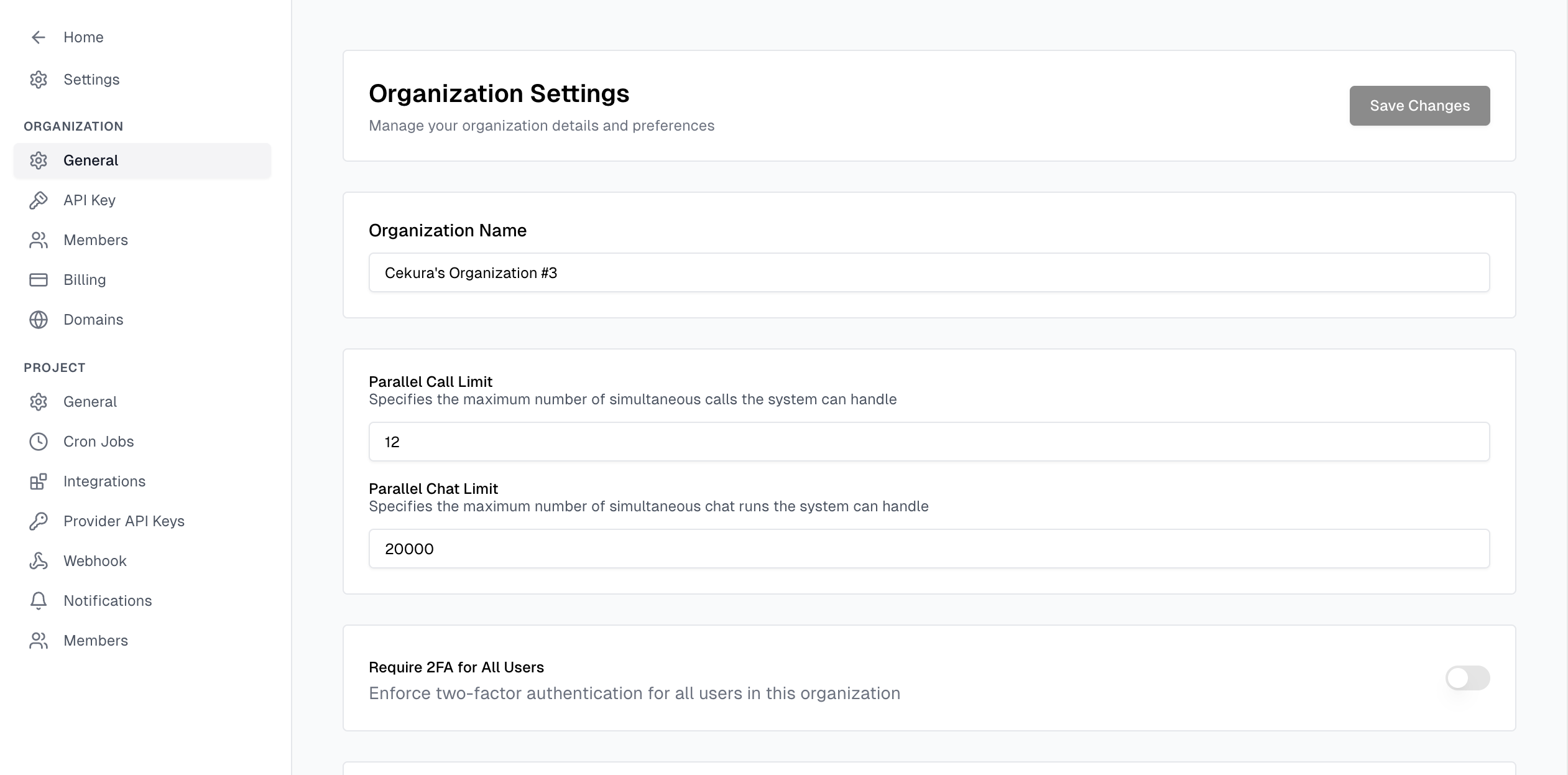
* Your concurrency settings\* properly configured on both Cekura (settings -> organization -> general -> **parallel call/chat limit**), as well as on your provider's side.
\* The Developer plan has a limit of 10 concurrent calls. For higher allowances or any questions, feel free to contact us at [support@cekura.ai](mailto:support@cekura.ai).
Load testing is for finding infrastructure limits, not debugging conversation logic. If your evaluators fail at frequency 1, fix them first before scaling.
Keep expected outcomes short and focused — lengthy expected outcomes with many assertions may fail inconsistently under load. Tie your test cases and expected outcomes to core agent flows and functionality.
## Default Metrics
Cekura provides three metrics that are automatically applied to every load test run — Talk Ratio, Infrastructure Issues, and Latency.
You can optionally enable **Expected Outcome** as well for an added layer of verification that your core flows are still working under load.
All other metrics can be disabled for load testing runs.
| Metric | What It Measures | What Degradation Means |
| ------------------------- | ------------------------------------------------------------------- | ------------------------------------------------------------------------------ |
| **Talk Ratio** | Percentage of the call where the agent is speaking vs. listening | Agent may be stalling, repeating itself, or producing longer pauses under load |
| **Infrastructure Issues** | Technical failures — dropped calls, connection errors, timeouts | Your infrastructure is struggling with the concurrency level |
| **Latency** | Time between the caller finishing a sentence and the agent replying | Response time is creeping up as concurrent calls increase |
## Step-by-Step Process
Run your evaluator(s) once with frequency set to **1**. Record:
* Expected outcome pass rate
* Average latency per evaluator
* Infrastructure issue count (should be 0)
* Talk ratio norms
**These baseline numbers are your reference point for every subsequent load test.**
In the Cekura dashboard:
1. Navigate to your agent's **Evaluators** tab
2. Select the evaluators you want to include in the load test
3. Set the **Frequency** field to your target number
4. Click **Run**
 The frequency controls how many times each selected evaluator runs. All runs execute concurrently.
Don't jump straight to high numbers. Increase incrementally so you can identify exactly where degradation begins:
| Step | Frequency | What to Watch |
| ----------- | ------------ | -------------------------------- |
| Baseline | 1 | Establish norms |
| Low load | 2–3 | Should match baseline closely |
| Medium load | 5–10 | First signs of latency creep |
| High load | 50–100 | Infrastructure issues may appear |
| Stress test | 200–500 | Finding the breaking point |
| Peak load | 1,000–2,000+ | Maximum capacity testing |
Cekura schedules calls at a rate of **5 CPS** (calls per second). At higher frequencies, ensure each call is long enough so that all scheduled calls are running concurrently.
For example, 50 calls requires a minimum call length of 50 ÷ 5 = **10 seconds**, and 100 calls requires 100 ÷ 5 = **20 seconds**.
If calls are too short, earlier calls may finish before later ones start, meaning you won't hit true peak concurrency.
After each step, compare results against your baseline before increasing further.
After each run completes, compare the three default metrics against your baseline:
* **Latency** — A consistent 1–2 second increase is a yellow flag. Spikes above 5 seconds mean your infrastructure is under strain.
* **Infrastructure Issues** — Any non-zero count at low frequency is a bug, not a load problem. At higher frequencies, these indicate you've hit a concurrency ceiling.
* **Talk Ratio** — Significant shifts from baseline suggest the agent is behaving differently under load (longer pauses, repeated phrases, or truncated responses).
* **Expected Outcome Pass Rate** — If evaluators that pass at frequency 1 start failing at higher frequencies, conversation quality is degrading under load.
## Concurrency Limits
| Plan | Concurrent Call Limit |
| --------- | ----------------------------------------------------------------------------------- |
| Developer | 10 |
| Custom | Configurable based on your plan — the platform supports **2,000+ concurrent calls** |
If your current plan's concurrent call limit is lower than what your load test requires, reach out to [support@cekura.ai](mailto:support@cekura.ai) to discuss upgrading your concurrency allowance.
## Best Practices
### Start with Passing Evaluators
Load testing should surface infrastructure problems, not prompt issues. If an evaluator fails at frequency 1, fix it before including it in a load test.
### Isolate Variables
Don't change your agent's prompt and run a load test at the same time. You won't know whether failures are from the prompt change or the increased load.
### Test at Realistic Peaks
If your agent typically handles 20 concurrent calls in production, test at 20, 30, and 50 — not just 100. You want to know your headroom above real-world usage, not just the absolute ceiling.
### Run Each Level Multiple Times
A single run can be noisy. Run the same frequency 2–3 times and look for consistent patterns rather than one-off spikes.
### Monitor Downstream Systems
Cekura tests the agent, but if your internal and/or external systems that the agent depends on (i.e. toolcalls, for example) can't handle the load, you'll see failures that look like agent problems. Check your backend logs alongside Cekura results.
## Related Resources
* [Suggested Testing Approach](/documentation/guides/testing-agents/suggested-testing-approach) — Build a solid evaluator suite before load testing
* [Evaluators Overview](/documentation/key-concepts/evaluators/overview) — Design effective test scenarios
* [Mock Tools](/documentation/guides/testing-agents/mock-tools) — Use mock tools during load tests to isolate agent performance from backend dependencies
The frequency controls how many times each selected evaluator runs. All runs execute concurrently.
Don't jump straight to high numbers. Increase incrementally so you can identify exactly where degradation begins:
| Step | Frequency | What to Watch |
| ----------- | ------------ | -------------------------------- |
| Baseline | 1 | Establish norms |
| Low load | 2–3 | Should match baseline closely |
| Medium load | 5–10 | First signs of latency creep |
| High load | 50–100 | Infrastructure issues may appear |
| Stress test | 200–500 | Finding the breaking point |
| Peak load | 1,000–2,000+ | Maximum capacity testing |
Cekura schedules calls at a rate of **5 CPS** (calls per second). At higher frequencies, ensure each call is long enough so that all scheduled calls are running concurrently.
For example, 50 calls requires a minimum call length of 50 ÷ 5 = **10 seconds**, and 100 calls requires 100 ÷ 5 = **20 seconds**.
If calls are too short, earlier calls may finish before later ones start, meaning you won't hit true peak concurrency.
After each step, compare results against your baseline before increasing further.
After each run completes, compare the three default metrics against your baseline:
* **Latency** — A consistent 1–2 second increase is a yellow flag. Spikes above 5 seconds mean your infrastructure is under strain.
* **Infrastructure Issues** — Any non-zero count at low frequency is a bug, not a load problem. At higher frequencies, these indicate you've hit a concurrency ceiling.
* **Talk Ratio** — Significant shifts from baseline suggest the agent is behaving differently under load (longer pauses, repeated phrases, or truncated responses).
* **Expected Outcome Pass Rate** — If evaluators that pass at frequency 1 start failing at higher frequencies, conversation quality is degrading under load.
## Concurrency Limits
| Plan | Concurrent Call Limit |
| --------- | ----------------------------------------------------------------------------------- |
| Developer | 10 |
| Custom | Configurable based on your plan — the platform supports **2,000+ concurrent calls** |
If your current plan's concurrent call limit is lower than what your load test requires, reach out to [support@cekura.ai](mailto:support@cekura.ai) to discuss upgrading your concurrency allowance.
## Best Practices
### Start with Passing Evaluators
Load testing should surface infrastructure problems, not prompt issues. If an evaluator fails at frequency 1, fix it before including it in a load test.
### Isolate Variables
Don't change your agent's prompt and run a load test at the same time. You won't know whether failures are from the prompt change or the increased load.
### Test at Realistic Peaks
If your agent typically handles 20 concurrent calls in production, test at 20, 30, and 50 — not just 100. You want to know your headroom above real-world usage, not just the absolute ceiling.
### Run Each Level Multiple Times
A single run can be noisy. Run the same frequency 2–3 times and look for consistent patterns rather than one-off spikes.
### Monitor Downstream Systems
Cekura tests the agent, but if your internal and/or external systems that the agent depends on (i.e. toolcalls, for example) can't handle the load, you'll see failures that look like agent problems. Check your backend logs alongside Cekura results.
## Related Resources
* [Suggested Testing Approach](/documentation/guides/testing-agents/suggested-testing-approach) — Build a solid evaluator suite before load testing
* [Evaluators Overview](/documentation/key-concepts/evaluators/overview) — Design effective test scenarios
* [Mock Tools](/documentation/guides/testing-agents/mock-tools) — Use mock tools during load tests to isolate agent performance from backend dependencies