> ## Documentation Index
> Fetch the complete documentation index at: https://docs.cekura.ai/llms.txt
> Use this file to discover all available pages before exploring further.
# Infrastructure Suite
> Pre-built test scenarios to validate latency, stability, and failure handling across voice infrastructure stacks
export const CopyPageButton = () => {
if (typeof window !== 'undefined') {
setTimeout(function () {
if (document.getElementById('ck-tools')) return;
var anchor = document.getElementById('content-area') || document.querySelector('.mdx-content');
if (!anchor) return;
if (!document.getElementById('ck-style')) {
var s = document.createElement('style');
s.id = 'ck-style';
s.textContent = '#ck-tools{position:absolute;top:6px;right:0;z-index:100;font-family:inherit;}' + '.ck-row{display:inline-flex;align-items:stretch;border:1px solid rgba(0,0,0,0.15);border-radius:8px;overflow:hidden;background:#fff;}' + ':root.dark .ck-row{background:rgba(255,255,255,0.06);border-color:rgba(255,255,255,0.12);}' + '.ck-btn{padding:5px 12px;border:none;background:none;cursor:pointer;font-size:13px;font-weight:500;font-family:inherit;color:#374151;}' + ':root.dark .ck-btn{color:#d1d5db;}' + '.ck-btn:hover{background:rgba(0,0,0,0.04);}' + ':root.dark .ck-btn:hover{background:rgba(255,255,255,0.06);}' + '.ck-chevron{padding:5px 8px;border:none;background:none;cursor:pointer;font-size:14px;font-family:inherit;color:#374151;}' + ':root.dark .ck-chevron{color:#d1d5db;}' + '.ck-chevron:hover{background:rgba(0,0,0,0.04);}' + ':root.dark .ck-chevron:hover{background:rgba(255,255,255,0.06);}' + '.ck-divider{width:1px;background:rgba(0,0,0,0.12);flex-shrink:0;}' + ':root.dark .ck-divider{background:rgba(255,255,255,0.12);}' + '.ck-dd{position:absolute;top:calc(100% + 4px);right:0;min-width:180px;background:#fff;border:1px solid rgba(0,0,0,0.12);border-radius:8px;box-shadow:0 4px 12px rgba(0,0,0,0.1);padding:4px;display:none;z-index:200;}' + ':root.dark .ck-dd{background:#1f2937;border-color:rgba(255,255,255,0.1);box-shadow:0 4px 16px rgba(0,0,0,0.35);}' + '.ck-item{display:block;width:100%;padding:7px 12px;border:none;background:none;border-radius:6px;cursor:pointer;font-size:13px;font-family:inherit;text-align:left;color:#374151;}' + ':root.dark .ck-item{color:#d1d5db;}' + '.ck-item:hover{background:rgba(0,0,0,0.05);}' + ':root.dark .ck-item:hover{background:rgba(255,255,255,0.07);}';
document.head.appendChild(s);
}
var wrap = document.createElement('div');
wrap.id = 'ck-tools';
var row = document.createElement('div');
row.className = 'ck-row';
var mainBtn = document.createElement('button');
mainBtn.className = 'ck-btn';
mainBtn.textContent = 'Copy page';
var divider = document.createElement('span');
divider.className = 'ck-divider';
var chevron = document.createElement('button');
chevron.className = 'ck-chevron';
chevron.textContent = '▾';
var dd = document.createElement('div');
dd.className = 'ck-dd';
function closeDD() {
dd.style.display = 'none';
}
function openDD() {
dd.style.display = 'block';
}
chevron.onclick = function (e) {
e.stopPropagation();
if (dd.style.display === 'block') {
closeDD();
} else {
openDD();
}
};
document.addEventListener('click', function (e) {
if (!e.target.closest('#ck-tools')) {
closeDD();
}
});
document.addEventListener('keydown', function (e) {
if (e.key === 'Escape') {
closeDD();
}
});
function makeItem(label, fn) {
var b = document.createElement('button');
b.className = 'ck-item';
b.textContent = label;
b.onclick = function () {
fn();
closeDD();
};
return b;
}
function getMarkdown() {
var walk = function (node) {
if (!node) return '';
if (node.nodeType === 3) return node.textContent || '';
if (node.nodeType !== 1) return '';
var tag = node.tagName.toLowerCase();
var skip = ['script', 'style', 'svg', 'noscript', 'button', 'iframe'];
if (skip.indexOf(tag) !== -1) return '';
if (node.id === 'ck-tools') return '';
var ch = Array.from(node.childNodes).map(walk).join('');
if (tag === 'h1') return '\n# ' + ch.trim() + '\n\n';
if (tag === 'h2') return '\n## ' + ch.trim() + '\n\n';
if (tag === 'h3') return '\n### ' + ch.trim() + '\n\n';
if (tag === 'p') return '\n' + ch.trim() + '\n\n';
if (tag === 'pre') return '\n```\n' + node.textContent.trim() + '\n```\n\n';
if (tag === 'li') return '- ' + ch.trim() + '\n';
if (tag === 'code') return '`' + ch.trim() + '`';
return ch;
};
var content = document.querySelector('.mdx-content') || document.getElementById('content-area') || document.body;
return walk(content).replace(/\n\n\n+/g, '\n\n').trim();
}
function copyMd() {
var md = getMarkdown();
navigator.clipboard.writeText(md).then(function () {
mainBtn.textContent = 'Copied!';
setTimeout(function () {
mainBtn.textContent = 'Copy page';
}, 2000);
});
}
function viewMd() {
var md = getMarkdown();
var safe = md.split('&').join('&').split('<').join('<').split('>').join('>');
var html = '' + safe + '';
window.open(URL.createObjectURL(new Blob([html], {
type: 'text/html'
})), '_blank');
}
function openClaude() {
var prompt = 'Can you read this Cekura docs page ' + window.location.href + ' so I can ask you questions?';
window.open('https://claude.ai/new?q=' + encodeURIComponent(prompt), '_blank');
}
mainBtn.onclick = copyMd;
dd.appendChild(makeItem('Copy page', copyMd));
dd.appendChild(makeItem('View as Markdown', viewMd));
dd.appendChild(makeItem('Open in Claude', openClaude));
row.appendChild(mainBtn);
row.appendChild(divider);
row.appendChild(chevron);
wrap.appendChild(row);
wrap.appendChild(dd);
anchor.style.position = 'relative';
anchor.insertBefore(wrap, anchor.firstChild);
}, 50);
}
return null;
};
## What is Infrastructure Suite?
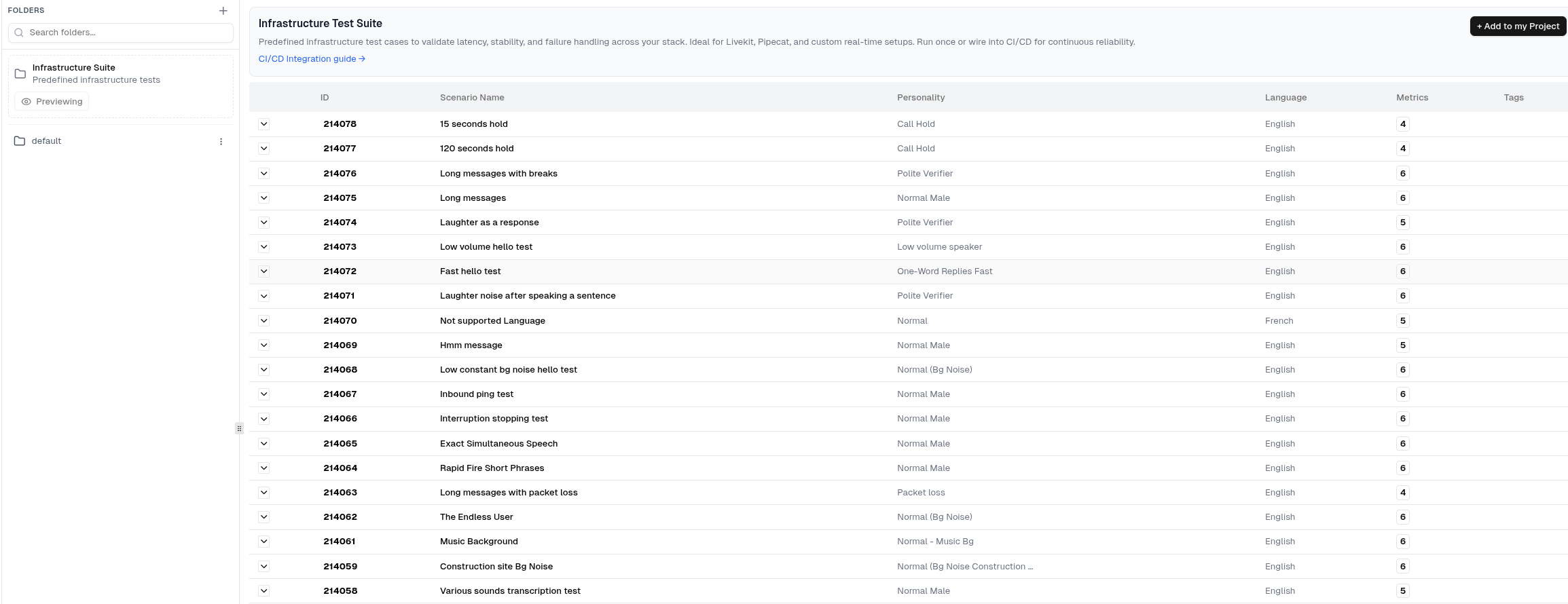
Infrastructure Suite is a collection of pre-built test scenarios designed to validate the reliability of your voice AI infrastructure. With one click, you can add 18+ ready-made test cases to your project that cover latency, audio quality, interruption handling, language support, and edge cases.
Rather than building infrastructure tests from scratch, Infrastructure Suite provides "batteries included" testing that works across all voice stacks — LiveKit, Pipecat, VAPI, Retell, and custom real-time setups.
## Why Use Infrastructure Suite?
Skip the manual work of creating infrastructure test scenarios. Add 18+ pre-configured tests instantly.
Validate that your infrastructure handles real-world challenges like interruptions, background noise, and latency spikes.
Run Infrastructure Suite tests regularly in CI/CD to catch infrastructure degradation before it impacts users.
Leverage test scenarios built from common infrastructure failure patterns observed across production systems.
## What's Included
Infrastructure Suite includes 18+ test scenarios covering hold tests, audio quality under various conditions, interruption handling, language support, and edge cases like packet loss and rapid-fire phrases.
 ## How to Add Infrastructure Suite
In the Cekura dashboard, go to your agent's **Evaluators** tab in the sidebar.
In the **Folders** section, you'll see the **Infrastructure Suite** folder labeled as "Predefined infrastructure tests".
## How to Add Infrastructure Suite
In the Cekura dashboard, go to your agent's **Evaluators** tab in the sidebar.
In the **Folders** section, you'll see the **Infrastructure Suite** folder labeled as "Predefined infrastructure tests".
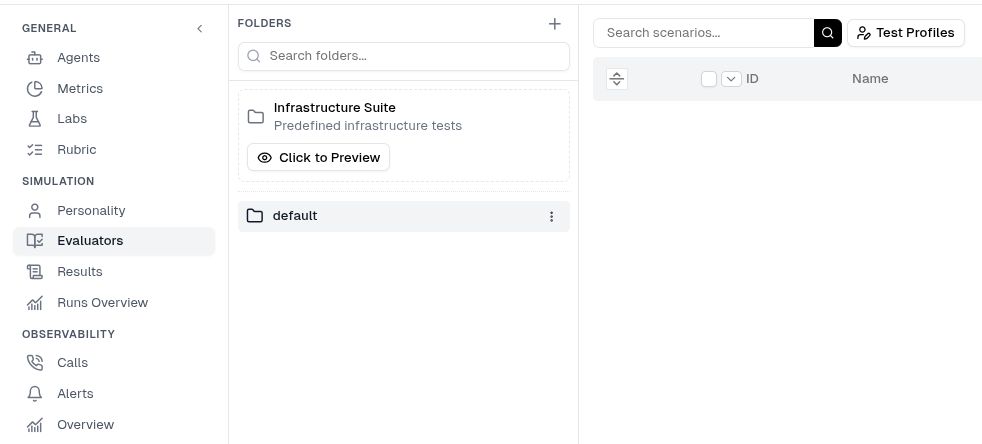 Click **Click to Preview** to view all available test scenarios and their details.
Click **+ Add to my Project** in the top-right corner. This copies all scenarios to your project with the appropriate personality and metric mappings.
Infrastructure Suite scenarios are copied (not linked) to your project. You can modify them as needed without affecting the original templates. Global personalities are reused, while others are created as org-scoped copies.
A Rubric rule will be added to your project: **AI Interrupting user = 0**. This rule affects pass/fail on runs with interruption-related scenarios. You can remove it later from Rubric settings if not relevant to your use case.
## Running Infrastructure Tests
Infrastructure Suite scenarios include conditions with the `` tag, so the testing agent will end the call when those conditions fire. If you want to prevent the testing agent from ending the call on a specific scenario, remove the `` tag from that condition's action text. See [How can I prevent the testing agent from ending the call?](/documentation/FAQ#how-can-i-prevent-the-testing-agent-from-ending-the-call) for details.
Once added, select the scenarios from your Evaluators tab and click **Run**. Use the frequency parameter for load testing — see [Load Testing](/documentation/guides/testing-agents/load-testing) for details.
## Integration with CI/CD
Infrastructure Suite tests are ideal for continuous integration workflows. Use the Cekura GitHub Actions to run infrastructure validation automatically:
```yaml theme={null}
- uses: cekura-ai/cekura-github-actions@v1.0.0
with:
agent_id: ${{ vars.AGENT_ID }}
tags: "infrastructure-suite"
api_key: ${{ secrets.CEKURA_API_KEY }}
```
Tag your Infrastructure Suite scenarios with `infrastructure-suite` to run them as a group in CI/CD pipelines. Learn more about [GitHub Actions CI/CD](/documentation/guides/github-actions-ci-cd).
Click **Click to Preview** to view all available test scenarios and their details.
Click **+ Add to my Project** in the top-right corner. This copies all scenarios to your project with the appropriate personality and metric mappings.
Infrastructure Suite scenarios are copied (not linked) to your project. You can modify them as needed without affecting the original templates. Global personalities are reused, while others are created as org-scoped copies.
A Rubric rule will be added to your project: **AI Interrupting user = 0**. This rule affects pass/fail on runs with interruption-related scenarios. You can remove it later from Rubric settings if not relevant to your use case.
## Running Infrastructure Tests
Infrastructure Suite scenarios include conditions with the `` tag, so the testing agent will end the call when those conditions fire. If you want to prevent the testing agent from ending the call on a specific scenario, remove the `` tag from that condition's action text. See [How can I prevent the testing agent from ending the call?](/documentation/FAQ#how-can-i-prevent-the-testing-agent-from-ending-the-call) for details.
Once added, select the scenarios from your Evaluators tab and click **Run**. Use the frequency parameter for load testing — see [Load Testing](/documentation/guides/testing-agents/load-testing) for details.
## Integration with CI/CD
Infrastructure Suite tests are ideal for continuous integration workflows. Use the Cekura GitHub Actions to run infrastructure validation automatically:
```yaml theme={null}
- uses: cekura-ai/cekura-github-actions@v1.0.0
with:
agent_id: ${{ vars.AGENT_ID }}
tags: "infrastructure-suite"
api_key: ${{ secrets.CEKURA_API_KEY }}
```
Tag your Infrastructure Suite scenarios with `infrastructure-suite` to run them as a group in CI/CD pipelines. Learn more about [GitHub Actions CI/CD](/documentation/guides/github-actions-ci-cd).