> ## Documentation Index
> Fetch the complete documentation index at: https://docs.cekura.ai/llms.txt
> Use this file to discover all available pages before exploring further.
# DTMF Testing
> Test DTMF (keypad) interactions with your voice agents - simulate button presses during calls for IVR navigation and menu testing
export const CopyPageButton = () => {
if (typeof window !== 'undefined') {
setTimeout(function () {
if (document.getElementById('ck-tools')) return;
var anchor = document.getElementById('content-area') || document.querySelector('.mdx-content');
if (!anchor) return;
if (!document.getElementById('ck-style')) {
var s = document.createElement('style');
s.id = 'ck-style';
s.textContent = '#ck-tools{position:absolute;top:6px;right:0;z-index:100;font-family:inherit;}' + '.ck-row{display:inline-flex;align-items:stretch;border:1px solid rgba(0,0,0,0.15);border-radius:8px;overflow:hidden;background:#fff;}' + ':root.dark .ck-row{background:rgba(255,255,255,0.06);border-color:rgba(255,255,255,0.12);}' + '.ck-btn{padding:5px 12px;border:none;background:none;cursor:pointer;font-size:13px;font-weight:500;font-family:inherit;color:#374151;}' + ':root.dark .ck-btn{color:#d1d5db;}' + '.ck-btn:hover{background:rgba(0,0,0,0.04);}' + ':root.dark .ck-btn:hover{background:rgba(255,255,255,0.06);}' + '.ck-chevron{padding:5px 8px;border:none;background:none;cursor:pointer;font-size:14px;font-family:inherit;color:#374151;}' + ':root.dark .ck-chevron{color:#d1d5db;}' + '.ck-chevron:hover{background:rgba(0,0,0,0.04);}' + ':root.dark .ck-chevron:hover{background:rgba(255,255,255,0.06);}' + '.ck-divider{width:1px;background:rgba(0,0,0,0.12);flex-shrink:0;}' + ':root.dark .ck-divider{background:rgba(255,255,255,0.12);}' + '.ck-dd{position:absolute;top:calc(100% + 4px);right:0;min-width:180px;background:#fff;border:1px solid rgba(0,0,0,0.12);border-radius:8px;box-shadow:0 4px 12px rgba(0,0,0,0.1);padding:4px;display:none;z-index:200;}' + ':root.dark .ck-dd{background:#1f2937;border-color:rgba(255,255,255,0.1);box-shadow:0 4px 16px rgba(0,0,0,0.35);}' + '.ck-item{display:block;width:100%;padding:7px 12px;border:none;background:none;border-radius:6px;cursor:pointer;font-size:13px;font-family:inherit;text-align:left;color:#374151;}' + ':root.dark .ck-item{color:#d1d5db;}' + '.ck-item:hover{background:rgba(0,0,0,0.05);}' + ':root.dark .ck-item:hover{background:rgba(255,255,255,0.07);}';
document.head.appendChild(s);
}
var wrap = document.createElement('div');
wrap.id = 'ck-tools';
var row = document.createElement('div');
row.className = 'ck-row';
var mainBtn = document.createElement('button');
mainBtn.className = 'ck-btn';
mainBtn.textContent = 'Copy page';
var divider = document.createElement('span');
divider.className = 'ck-divider';
var chevron = document.createElement('button');
chevron.className = 'ck-chevron';
chevron.textContent = '▾';
var dd = document.createElement('div');
dd.className = 'ck-dd';
function closeDD() {
dd.style.display = 'none';
}
function openDD() {
dd.style.display = 'block';
}
chevron.onclick = function (e) {
e.stopPropagation();
if (dd.style.display === 'block') {
closeDD();
} else {
openDD();
}
};
document.addEventListener('click', function (e) {
if (!e.target.closest('#ck-tools')) {
closeDD();
}
});
document.addEventListener('keydown', function (e) {
if (e.key === 'Escape') {
closeDD();
}
});
function makeItem(label, fn) {
var b = document.createElement('button');
b.className = 'ck-item';
b.textContent = label;
b.onclick = function () {
fn();
closeDD();
};
return b;
}
function getMarkdown() {
var walk = function (node) {
if (!node) return '';
if (node.nodeType === 3) return node.textContent || '';
if (node.nodeType !== 1) return '';
var tag = node.tagName.toLowerCase();
var skip = ['script', 'style', 'svg', 'noscript', 'button', 'iframe'];
if (skip.indexOf(tag) !== -1) return '';
if (node.id === 'ck-tools') return '';
var ch = Array.from(node.childNodes).map(walk).join('');
if (tag === 'h1') return '\n# ' + ch.trim() + '\n\n';
if (tag === 'h2') return '\n## ' + ch.trim() + '\n\n';
if (tag === 'h3') return '\n### ' + ch.trim() + '\n\n';
if (tag === 'p') return '\n' + ch.trim() + '\n\n';
if (tag === 'pre') return '\n```\n' + node.textContent.trim() + '\n```\n\n';
if (tag === 'li') return '- ' + ch.trim() + '\n';
if (tag === 'code') return '`' + ch.trim() + '`';
return ch;
};
var content = document.querySelector('.mdx-content') || document.getElementById('content-area') || document.body;
return walk(content).replace(/\n\n\n+/g, '\n\n').trim();
}
function copyMd() {
var md = getMarkdown();
navigator.clipboard.writeText(md).then(function () {
mainBtn.textContent = 'Copied!';
setTimeout(function () {
mainBtn.textContent = 'Copy page';
}, 2000);
});
}
function viewMd() {
var md = getMarkdown();
var safe = md.split('&').join('&').split('<').join('<').split('>').join('>');
var html = '' + safe + '';
window.open(URL.createObjectURL(new Blob([html], {
type: 'text/html'
})), '_blank');
}
function openClaude() {
var prompt = 'Can you read this Cekura docs page ' + window.location.href + ' so I can ask you questions?';
window.open('https://claude.ai/new?q=' + encodeURIComponent(prompt), '_blank');
}
mainBtn.onclick = copyMd;
dd.appendChild(makeItem('Copy page', copyMd));
dd.appendChild(makeItem('View as Markdown', viewMd));
dd.appendChild(makeItem('Open in Claude', openClaude));
row.appendChild(mainBtn);
row.appendChild(divider);
row.appendChild(chevron);
wrap.appendChild(row);
wrap.appendChild(dd);
anchor.style.position = 'relative';
anchor.insertBefore(wrap, anchor.firstChild);
}, 50);
}
return null;
};
## What is DTMF Testing?
DTMF (Dual-Tone Multi-Frequency) testing allows you to simulate phone keypad button presses during test calls. This is essential for testing:
* IVR (Interactive Voice Response) navigation
* Menu selection scenarios
* Account number or PIN entry
* Call transfer requests ("Press 1 for sales")
* Any interaction requiring keypad input
## Two Ways to Use DTMF
### 1. Via Evaluator Tools
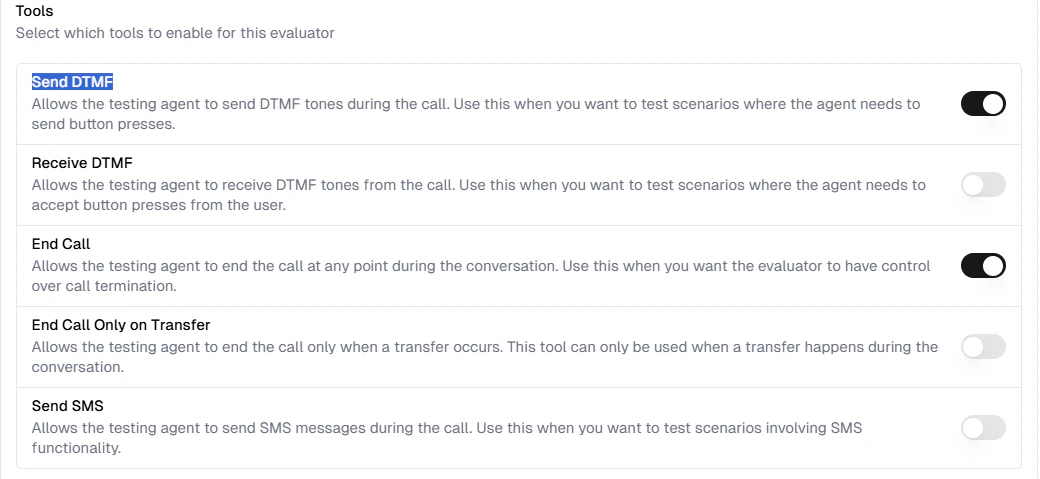
Enable DTMF tools on your evaluators to give them the ability to send or receive button presses during calls.
**Send DTMF**: Evaluator sends button presses to the main agent (testing IVR navigation)
**Receive DTMF**: Main agent sends button presses, evaluator receives them
### 2. Via Structured Tests
Use the `` tag in Structured Tests to send specific button sequences at precise moments during the conversation.
## Enabling DTMF Tools
To enable DTMF functionality for your testing agents:
Click on the **Evaluators** tab and select the evaluator you want to configure.
Scroll to the **Tools** section, find **Send DTMF** or **Receive DTMF** in the list of available tools, and toggle the switch to enable it.
 ### Available DTMF Tools
| Tool | Description |
| ---------------- | -------------------------------------------------------------------------------------------------------------------------------------------------------------------- |
| **Send DTMF** | Allows the testing agent to send DTMF tones during the call. Use this when you want to test scenarios where the agent needs to send button presses. |
| **Receive DTMF** | Allows the testing agent to receive DTMF tones from the call. Use this when you want to test scenarios where the agent needs to accept button presses from the user. |
When Send DTMF is enabled, the evaluator can intelligently decide when to press buttons based on the conversation context.
## Using the DTMF Tag in Structured Tests
The `` tag allows you to send specific button sequences at exact moments in your test scenarios.
### Syntax
```xml theme={null}
```
### Parameters
* **digits**: The buttons to press (valid characters: `0-9`, `*`, `#`, `A-D`)
**Provider Support:** The `` tag works with all TTS providers (Cartesia, ElevenLabs, etc.)
### Example Scenario
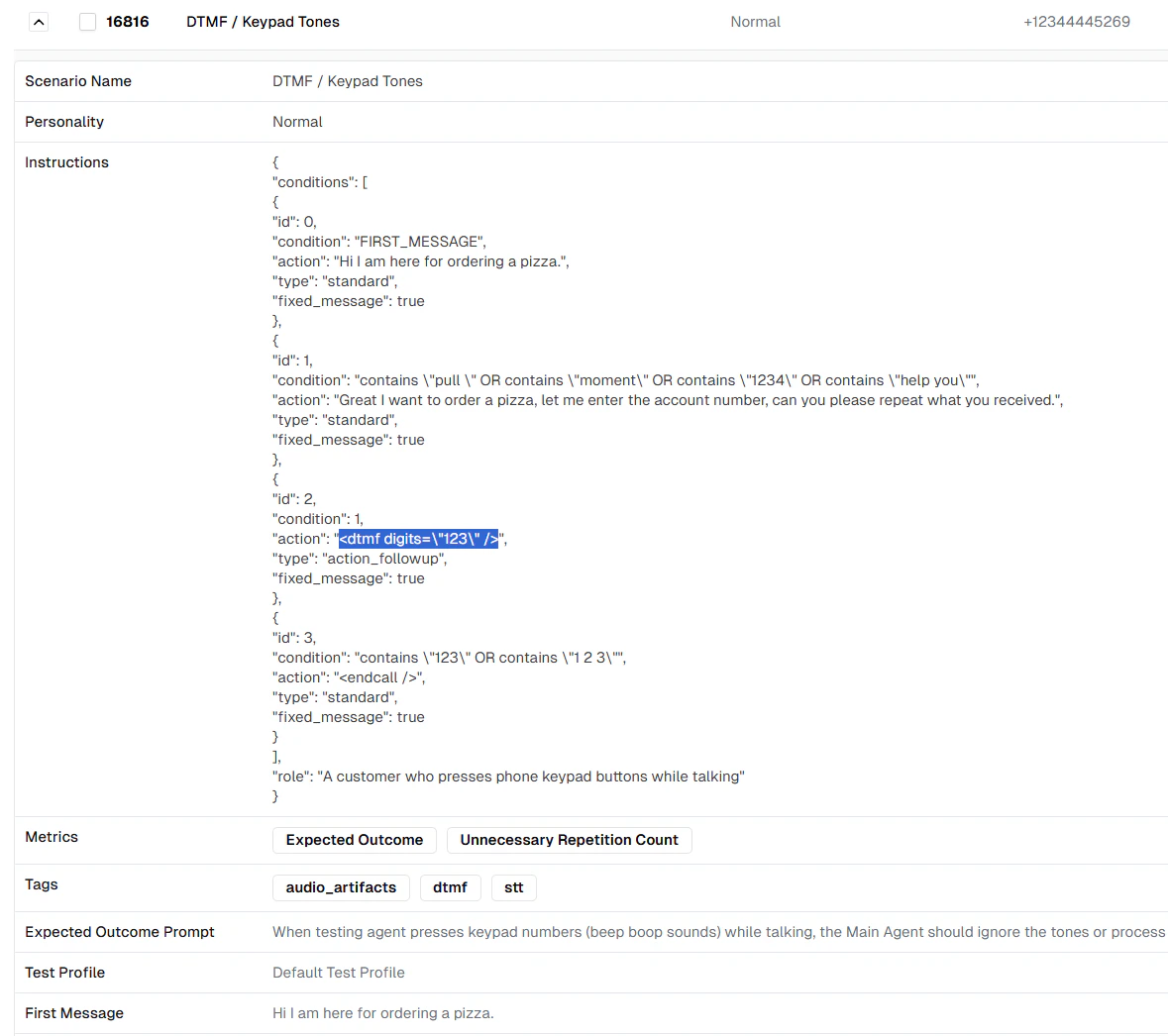
Here's a practical example of testing an agent that requires menu navigation:
### Available DTMF Tools
| Tool | Description |
| ---------------- | -------------------------------------------------------------------------------------------------------------------------------------------------------------------- |
| **Send DTMF** | Allows the testing agent to send DTMF tones during the call. Use this when you want to test scenarios where the agent needs to send button presses. |
| **Receive DTMF** | Allows the testing agent to receive DTMF tones from the call. Use this when you want to test scenarios where the agent needs to accept button presses from the user. |
When Send DTMF is enabled, the evaluator can intelligently decide when to press buttons based on the conversation context.
## Using the DTMF Tag in Structured Tests
The `` tag allows you to send specific button sequences at exact moments in your test scenarios.
### Syntax
```xml theme={null}
```
### Parameters
* **digits**: The buttons to press (valid characters: `0-9`, `*`, `#`, `A-D`)
**Provider Support:** The `` tag works with all TTS providers (Cartesia, ElevenLabs, etc.)
### Example Scenario
Here's a practical example of testing an agent that requires menu navigation:
 ```json theme={null}
{
"conditions": [
{
"id": 0,
"condition": "FIRST_MESSAGE",
"action": "Hi I am here for ordering a pizza.",
"type": "standard",
"fixed_message": true
},
{
"id": 1,
"condition": "contains \"pull \" OR contains \"moment\" OR contains \"1234\" OR contains \"help you\"",
"action": "Great I want to order a pizza, let me enter the account number, can you please repeat what you received.",
"type": "standard",
"fixed_message": true
},
{
"id": 2,
"condition": 1,
"action": "",
"type": "action_followup",
"fixed_message": true
},
{
"id": 3,
"condition": "contains \"123\" OR contains \"1 2 3\"",
"action": "",
"type": "standard",
"fixed_message": true
}
],
"role": "A customer who presses phone keypad buttons while talking"
}
```
In this example:
1. Evaluator starts the conversation
2. When the agent asks for account number, evaluator responds
3. Immediately after, the `` tag sends "123" via keypad
4. Agent confirms receiving "123" and the call ends
### Combining DTMF with Text
You can combine DTMF tags with text messages:
```json theme={null}
{
"action": "Let me enter that now. "
}
```
This will speak "Let me enter that now." and then send the `*99` button sequence.
### DTMF-Only Actions
To send button presses without speaking:
```json theme={null}
{
"action": ""
}
```
This sends only the button press with no spoken message.
## Valid DTMF Characters
The following characters are supported for DTMF tones:
| Character | Description |
| --------- | -------------------------------- |
| `0-9` | Numeric digits |
| `*` | Star/asterisk key |
| `#` | Pound/hash key |
| `A-D` | Extended DTMF keys (rarely used) |
Invalid characters in the digits parameter will cause the DTMF send to fail. Always use only the characters listed above.
## Common Use Cases
### 1. IVR Menu Navigation
Test agents that navigate phone menus:
```json theme={null}
{
"action": "",
"type": "action_followup"
}
```
### 2. Account Number Entry
Test multi-digit input scenarios:
```json theme={null}
{
"action": "",
"type": "action_followup"
}
```
### 3. PIN Verification
Test secure input flows:
```json theme={null}
{
"action": "Let me enter my PIN. "
}
```
### 4. Transfer Requests
Test call transfer scenarios:
```json theme={null}
{
"action": "",
"type": "action_followup"
}
```
### 5. Star Codes
Test special IVR functions:
```json theme={null}
{
"action": "",
"type": "action_followup"
}
```
## How DTMF Appears in Transcripts
When DTMF tones are sent during a call, they appear in the transcript for tracking:
* **Via Tool**: Shows as a function call with the digits sent
* **Via Tag**: Automatically recorded in the conversation flow
* **Received DTMF**: Shown as user input in the transcript
This helps you verify that button presses were sent and received correctly during testing.
## Best Practices
### 1. Enable Tools Selectively
Only enable Send/Receive DTMF tools for evaluators that need to test DTMF functionality.
### 2. Use Structured Tests for Precise Timing
When you need exact control over when buttons are pressed, use the `` tag in Structured Tests rather than relying on the LLM to decide.
### 3. Clear Instructions
When using DTMF tools (not tags), be explicit in your evaluator instructions:
```
✅ Good: "When the agent says 'Press 1 for sales', press 1"
❌ Vague: "Navigate the menu appropriately"
```
### 4. Test Both Scenarios
Test both sending DTMF (evaluator → agent) and receiving DTMF (agent → evaluator) to ensure bidirectional functionality works correctly.
### 5. Validate with Metrics
Use metrics to verify:
* Agent correctly recognizes DTMF input
* Agent responds appropriately to button presses
* Navigation flows work as expected
***
## Next Steps
* Learn about [Test Profiles](/documentation/key-concepts/evaluators/test-profile) for comprehensive testing
* Explore [Conditional Actions](/documentation/key-concepts/evaluators/overview) for advanced scenarios
* Review [Custom Metrics](/documentation/key-concepts/metrics/custom-metrics) for DTMF validation
```json theme={null}
{
"conditions": [
{
"id": 0,
"condition": "FIRST_MESSAGE",
"action": "Hi I am here for ordering a pizza.",
"type": "standard",
"fixed_message": true
},
{
"id": 1,
"condition": "contains \"pull \" OR contains \"moment\" OR contains \"1234\" OR contains \"help you\"",
"action": "Great I want to order a pizza, let me enter the account number, can you please repeat what you received.",
"type": "standard",
"fixed_message": true
},
{
"id": 2,
"condition": 1,
"action": "",
"type": "action_followup",
"fixed_message": true
},
{
"id": 3,
"condition": "contains \"123\" OR contains \"1 2 3\"",
"action": "",
"type": "standard",
"fixed_message": true
}
],
"role": "A customer who presses phone keypad buttons while talking"
}
```
In this example:
1. Evaluator starts the conversation
2. When the agent asks for account number, evaluator responds
3. Immediately after, the `` tag sends "123" via keypad
4. Agent confirms receiving "123" and the call ends
### Combining DTMF with Text
You can combine DTMF tags with text messages:
```json theme={null}
{
"action": "Let me enter that now. "
}
```
This will speak "Let me enter that now." and then send the `*99` button sequence.
### DTMF-Only Actions
To send button presses without speaking:
```json theme={null}
{
"action": ""
}
```
This sends only the button press with no spoken message.
## Valid DTMF Characters
The following characters are supported for DTMF tones:
| Character | Description |
| --------- | -------------------------------- |
| `0-9` | Numeric digits |
| `*` | Star/asterisk key |
| `#` | Pound/hash key |
| `A-D` | Extended DTMF keys (rarely used) |
Invalid characters in the digits parameter will cause the DTMF send to fail. Always use only the characters listed above.
## Common Use Cases
### 1. IVR Menu Navigation
Test agents that navigate phone menus:
```json theme={null}
{
"action": "",
"type": "action_followup"
}
```
### 2. Account Number Entry
Test multi-digit input scenarios:
```json theme={null}
{
"action": "",
"type": "action_followup"
}
```
### 3. PIN Verification
Test secure input flows:
```json theme={null}
{
"action": "Let me enter my PIN. "
}
```
### 4. Transfer Requests
Test call transfer scenarios:
```json theme={null}
{
"action": "",
"type": "action_followup"
}
```
### 5. Star Codes
Test special IVR functions:
```json theme={null}
{
"action": "",
"type": "action_followup"
}
```
## How DTMF Appears in Transcripts
When DTMF tones are sent during a call, they appear in the transcript for tracking:
* **Via Tool**: Shows as a function call with the digits sent
* **Via Tag**: Automatically recorded in the conversation flow
* **Received DTMF**: Shown as user input in the transcript
This helps you verify that button presses were sent and received correctly during testing.
## Best Practices
### 1. Enable Tools Selectively
Only enable Send/Receive DTMF tools for evaluators that need to test DTMF functionality.
### 2. Use Structured Tests for Precise Timing
When you need exact control over when buttons are pressed, use the `` tag in Structured Tests rather than relying on the LLM to decide.
### 3. Clear Instructions
When using DTMF tools (not tags), be explicit in your evaluator instructions:
```
✅ Good: "When the agent says 'Press 1 for sales', press 1"
❌ Vague: "Navigate the menu appropriately"
```
### 4. Test Both Scenarios
Test both sending DTMF (evaluator → agent) and receiving DTMF (agent → evaluator) to ensure bidirectional functionality works correctly.
### 5. Validate with Metrics
Use metrics to verify:
* Agent correctly recognizes DTMF input
* Agent responds appropriately to button presses
* Navigation flows work as expected
***
## Next Steps
* Learn about [Test Profiles](/documentation/key-concepts/evaluators/test-profile) for comprehensive testing
* Explore [Conditional Actions](/documentation/key-concepts/evaluators/overview) for advanced scenarios
* Review [Custom Metrics](/documentation/key-concepts/metrics/custom-metrics) for DTMF validation