> ## Documentation Index
> Fetch the complete documentation index at: https://docs.cekura.ai/llms.txt
> Use this file to discover all available pages before exploring further.
# Dynamic Agent Description
> Learn how to use dynamic agent descriptions with Cekura's observability features to evaluate different agent configurations
export const CopyPageButton = () => {
if (typeof window !== 'undefined') {
setTimeout(function () {
if (document.getElementById('ck-tools')) return;
var anchor = document.getElementById('content-area') || document.querySelector('.mdx-content');
if (!anchor) return;
if (!document.getElementById('ck-style')) {
var s = document.createElement('style');
s.id = 'ck-style';
s.textContent = '#ck-tools{position:absolute;top:6px;right:0;z-index:100;font-family:inherit;}' + '.ck-row{display:inline-flex;align-items:stretch;border:1px solid rgba(0,0,0,0.15);border-radius:8px;overflow:hidden;background:#fff;}' + ':root.dark .ck-row{background:rgba(255,255,255,0.06);border-color:rgba(255,255,255,0.12);}' + '.ck-btn{padding:5px 12px;border:none;background:none;cursor:pointer;font-size:13px;font-weight:500;font-family:inherit;color:#374151;}' + ':root.dark .ck-btn{color:#d1d5db;}' + '.ck-btn:hover{background:rgba(0,0,0,0.04);}' + ':root.dark .ck-btn:hover{background:rgba(255,255,255,0.06);}' + '.ck-chevron{padding:5px 8px;border:none;background:none;cursor:pointer;font-size:14px;font-family:inherit;color:#374151;}' + ':root.dark .ck-chevron{color:#d1d5db;}' + '.ck-chevron:hover{background:rgba(0,0,0,0.04);}' + ':root.dark .ck-chevron:hover{background:rgba(255,255,255,0.06);}' + '.ck-divider{width:1px;background:rgba(0,0,0,0.12);flex-shrink:0;}' + ':root.dark .ck-divider{background:rgba(255,255,255,0.12);}' + '.ck-dd{position:absolute;top:calc(100% + 4px);right:0;min-width:180px;background:#fff;border:1px solid rgba(0,0,0,0.12);border-radius:8px;box-shadow:0 4px 12px rgba(0,0,0,0.1);padding:4px;display:none;z-index:200;}' + ':root.dark .ck-dd{background:#1f2937;border-color:rgba(255,255,255,0.1);box-shadow:0 4px 16px rgba(0,0,0,0.35);}' + '.ck-item{display:block;width:100%;padding:7px 12px;border:none;background:none;border-radius:6px;cursor:pointer;font-size:13px;font-family:inherit;text-align:left;color:#374151;}' + ':root.dark .ck-item{color:#d1d5db;}' + '.ck-item:hover{background:rgba(0,0,0,0.05);}' + ':root.dark .ck-item:hover{background:rgba(255,255,255,0.07);}';
document.head.appendChild(s);
}
var wrap = document.createElement('div');
wrap.id = 'ck-tools';
var row = document.createElement('div');
row.className = 'ck-row';
var mainBtn = document.createElement('button');
mainBtn.className = 'ck-btn';
mainBtn.textContent = 'Copy page';
var divider = document.createElement('span');
divider.className = 'ck-divider';
var chevron = document.createElement('button');
chevron.className = 'ck-chevron';
chevron.textContent = '▾';
var dd = document.createElement('div');
dd.className = 'ck-dd';
function closeDD() {
dd.style.display = 'none';
}
function openDD() {
dd.style.display = 'block';
}
chevron.onclick = function (e) {
e.stopPropagation();
if (dd.style.display === 'block') {
closeDD();
} else {
openDD();
}
};
document.addEventListener('click', function (e) {
if (!e.target.closest('#ck-tools')) {
closeDD();
}
});
document.addEventListener('keydown', function (e) {
if (e.key === 'Escape') {
closeDD();
}
});
function makeItem(label, fn) {
var b = document.createElement('button');
b.className = 'ck-item';
b.textContent = label;
b.onclick = function () {
fn();
closeDD();
};
return b;
}
function getMarkdown() {
var walk = function (node) {
if (!node) return '';
if (node.nodeType === 3) return node.textContent || '';
if (node.nodeType !== 1) return '';
var tag = node.tagName.toLowerCase();
var skip = ['script', 'style', 'svg', 'noscript', 'button', 'iframe'];
if (skip.indexOf(tag) !== -1) return '';
if (node.id === 'ck-tools') return '';
var ch = Array.from(node.childNodes).map(walk).join('');
if (tag === 'h1') return '\n# ' + ch.trim() + '\n\n';
if (tag === 'h2') return '\n## ' + ch.trim() + '\n\n';
if (tag === 'h3') return '\n### ' + ch.trim() + '\n\n';
if (tag === 'p') return '\n' + ch.trim() + '\n\n';
if (tag === 'pre') return '\n```\n' + node.textContent.trim() + '\n```\n\n';
if (tag === 'li') return '- ' + ch.trim() + '\n';
if (tag === 'code') return '`' + ch.trim() + '`';
return ch;
};
var content = document.querySelector('.mdx-content') || document.getElementById('content-area') || document.body;
return walk(content).replace(/\n\n\n+/g, '\n\n').trim();
}
function copyMd() {
var md = getMarkdown();
navigator.clipboard.writeText(md).then(function () {
mainBtn.textContent = 'Copied!';
setTimeout(function () {
mainBtn.textContent = 'Copy page';
}, 2000);
});
}
function viewMd() {
var md = getMarkdown();
var safe = md.split('&').join('&').split('<').join('<').split('>').join('>');
var html = '' + safe + '';
window.open(URL.createObjectURL(new Blob([html], {
type: 'text/html'
})), '_blank');
}
function openClaude() {
var prompt = 'Can you read this Cekura docs page ' + window.location.href + ' so I can ask you questions?';
window.open('https://claude.ai/new?q=' + encodeURIComponent(prompt), '_blank');
}
mainBtn.onclick = copyMd;
dd.appendChild(makeItem('Copy page', copyMd));
dd.appendChild(makeItem('View as Markdown', viewMd));
dd.appendChild(makeItem('Open in Claude', openClaude));
row.appendChild(mainBtn);
row.appendChild(divider);
row.appendChild(chevron);
wrap.appendChild(row);
wrap.appendChild(dd);
anchor.style.position = 'relative';
anchor.insertBefore(wrap, anchor.firstChild);
}, 50);
}
return null;
};
## Overview
Dynamic agent description allows you to modify your agent's description and instructions on-the-fly during observability. This powerful feature enables you to test different prompts, agent descriptions, and behaviors without changing your agent's core configuration, making it perfect for A/B testing and prompt optimization.
## How Dynamic Agent Description Works
When you send call data to Cekura's observability platform, you can include `dynamic_variables` in your request. These variables override your agent's default agent description for that specific call evaluation. This feature is useful for these use cases:
* If you use dynamic\_variables in your AI agent's prompt
* You want to record calls under one agent on Cekura
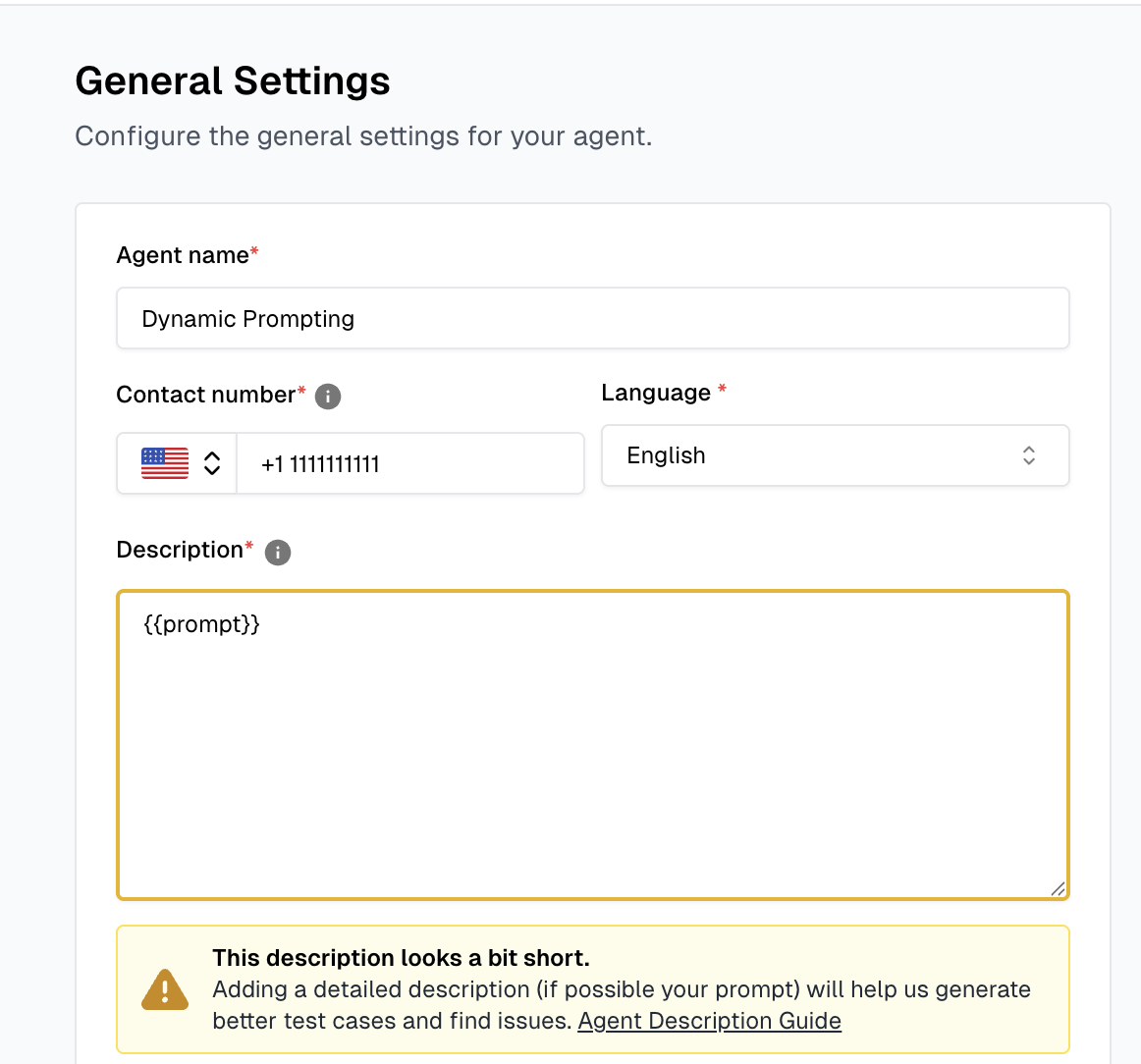
## Setting Up Your Agent Description
Before using dynamic agent description, ensure your agent description on the Cekura platform is configured to handle dynamic variables. You can add dynamic variables using the `{{ }}` syntax in your agent description.
### Examples of Dynamic Variables
**Full prompt replacement:**
```
{{prompt}}
```
**Mixed content with variables:**
```
You are a {{agent_type}} assistant. Your primary goal is to {{primary_goal}}.
Always be {{tone}} and focus on {{focus_area}}.
```
**Multiple variables:**
```
You are a {{role}} working for {{company}}.
Your expertise includes {{expertise_areas}}.
Always respond in a {{communication_style}} manner.
```
**Important**: Set your agent description in the dashboard to work with dynamic prompting. The agent should be configured to accept and process the dynamic prompt variable effectively.
 ## API Integration
### Retell Integration Example
When integrating with Retell, use the [Cekura Observe API](/api-reference/observability/post-observabilityv1observe) with the following structure:
```json theme={null}
{
"call_id": "retell_response.call_id",
"transcript_type": "retell",
"transcript_json": "retell_response.transcript_with_tool_calls",
"call_ended_reason": "retell_response.disconnect_reason",
"voice_recording_url": "retell_response.recording_url",
"dynamic_variables": {
"prompt": "Your custom prompt as a string"
}
}
```
### Implementation Example
Here's a practical example of how to implement dynamic agent description with Retell:
```javascript theme={null}
// After receiving a webhook from Retell
const observeData = {
call_id: retellWebhook.call_id,
transcript_type: "retell",
transcript_json: retellWebhook.transcript_with_tool_calls,
call_ended_reason: retellWebhook.disconnect_reason,
voice_recording_url: retellWebhook.recording_url,
dynamic_variables: {
prompt: `You are a helpful customer service representative.
Be empathetic and solution-focused.
Always confirm understanding before proceeding.
Prioritize customer satisfaction above all else.`,
},
};
// Send to Cekura Observability
const response = await fetch("https://api.cekura.ai/observability/v1/observe", {
method: "POST",
headers: {
"Content-Type": "application/json",
"X-CEKURA-API-KEY": "YOUR_API_KEY",
},
body: JSON.stringify(observeData),
});
```
## API Integration
### Retell Integration Example
When integrating with Retell, use the [Cekura Observe API](/api-reference/observability/post-observabilityv1observe) with the following structure:
```json theme={null}
{
"call_id": "retell_response.call_id",
"transcript_type": "retell",
"transcript_json": "retell_response.transcript_with_tool_calls",
"call_ended_reason": "retell_response.disconnect_reason",
"voice_recording_url": "retell_response.recording_url",
"dynamic_variables": {
"prompt": "Your custom prompt as a string"
}
}
```
### Implementation Example
Here's a practical example of how to implement dynamic agent description with Retell:
```javascript theme={null}
// After receiving a webhook from Retell
const observeData = {
call_id: retellWebhook.call_id,
transcript_type: "retell",
transcript_json: retellWebhook.transcript_with_tool_calls,
call_ended_reason: retellWebhook.disconnect_reason,
voice_recording_url: retellWebhook.recording_url,
dynamic_variables: {
prompt: `You are a helpful customer service representative.
Be empathetic and solution-focused.
Always confirm understanding before proceeding.
Prioritize customer satisfaction above all else.`,
},
};
// Send to Cekura Observability
const response = await fetch("https://api.cekura.ai/observability/v1/observe", {
method: "POST",
headers: {
"Content-Type": "application/json",
"X-CEKURA-API-KEY": "YOUR_API_KEY",
},
body: JSON.stringify(observeData),
});
```