> ## Documentation Index
> Fetch the complete documentation index at: https://docs.cekura.ai/llms.txt
> Use this file to discover all available pages before exploring further.
# Custom Observability
> To begin using observability features, you will need a Cekura account. If you do not have access, please contact [support@cekura.ai](mailto:support@cekura.ai).
export const CopyPageButton = () => {
if (typeof window !== 'undefined') {
setTimeout(function () {
if (document.getElementById('ck-tools')) return;
var anchor = document.getElementById('content-area') || document.querySelector('.mdx-content');
if (!anchor) return;
if (!document.getElementById('ck-style')) {
var s = document.createElement('style');
s.id = 'ck-style';
s.textContent = '#ck-tools{position:absolute;top:6px;right:0;z-index:100;font-family:inherit;}' + '.ck-row{display:inline-flex;align-items:stretch;border:1px solid rgba(0,0,0,0.15);border-radius:8px;overflow:hidden;background:#fff;}' + ':root.dark .ck-row{background:rgba(255,255,255,0.06);border-color:rgba(255,255,255,0.12);}' + '.ck-btn{padding:5px 12px;border:none;background:none;cursor:pointer;font-size:13px;font-weight:500;font-family:inherit;color:#374151;}' + ':root.dark .ck-btn{color:#d1d5db;}' + '.ck-btn:hover{background:rgba(0,0,0,0.04);}' + ':root.dark .ck-btn:hover{background:rgba(255,255,255,0.06);}' + '.ck-chevron{padding:5px 8px;border:none;background:none;cursor:pointer;font-size:14px;font-family:inherit;color:#374151;}' + ':root.dark .ck-chevron{color:#d1d5db;}' + '.ck-chevron:hover{background:rgba(0,0,0,0.04);}' + ':root.dark .ck-chevron:hover{background:rgba(255,255,255,0.06);}' + '.ck-divider{width:1px;background:rgba(0,0,0,0.12);flex-shrink:0;}' + ':root.dark .ck-divider{background:rgba(255,255,255,0.12);}' + '.ck-dd{position:absolute;top:calc(100% + 4px);right:0;min-width:180px;background:#fff;border:1px solid rgba(0,0,0,0.12);border-radius:8px;box-shadow:0 4px 12px rgba(0,0,0,0.1);padding:4px;display:none;z-index:200;}' + ':root.dark .ck-dd{background:#1f2937;border-color:rgba(255,255,255,0.1);box-shadow:0 4px 16px rgba(0,0,0,0.35);}' + '.ck-item{display:block;width:100%;padding:7px 12px;border:none;background:none;border-radius:6px;cursor:pointer;font-size:13px;font-family:inherit;text-align:left;color:#374151;}' + ':root.dark .ck-item{color:#d1d5db;}' + '.ck-item:hover{background:rgba(0,0,0,0.05);}' + ':root.dark .ck-item:hover{background:rgba(255,255,255,0.07);}';
document.head.appendChild(s);
}
var wrap = document.createElement('div');
wrap.id = 'ck-tools';
var row = document.createElement('div');
row.className = 'ck-row';
var mainBtn = document.createElement('button');
mainBtn.className = 'ck-btn';
mainBtn.textContent = 'Copy page';
var divider = document.createElement('span');
divider.className = 'ck-divider';
var chevron = document.createElement('button');
chevron.className = 'ck-chevron';
chevron.textContent = '▾';
var dd = document.createElement('div');
dd.className = 'ck-dd';
function closeDD() {
dd.style.display = 'none';
}
function openDD() {
dd.style.display = 'block';
}
chevron.onclick = function (e) {
e.stopPropagation();
if (dd.style.display === 'block') {
closeDD();
} else {
openDD();
}
};
document.addEventListener('click', function (e) {
if (!e.target.closest('#ck-tools')) {
closeDD();
}
});
document.addEventListener('keydown', function (e) {
if (e.key === 'Escape') {
closeDD();
}
});
function makeItem(label, fn) {
var b = document.createElement('button');
b.className = 'ck-item';
b.textContent = label;
b.onclick = function () {
fn();
closeDD();
};
return b;
}
function getMarkdown() {
var walk = function (node) {
if (!node) return '';
if (node.nodeType === 3) return node.textContent || '';
if (node.nodeType !== 1) return '';
var tag = node.tagName.toLowerCase();
var skip = ['script', 'style', 'svg', 'noscript', 'button', 'iframe'];
if (skip.indexOf(tag) !== -1) return '';
if (node.id === 'ck-tools') return '';
var ch = Array.from(node.childNodes).map(walk).join('');
if (tag === 'h1') return '\n# ' + ch.trim() + '\n\n';
if (tag === 'h2') return '\n## ' + ch.trim() + '\n\n';
if (tag === 'h3') return '\n### ' + ch.trim() + '\n\n';
if (tag === 'p') return '\n' + ch.trim() + '\n\n';
if (tag === 'pre') return '\n```\n' + node.textContent.trim() + '\n```\n\n';
if (tag === 'li') return '- ' + ch.trim() + '\n';
if (tag === 'code') return '`' + ch.trim() + '`';
return ch;
};
var content = document.querySelector('.mdx-content') || document.getElementById('content-area') || document.body;
return walk(content).replace(/\n\n\n+/g, '\n\n').trim();
}
function copyMd() {
var md = getMarkdown();
navigator.clipboard.writeText(md).then(function () {
mainBtn.textContent = 'Copied!';
setTimeout(function () {
mainBtn.textContent = 'Copy page';
}, 2000);
});
}
function viewMd() {
var md = getMarkdown();
var safe = md.split('&').join('&').split('<').join('<').split('>').join('>');
var html = '' + safe + '';
window.open(URL.createObjectURL(new Blob([html], {
type: 'text/html'
})), '_blank');
}
function openClaude() {
var prompt = 'Can you read this Cekura docs page ' + window.location.href + ' so I can ask you questions?';
window.open('https://claude.ai/new?q=' + encodeURIComponent(prompt), '_blank');
}
mainBtn.onclick = copyMd;
dd.appendChild(makeItem('Copy page', copyMd));
dd.appendChild(makeItem('View as Markdown', viewMd));
dd.appendChild(makeItem('Open in Claude', openClaude));
row.appendChild(mainBtn);
row.appendChild(divider);
row.appendChild(chevron);
wrap.appendChild(row);
wrap.appendChild(dd);
anchor.style.position = 'relative';
anchor.insertBefore(wrap, anchor.firstChild);
}, 50);
}
return null;
};
## Configure Custom Observability
Follow these steps to set up custom observability for your voice agents:
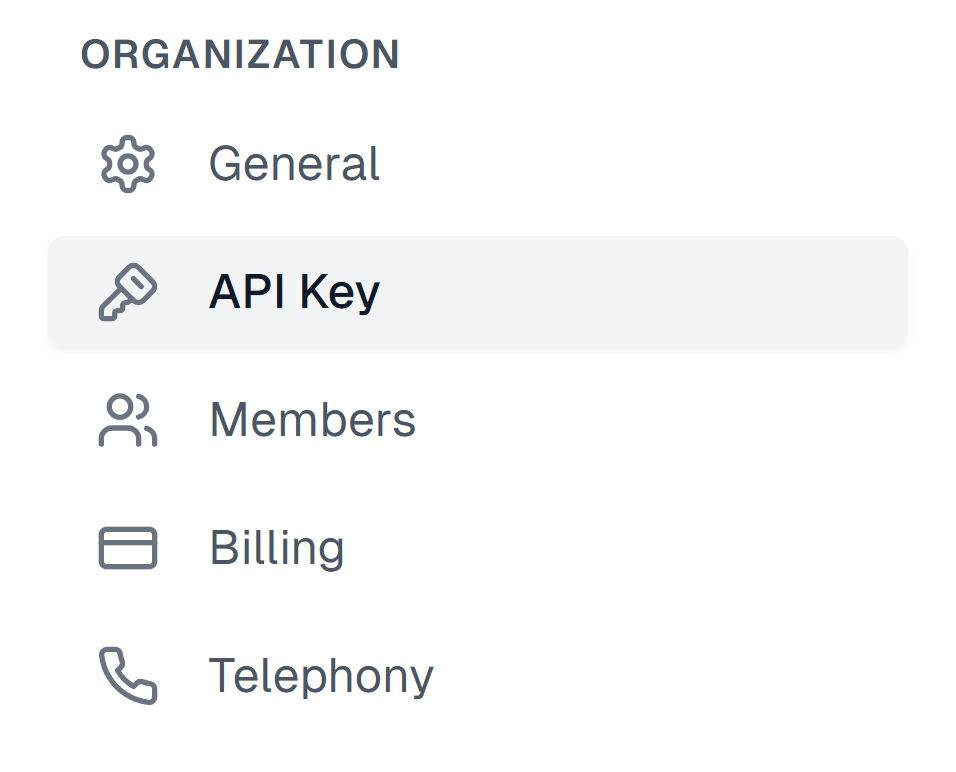
Log in to your [Cekura dashboard](https://dashboard.cekura.ai) to retrieve your API key. You can find it in the Settings tab visible on the top right corner. This key is essential for authenticating your requests and accessing observability features.\
\
**Home > Settings > API Key**
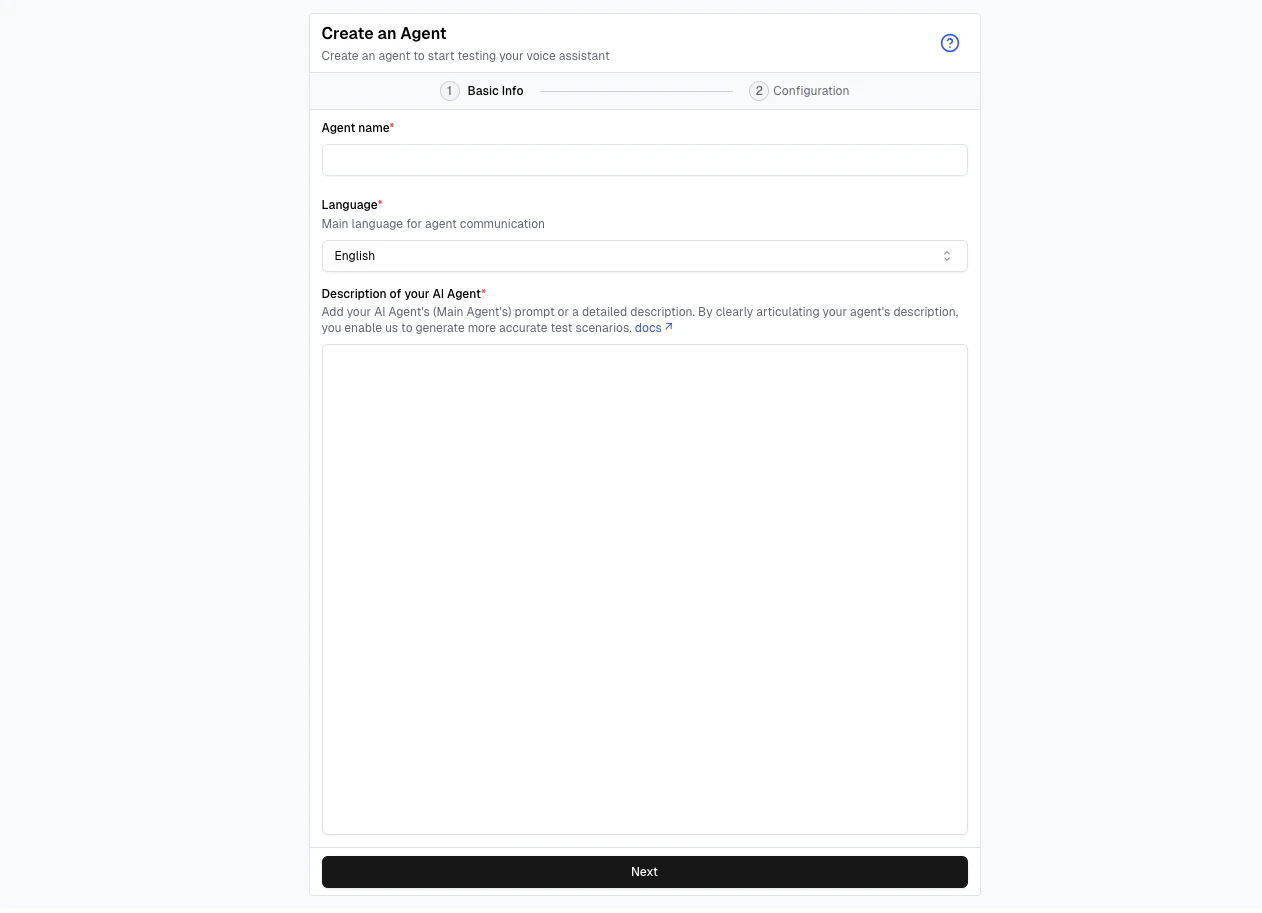
Navigate to the dashboard and create an agent. This agent will be responsible for collecting and sending data to the observability platform.
Read more on [Creating an Agent](/documentation/key-concepts/agents/Agent_Setup_Guide).
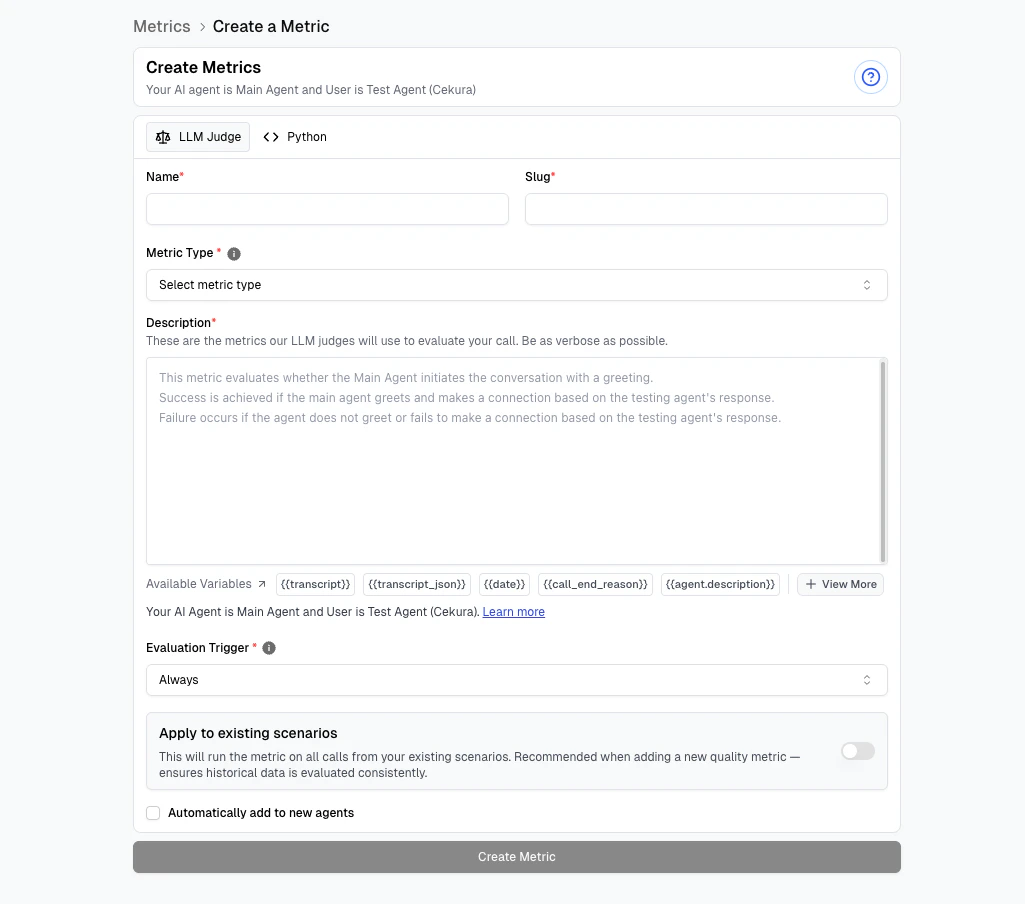
Go to [dashboard.cekura.ai](https://dashboard.cekura.ai) and select your agent to start creating metrics. These metrics will help you monitor and analyze the performance of your systems.
Choose your voice provider below to forward call data to Cekura's observability suite.
## Connect your Providers
```python Python theme={null}
import requests
# Send call data to Cekura observability
url = 'https://api.cekura.ai/observability/v1/observe/'
headers = {
'X-CEKURA-API-KEY': '',
'Content-Type': 'application/json'
}
data = {
'agent': '',
'voice_recording_url': '',
'transcript_type': 'custom',
'transcript_json': [
{
'role': 'user',
'content': 'Hello, I want to book an appointment.',
'start_time': 0.5,
'end_time': 2.3
},
{
'role': 'assistant',
'content': 'Sure, what time works for you?',
'start_time': 2.5,
'end_time': 4.1
}
],
'call_id': '',
'call_ended_reason': ''
}
response = requests.post(url, headers=headers, json=data)
```
```javascript Node.js theme={null}
const axios = require('axios');
// Send call data to Cekura observability
const url = 'https://api.cekura.ai/observability/v1/observe/';
const headers = {
'X-CEKURA-API-KEY': '',
'Content-Type': 'application/json'
};
const data = {
agent: '',
voice_recording_url: '',
transcript_type: 'custom',
transcript_json: [
{
role: 'user',
content: 'Hello, I want to book an appointment.',
start_time: 0.5,
end_time: 2.3
},
{
role: 'assistant',
content: 'Sure, what time works for you?',
start_time: 2.5,
end_time: 4.1
}
],
call_id: '',
call_ended_reason: ''
};
const response = await axios.post(url, data, { headers });
```
```python Python theme={null}
import requests
# Forward VAPI webhook response to Cekura
url = 'https://api.cekura.ai/observability/v1/observe/'
headers = {
'X-CEKURA-API-KEY': '',
'Content-Type': 'application/json'
}
data = {
'agent': '',
'voice_recording_url': vapi_response["stereoRecordingUrl"],
'transcript_type': 'vapi',
'transcript_json': vapi_response["messages"],
'call_id': vapi_response["id"],
'call_ended_reason': vapi_response["endedReason"]
}
response = requests.post(url, headers=headers, json=data)
```
```javascript Node.js theme={null}
const axios = require('axios');
// Forward VAPI webhook response to Cekura
const url = 'https://api.cekura.ai/observability/v1/observe/';
const headers = {
'X-CEKURA-API-KEY': '',
'Content-Type': 'application/json'
};
const data = {
agent: '',
voice_recording_url: vapiResponse.stereoRecordingUrl,
transcript_type: 'vapi',
transcript_json: vapiResponse.messages,
call_id: vapiResponse.id,
call_ended_reason: vapiResponse.endedReason
};
const response = await axios.post(url, data, { headers });
```
Navigate to the [API keys](https://dashboard.cekura.ai/dashboard/settings/org/api-key) section in your Cekura dashboard settings. If you don't have an API key yet, create a new one. Copy the API key value as you'll need it to authenticate your requests to Cekura's observability API.
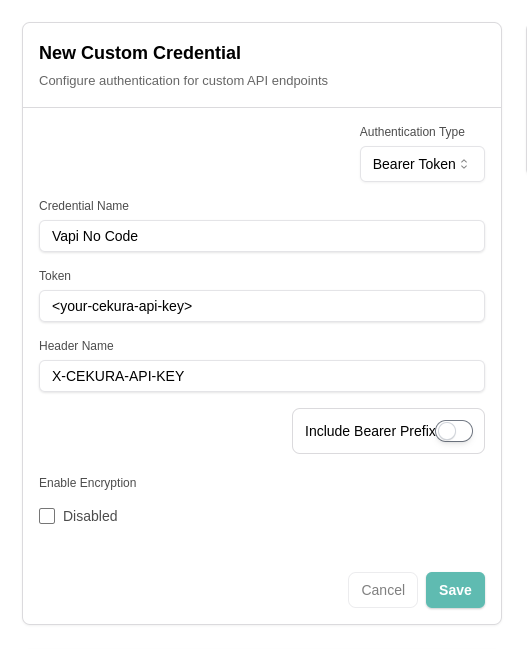
In your VAPI dashboard, navigate to [integrations](https://dashboard.vapi.ai/settings/integrations/custom-credential) in your account settings and add custom integration with the following details:
* Auth type: Bearer token
* Credential name: Cekura API key
* Token: Your Cekura API key
* Header name: X-CEKURA-API-KEY
* Include bearer prefix: No
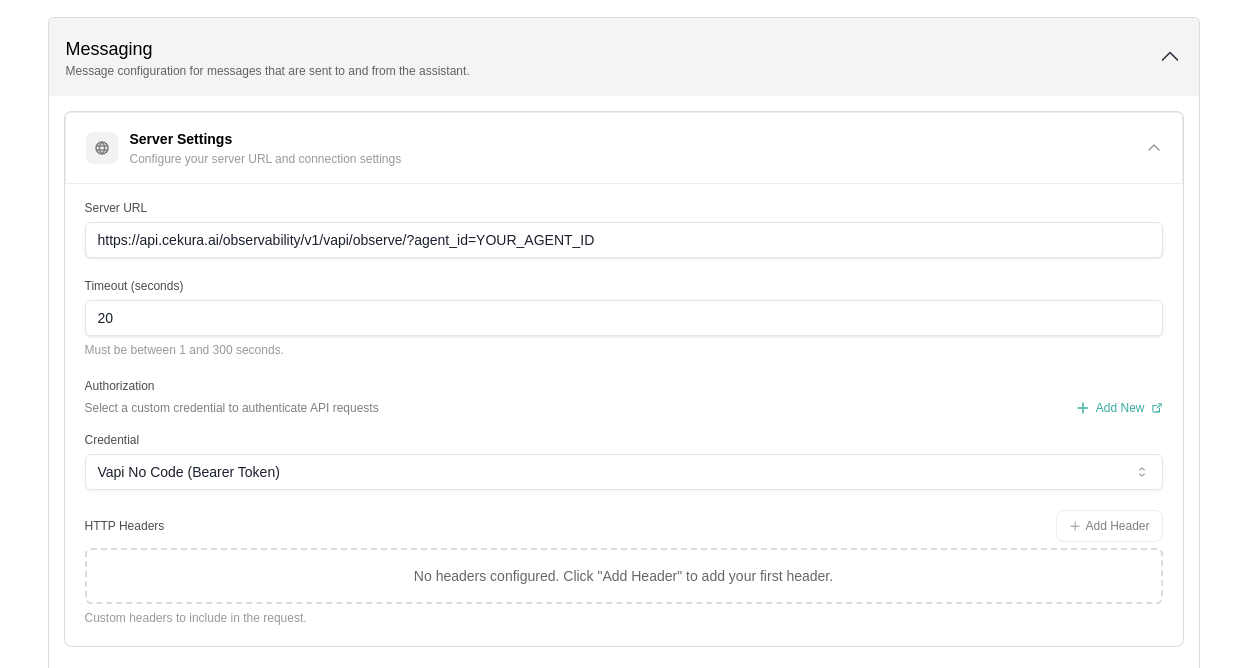
In your VAPI dashboard, navigate to your agent settings and configure the Server URL and authorization header you created in the previous step. This URL is used for all communication between your application and VAPI, including context retrieval, function calls, and end-of-call reporting.
Set the Server URL to:
```
https://api.cekura.ai/observability/v1/vapi/observe/?agent_id=YOUR_AGENT_ID
```
Each VAPI agent has a unique Assistant ID that identifies your specific implementation. Copy your Assistant ID from the VAPI dashboard:
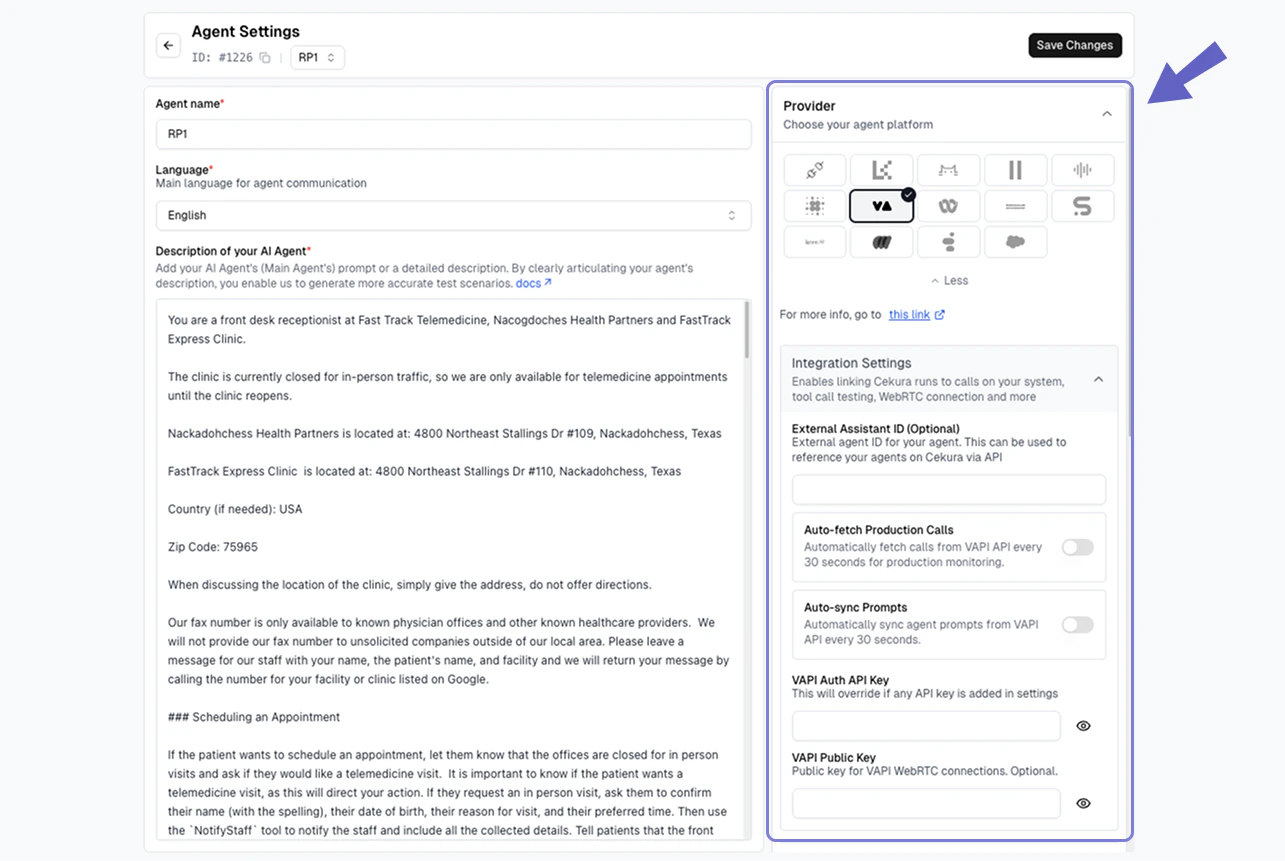
In your Cekura Agent Settings page:
1. Add the API key from VAPI with the tag `webhook`
2. Copy and add your `agent ID` from VAPI
Make a test call from VAPI (phone number based or webcall). Your calls should now appear in the Cekura observability `Calls` section.
```python Python theme={null}
import requests
import json
# Download audio from ElevenLabs
ELEVENLABS_API_KEY = "your_elevenlabs_api_key"
ELEVENLABS_API_BASE_URL = "https://api.elevenlabs.io/v1"
conversation_id = "your_conversation_id"
url_audio = f"{ELEVENLABS_API_BASE_URL}/convai/conversations/{conversation_id}/audio"
headers_audio = {"xi-api-key": ELEVENLABS_API_KEY}
audio_response = requests.get(url_audio, headers=headers_audio)
audio_content = audio_response.content if audio_response.status_code == 200 else None
# Send to Cekura
CEKURA_API_KEY = "your_cekura_api_key"
CEKURA_AGENT_ID = "your_cekura_agent_id"
url_cekura = "https://api.cekura.ai/observability/v1/observe/"
headers_cekura = {"X-CEKURA-API-KEY": CEKURA_API_KEY}
data = {
"agent": CEKURA_AGENT_ID,
"call_id": conversation_id,
"transcript_type": "elevenlabs",
"transcript_json": json.dumps(transcript_data)
}
files = {
"voice_recording": (f"elevenlabs_recording_{conversation_id}.mp3", audio_content, "audio/mpeg")
}
response = requests.post(url_cekura, headers=headers_cekura, data=data, files=files)
```
```javascript Node.js theme={null}
const axios = require('axios');
const FormData = require('form-data');
// Download audio from ElevenLabs
const ELEVENLABS_API_KEY = 'your_elevenlabs_api_key';
const ELEVENLABS_API_BASE_URL = 'https://api.elevenlabs.io/v1';
const conversationId = 'your_conversation_id';
const audioResponse = await axios.get(
`${ELEVENLABS_API_BASE_URL}/convai/conversations/${conversationId}/audio`,
{ headers: { 'xi-api-key': ELEVENLABS_API_KEY }, responseType: 'arraybuffer' }
);
const audioContent = audioResponse.status === 200 ? audioResponse.data : null;
// Send to Cekura
const CEKURA_API_KEY = 'your_cekura_api_key';
const CEKURA_AGENT_ID = 'your_cekura_agent_id';
const form = new FormData();
form.append('agent', CEKURA_AGENT_ID);
form.append('call_id', conversationId);
form.append('transcript_type', 'elevenlabs');
form.append('transcript_json', JSON.stringify(transcriptData));
form.append('voice_recording', Buffer.from(audioContent), {
filename: `elevenlabs_recording_${conversationId}.mp3`,
contentType: 'audio/mpeg'
});
const response = await axios.post(
'https://api.cekura.ai/observability/v1/observe/',
form,
{ headers: { 'X-CEKURA-API-KEY': CEKURA_API_KEY, ...form.getHeaders() } }
);
```
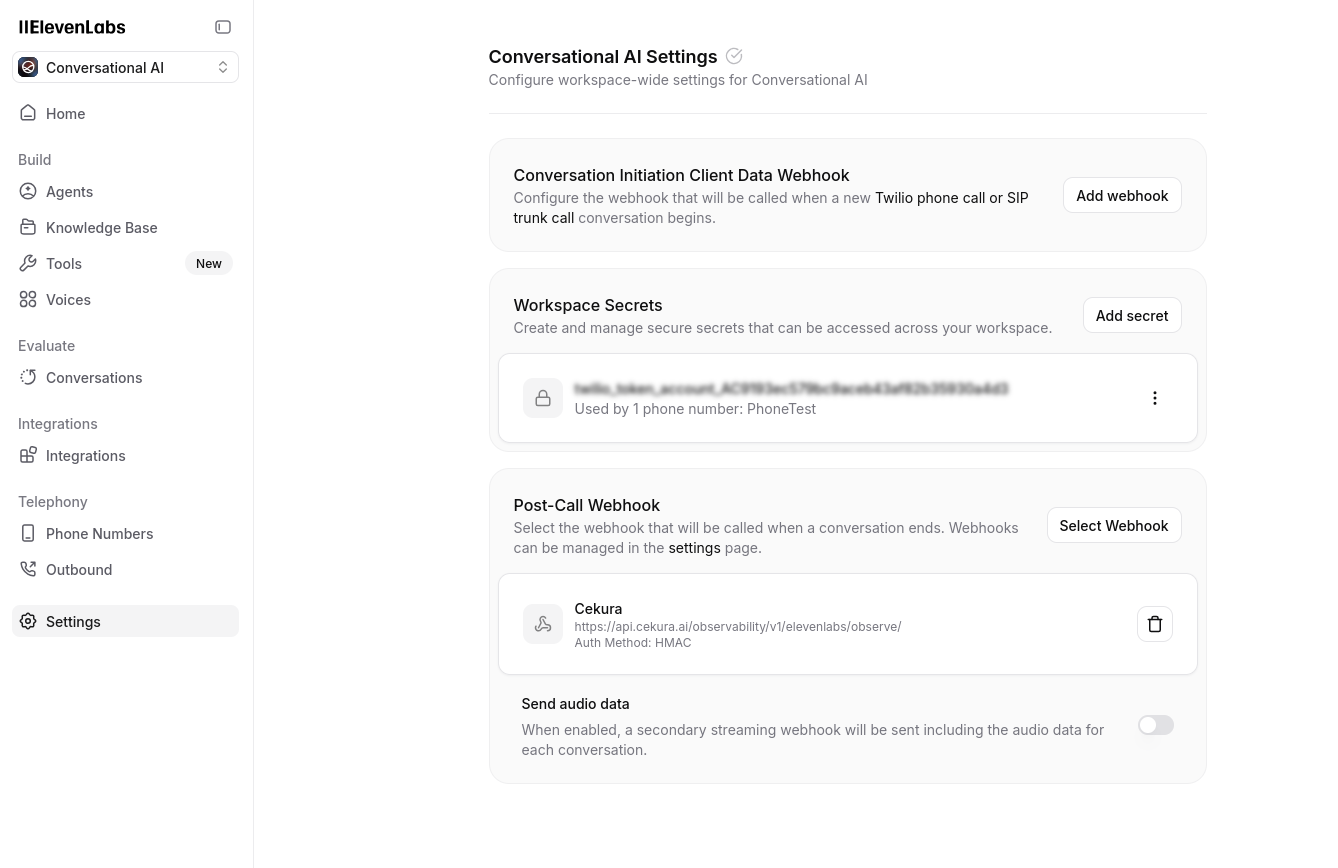
In your ElevenLabs dashboard, navigate to your agent settings and configure the observability webhook URL:
```
https://api.cekura.ai/observability/v1/elevenlabs/observe/
```
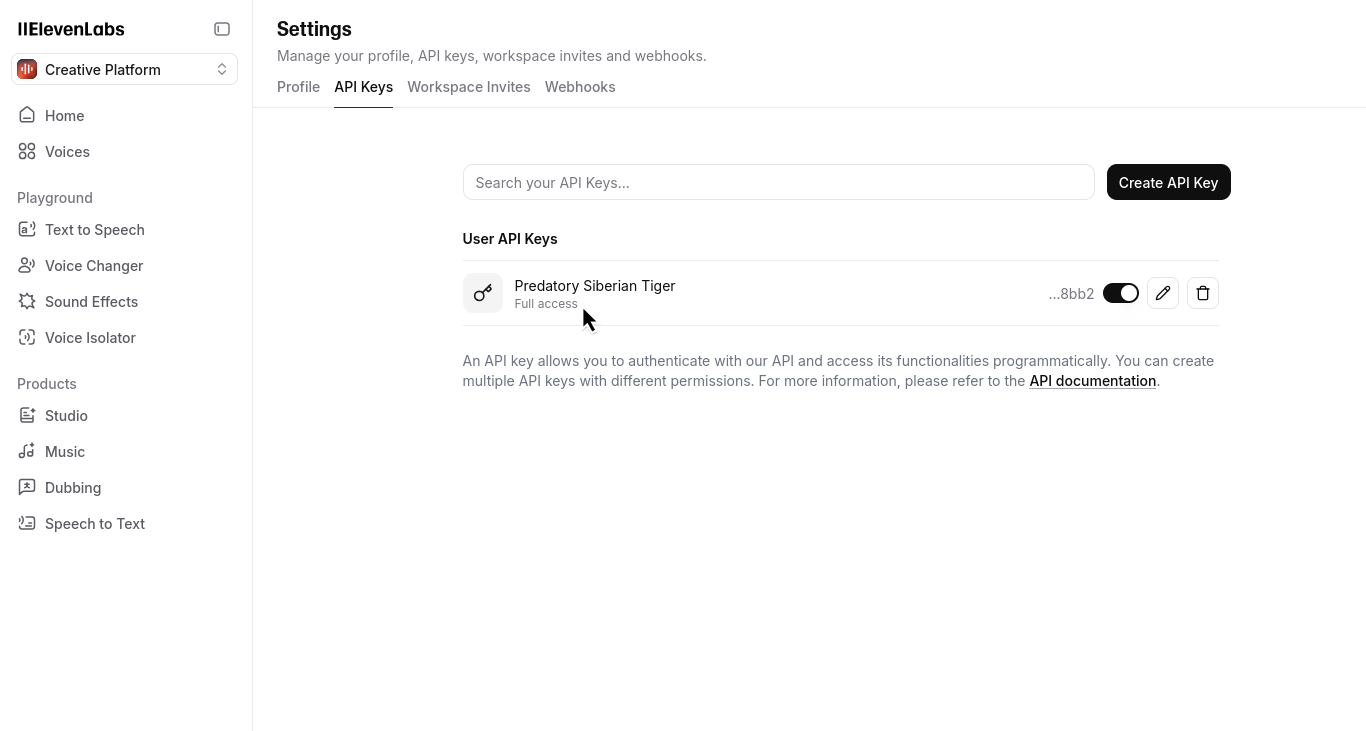
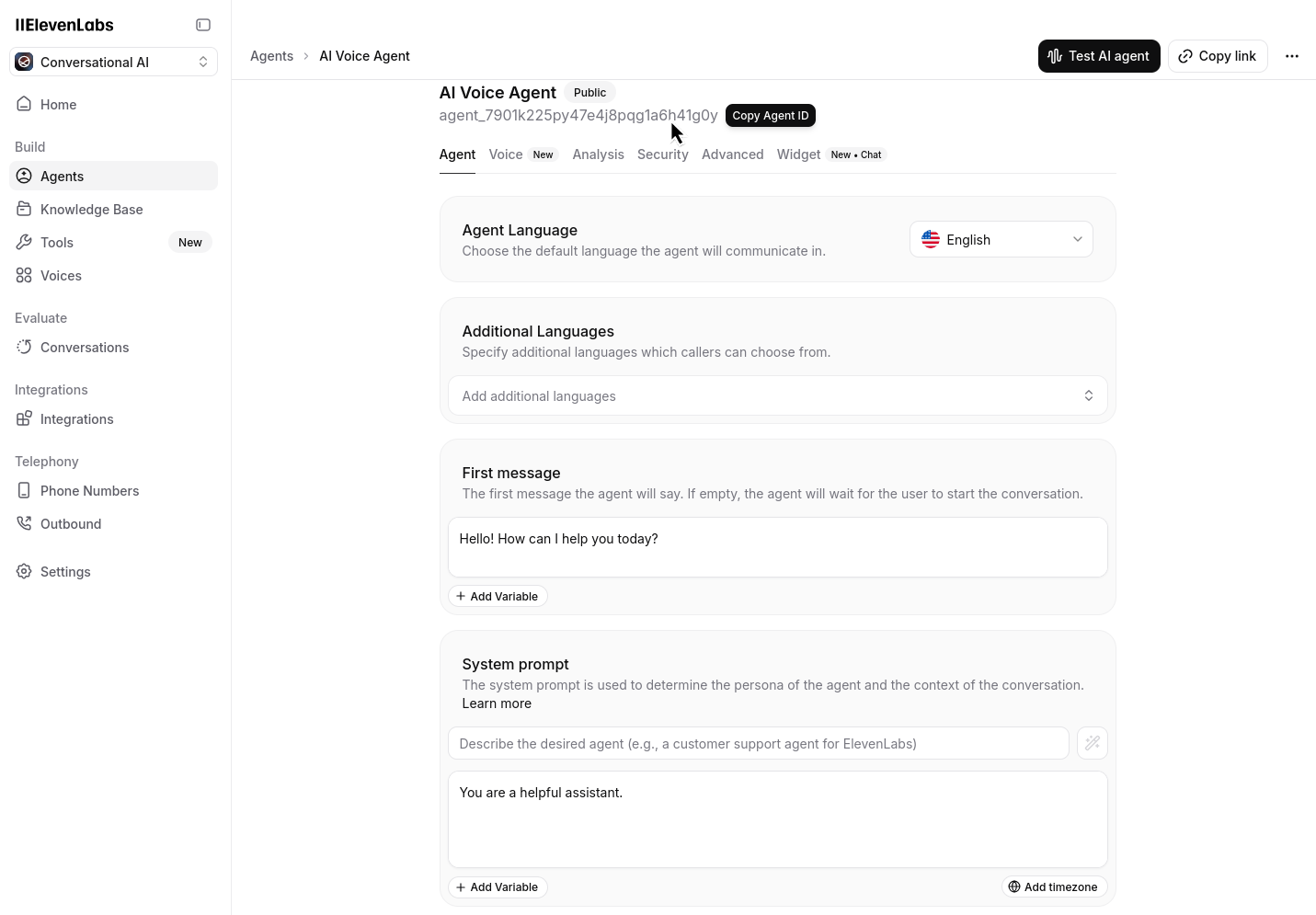
Go to the API keys section in your ElevenLabs dashboard and ensure you have at least one API key configured. Also note your Agent ID from the dashboard:
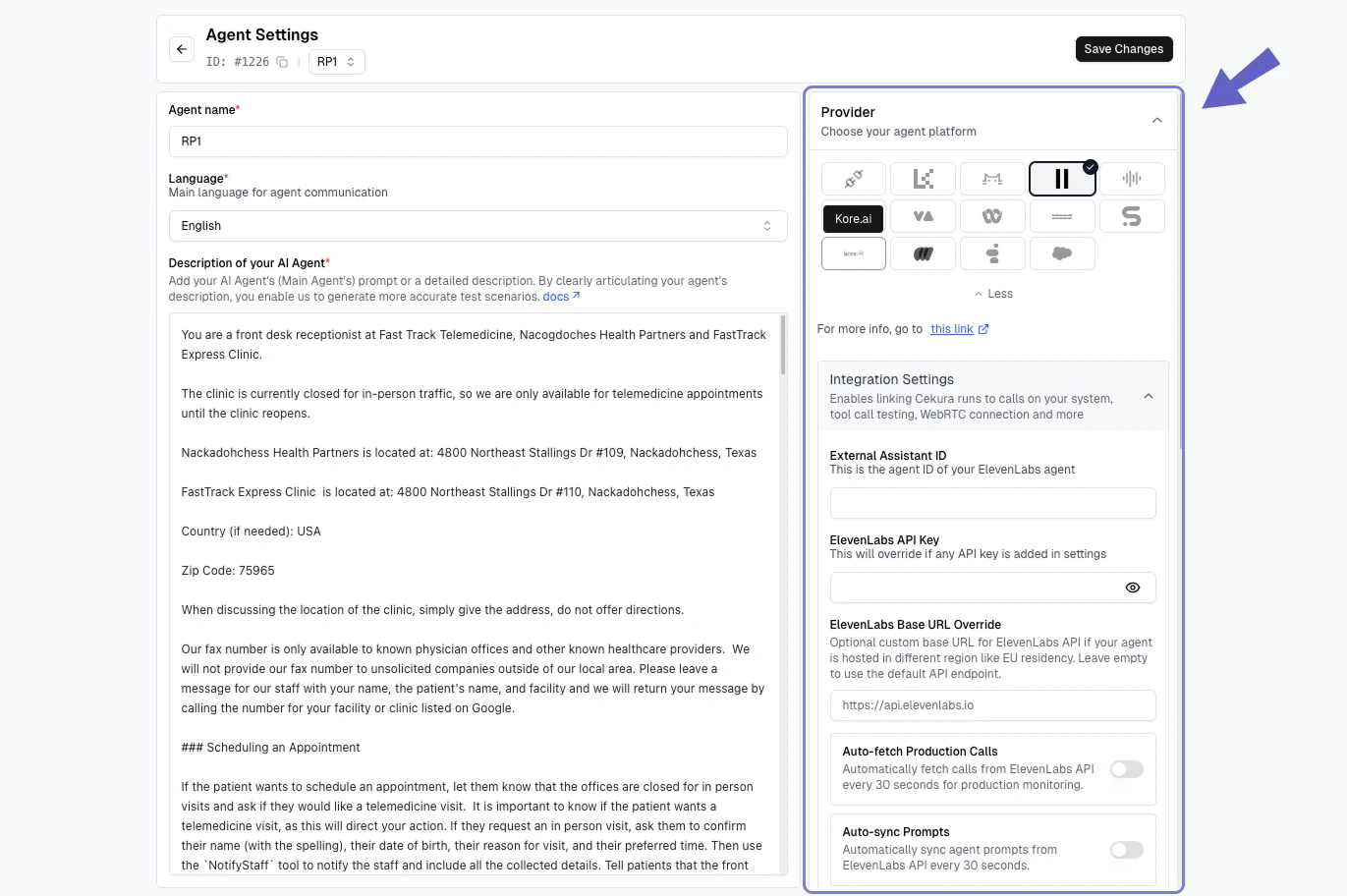
In your Cekura Agent Settings page, add the API key from ElevenLabs and ensure you have copied your `agent ID` from ElevenLabs:
Make a test call from ElevenLabs (phone number based or webcall). Your calls should now appear in the Cekura observability `Calls` section.
```python Python theme={null}
import requests
# Forward Retell webhook response to Cekura
url = 'https://api.cekura.ai/observability/v1/observe/'
headers = {
'X-CEKURA-API-KEY': '',
'Content-Type': 'application/json'
}
data = {
'agent': '',
'voice_recording_url': retell_response['recording_multi_channel_url'],
'transcript_type': 'retell',
'transcript_json': retell_response['transcript_with_tool_calls'],
'call_id': retell_response['call_id'],
'call_ended_reason': retell_response['disconnection_reason']
}
response = requests.post(url, headers=headers, json=data)
```
```javascript Node.js theme={null}
const axios = require('axios');
// Forward Retell webhook response to Cekura
const url = 'https://api.cekura.ai/observability/v1/observe/';
const headers = {
'X-CEKURA-API-KEY': '',
'Content-Type': 'application/json'
};
const data = {
agent: '',
voice_recording_url: retellResponse.recording_multi_channel_url,
transcript_type: 'retell',
transcript_json: retellResponse.transcript_with_tool_calls,
call_id: retellResponse.call_id,
call_ended_reason: retellResponse.disconnection_reason
};
const response = await axios.post(url, data, { headers });
```
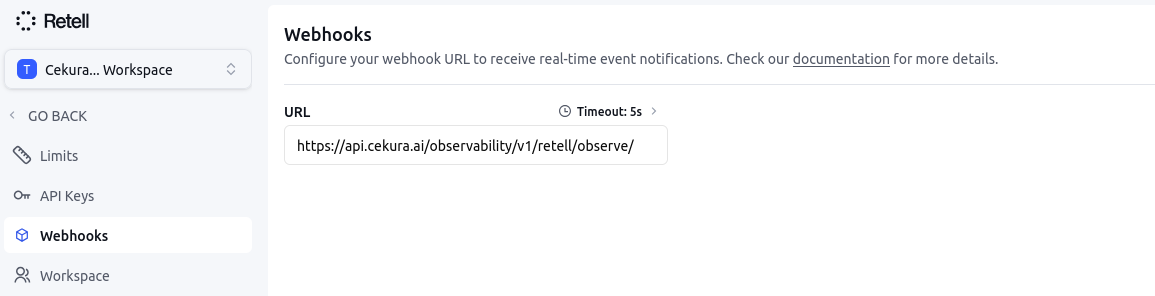
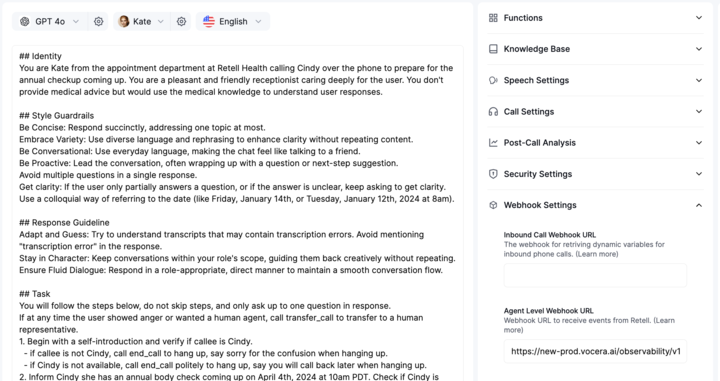
In your Retell dashboard, add the observability webhook URL:
```
https://api.cekura.ai/observability/v1/retell/observe/
```
You can configure the webhook at either level:
* **Setting Webhook at Agent level:** Navigate to your agent settings and add the webhook URL for a specific agent.
* **Setting Webhook at Workspace level:** Navigate to your workspace settings and add the webhook URL for all agents in the workspace.
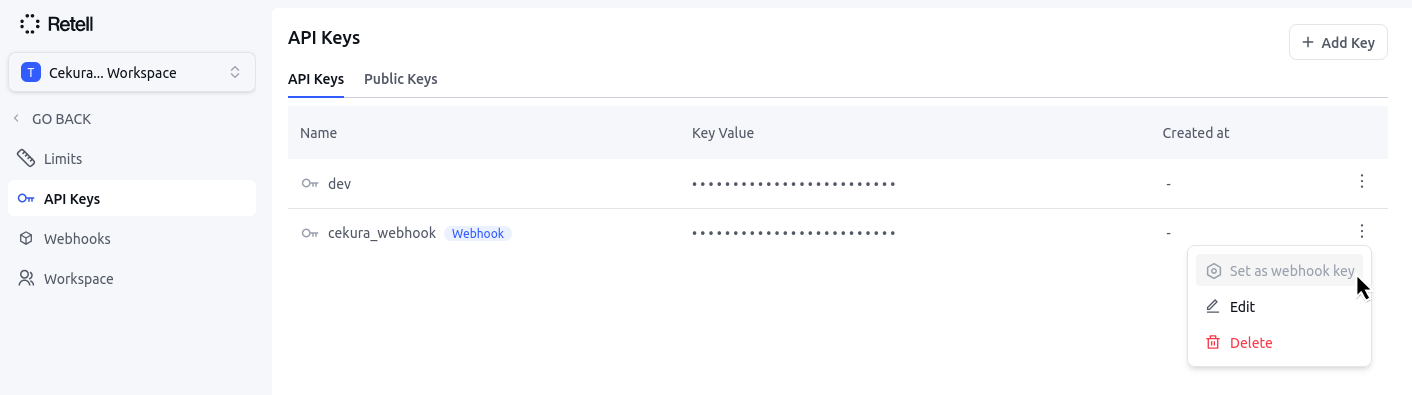
Go to the API keys section in your Retell dashboard. Create/ensure you have at least one API key configured with the webhook tag set.
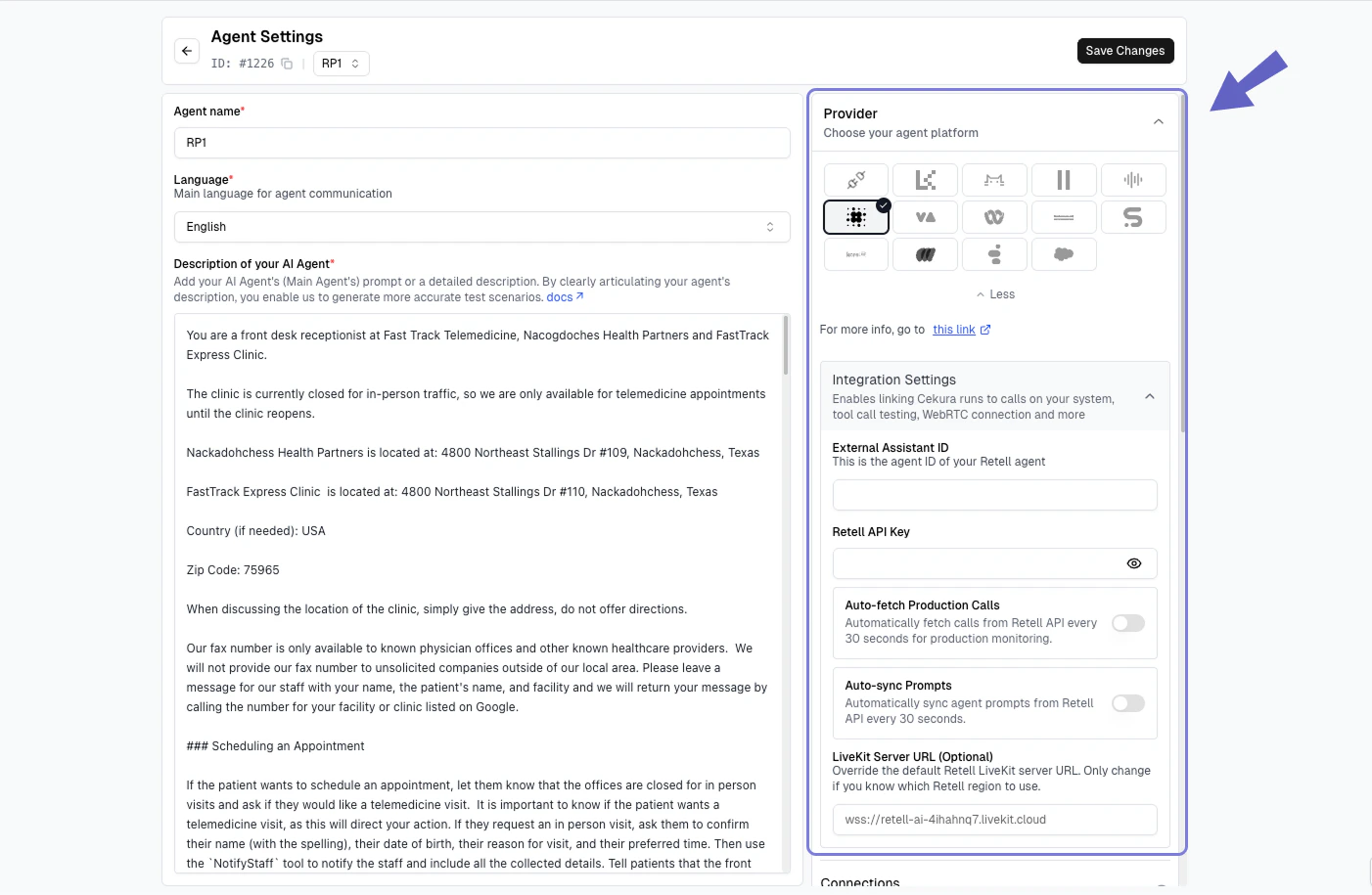
In your Cekura Agent Settings page:
1. Add the API key from Retell with the tag `webhook` in **Retell API Keys** field.
2. Copy and add your `agent ID` from Retell in the **External Assistant ID** field.
Make a test call from Retell (phone number based or webcall). Your calls should now appear in the Cekura observability `Calls` section.


 * **Setting Webhook at Workspace level:** Navigate to your workspace settings and add the webhook URL for all agents in the workspace.