> ## Documentation Index
> Fetch the complete documentation index at: https://docs.cekura.ai/llms.txt
> Use this file to discover all available pages before exploring further.
# GitHub Actions Tutorial
> Learn how to set up GitHub Actions workflows to automatically test your agents with each change
export const CopyPageButton = () => {
if (typeof window !== 'undefined') {
setTimeout(function () {
if (document.getElementById('ck-tools')) return;
var anchor = document.getElementById('content-area') || document.querySelector('.mdx-content');
if (!anchor) return;
if (!document.getElementById('ck-style')) {
var s = document.createElement('style');
s.id = 'ck-style';
s.textContent = '#ck-tools{position:absolute;top:6px;right:0;z-index:100;font-family:inherit;}' + '.ck-row{display:inline-flex;align-items:stretch;border:1px solid rgba(0,0,0,0.15);border-radius:8px;overflow:hidden;background:#fff;}' + ':root.dark .ck-row{background:rgba(255,255,255,0.06);border-color:rgba(255,255,255,0.12);}' + '.ck-btn{padding:5px 12px;border:none;background:none;cursor:pointer;font-size:13px;font-weight:500;font-family:inherit;color:#374151;}' + ':root.dark .ck-btn{color:#d1d5db;}' + '.ck-btn:hover{background:rgba(0,0,0,0.04);}' + ':root.dark .ck-btn:hover{background:rgba(255,255,255,0.06);}' + '.ck-chevron{padding:5px 8px;border:none;background:none;cursor:pointer;font-size:14px;font-family:inherit;color:#374151;}' + ':root.dark .ck-chevron{color:#d1d5db;}' + '.ck-chevron:hover{background:rgba(0,0,0,0.04);}' + ':root.dark .ck-chevron:hover{background:rgba(255,255,255,0.06);}' + '.ck-divider{width:1px;background:rgba(0,0,0,0.12);flex-shrink:0;}' + ':root.dark .ck-divider{background:rgba(255,255,255,0.12);}' + '.ck-dd{position:absolute;top:calc(100% + 4px);right:0;min-width:180px;background:#fff;border:1px solid rgba(0,0,0,0.12);border-radius:8px;box-shadow:0 4px 12px rgba(0,0,0,0.1);padding:4px;display:none;z-index:200;}' + ':root.dark .ck-dd{background:#1f2937;border-color:rgba(255,255,255,0.1);box-shadow:0 4px 16px rgba(0,0,0,0.35);}' + '.ck-item{display:block;width:100%;padding:7px 12px;border:none;background:none;border-radius:6px;cursor:pointer;font-size:13px;font-family:inherit;text-align:left;color:#374151;}' + ':root.dark .ck-item{color:#d1d5db;}' + '.ck-item:hover{background:rgba(0,0,0,0.05);}' + ':root.dark .ck-item:hover{background:rgba(255,255,255,0.07);}';
document.head.appendChild(s);
}
var wrap = document.createElement('div');
wrap.id = 'ck-tools';
var row = document.createElement('div');
row.className = 'ck-row';
var mainBtn = document.createElement('button');
mainBtn.className = 'ck-btn';
mainBtn.textContent = 'Copy page';
var divider = document.createElement('span');
divider.className = 'ck-divider';
var chevron = document.createElement('button');
chevron.className = 'ck-chevron';
chevron.textContent = '▾';
var dd = document.createElement('div');
dd.className = 'ck-dd';
function closeDD() {
dd.style.display = 'none';
}
function openDD() {
dd.style.display = 'block';
}
chevron.onclick = function (e) {
e.stopPropagation();
if (dd.style.display === 'block') {
closeDD();
} else {
openDD();
}
};
document.addEventListener('click', function (e) {
if (!e.target.closest('#ck-tools')) {
closeDD();
}
});
document.addEventListener('keydown', function (e) {
if (e.key === 'Escape') {
closeDD();
}
});
function makeItem(label, fn) {
var b = document.createElement('button');
b.className = 'ck-item';
b.textContent = label;
b.onclick = function () {
fn();
closeDD();
};
return b;
}
function getMarkdown() {
var walk = function (node) {
if (!node) return '';
if (node.nodeType === 3) return node.textContent || '';
if (node.nodeType !== 1) return '';
var tag = node.tagName.toLowerCase();
var skip = ['script', 'style', 'svg', 'noscript', 'button', 'iframe'];
if (skip.indexOf(tag) !== -1) return '';
if (node.id === 'ck-tools') return '';
var ch = Array.from(node.childNodes).map(walk).join('');
if (tag === 'h1') return '\n# ' + ch.trim() + '\n\n';
if (tag === 'h2') return '\n## ' + ch.trim() + '\n\n';
if (tag === 'h3') return '\n### ' + ch.trim() + '\n\n';
if (tag === 'p') return '\n' + ch.trim() + '\n\n';
if (tag === 'pre') return '\n```\n' + node.textContent.trim() + '\n```\n\n';
if (tag === 'li') return '- ' + ch.trim() + '\n';
if (tag === 'code') return '`' + ch.trim() + '`';
return ch;
};
var content = document.querySelector('.mdx-content') || document.getElementById('content-area') || document.body;
return walk(content).replace(/\n\n\n+/g, '\n\n').trim();
}
function copyMd() {
var md = getMarkdown();
navigator.clipboard.writeText(md).then(function () {
mainBtn.textContent = 'Copied!';
setTimeout(function () {
mainBtn.textContent = 'Copy page';
}, 2000);
});
}
function viewMd() {
var md = getMarkdown();
var safe = md.split('&').join('&').split('<').join('<').split('>').join('>');
var html = '' + safe + '';
window.open(URL.createObjectURL(new Blob([html], {
type: 'text/html'
})), '_blank');
}
function openClaude() {
var prompt = 'Can you read this Cekura docs page ' + window.location.href + ' so I can ask you questions?';
window.open('https://claude.ai/new?q=' + encodeURIComponent(prompt), '_blank');
}
mainBtn.onclick = copyMd;
dd.appendChild(makeItem('Copy page', copyMd));
dd.appendChild(makeItem('View as Markdown', viewMd));
dd.appendChild(makeItem('Open in Claude', openClaude));
row.appendChild(mainBtn);
row.appendChild(divider);
row.appendChild(chevron);
wrap.appendChild(row);
wrap.appendChild(dd);
anchor.style.position = 'relative';
anchor.insertBefore(wrap, anchor.firstChild);
}, 50);
}
return null;
};
Automate your agent testing by integrating Cekura with GitHub Actions. This guide walks you through setting up workflows to test your agents automatically on every code change, pull request, or on a custom schedule.
The Cekura GitHub Action is a simple, dependency-free solution that uses standard tools available on GitHub runners (curl, bash, and python3 for JSON parsing). No installation or setup required - it works out of the box.
## Before You Get Started
**Important**: Before setting up a workflow, ensure your agent is properly configured with scenarios in the Cekura dashboard.
You'll need your **Agent ID** and either **Scenario IDs** or **Tags** to select which tests to run.
### Finding Your Agent ID
1. Log in to your [Cekura dashboard](https://dashboard.cekura.ai)
2. Navigate to the **Agents** section
3. Select your agent
4. Copy the **Agent ID** displayed in the agent details
You can retrieve your agent ID programmatically using the Cekura API:
```bash theme={null}
curl --request GET \
--url https://api.cekura.ai/test_framework/v1/aiagents/ \
--header 'X-CEKURA-API-KEY: '
```
The response will include your agent ID in the `id` field.
## Using Tags vs Scenario IDs
You can run tests in two ways:
Run specific scenarios by their IDs. Use this when you want to test exact scenarios.
```yaml theme={null}
- uses: cekura-ai/cekura-github-actions@v1.0.0
with:
agent_id: ${{ vars.AGENT_ID }}
scenario_ids: ${{ vars.SCENARIO_IDS }}
api_key: ${{ secrets.CEKURA_API_KEY }}
```
Run all scenarios with specific tags. Use this when you want to test groups of scenarios (e.g., `smoke-test`, `critical`).
```yaml theme={null}
- uses: cekura-ai/cekura-github-actions@v1.0.0
with:
agent_id: ${{ vars.AGENT_ID }}
tags: ${{ vars.TAGS }}
api_key: ${{ secrets.CEKURA_API_KEY }}
```
## Step-by-Step Tutorial
In your repository, create a file at `.github/workflows/test-agents.yml`:
```yaml theme={null}
name: Agent Tests
on:
workflow_dispatch:
inputs:
agent_id:
description: 'The agent identifier'
required: false
type: string
scenario_ids:
description: 'Comma-separated scenario IDs (e.g., "123,456,789")'
required: false
type: string
api_url:
description: 'Custom Cekura API endpoint'
required: false
type: string
default: 'https://api.cekura.ai'
push:
branches: [main]
pull_request:
types: [opened, synchronize]
jobs:
run-simulation-tests:
runs-on: ubuntu-latest
steps:
- name: Cekura Run Tests
uses: cekura-ai/cekura-github-actions@v1.0.0
with:
agent_id: ${{ inputs.agent_id || vars.AGENT_ID }}
scenario_ids: ${{ inputs.scenario_ids || vars.SCENARIO_IDS }}
api_url: ${{ inputs.api_url || vars.API_URL }}
api_key: ${{ secrets.CEKURA_API_KEY }}
```
Go to your repository → **Settings** → **Secrets and variables** → **Actions**
**Add Secret (API Key):**
1. Click **New repository secret**
2. Name: `CEKURA_API_KEY`
3. Value: Your API key from the Cekura dashboard
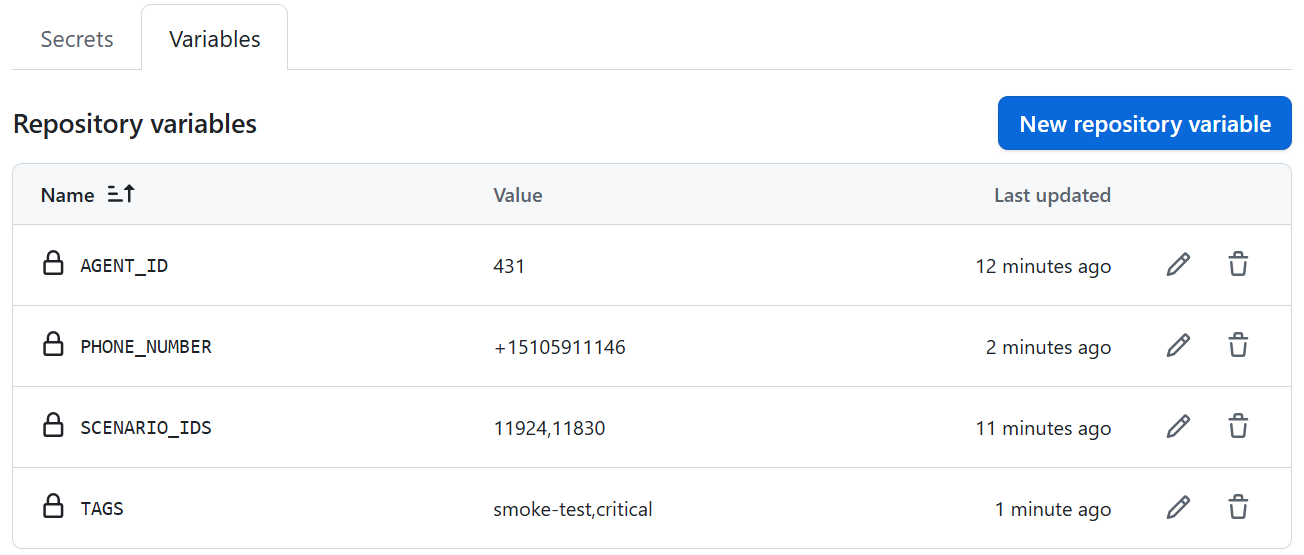
**Add Variables:**
1. Click the **Variables** tab
2. Click **New repository variable**
3. Add required variables:
* `AGENT_ID` - Your agent ID (required)
4. Add one or both of the following:
* `SCENARIO_IDS` - Comma-separated scenario IDs (e.g., `123,456,789`)
* `TAGS` - Comma-separated tags (e.g., `smoke-test,critical`)
5. Optionally add:
* `PHONE_NUMBER` - Outbound phone number for testing (e.g., `+1234567890`)
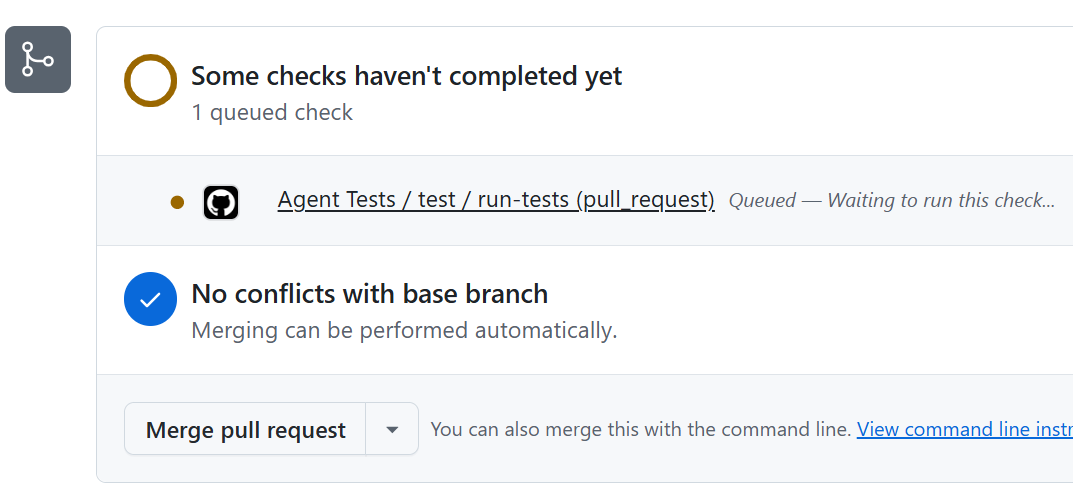
 To test your workflow, make a change to your codebase and raise a pull request. This will trigger the workflow automatically.
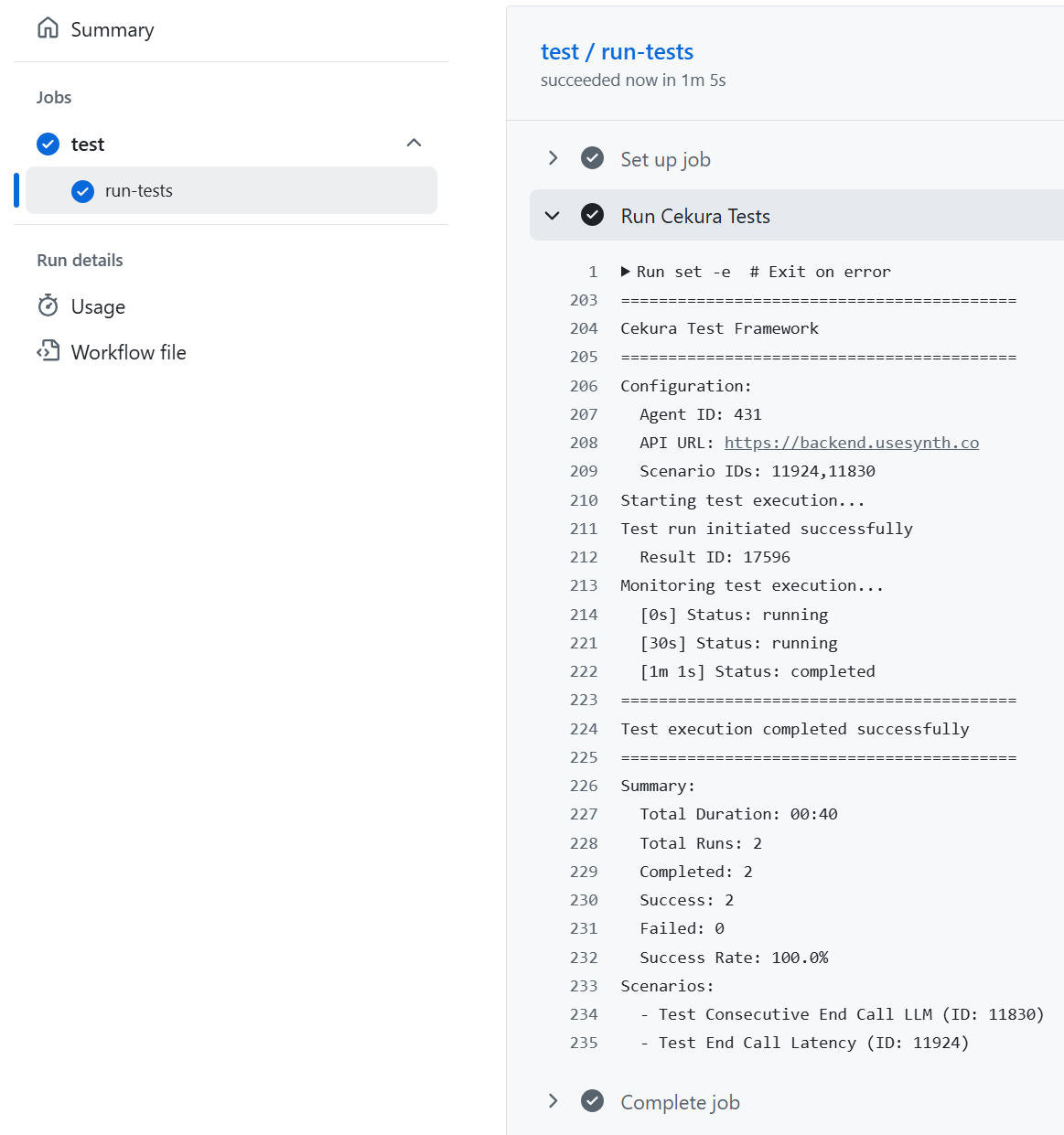
 1. Go to your repository on GitHub
2. Click the **Actions** tab
3. You'll see your workflow running
4. Click on the workflow run to see detailed logs
1. Go to your repository on GitHub
2. Click the **Actions** tab
3. You'll see your workflow running
4. Click on the workflow run to see detailed logs
 ## Advanced Usage
### Different Triggers
```yaml theme={null}
on:
push:
branches: [main]
```
```yaml theme={null}
on:
pull_request:
types: [opened, synchronize]
```
```yaml theme={null}
on:
workflow_dispatch:
```
Then trigger from the Actions tab → Run workflow button.
For more information about workflow triggers and events, check out the [GitHub Actions official documentation](https://docs.github.com/en/actions/reference/workflows-and-actions/events-that-trigger-workflows).
### Environment-Specific Testing
Test different environments (staging, production) with separate secrets:
```yaml theme={null}
jobs:
staging-tests:
runs-on: ubuntu-latest
steps:
- name: Test Staging
uses: cekura-ai/cekura-github-actions@v1.0.0
with:
agent_id: ${{ vars.STAGING_AGENT_ID }}
tags: ${{ vars.STAGING_TAGS }}
api_url: 'https://api.cekura.ai'
api_key: ${{ secrets.STAGING_API_KEY }}
production-tests:
runs-on: ubuntu-latest
needs: staging-tests
steps:
- name: Test Production
uses: cekura-ai/cekura-github-actions@v1.0.0
with:
agent_id: ${{ vars.PROD_AGENT_ID }}
tags: ${{ vars.PROD_TAGS }}
api_key: ${{ secrets.PROD_API_KEY }}
```
### Testing with Phone Numbers
When testing agents that make outbound calls, you can specify a phone number:
```yaml theme={null}
jobs:
run-simulation-tests:
runs-on: ubuntu-latest
steps:
- name: Run Cekura Tests
uses: cekura-ai/cekura-github-actions@v1.0.0
with:
agent_id: ${{ vars.AGENT_ID }}
scenario_ids: ${{ vars.SCENARIO_IDS }}
phone_number: ${{ vars.PHONE_NUMBER }}
api_key: ${{ secrets.CEKURA_API_KEY }}
```
## Action Inputs
The action accepts these inputs:
| Input | Description | Required | Default |
| -------------- | -------------------------------------------------- | -------- | ----------------------- |
| `agent_id` | Agent ID to test | Yes | - |
| `api_key` | Cekura API Key | Yes | - |
| `scenario_ids` | Comma-separated scenario IDs (e.g., `123,456,789`) | No\* | - |
| `tags` | Comma-separated tags (e.g., `smoke-test,critical`) | No\* | - |
| `phone_number` | Outbound phone number for testing | No | - |
| `api_url` | Cekura API URL | No | `https://api.cekura.ai` |
| `frequency` | Run each scenario N times | No | `1` |
| `timeout` | Timeout in seconds | No | `3600` |
\*Either `scenario_ids` or `tags` must be provided (or both)
### Example with All Options
```yaml theme={null}
jobs:
run-simulation-tests:
runs-on: ubuntu-latest
steps:
- name: Run Cekura Tests
uses: cekura-ai/cekura-github-actions@v1.0.0
with:
agent_id: ${{ vars.AGENT_ID }}
scenario_ids: ${{ vars.SCENARIO_IDS }}
tags: ${{ vars.TAGS }}
phone_number: ${{ vars.PHONE_NUMBER }}
api_url: 'https://api.cekura.ai'
frequency: '3' # Run each scenario 3 times
timeout: '7200' # 2 hour timeout
api_key: ${{ secrets.CEKURA_API_KEY }}
```
## Troubleshooting
Make sure your workflow file is:
* Located in `.github/workflows/` directory
* Pushed to your repository (workflows don't run from local files)
* Named with `.yml` or `.yaml` extension
Common secret issues:
* Secret names are **case-sensitive** - must match exactly
* Secrets must be added in **Settings → Secrets and variables → Actions**
* Forked repos can't access secrets from the parent repository
Check these in your workflow logs:
* API key is valid and has correct permissions
* Agent ID and Scenario IDs are correct
* Scenario IDs format: comma-separated with no spaces (e.g., `123,456,789`)
* Try increasing timeout with `timeout: '7200'` parameter
Make sure you're using **Variables** (not Secrets) for Agent ID and Scenario IDs:
* Go to **Settings → Secrets and variables → Actions → Variables tab**
* Variables are referenced with `vars.VARIABLE_NAME`
* Secrets are referenced with `secrets.SECRET_NAME`
## Advanced Usage
### Different Triggers
```yaml theme={null}
on:
push:
branches: [main]
```
```yaml theme={null}
on:
pull_request:
types: [opened, synchronize]
```
```yaml theme={null}
on:
workflow_dispatch:
```
Then trigger from the Actions tab → Run workflow button.
For more information about workflow triggers and events, check out the [GitHub Actions official documentation](https://docs.github.com/en/actions/reference/workflows-and-actions/events-that-trigger-workflows).
### Environment-Specific Testing
Test different environments (staging, production) with separate secrets:
```yaml theme={null}
jobs:
staging-tests:
runs-on: ubuntu-latest
steps:
- name: Test Staging
uses: cekura-ai/cekura-github-actions@v1.0.0
with:
agent_id: ${{ vars.STAGING_AGENT_ID }}
tags: ${{ vars.STAGING_TAGS }}
api_url: 'https://api.cekura.ai'
api_key: ${{ secrets.STAGING_API_KEY }}
production-tests:
runs-on: ubuntu-latest
needs: staging-tests
steps:
- name: Test Production
uses: cekura-ai/cekura-github-actions@v1.0.0
with:
agent_id: ${{ vars.PROD_AGENT_ID }}
tags: ${{ vars.PROD_TAGS }}
api_key: ${{ secrets.PROD_API_KEY }}
```
### Testing with Phone Numbers
When testing agents that make outbound calls, you can specify a phone number:
```yaml theme={null}
jobs:
run-simulation-tests:
runs-on: ubuntu-latest
steps:
- name: Run Cekura Tests
uses: cekura-ai/cekura-github-actions@v1.0.0
with:
agent_id: ${{ vars.AGENT_ID }}
scenario_ids: ${{ vars.SCENARIO_IDS }}
phone_number: ${{ vars.PHONE_NUMBER }}
api_key: ${{ secrets.CEKURA_API_KEY }}
```
## Action Inputs
The action accepts these inputs:
| Input | Description | Required | Default |
| -------------- | -------------------------------------------------- | -------- | ----------------------- |
| `agent_id` | Agent ID to test | Yes | - |
| `api_key` | Cekura API Key | Yes | - |
| `scenario_ids` | Comma-separated scenario IDs (e.g., `123,456,789`) | No\* | - |
| `tags` | Comma-separated tags (e.g., `smoke-test,critical`) | No\* | - |
| `phone_number` | Outbound phone number for testing | No | - |
| `api_url` | Cekura API URL | No | `https://api.cekura.ai` |
| `frequency` | Run each scenario N times | No | `1` |
| `timeout` | Timeout in seconds | No | `3600` |
\*Either `scenario_ids` or `tags` must be provided (or both)
### Example with All Options
```yaml theme={null}
jobs:
run-simulation-tests:
runs-on: ubuntu-latest
steps:
- name: Run Cekura Tests
uses: cekura-ai/cekura-github-actions@v1.0.0
with:
agent_id: ${{ vars.AGENT_ID }}
scenario_ids: ${{ vars.SCENARIO_IDS }}
tags: ${{ vars.TAGS }}
phone_number: ${{ vars.PHONE_NUMBER }}
api_url: 'https://api.cekura.ai'
frequency: '3' # Run each scenario 3 times
timeout: '7200' # 2 hour timeout
api_key: ${{ secrets.CEKURA_API_KEY }}
```
## Troubleshooting
Make sure your workflow file is:
* Located in `.github/workflows/` directory
* Pushed to your repository (workflows don't run from local files)
* Named with `.yml` or `.yaml` extension
Common secret issues:
* Secret names are **case-sensitive** - must match exactly
* Secrets must be added in **Settings → Secrets and variables → Actions**
* Forked repos can't access secrets from the parent repository
Check these in your workflow logs:
* API key is valid and has correct permissions
* Agent ID and Scenario IDs are correct
* Scenario IDs format: comma-separated with no spaces (e.g., `123,456,789`)
* Try increasing timeout with `timeout: '7200'` parameter
Make sure you're using **Variables** (not Secrets) for Agent ID and Scenario IDs:
* Go to **Settings → Secrets and variables → Actions → Variables tab**
* Variables are referenced with `vars.VARIABLE_NAME`
* Secrets are referenced with `secrets.SECRET_NAME`