> ## Documentation Index
> Fetch the complete documentation index at: https://docs.cekura.ai/llms.txt
> Use this file to discover all available pages before exploring further.
# Creating Custom Personalities
> Personalities in Cekura define how your AI agents behave, communicate, and interact with users. They encompass the agent's tone, knowledge base, response style, and voice characteristics, allowing you to create unique and purposeful AI experiences.
export const CopyPageButton = () => {
if (typeof window !== 'undefined') {
setTimeout(function () {
if (document.getElementById('ck-tools')) return;
var anchor = document.getElementById('content-area') || document.querySelector('.mdx-content');
if (!anchor) return;
if (!document.getElementById('ck-style')) {
var s = document.createElement('style');
s.id = 'ck-style';
s.textContent = '#ck-tools{position:absolute;top:6px;right:0;z-index:100;font-family:inherit;}' + '.ck-row{display:inline-flex;align-items:stretch;border:1px solid rgba(0,0,0,0.15);border-radius:8px;overflow:hidden;background:#fff;}' + ':root.dark .ck-row{background:rgba(255,255,255,0.06);border-color:rgba(255,255,255,0.12);}' + '.ck-btn{padding:5px 12px;border:none;background:none;cursor:pointer;font-size:13px;font-weight:500;font-family:inherit;color:#374151;}' + ':root.dark .ck-btn{color:#d1d5db;}' + '.ck-btn:hover{background:rgba(0,0,0,0.04);}' + ':root.dark .ck-btn:hover{background:rgba(255,255,255,0.06);}' + '.ck-chevron{padding:5px 8px;border:none;background:none;cursor:pointer;font-size:14px;font-family:inherit;color:#374151;}' + ':root.dark .ck-chevron{color:#d1d5db;}' + '.ck-chevron:hover{background:rgba(0,0,0,0.04);}' + ':root.dark .ck-chevron:hover{background:rgba(255,255,255,0.06);}' + '.ck-divider{width:1px;background:rgba(0,0,0,0.12);flex-shrink:0;}' + ':root.dark .ck-divider{background:rgba(255,255,255,0.12);}' + '.ck-dd{position:absolute;top:calc(100% + 4px);right:0;min-width:180px;background:#fff;border:1px solid rgba(0,0,0,0.12);border-radius:8px;box-shadow:0 4px 12px rgba(0,0,0,0.1);padding:4px;display:none;z-index:200;}' + ':root.dark .ck-dd{background:#1f2937;border-color:rgba(255,255,255,0.1);box-shadow:0 4px 16px rgba(0,0,0,0.35);}' + '.ck-item{display:block;width:100%;padding:7px 12px;border:none;background:none;border-radius:6px;cursor:pointer;font-size:13px;font-family:inherit;text-align:left;color:#374151;}' + ':root.dark .ck-item{color:#d1d5db;}' + '.ck-item:hover{background:rgba(0,0,0,0.05);}' + ':root.dark .ck-item:hover{background:rgba(255,255,255,0.07);}';
document.head.appendChild(s);
}
var wrap = document.createElement('div');
wrap.id = 'ck-tools';
var row = document.createElement('div');
row.className = 'ck-row';
var mainBtn = document.createElement('button');
mainBtn.className = 'ck-btn';
mainBtn.textContent = 'Copy page';
var divider = document.createElement('span');
divider.className = 'ck-divider';
var chevron = document.createElement('button');
chevron.className = 'ck-chevron';
chevron.textContent = '▾';
var dd = document.createElement('div');
dd.className = 'ck-dd';
function closeDD() {
dd.style.display = 'none';
}
function openDD() {
dd.style.display = 'block';
}
chevron.onclick = function (e) {
e.stopPropagation();
if (dd.style.display === 'block') {
closeDD();
} else {
openDD();
}
};
document.addEventListener('click', function (e) {
if (!e.target.closest('#ck-tools')) {
closeDD();
}
});
document.addEventListener('keydown', function (e) {
if (e.key === 'Escape') {
closeDD();
}
});
function makeItem(label, fn) {
var b = document.createElement('button');
b.className = 'ck-item';
b.textContent = label;
b.onclick = function () {
fn();
closeDD();
};
return b;
}
function getMarkdown() {
var walk = function (node) {
if (!node) return '';
if (node.nodeType === 3) return node.textContent || '';
if (node.nodeType !== 1) return '';
var tag = node.tagName.toLowerCase();
var skip = ['script', 'style', 'svg', 'noscript', 'button', 'iframe'];
if (skip.indexOf(tag) !== -1) return '';
if (node.id === 'ck-tools') return '';
var ch = Array.from(node.childNodes).map(walk).join('');
if (tag === 'h1') return '\n# ' + ch.trim() + '\n\n';
if (tag === 'h2') return '\n## ' + ch.trim() + '\n\n';
if (tag === 'h3') return '\n### ' + ch.trim() + '\n\n';
if (tag === 'p') return '\n' + ch.trim() + '\n\n';
if (tag === 'pre') return '\n```\n' + node.textContent.trim() + '\n```\n\n';
if (tag === 'li') return '- ' + ch.trim() + '\n';
if (tag === 'code') return '`' + ch.trim() + '`';
return ch;
};
var content = document.querySelector('.mdx-content') || document.getElementById('content-area') || document.body;
return walk(content).replace(/\n\n\n+/g, '\n\n').trim();
}
function copyMd() {
var md = getMarkdown();
navigator.clipboard.writeText(md).then(function () {
mainBtn.textContent = 'Copied!';
setTimeout(function () {
mainBtn.textContent = 'Copy page';
}, 2000);
});
}
function viewMd() {
var md = getMarkdown();
var safe = md.split('&').join('&').split('<').join('<').split('>').join('>');
var html = '' + safe + '';
window.open(URL.createObjectURL(new Blob([html], {
type: 'text/html'
})), '_blank');
}
function openClaude() {
var prompt = 'Can you read this Cekura docs page ' + window.location.href + ' so I can ask you questions?';
window.open('https://claude.ai/new?q=' + encodeURIComponent(prompt), '_blank');
}
mainBtn.onclick = copyMd;
dd.appendChild(makeItem('Copy page', copyMd));
dd.appendChild(makeItem('View as Markdown', viewMd));
dd.appendChild(makeItem('Open in Claude', openClaude));
row.appendChild(mainBtn);
row.appendChild(divider);
row.appendChild(chevron);
wrap.appendChild(row);
wrap.appendChild(dd);
anchor.style.position = 'relative';
anchor.insertBefore(wrap, anchor.firstChild);
}, 50);
}
return null;
};
## Getting Started
### 1. Access the Dashboard
1. Log in to your account at [dashboard.cekura.ai](https://dashboard.cekura.ai)
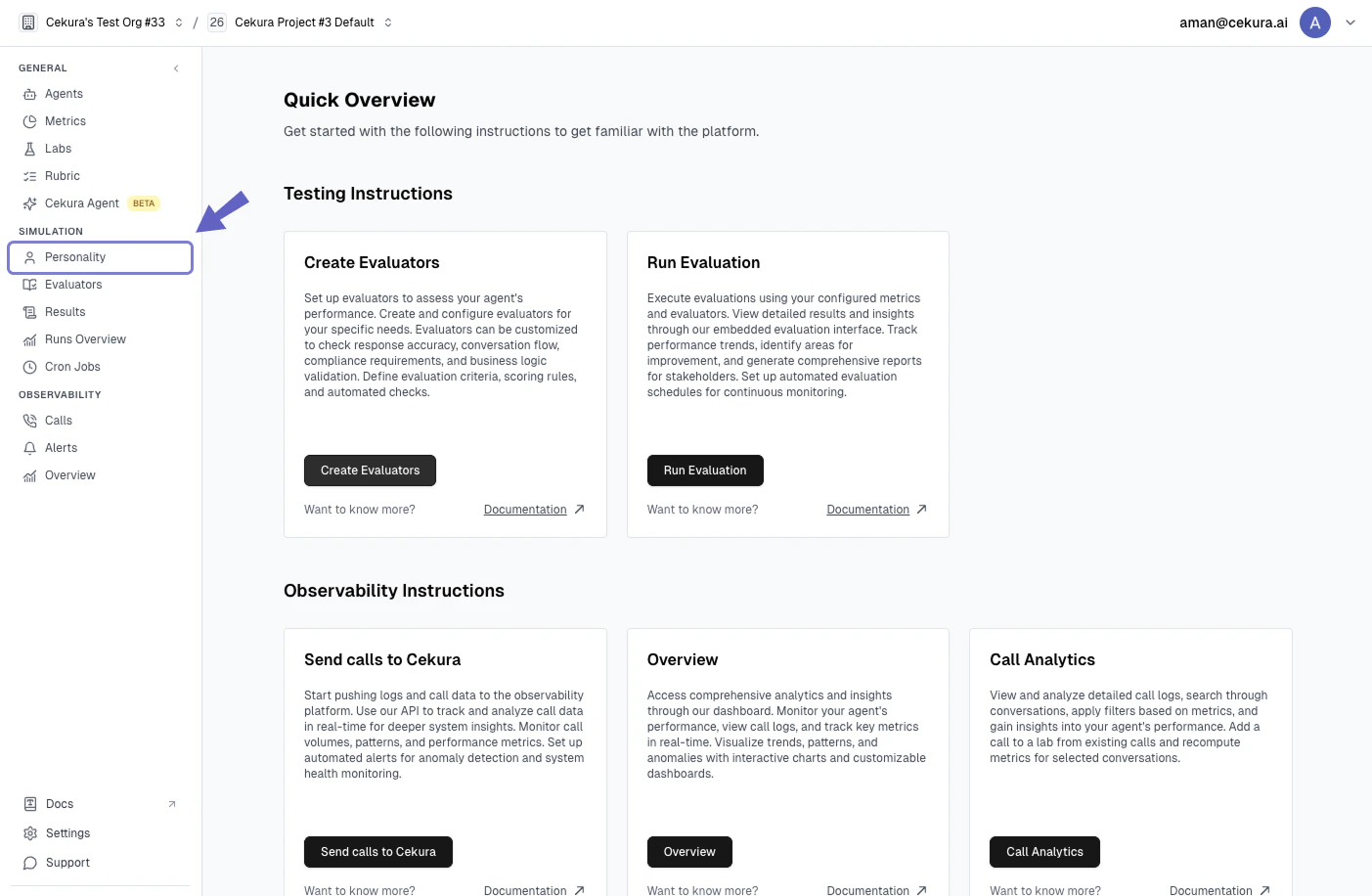
2. Navigate to the Personalities section from the sidebar menu
 ### 2. Creating a New Personality
You have two options for setting up personalities:
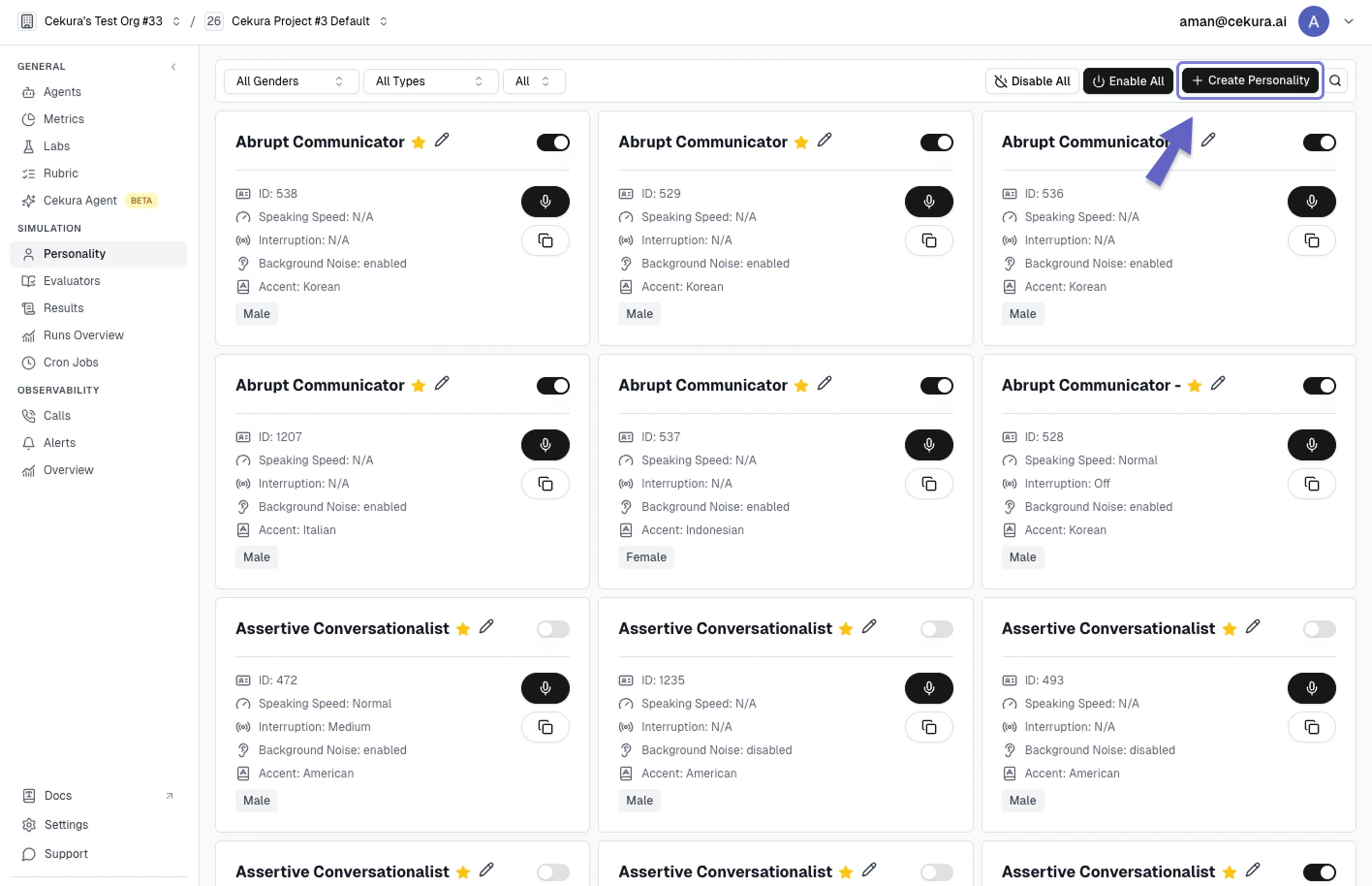
1. **Use Pre-defined Personalities**: Choose from Cekura's curated collection of optimized personalities
2. **Create Custom Personality**: Design a completely new personality from scratch
### To create a custom personality:
#### 1. Click the **"Create Personality"** button in the Personalities section
### 2. Creating a New Personality
You have two options for setting up personalities:
1. **Use Pre-defined Personalities**: Choose from Cekura's curated collection of optimized personalities
2. **Create Custom Personality**: Design a completely new personality from scratch
### To create a custom personality:
#### 1. Click the **"Create Personality"** button in the Personalities section
 #### 2. Fill in the following required fields:
#### Basic Information
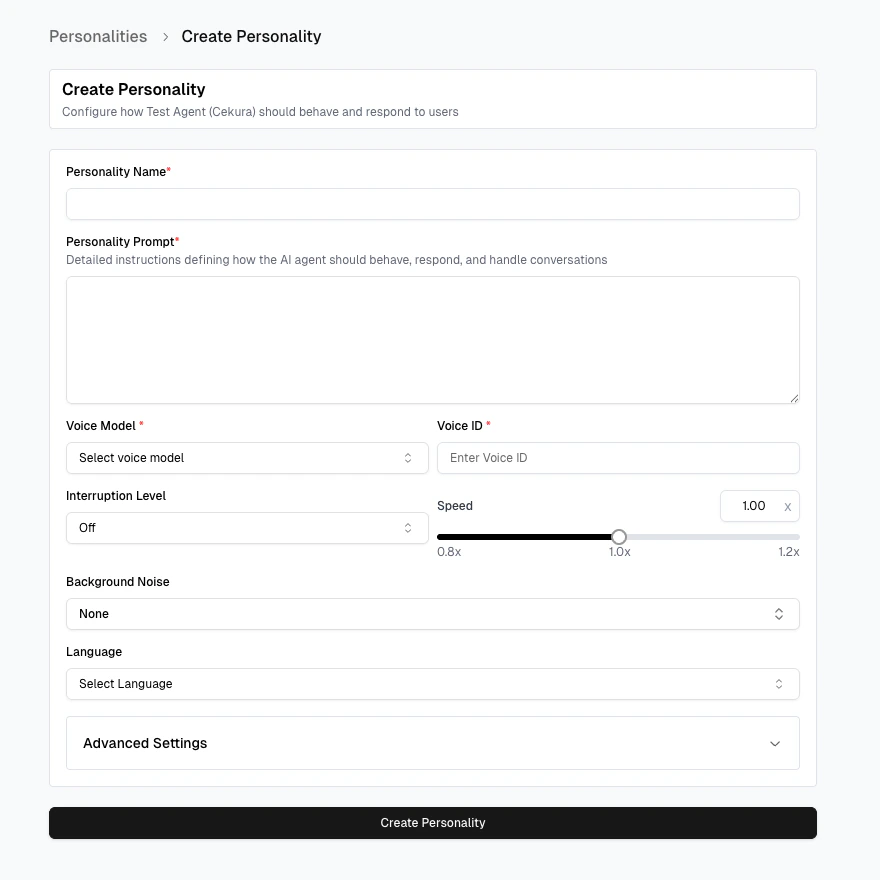
* **Personality Name**: Give your personality a unique, descriptive name
* **Personality Description**: Briefly describe the personality's purpose and characteristics
#### Behavior Configuration
* **Personality Prompt**: Define detailed instructions for how the AI should behave and respond
* **Temperature**: Set the creativity level (default: 0.7)
* **Model**: Choose the AI model that powers your personality
#### Voice Settings
* **Background Noise**: Control background noise during conversations. The dropdown offers several options including built-in noise presets and a **Custom URL** option — select "Custom URL" and enter a direct link to an audio file (e.g., `https:///background.mp3`) to play any sound file as background noise during the simulation.
* **Voice ID**: Select a unique voice identifier
* **Voice Provider**: Choose your preferred voice service provider
#### 2. Fill in the following required fields:
#### Basic Information
* **Personality Name**: Give your personality a unique, descriptive name
* **Personality Description**: Briefly describe the personality's purpose and characteristics
#### Behavior Configuration
* **Personality Prompt**: Define detailed instructions for how the AI should behave and respond
* **Temperature**: Set the creativity level (default: 0.7)
* **Model**: Choose the AI model that powers your personality
#### Voice Settings
* **Background Noise**: Control background noise during conversations. The dropdown offers several options including built-in noise presets and a **Custom URL** option — select "Custom URL" and enter a direct link to an audio file (e.g., `https:///background.mp3`) to play any sound file as background noise during the simulation.
* **Voice ID**: Select a unique voice identifier
* **Voice Provider**: Choose your preferred voice service provider
 ## Next Steps
After creating your personality, you can:
* Assign it to specific agents
* Test interactions
* Monitor performance
* Make adjustments as needed
## Next Steps
After creating your personality, you can:
* Assign it to specific agents
* Test interactions
* Monitor performance
* Make adjustments as needed